
A novel WhatsApp account-takeover campaign dubbed “GhostPairing Attack” has emerged, enabling threat actors to gain complete access to victim accounts without stealing passwords or conducting SIM swaps.
Security researchers at Gen have uncovered the sophisticated social engineering scheme that exploits WhatsApp’s legitimate device pairing feature to compromise accounts across multiple countries silently.
The GhostPairing Attack begins with a deceptively simple lure message sent through WhatsApp.
Victims typically receive messages from compromised contacts with text like “Hey, I just found your photo!” accompanied by a link that appears as a Facebook-style preview within the messaging app.
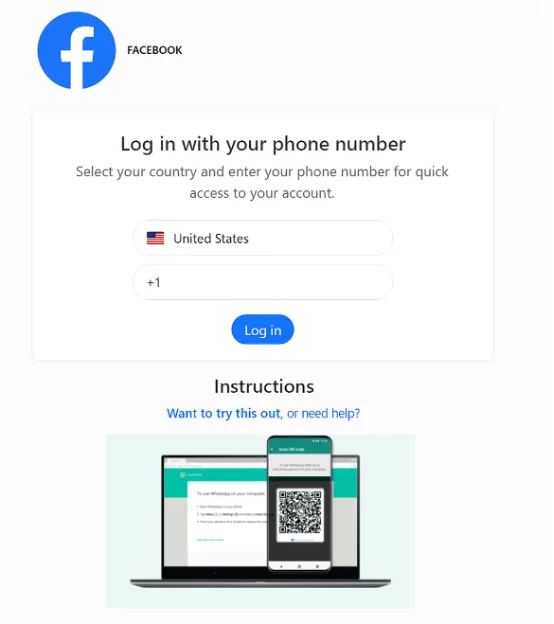
When users click the link, they land on a minimalist page impersonating Facebook’s login interface, complete with branding and colors designed to establish trust.
The page requests users to “verify” or “confirm” their identity before viewing the photo. In reality, the fake page acts as an attacker’s control panel, proxying requests to WhatsApp’s legitimate device linking infrastructure.
The attack exploits WhatsApp’s phone number-based device pairing mechanism. After victims enter their phone number on the fraudulent page, the attacker’s site forwards that information to WhatsApp’s genuine device linking endpoint.
WhatsApp generates an authentication code intended only for the account owner, which the attacker intercepts and displays back to the victim as if it were part of the verification process.
When victims enter this code into WhatsApp, they unknowingly approve the attacker’s browser as a linked device on their account.
From WhatsApp’s perspective, the legitimate account owner has authorized the new session. The entire process resembles standard two-factor authentication, which is why many users complete it without suspicion.
Attack Infrastructure and Scope
The campaign was first observed in Czechia, where compromised accounts began distributing lure messages to local contacts.
The victim opens WhatsApp, sees the pairing prompt and enters the code, believing they are completing a security check.
Researchers identified a cluster of lookalike domains used across the attack infrastructure, including photobox[.]life, postsphoto[.]life, yourphoto[.]life, and fotopost[.]live.
These domains follow a consistent pattern, suggesting the GhostPairing Attack operates as a reusable kit that criminals can purchase and customize for different regions or target groups.
The linguistic variations in lure messages indicate the attack template can be rapidly adapted for any country, making it a scalable threat with significant global potential.
Once linked to a victim’s account, attackers gain comprehensive access equivalent to WhatsApp Web sessions.
This includes reading historical conversations, receiving messages in real-time, accessing and downloading media such as photos and videos, and collecting sensitive information like addresses and authentication codes.
Most dangerously, attackers can send messages and forward lure content to the victim’s contacts, enabling rapid account compromise propagation without the original victim’s awareness.
The attack creates persistent access that remains active until the victim manually revokes linked devices. Many users remain unaware that unauthorized sessions exist, allowing attackers to monitor conversations indefinitely.
Protective Measures
Users should immediately review linked devices by navigating to WhatsApp Settings → Linked Devices and logging out of unrecognized sessions.
Treating any request to scan QR codes or enter numeric codes from external websites as suspicious is critical. Enabling WhatsApp’s Two-Step Verification provides additional protection, though it does not entirely prevent such attacks.
Sharing information about GhostPairing with contacts and group chats significantly increases awareness and reduces falling victim rates.
The GhostPairing pattern extends beyond WhatsApp. Any platform employing device pairing through QR codes or numeric authentication codes represents a similar attack surface.
As digital services increasingly rely on “approve on your phone” workflows, the importance of transparent device linking interfaces and better visibility of connected sessions becomes paramount for preventing silent account compromises.
Follow us on Google News, LinkedIn, and X to Get Instant Updates and Set GBH as a Preferred Source in Google.