
In December, the Push Security research team discovered and blocked a brand new attack technique that we coined ConsentFix. This technique merged ClickFix-style social engineering with OAuth consent phishing to hijack Microsoft accounts.
We saw this attack running across a large network of compromised websites that attackers were injecting the malicious payload into, forming a large-scale campaign that was detected across multiple customer estates.
ConsentFix got a pretty awesome response from the community in a very short space of time.
Within days, John Hammond shared a new and improved version of the technique that he’d spun up in his own lab, while security researchers from Microsoft, Glueck Kanja, and other individual contributors all shared analysis and recommendations.
In this blog, we’re sharing some new insights on the campaign, pulling together some of the top recommendations and resources shared across the community, and looking forward to what the future holds for this novel technique as it quickly enters the mainstream.
First though, let’s quickly recap what ConsentFix is and how it works.
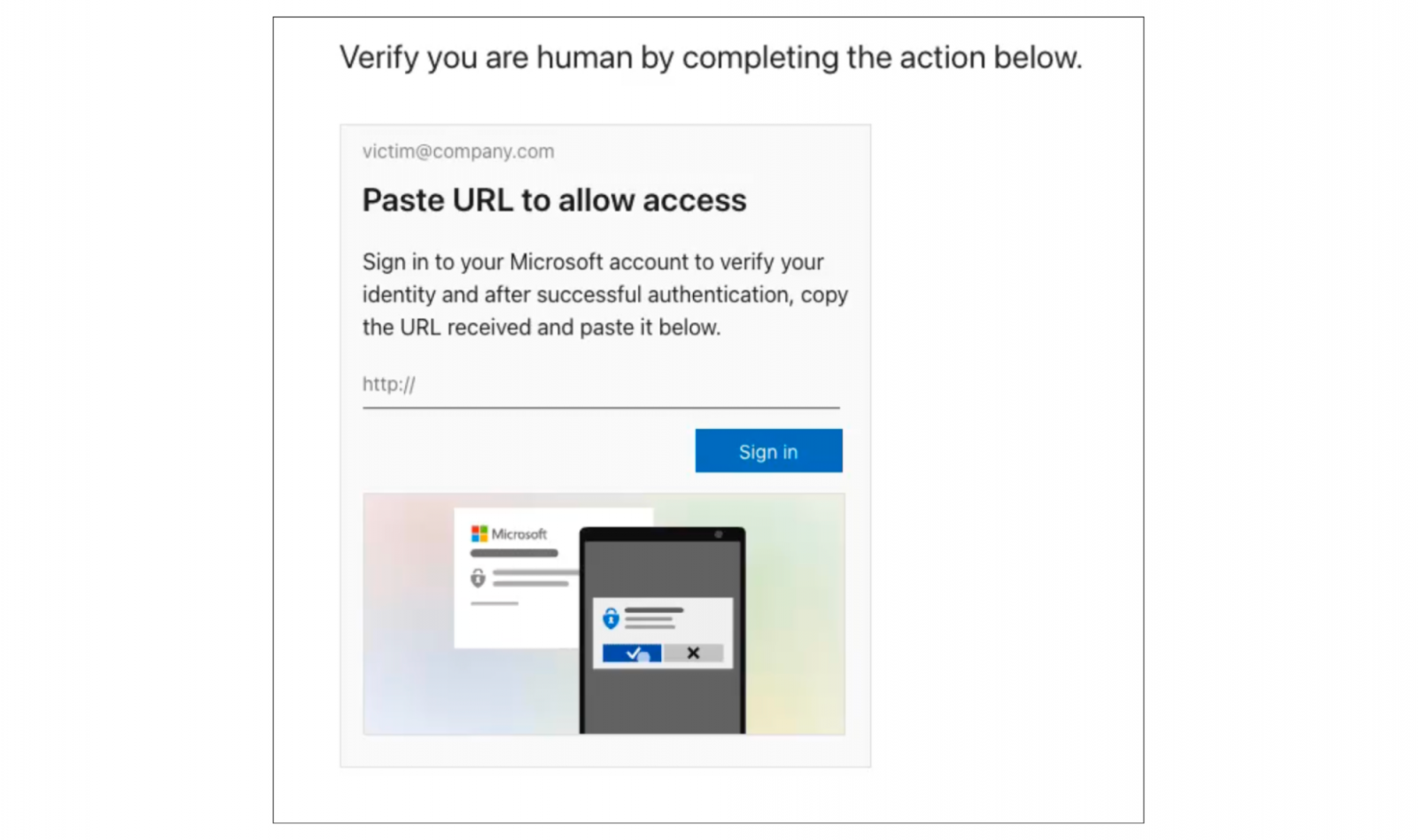
ConsentFix is an attack technique that prompts the victim to share an OAuth authorization code with an attacker via a phishing page. The attacker then enters this code into a target application on their own device in order to complete the authorization handshake and take over the account.
By hijacking OAuth, attackers can effectively bypass identity-layer controls like passwords and MFA — even phishing resistant authentication methods like passkeys have no impact on this attack, because it sidesteps the authentication process altogether.
OAuth abuse attacks are not new. Techniques like consent phishing and device code phishing have been around for some time.
However, these mainly focus on connecting your primary workspace account (e.g. Microsoft, Google, etc.) to a fraudulent, attacker-controlled application. But this is becoming increasingly difficult in core enterprise cloud environments like Azure due to stricter default configs. That said, device code phishing still featured prominently in the recent high-profile Salesforce attacks in 2025.
Check out the latest webinar from Push Security on February 11th where your inputs will guide our investigations.
Join Field CTO, Mark Orlando, and tackle modern attacks like ClickFix, credential phishing, and other in-browser attacks seen in the wild.
Register now
What makes ConsentFix so dangerous?
Unlike typical OAuth attacks, the novel ConsentFix approach enabled the attacker to target different types of application to what they usually go after — with big implications for detection and response. In this case, the attacker:
-
Specifically targeted first-party Microsoft apps that cannot be restricted in the same way as third-party applications, and are pre-consented in every tenant (meaning users can authenticate to them without admin approval).
-
Leveraged legacy scopes that are outside the scope of default logging to evade detection, and targeted scopes with known Conditional Access policy exclusions.
This means that default controls you’d expect to block malicious OAuth grants don’t apply, you may not have logging enabled to detect it if it did happen to you, and to top it off, conditional access policy exclusions mean that many organizations’ expected controls don’t work as intended in this case.
Let’s quickly recap how the ConsentFix campaign was implemented.
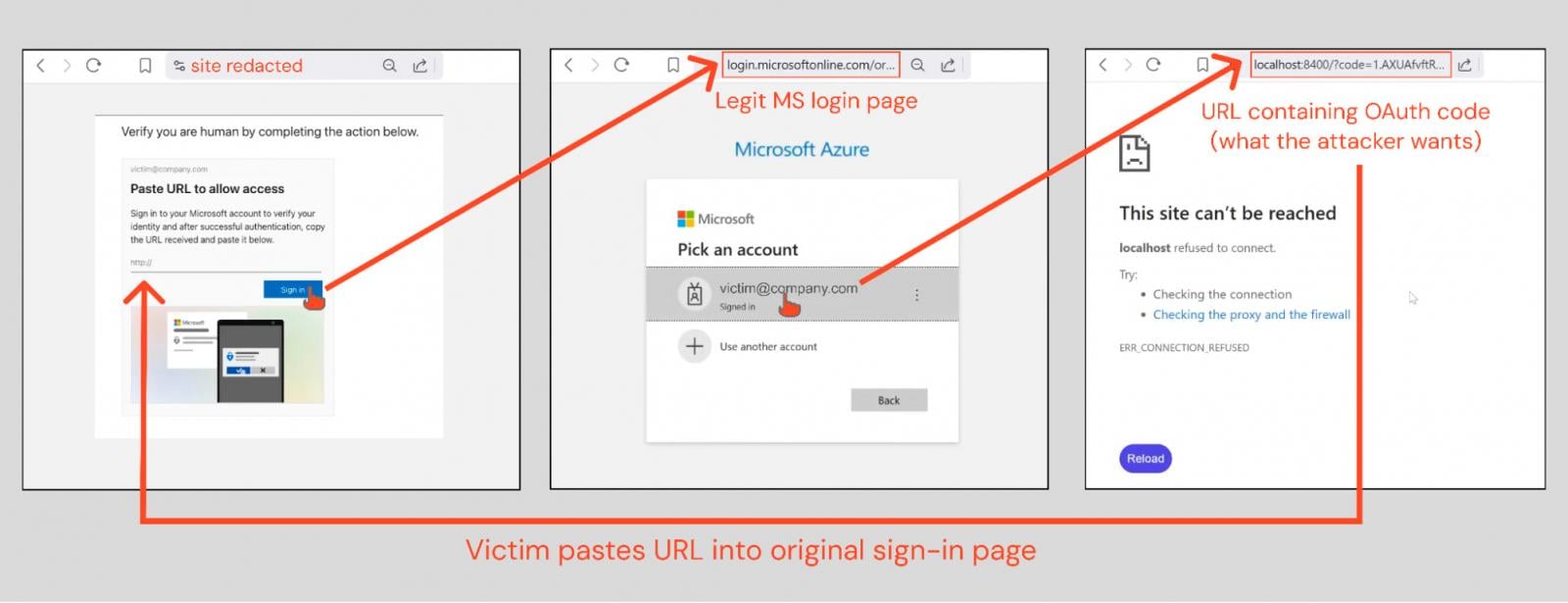
The victim is served a page which requires that they verify that they are human by pasting a URL into the phishing page.
Clicking the “Sign In” button opens a legitimate Microsoft login page. If the user is already logged in (which they likely are if working in their normal browser) their account information is already pre-populated and they won’t need to authenticate again.
Selecting their account redirects them to a localhost URL containing an OAuth authorization code — this is what they then post into the original phishing page to complete the attack.
Once the attacker gets the URL, they can exchange it for an access token or refresh token for the particular application being targeted — in this case, Azure CLI.
The TL;DR is that the attacker is manually completing an authorization flow that happens when a user logs into Azure CLI — a command line client that provides you with the ability to easily manage your Azure AD / Entra ID environment. Except in this case, they’re taking the victim’s information to log in on the attacker’s device instead.
Latest campaign details
Since we shared our blog post, we’ve had a number of additional details come to light about the campaign, which we’ve continued to track.
It appears to be linked to Russian state-affiliated APT29, as corroborated by threat researchers we’ve been collaborating with. This is consistent with the stealthy tactics we observed, which go far beyond the run-of-the-mill detection evasion techniques we see used in criminal phishing campaigns.
It shares many similarities with, and appears to be an evolution of, this Russia-affiliated campaign identified by Volexity that featured a manual version of the attack — where they victim was social engineered via email into opening the Microsoft URL, copying the localhost response, and sending it back to the attacker via email.
As we mentioned earlier, the community response to ConsentFix has been incredible.
As ever, you get a lot of vendors covering the attack technique with “install our product” as the recommendation. This is to be expected, but it’s misleading when some of these vendors are pushing EDR products that would have absolutely no way of detecting or blocking the attack.
But cutting through the marketing, a lot of really great resources and recommendations were shared.
V2.0 released by John Hammond
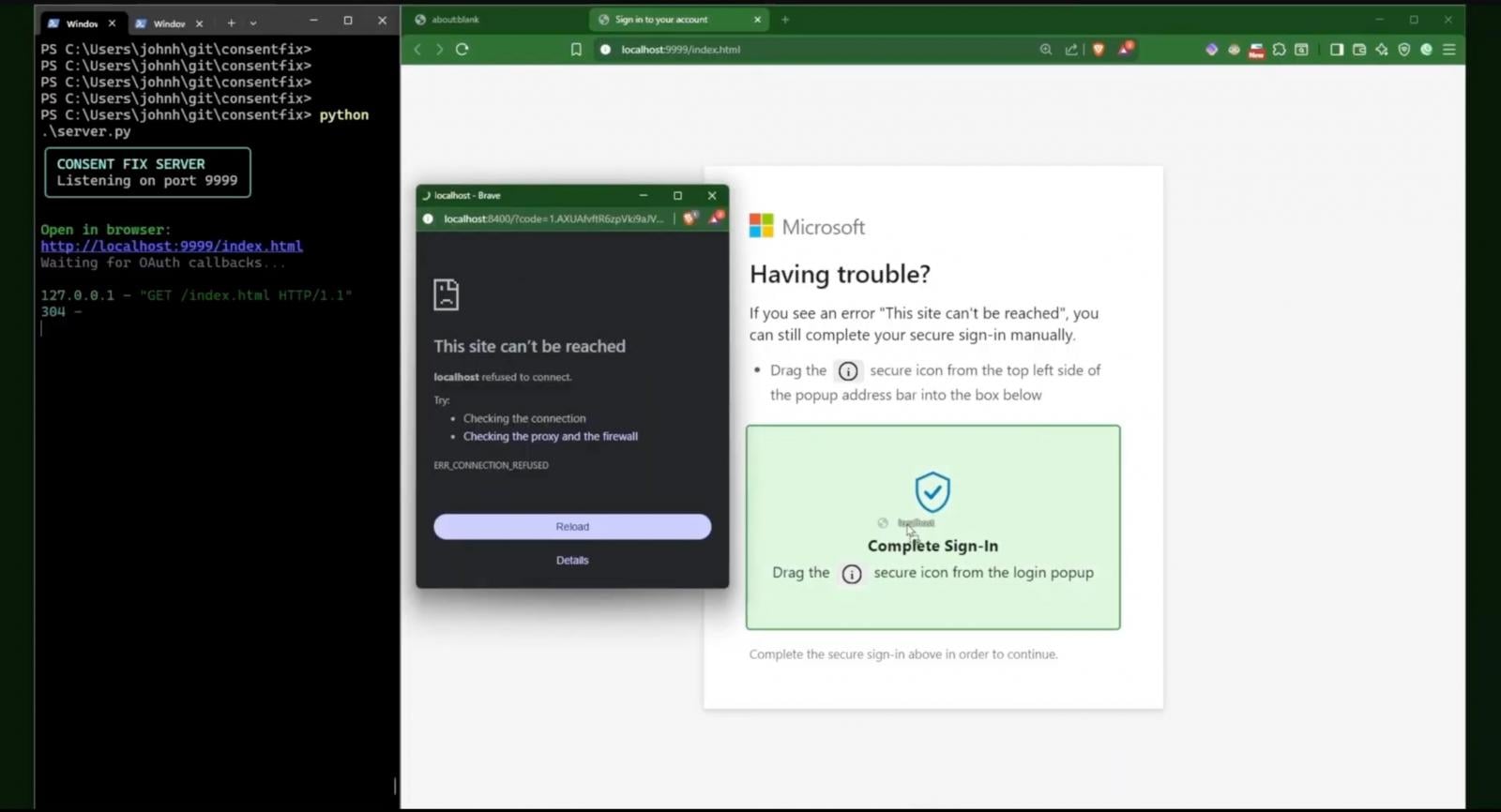
Within days, John Hammond posted about ConsentFix on his Youtube channel, where he showed off a slick improvement on the ConsentFix implementation used by attackers.
In his version, the URL containing the Microsoft authorization code was generated in a pop-up browser window that could simply be drag-and-dropped into the phishing page.
This implementation is way smoother, making it much more likely that a victim would fall for it. And this took a matter of days…
Source: John Hammond
Additional vulnerable first-party apps identified
Fabian Bader and Dirk-jan Mollema from Glueck Kanja have shared a great resource on wider first-party apps that are vulnerable to ConsentFix.
In total, there are 11 apps vulnerable to ConsentFix that also have known Conditional Access exclusions (either for the app generally, or when specific scopes are requested for the app):
-
Microsoft Azure CLI: 04b07795-8ddb-461a-bbee-02f9e1bf7b46
-
Microsoft Azure PowerShell: 1950a258-227b-4e31-a9cf-717495945fc2
-
Microsoft Teams: 1fec8e78-bce4-4aaf-ab1b-5451cc387264
-
Microsoft Whiteboard Client: 57336123-6e14-4acc-8dcf-287b6088aa28
-
Microsoft Flow Mobile PROD-GCCH-CN: 57fcbcfa-7cee-4eb1-8b25-12d2030b4ee0
-
Enterprise Roaming and Backup: 60c8bde5-3167-4f92-8fdb-059f6176dc0
-
Visual Studio: 872cd9fa-d31f-45e0-9eab-6e460a02d1f1
-
Aadrm Admin Powershell: 90f610bf-206d-4950-b61d-37fa6fd1b224
-
Microsoft SharePoint Online Management Shell: 9bc3ab49-b65d-410a-85ad-de819febfddc
-
Microsoft Power Query for Excel: a672d62c-fc7b-4e81-a576-e60dc46e951d
-
Visual Studio Code: aebc6443-996d-45c2-90f0-388ff96faa56
Based on the speed at which new iterations on the ConsentFix technique were shared by security researchers, and the breadth of apps and possible scopes that can be leveraged, both red teams and criminals will inevitably adopt ConsentFix into their arsenal of TTPs in the near future.
It is likely that new ConsentFix variants will emerge imminently (if not already in circulation).
All security teams responsible for protecting Microsoft environments should ensure that monitoring controls and mitigations are put in place as a matter of high priority.
As an entirely browser-native attack technique, many traditional security tools and data sources are of limited use when it comes to detecting or pre-emptively blocking this attack. At the same time, the attack exploits default Microsoft security configs to evade both prevention and detection controls.
To be able to tackle modern attacks like ConsentFix that occur entirely within the browser context, it is vital that organizations look to monitor the browser as a detection surface, hunt for signs of malicious activity, and block attacks in real-time — in the same way that you would expect EDR to work for endpoint attacks.
For organizations relying on Microsoft logging as the sole line of defense against this attack, there are some new recommendations to add to the list thanks to the community response:
Additional resources that may be of use include community-created Elastic detection rules for ConsentFix and further mitigation and hunting guidance from Glueck Kanja.
Even though this was a brand new technique, Push intercepted the attack and shut it down before customers could interact with it.
Push detects browser-based attacks using behavioral threat detection controls, powered by deep browser telemetry, to provide broad detection and blocking capabilities against attacks happening in the browser. This means analyzing the end-to-end process of a webpage loading/running in the browser, and how the user interacts with the page, to spot universal indicators of bad activity.
This is the only reliable way to detect malicious websites in a world where IoC-based detections are trivial for attackers to get around. Rather than playing known-bad whac-a-mole, Push detects and blocks even zero-day browser threats in real time.
Push stops browser-based attacks like AiTM phishing, credential stuffing, malicious browser extensions, ClickFix, ConsentFix, and session hijacking.
You don’t need to wait until it all goes wrong either — you can also use Push to proactively find and fix vulnerabilities across the apps that your employees use, like ghost logins, SSO coverage gaps, MFA gaps, vulnerable passwords, and more to harden your identity attack surface.
To learn more about Push, check out our latest product overview or book some time with one of our team for a live demo.
Sponsored and written by Push Security.