
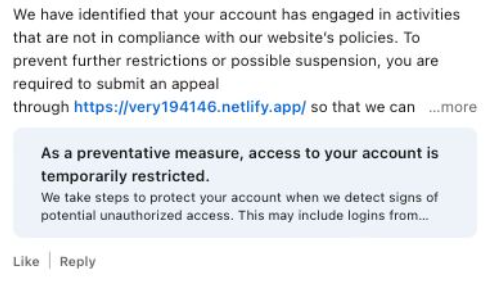
Recently, fake LinkedIn profiles have started posting comment replies claiming that a user has “engaged in activities that are not in compliance” with LinkedIn’s policies and that their account has been “temporarily restricted” until they submit an appeal through a specified link in the comment.
The comments come in different shapes and sizes, but here’s one example we found.
The accounts posting the comments all try to look like official LinkedIn bots and use various names. It’s likely they create new accounts when LinkedIn removes them. Either way, multiple accounts similar to the “Linked Very” one above were reported in a short period, suggesting automated creation and posting at scale.
The same pattern is true for the links. The shortened link used in the example above has already been disabled, while others point directly to phishing sites. Scammers often use shortened LinkedIn links to build trust, making targets believe the messages are legitimate. Because LinkedIn can quickly disable these links, attackers likely test different approaches to see which last the longest.
Here’s another example:
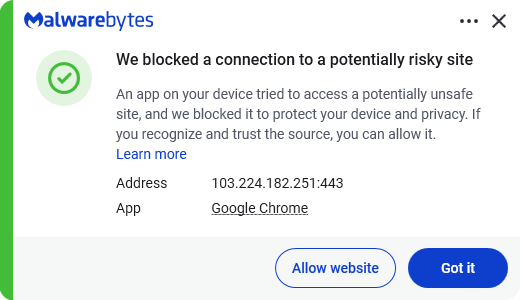
Malwarebytes blocks this last link based on the IP address:
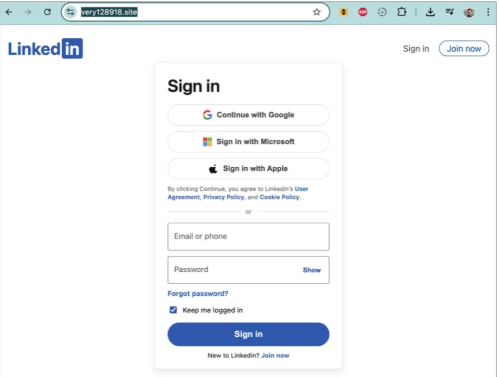
If users follow these links, they are taken to a phishing page designed to steal their LinkedIn login details:
A LinkedIn spokesperson confirmed to BleepingComputer they are aware of the situation:
“I can confirm that we are aware of this activity and our teams are working to take action.”
Stay safe
In situations like this awareness is key—and now you know what to watch for. Some additional tips:
- Don’t click on unsolicited links in private messages and comments without verifying with the trusted sender that they’re legitimate.
- Always log in directly on the platform that you are trying to access, rather than through a link.
- Use a password manager, which won’t auto-fill in credentials on fake websites.
- Use a real-time, up-to-date anti-malware solution with a web protection module to block malicious sites.
Pro tip: The free Malwarebytes Browser Guard extension blocks known malicious websites and scripts.
We don’t just report on scams—we help detect them
Cybersecurity risks should never spread beyond a headline. If something looks dodgy to you, check if it’s a scam using Malwarebytes Scam Guard, a feature of our mobile protection products. Submit a screenshot, paste suspicious content, or share a text or phone number, and we’ll tell you if it’s a scam or legit. Download Malwarebytes Mobile Security for iOS or Android and try it today!