
Over the past few months, a large-scale cloud storage subscription scam campaign has been targeting users worldwide with repeated emails falsely warning recipients that their photos, files, and accounts are about to be blocked or deleted due to an alleged payment failure.
Based on numerous emails seen by BleepingComputer, the campaign has escalated over the past few months, with people receiving multiple versions of the scam each day, all appearing to be sent by the same scammers.
While the email text, the messages all attempt to create a sense of urgency by claiming a payment problem or storage issue must be resolved immediately, or people’s files will be deleted or blocked.

The cloud storage scam email campaign
The phishing emails originate from a wide range of domains, with most appearing to be randomly generated for the spam campaign, as shown in the sample list below.
[email protected]
[email protected]
[email protected]
[name][email protected]
The emails themselves use a wide variety of subject lines, all designed to scare a recipient into opening the email.
Example subject lines seen by BleepingComputer include:
- Immediate Action Required. Payment Declined
- Cloud Storage 1TB: Payment overdue
- [personal name]¸Your Account Has been Blocked! Your Photos and Videos will be Removed Fri,30 Jan-2026. take action!!
- We’ve blocked your account! Your photos and videos will be deleted . Renew your subscription for free now!
- [personal name] – Your store is full , click to check and save 80% , ID#88839
- [personal name], Your Cloud Account has been locked on Mon,26 Jan-2026. Your photos and videos will be removed!
- Sorry [
], We Have To Suspend Your Account Today ! Sat,24 Jan-2026 - [name] – Your store is full , click to check and save 80%
- Cloud Storage 1TB: Payment overdue
Many of the subject lines are personalized with the recipient’s name or email address and include specific dates or identifiers to increase urgency and make the messages appear legitimate.
The email seen by BleepingComputer claim that a cloud subscription renewal failed or that a payment method has expired, with recipients warned that backups may stop syncing and that photos, videos, documents, and device backups could be lost if the issue is not resolved.
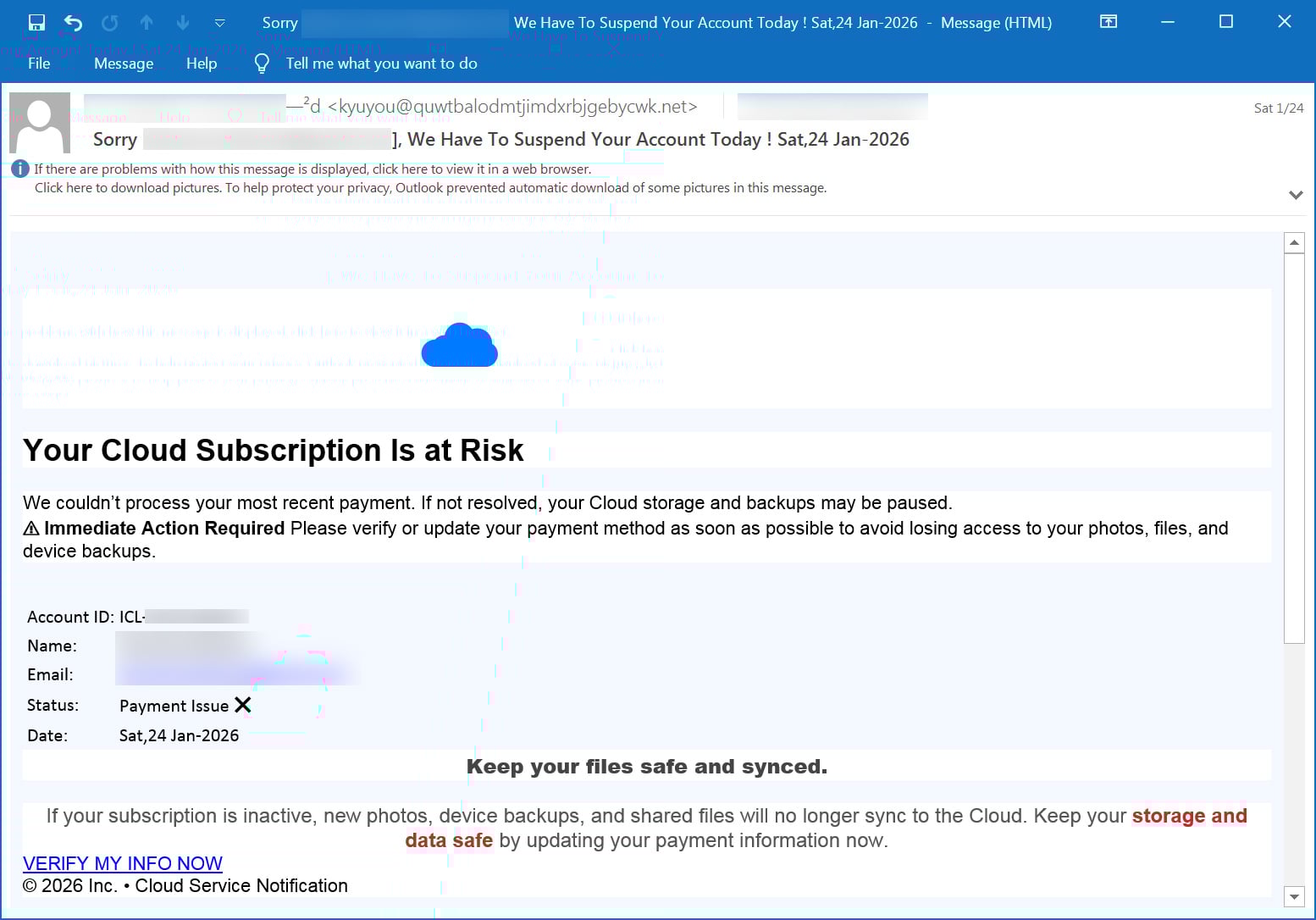
Source: BleepingComputer
The emails seen by BleepingComputer claim that a cloud subscription renewal failed or that a payment method has expired, and warn recipients that backups may stop syncing and that photos, videos, documents, and device backups could be lost if the issue is not resolved.
The messages frequently include made-up account IDs, subscription numbers, and expiration dates to add legitimacy.
“Your Cloud Subscription Is at Risk. We couldn’t process your most recent payment. If not resolved, your Cloud storage and backups may be paused,” reads an email seen by BleepingComputer.
“Immediate Action Required Please verify or update your payment method as soon as possible to avoid losing access to your photos, files, and device backups.”
All spam emails in this campaign contained a link to https://storage.googleapis.com/, which is part of Google Cloud Storage, where threat actors hosted static redirector HTML files. When a visitor clicks this, the URL redirects them to a scam/phishing site hosted on random domains.
All of the links tested by BleepingComputer lead to the same set of scam pages.
The phishing pages impersonate cloud service portals and prominently display cloud-themed branding, including the Google Cloud logo. The web pages claim the user’s cloud storage is full and warn that photos, videos, contacts, files, and private data are no longer being backed up and will be deleted.
“Because you’ve exceeded your storage plan, your documents, contacts, and device data are no longer backing up to Cloud and your photos and videos are not uploading to Cloud Photos. Cloud Drive and Cloud-enabled apps are not updating across your devices,” reads the phishing site shown below.
“Your data will be lost without security protection if no urgent action is taken.”
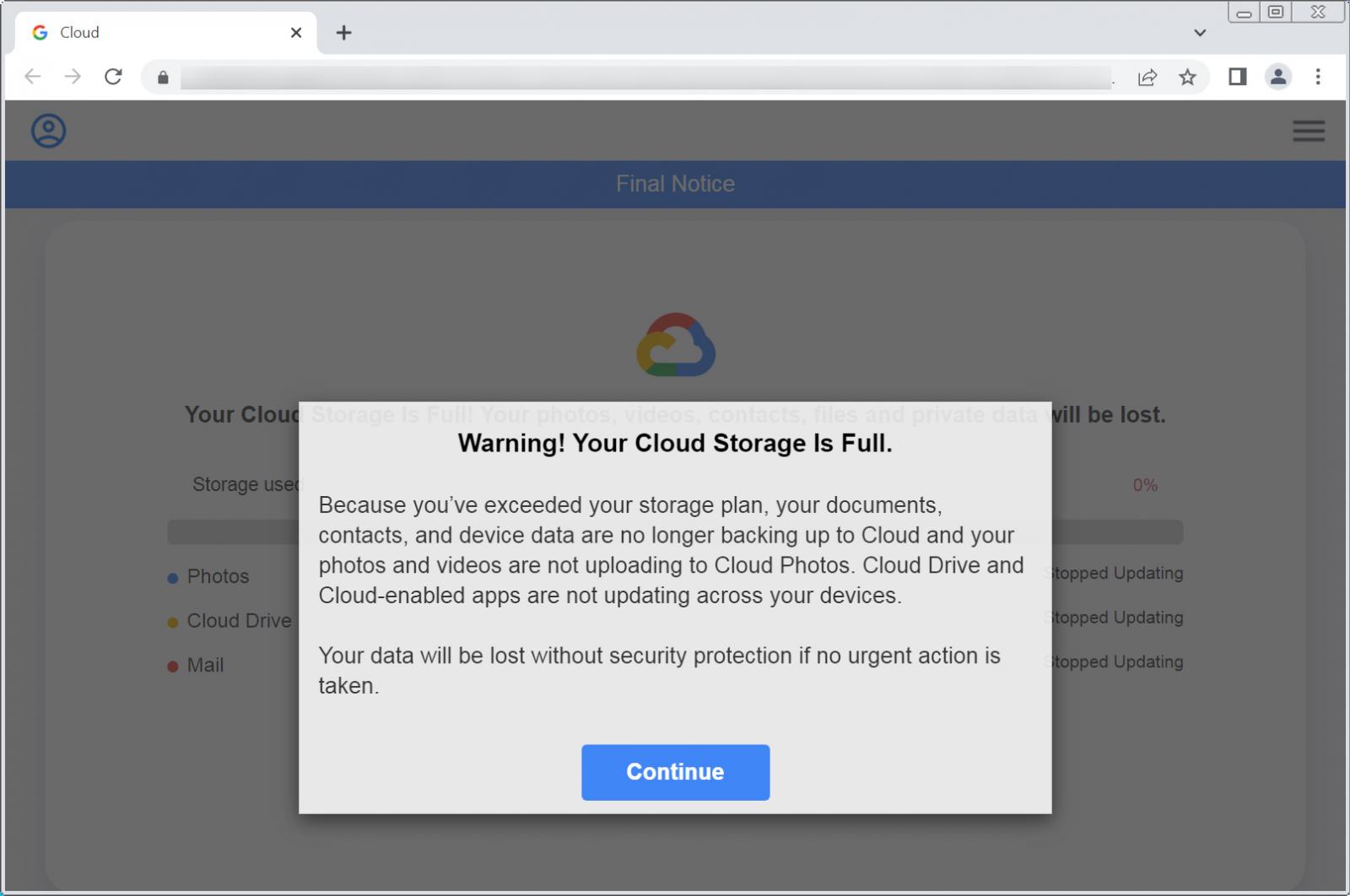
Source: BleepingComputer
Clicking on the “Continue” button brings targets to a fake storage scan that always reports that Photos, Cloud Drive, and Mail are all full. The pages then warn that data will be lost unless the cloud storage is upgraded, claiming that the person is eligible for a limited-time “loyalty” upgrade at an 80% discount.
However, after clicking the update storage button, instead of being taken to a legitimate cloud services page, you are redirected to affiliate marketing pages promoting unrelated products.
Products promoted in this phishing campaign include VPN services, little-known security software, and other subscription-based offerings with no connection to cloud storage.
The pages ultimately lead to checkout forms designed to collect credit card details and generate affiliate revenue for the threat actors behind the campaign.
Unfortunately, many people who receive these emails may not realize they’re scams and purchase a product they don’t need, thinking it will solve the fake cloud storage issues.
It is important to understand that these emails and landing pages are not legitimate cloud service notifications. Furthermore, legitimate cloud providers do not send emails that lead to storage scans or third-party security or VPN products to resolve billing issues.
Furthermore, most legitimate cloud storage providers will block access to your additional storage when you fail to make a payment, rather than deleting your files immediately.
For example, Google says that if a Google Drive plan is canceled, you will lose access to your additional storage until you make a payment again, and your files will only be deleted after 2 years.
Microsoft OneDrive follows a similar approach but says it may delete files after 6 months if the account exceeds its allocated storage.
Users who receive these spam messages should delete them without clicking any links and not purchase anything promoted through the emails.
As the campaign’s goal is to scare recipients into unnecessary purchases, ignoring these messages is the best course of action.
Any concerns about cloud storage or billing should instead be checked manually by visiting the official website or app of the legitimate cloud service.

As MCP (Model Context Protocol) becomes the standard for connecting LLMs to tools and data, security teams are moving fast to keep these new services safe.
This free cheat sheet outlines 7 best practices you can start using today.