
A sophisticated social engineering campaign targeting Windows users across the UK, using fake event invitations to silently install ScreenConnect a legitimate remote access tool that attackers have weaponized to gain complete system control.
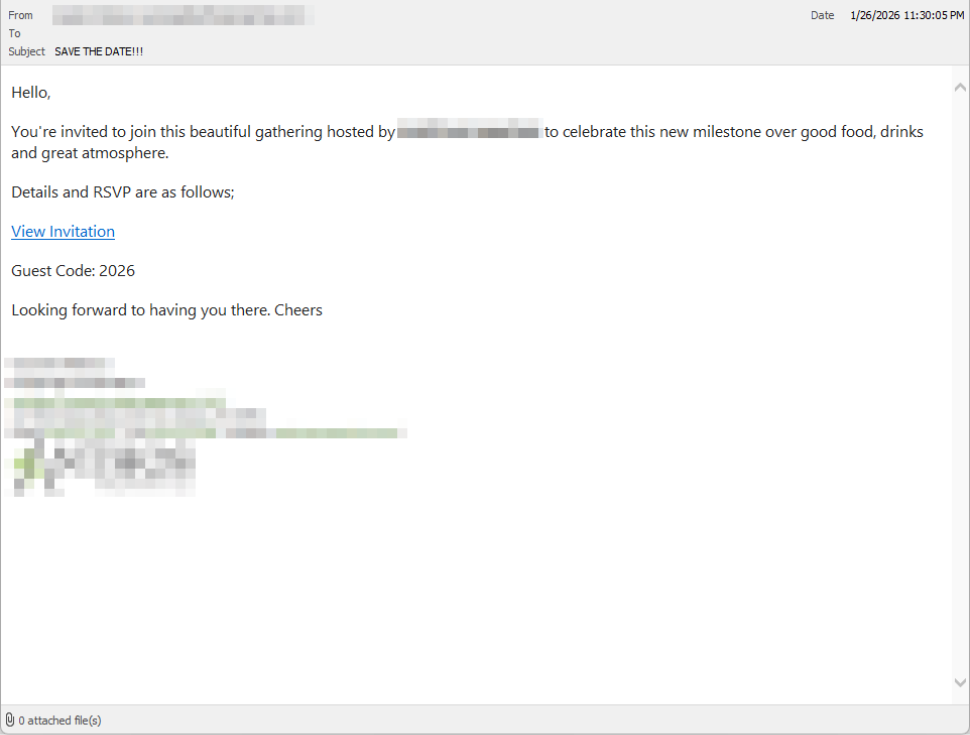
The attack chain begins with deceptive simplicity: victims receive emails that look like personal invitations from friends or colleagues.
These messages are deliberately informal and social, designed to lower suspicion and encourage quick action. In many cases, the emails come from compromised legitimate accounts, making them appear even more trustworthy.
The attacker-controlled landing page reinforces this deception with a polished party theme, complete with urgency cues and social proof (“I opened mine and it was so easy!”) noted.
When victims click the link, they’re redirected to download a file called RSVPPartyInvitationCard.msi.
The page even triggers automatic downloads to prevent users from pausing to think. However, this MSI installer contains no invitation it’s an installer for ScreenConnect Client.
How the scam works
Upon execution, the MSI file launches msiexec.exe and silently installs ScreenConnect binaries under C:Program Files (x86)ScreenConnect Client.
A persistent Windows service is created with a random identifier, and multiple . NET-based components are installed without any clear user-facing indication.
From the victim’s perspective, nothing obvious happens. But behind the scenes, an attacker has gained remote access equivalent to that of an IT technician.
Once installed, the ScreenConnect client establishes encrypted outbound connections to ScreenConnect relay servers using a uniquely assigned instance domain.
This gives attackers the ability to see the victim’s screen in real time, control the mouse and keyboard, upload or download files, and maintain access even after system restarts.
Because ScreenConnect is legitimate software commonly used by IT support teams, its presence isn’t always obvious.
Users often notice behavioral indicators first unexplained cursor movement, windows opening independently, or unfamiliar processes.
Clicking the link in the email leads to a polished invitation page hosted on an attacker-controlled domain.
This campaign is devastatingly effective because it exploits normal human behavior. Most people don’t perceive invitations as dangerous; opening one feels passive and low-risk.
Recommendations
Even security-aware users watch for warning messages and pressure tactics, neither of which appear in a friendly “you’re invited” message. By the time something feels suspicious, the malware is already installed.
Detection requires vigilance. Affected systems may show a download of RSVPPartyInvitationCard.msi, unexpected ScreenConnect Client installation, a Windows service named ScreenConnect Client followed by random characters, outbound HTTPS connections to ScreenConnect relay domains, or DNS resolution of xnyr[.]digital.
Users should treat unsolicited invitations downloading software with extreme skepticism. Never execute MSI files from unsolicited emails, and always verify invitations through alternative channels.
If you suspect infection, disconnect from the internet immediately, check for and uninstall ScreenConnect, run a full security scan, and change passwords from a clean device.
Organizations, particularly in the UK, should alert on unauthorized ScreenConnect installations, restrict MSI execution where possible, treat remote support tools as high-risk software, and educate users that legitimate invitations never arrive as installers.
Modern attacks don’t break in they’re invited in. This campaign demonstrates why endpoint protection that detects newly installed remote access tools is essential.
Follow us on Google News, LinkedIn, and X to Get Instant Updates and Set GBH as a Preferred Source in Google.