A new phishing campaign is targeting MetaMask users with cleverly crafted emails designed to trick recipients into enabling a fake Two-Factor Authentication (2FA) setup.
The lure includes a forged “security report” PDF meant to mimic a legitimate notification about unusual login activity, adding credibility and emotional urgency to the scam.
The attack blends social engineering with basic technical obfuscation to bypass quick user suspicion. Although relatively low in sophistication, the campaign demonstrates how threat actors increasingly abuse legitimate file-generation services to appear authentic.
A researcher shared one such phishing email that impersonates MetaMask, the widely used cryptocurrency wallet available as a browser extension and mobile app.
The Phishing Email Setup
The fraudulent email alerts the recipient about “unusual login activity” and urges them to “enhance account security” by enabling 2FA. It includes a suspicious link hosted on an AWS S3 bucket:
hxxps://access-authority-2fa7abff0e[.]s3.us-east-1[.]amazonaws[.]com/index.html.
The link redirects to a counterfeit MetaMask login page designed to steal wallet credentials and seed phrases. Such use of Amazon’s legitimate infrastructure helps attackers evade basic filtering rules, as the domain initially appears benign and trustworthy.
Attached to the message is a non-malicious PDF labeled “Security_Reports.pdf”, which mirrors an authentic incident alert.
The goal is psychological manipulation convincing victims that their accounts have been compromised and that acting “immediately” will secure their funds.
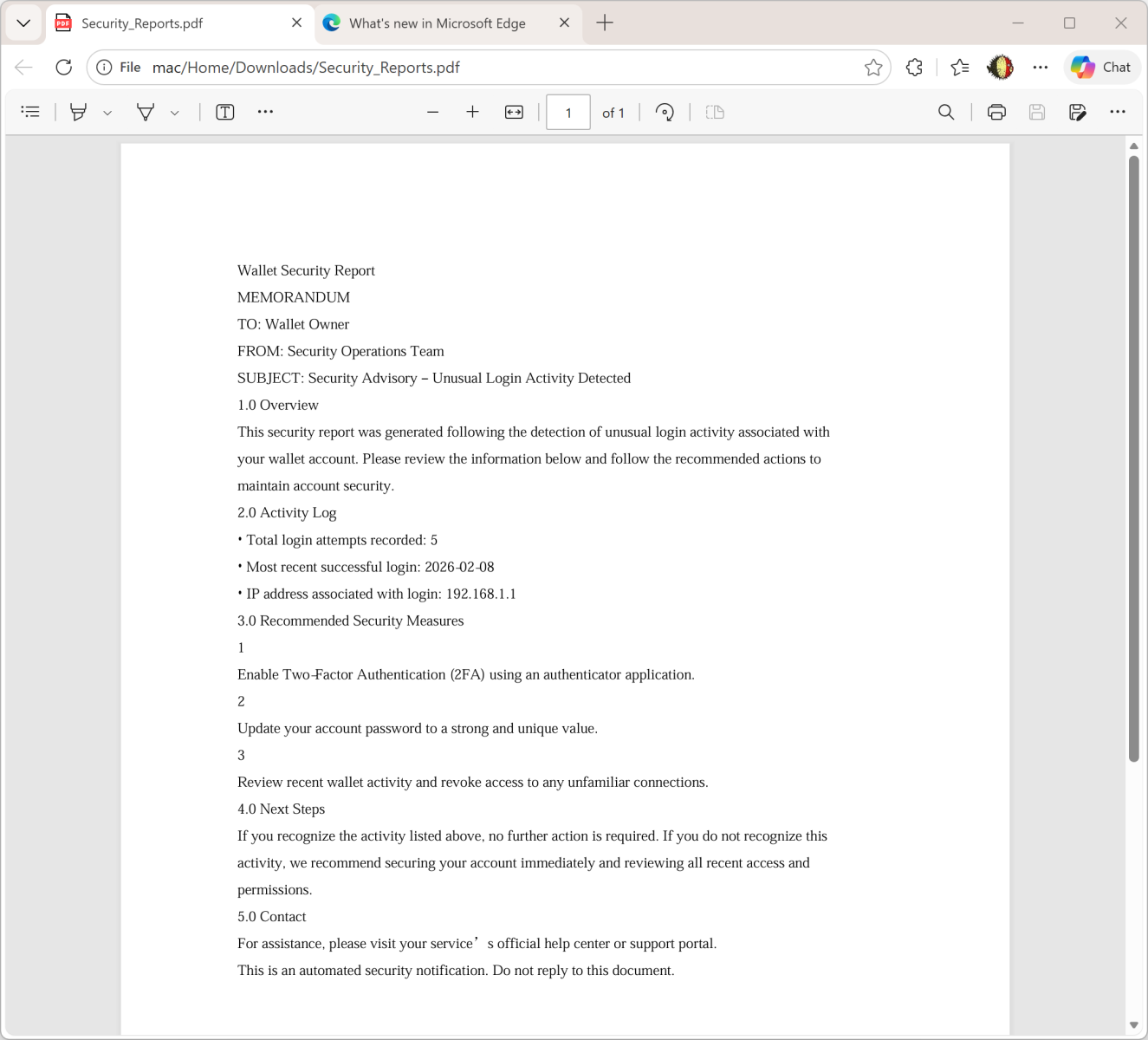
Upon inspection, the PDF’s metadata reveals that it was generated with the ReportLab PDF library, a legitimate Python-based toolkit for creating PDF documents programmatically. The metadata includes the following snippet:
text/Producer (ReportLab PDF Library - www.reportlab.com)
/CreationDate (D:20260211234209+00'00')
/Author (anonymous)
The file hash of the PDF is:
SHA256: 2486253ddc186e9f4a061670765ad0730c8945164a3fc83d7b22963950d6dcd1
Interestingly, although the attachment is clean containing no malware or embedded scripts it serves as a pretexting tool to increase believability. By combining a “security incident report” with a call-to-action link, attackers exploit user fear to elicit impulsive behavior.
Low Sophistication Yet Effective Tactics
Despite its emotionally manipulative tone, this phishing attempt lacks advanced craftsmanship.
The sender’s email address is not spoofed, and the attached PDF isn’t personalized with the victim’s details.
If the adversaries already automated the creation of PDF files, personalizing the content to include the target’s email or name would have made it far more convincing.
Nevertheless, this campaign highlights a broader concern: the abuse of legitimate platforms like AWS and ReportLab to distribute and disguise phishing lures. Such tactics make detection harder for filters relying solely on domain reputation or file signatures.
- Verify sender authenticity: Always cross-check URLs and sender domains before acting on security alerts.
- Inspect attachments safely: Use sandbox environments or online scanners to review PDFs and attachments.
- Educate users: Ongoing awareness training remains key to preventing credential theft from phishing campaigns.
- Report phishing hosts: Notify AWS or affected providers to take down malicious S3 buckets rapidly.
While the execution is rudimentary, it reinforces how simple social engineering combined with legitimate infrastructure can bypass user defenses.
As phishing actors continue refining their tactics, vigilance around “security notifications” especially those invoking urgency and fear remains essential.
Follow us on Google News, LinkedIn, and X to Get Instant Updates and Set GBH as a Preferred Source in Google.