A malvertising campaign is using a fake ad-blocking Chrome and Edge extension named NexShield that intentionally crashes the browser in preparation for ClickFix attacks.
The attacks were spotted earlier this month and delivered a new Python-based remote access tool called ModeloRAT that is deployed in corporate environments.
The NexShield extension, which has been removed from the Chrome Web Store, was promoted as a privacy-first, high-performance, lightweight ad blocker created by Raymond Hill, the original developer of the legitimate uBlock Origin ad blocker with more than 14 million users.


Source: Huntress
Researchers at managed security company Huntress say that NexShield creates a denial-of-service (DoS) condition in the browser by creating ‘chrome.runtime’ port connections in an infinite loop and exhausting its memory resources.
This results in frozen tabs, elevated CPU usage in the Chrome process, increased RAM usage, and general browser unresponsiveness. Eventually, Chrome/Edge hangs or crashes, forcing a kill via the Windows Task Manager.
Because of this, Huntress refers to these attacks as a variant of ClickFix that they named ‘CrashFix’.
When the browser is restarted, the extension displays a deceptive pop-up that shows a fake warning and suggests scanning the system locate the problem.
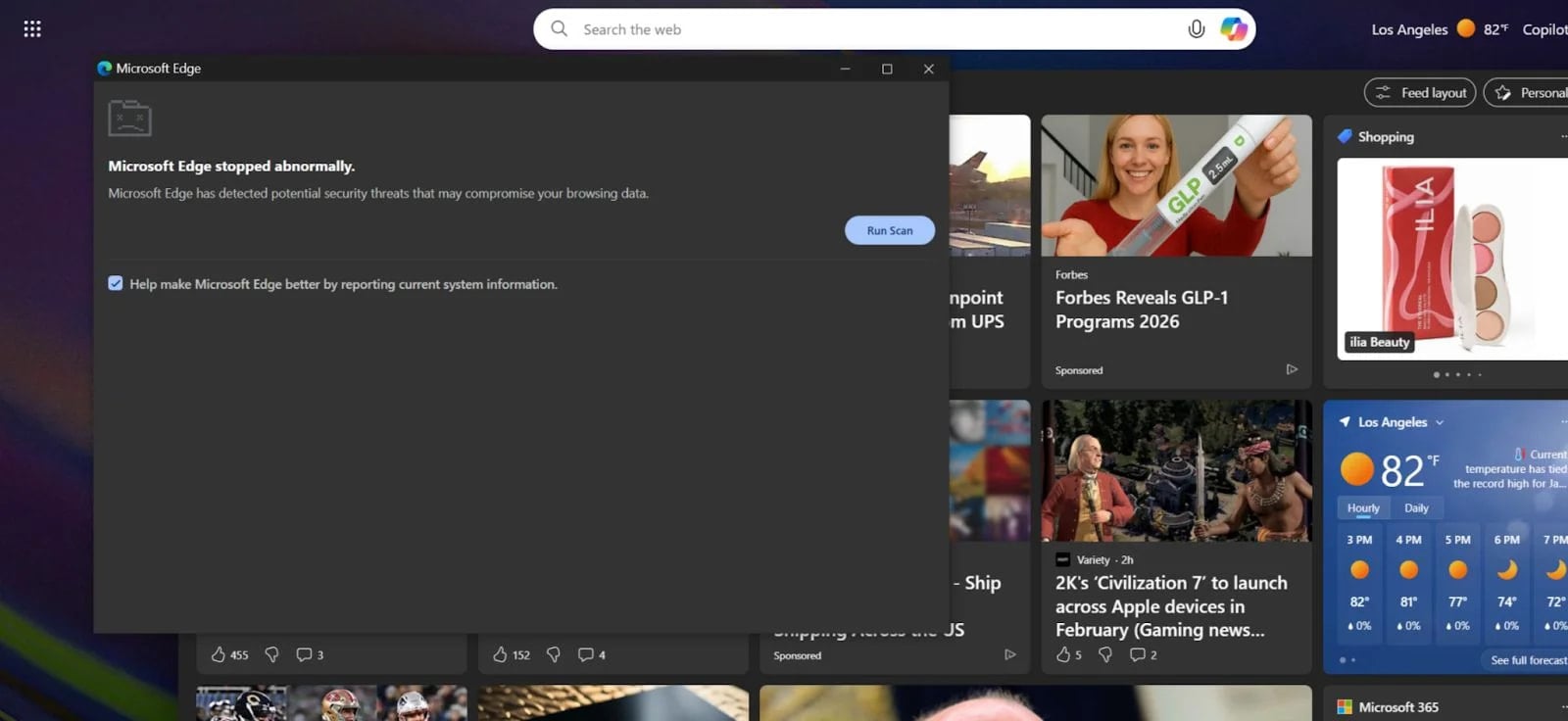
Source: Huntress
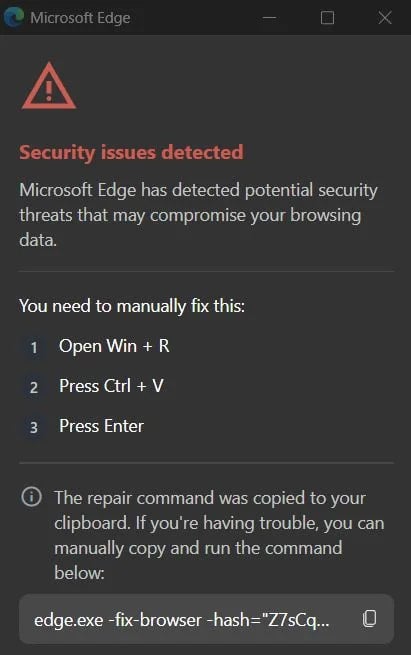
Doing so opens a new window with a fake warning about security issues detected that threaten the user’s data, with instructions on how to fix the problem, which involve executing malicious commands in the Windows command prompt.
In typical ClickFix fashion, the malicious extension copies a command to the clipboard and instructs the user to just hit ‘Ctrl+V’ and then run it in Command Prompt.
The ‘fixing’ command is a chain that triggers an obfuscated PowerShell script via a remote connection, which downloads and executes a malicious script.
Source: Huntress
In an attempt to dissociate the extension from the malicious activity and evade detection, the payload has a 60-minute execution delay after installing NexShield.
For domain-joined hosts specific to corporate environments, the threat actor delivers ModeloRAT, which can perform system reconnaissance, execute PowerShell commands, modify the Registry, introduce additional payloads, and update itself.

Source: Huntress
For non-domain hosts, which are normally home users, the command and control server returned a “TEST PAYLOAD!!!!” message, indicating either low priority or work in progress, Huntress researchers say.
Earlier this month, cybersecurity company Securonix spotted another ClickFix attack that simulated a Windows BSOD screen in the target browser by abusing the full-screen mode; however, in the case of CrashFix, the browser crash is real, making it more convincing.
The researchers provide a proper technical report on the entire CrashFix attack and the payloads delivered this way. They detail the multiple stages of the infection chain and ModeloRAT’s capabilities, from establishing persistence and collecting reconnaissance info to executing commands, fingerprinting systems, and determining its privileges on the compromised system.
Huntress attributes the analyzed CrashFix attack to a threat actor named ‘KongTuke’, whose operations have been on the company’s radar since early 2025.
Based on the recent discovery, the researchers believe that KongTuke is evolving and becoming more interested in enterprise networks, which are more lucrative for cybercriminals.
Falling for ClickFix attacks can be prevented by making sure that the effect of any external command executed on the system is well understood. Furthermore, installing browser extensions from trusted publishers or sources should keep you safe from CrashFix attacks or other threats.
Users who installed NexShield should perform a full system cleanup, as uninstalling the extension does not remove all payloads, such as ModeloRAT or other malicious scripts.

Whether you’re cleaning up old keys or setting guardrails for AI-generated code, this guide helps your team build securely from the start.
Get the cheat sheet and take the guesswork out of secrets management.