A new wave of attacks is exploiting legitimate Remote Monitoring and Management (RMM) tools like LogMeIn Resolve (formerly GoToResolve) and PDQ Connect to remotely control victims’ systems. Instead of dropping traditional malware, attackers trick people into installing these trusted IT support programs under false pretenses–disguising them as everyday utilities. Once installed, the tool gives attackers full remote access to the victim’s machine, evading many conventional security detections because the software itself is legitimate.
We’ve recently noticed an uptick in our telemetry for the detection name RiskWare.MisusedLegit.GoToResolve, which flags suspicious use of the legitimate GoToResolve/LogMeIn Resolve RMM tool.
Our data shows the tool was detected with several different filenames. Here are some examples from our telemetry:
The filenames also provide us with clues about how the targets were likely tricked into downloading the tool.
Here’s an example of a translated email sent to someone in Portugal:
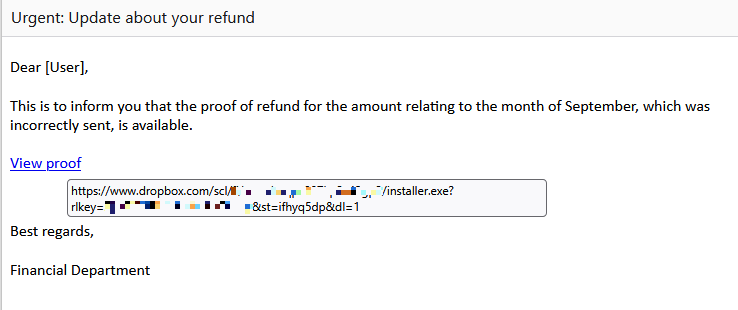
As you can see, hovering over the link shows that it points to a file uploaded to Dropbox. Using a legitimate RMM tool and a legitimate domain like dropbox[.]com makes it harder for security software to intercept such emails.
Other researchers have also described how attackers set up fake websites that mimic the download pages for popular free utilities like Notepad++ and 7-Zip.
Clicking that malicious link delivers an RMM installer that’s been pre-configured with the attacker’s unique “CompanyId”–a hardcoded identifier tying the victim machine directly to the attacker’s control panel.

This ID lets them instantly spot and connect to the newly infected system without needing extra credentials or custom malware, as the legitimate tool registers seamlessly with their account. Firewalls and other security tools often allow their RMM traffic, especially because RMMs are designed to run with admin privileges. The result is that malicious access blends in with normal IT admin traffic.
How to stay safe
By misusing trusted IT tools rather than conventional malware, attackers are raising the bar on stealth and persistence. Awareness and careful attention to download sources are your best defense.
- Always download software directly from official websites or verified sources.
- Check file signatures and certificates before installing anything.
- Verify unexpected update prompts through a separate, trusted channel.
- Keep your operating system and software up to date.
- Use an up-to-date, real-time anti-malware solution. Malwarebytes for Windows now includes Privacy Controls that alert you to any remote-access tools it finds on your desktop.
- Learn how to spot social engineering tricks used to push malicious downloads.
We don’t just report on threats—we remove them
Cybersecurity risks should never spread beyond a headline. Keep threats off your devices by downloading Malwarebytes today.