- IT hygiene overview
- The Wazuh IT hygiene capability
- Accessing the IT hygiene dashboard
- Practical use cases for enterprise IT hygiene
- Software patch management
- Browser extension management
- Identity management
- Hardware resource optimization
- Port and service monitoring
- Best practices for implementing IT hygiene with Wazuh
- Conclusion

Organizations face the challenge of maintaining visibility and control over their IT infrastructure. A forgotten user account, an outdated software package, an unauthorized service, or a malicious browser extension can expose vulnerabilities that threat actors are eager to exploit.
Addressing these risks requires a systematic approach to maintaining the security and integrity, and overall health of every system within the organization. This is where IT hygiene becomes essential.
IT hygiene is the systematic practice of maintaining consistent, secure configurations across all endpoints in an organization’s infrastructure. It encompasses continuous monitoring of hardware, software, user accounts, running processes, and network configurations to ensure alignment with security policies and compliance requirements.
Poor IT hygiene creates security gaps that can lead to data breaches, system compromises, and significant financial and reputational damage.
Wazuh is a free, open source security platform that provides multiple capabilities, including a dedicated IT hygiene capability, file integrity monitoring, configuration assessment, vulnerability detection, and active response.
This post explores how organizations can leverage Wazuh to maintain enterprise IT hygiene, examines practical use cases, and demonstrates its effectiveness in improving their security posture.
IT hygiene overview
IT hygiene encompasses the preventive measures organizations implement to maintain the health and security of their IT infrastructure. It reduces the risk of security incidents by ensuring systems remain properly configured, up to date, and monitored.
Key aspects include:
- Asset visibility: Maintaining a comprehensive, up-to-date inventory of all hardware and software assets across your infrastructure.
- Configuration management: Ensuring systems are configured in accordance with security best practices and organizational policies. These include minimizing services, ports, and software, as well as authentication and account hardening configurations.
- Patch management: Regularly updating software to address known vulnerabilities.
- Access control: Managing user accounts and permissions to prevent unauthorized access.
- Monitoring and auditing: Continuously tracking system activities and configurations to detect anomalies.
Without proper IT hygiene practices, organizations become vulnerable to threats such as unauthorized access, malware infections, data exfiltration, and compliance violations.
Protect your systems against hidden threats.
Learn how attackers use malware persistence techniques, and how Wazuh helps you detect and stop them.
Learn More About Wazuh
The Wazuh IT hygiene capability
Wazuh introduced its IT hygiene capability in version 4.13.0, providing security teams with a centralized dashboard for monitoring system inventory across an entire infrastructure.
The capability leverages the Wazuh Syscollector module to gather and aggregate data from all monitored endpoints, storing it in dedicated indices within the Wazuh indexer for querying and analysis.
The Wazuh IT hygiene capability collects system inventory data, including:
- Hardware specifications such as CPU, memory, and storage data
- Operating system details and versions
- Installed software packages and their versions
- Running processes and services
- Network configurations and open ports
- User accounts and group memberships
- Browser extensions and their permissions
This data is presented through an intuitive dashboard interface that enables security administrators to query and analyze inventory information across multiple endpoints simultaneously, eliminating the need for time-consuming manual checks.
Accessing the IT hygiene dashboard
Users can access inventory data through the Wazuh dashboard by navigating to Security operations > IT hygiene. The interface provides multiple tabs for different inventory categories:
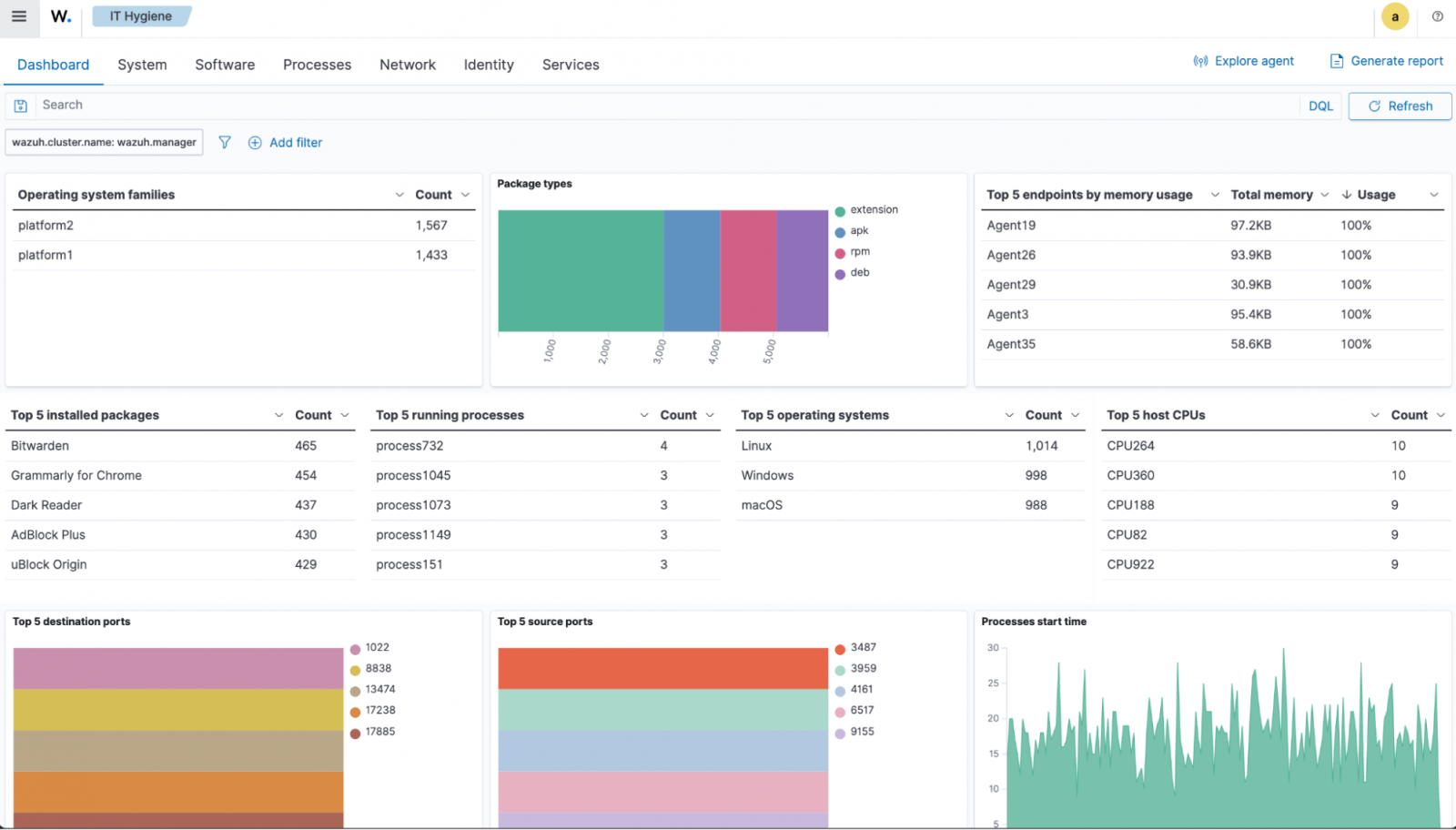
Each tab allows administrators to add custom filters to refine queries and select additional fields to display. This flexibility enables security teams to quickly identify configuration changes, policy violations, and security anomalies across their infrastructure.
Practical use cases for enterprise IT hygiene
Software patch management
Maintaining consistent software versions across all endpoints is critical for security, stability, and compliance. Inconsistent package versions introduce exploitable vulnerabilities and can violate organizational patching policies. Manually verifying software versions across thousands of endpoints is impractical and error-prone.
The Wazuh IT hygiene capability provides comprehensive visibility into installed packages across the entire infrastructure. Security administrators can:
- Identify endpoints running outdated or vulnerable software versions
- Detect unauthorized software installations
- Verify compliance with approved software catalogs
For example, administrators can use the filters on the Packages tab to identify all endpoints running a specific version of a critical application or library. By applying filters on fields such as package.name and the field package.version, security teams can quickly generate a list of endpoints requiring package updates, significantly streamlining the patch management process.

Browser extension management
Browser extensions are an increasingly exploited attack surface, particularly in enterprise environments. Extensions with broad permissions can access sensitive data, inject malicious scripts, intercept credentials, and serve as malware vectors. Recent security incidents have involved fake ad blockers and password managers used in credential theft campaigns.
The Wazuh IT hygiene capability provides complete visibility into browser extensions across all monitored endpoints, including:
- Extension names and versions
- Requested permissions (tabs, storage, webRequest, and so on.)
- Installation dates and sources
- User associations
Security teams can use this information to identify unauthorized or high-risk extensions, detect extensions with excessive permissions, and enforce browser extension policies. This enables them to respond quickly to reports of malicious extensions.

Identity management
The Identity section of the Wazuh IT hygiene enables account auditing to ensure that user identities and permissions remain aligned with organizational policies across the entire infrastructure. Administrators can audit user information by applying the filters within the Users and Groups dashboard.
The following use case demonstrates dormant account detection to identify inactive or unnecessary accounts, and privilege account verification to ensure only authorized users hold elevated permissions.
Dormant account detection
Dormant or abandoned user accounts pose significant security risks. These accounts, often belonging to former employees or contractors, can be exploited by attackers for unauthorized access. They represent forgotten attack vectors that may lack current security controls, such as multi-factor authentication, and thus present an entry point for attackers.
The Wazuh IT hygiene capability enables organizations to identify dormant accounts systematically. Administrators can:
a. Navigate to Security operations > IT Hygiene > Identity > Users.
b. Filter accounts based on criteria such as:
- Accounts with valid login shells (indicating interactive access)
- Last login dates beyond organizational policies
- Accounts without recent activity
c. Generate lists of accounts requiring review or deactivation

For example, the above image shows users filtered for user.shell values such as /bin/bash or /bin/sh to identify accounts capable of interactive system access. Cross-referencing this data with the details from user.last.login field reveals dormant accounts that should be investigated or removed.
Privileged account auditing
Unauthorized users with administrative privileges pose a critical security risk. Accounts in the local Administrators group (Windows) or sudo group (Linux) can install software, modify system configurations, disable security controls, and access sensitive data.
Even if rarely used, these accounts are valuable targets for attackers seeking to maintain persistence and escalate privileges.
The Wazuh IT hygiene capability allows security teams to:
- Identify all users with elevated privileges across the infrastructure
- Verify that only authorized personnel have administrative access
- Detect privilege escalation attempts or policy violations
- Maintain compliance with access control policies
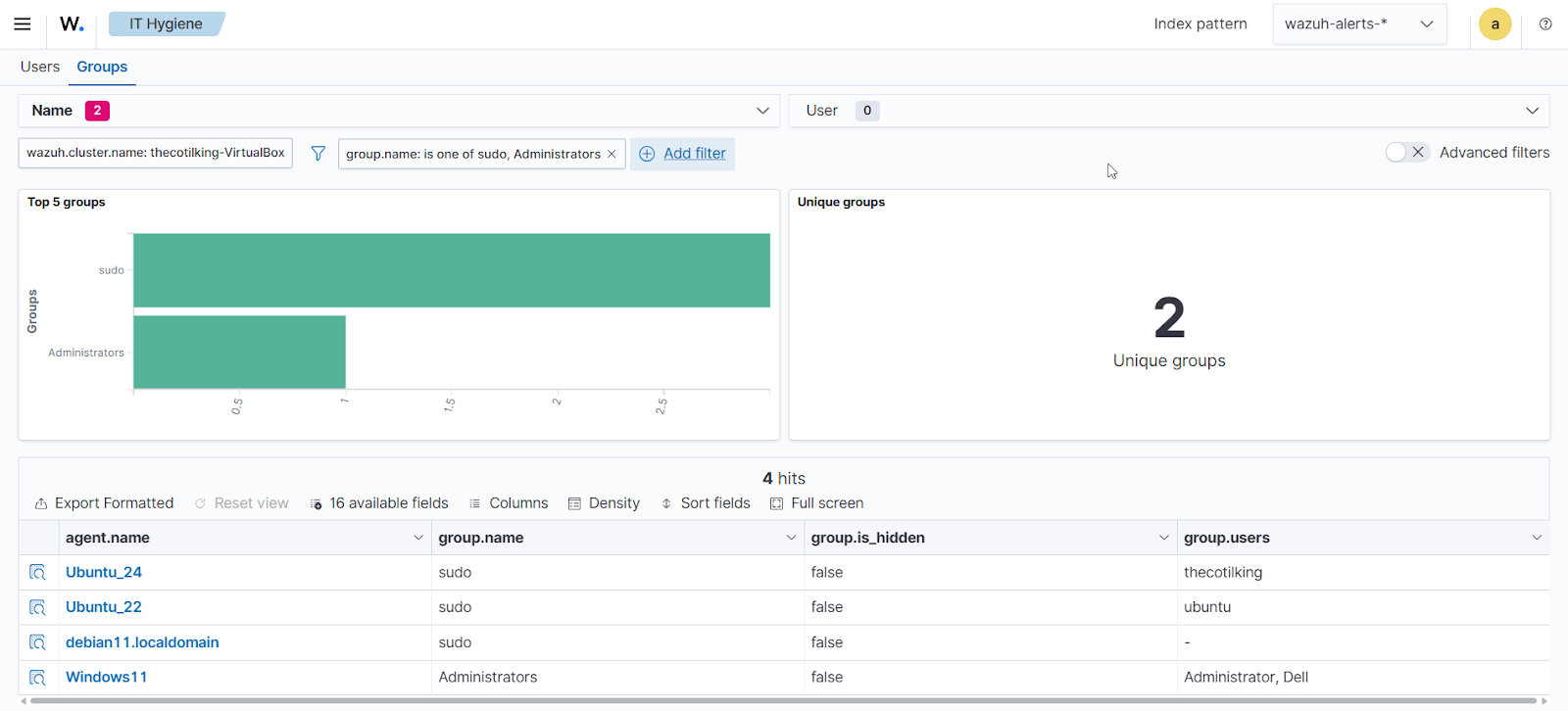
Administrators can use filters in the Groups tab within the Identity section of the Wazuh IT hygiene dashboard to identify members of privileged groups.
Administrators can then cross-reference these results against authorized user lists to identify accounts with unauthorized privilege assignments.
Hardware resource optimization
In large enterprise environments with numerous Linux and Windows endpoints, mismatched hardware specifications can lead to significant operational challenges.
Servers with insufficient CPU cores or memory create performance bottlenecks that impact critical workloads, while oversized instances waste resources and drive unnecessary cloud computing costs.
The Wazuh IT hygiene capability enables resource analysis across all devices, allowing administrators to:
- Identify endpoints that fall outside policy-defined specifications
- Detect underpowered systems affecting critical services
- Find oversized instances wasting budget
- Optimize cloud resource allocation
- Plan capacity upgrades based on actual usage patterns
For example, administrators can use the filters within the Hardware tab to identify all servers with memory below a defined threshold (for example, 8GB for web servers) or systems with excessive resources that could be downsized.

This data-driven approach supports both cost optimization and reliability improvements without requiring manual inspection of individual endpoints.
Port and service monitoring
Unnecessary open ports and unauthorized services expand the attack surface. Each open port is a potential entry point for attackers, and unauthorized services may contain vulnerabilities or misconfigurations that compromise security.
The Wazuh IT hygiene capability provides comprehensive visibility into:
- All open network ports across endpoints
- Services listening on each port
- Process associations for running services
- Port states and configurations
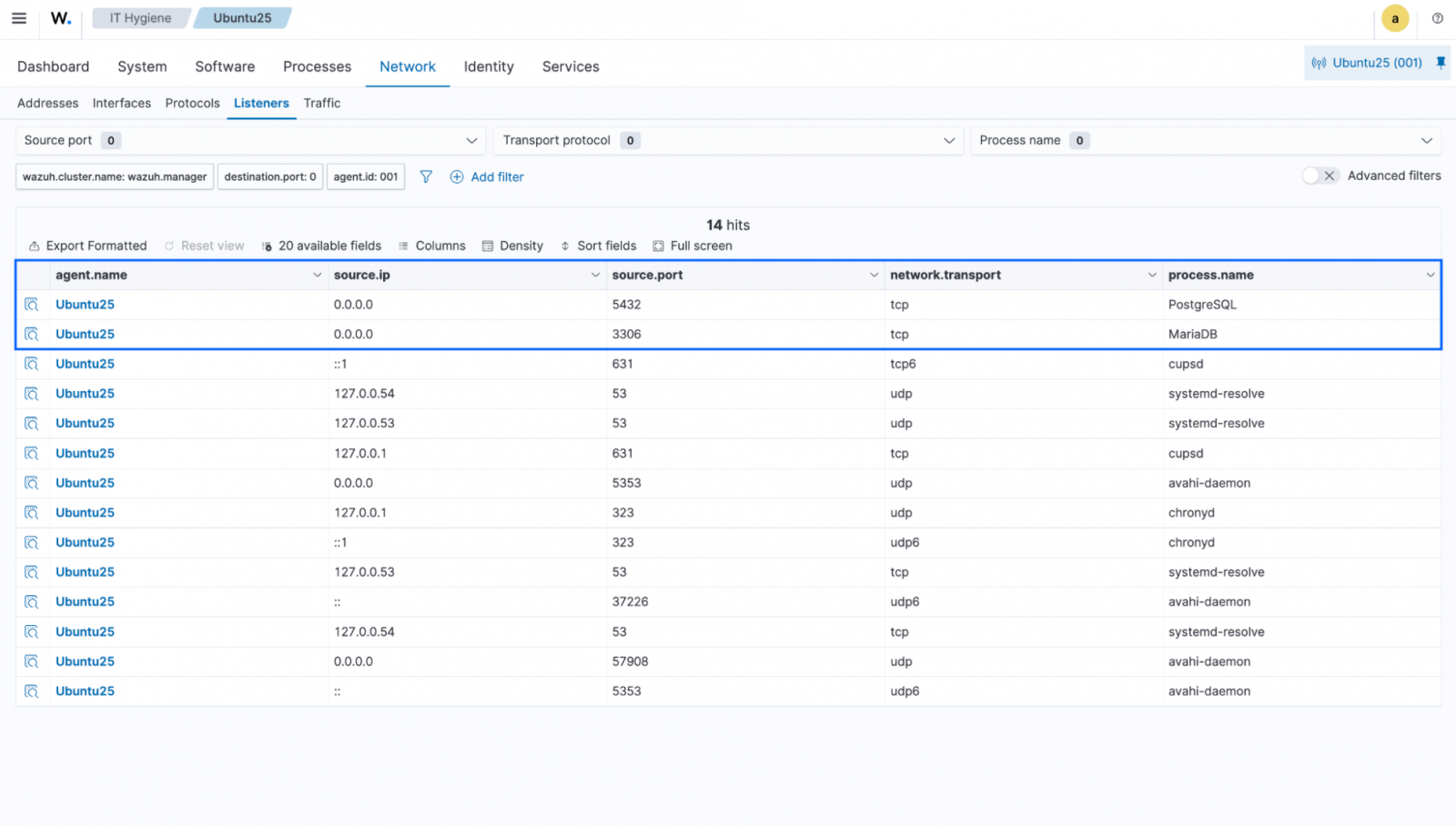
Security teams can use the filter within the Ports tab to identify endpoints with unexpected open ports or unauthorized services. For instance, database ports (3306, 5432) should not be open on workstations or web servers. They should be restricted to internal networks or specific application servers only.
Best practices for implementing IT hygiene with Wazuh
To maximize the benefits of Wazuh IT hygiene capabilities, organizations should follow these best practices:
1. Establish baseline inventories: Document expected configurations, approved software, authorized accounts, and standard hardware specifications for different endpoint types. Create explicit policies for software versions, user account lifecycles, browser extensions, privileged access, and hardware standards.
2. Automate alerting: Configure Wazuh to generate alerts for critical deviations such as new privileged accounts, unauthorized software installations, or suspicious browser extensions.
3. Integrate with workflows: Connect IT hygiene findings with existing ticketing systems, patch management tools, and incident response processes.
4. Maintain documentation: Keep detailed records of authorized exceptions, approved changes, and remediation actions taken in response to hygiene issues.
5. Leverage other Wazuh modules: Leverage SCA, vulnerability detection, and malware detection alongside IT hygiene for comprehensive security coverage.
6. Schedule regular reviews: Conduct periodic audits of inventory data to identify drift from baseline configurations and policy violations.
7. Train security teams: Ensure personnel understand how to effectively query and interpret IT hygiene data to identify security risks.
Conclusion
Maintaining IT hygiene reduces the risk of security incidents by keeping systems correctly configured, patched, and monitored. The Wazuh IT hygiene capability meets this need by providing a centralized, real-time inventory across all endpoints.
Security teams can quickly spot policy violations, configuration drift, and security anomalies using holistic data on hardware, software, accounts, processes, ports, and browser extensions, enabling informed, data-driven decisions.
Visit the Wazuh website or join the Wazuh community to learn more.
Sponsored and written by Wazuh.