A newly discovered Android malware dubbed DroidLock can lock victims’ screens for ransom and access text messages, call logs, contacts, audio recordings, or even erase data.
DroidLLock allows its operator to take complete control of the device via the VNC sharing system and can steal the device lock pattern by placing an overlay on the screen.
According to researchers at mobile security company Zimperium, the malware targets Spanish-speaking users and is distributed through malicious websites promoting fake applications that impersonate legitimate packages.
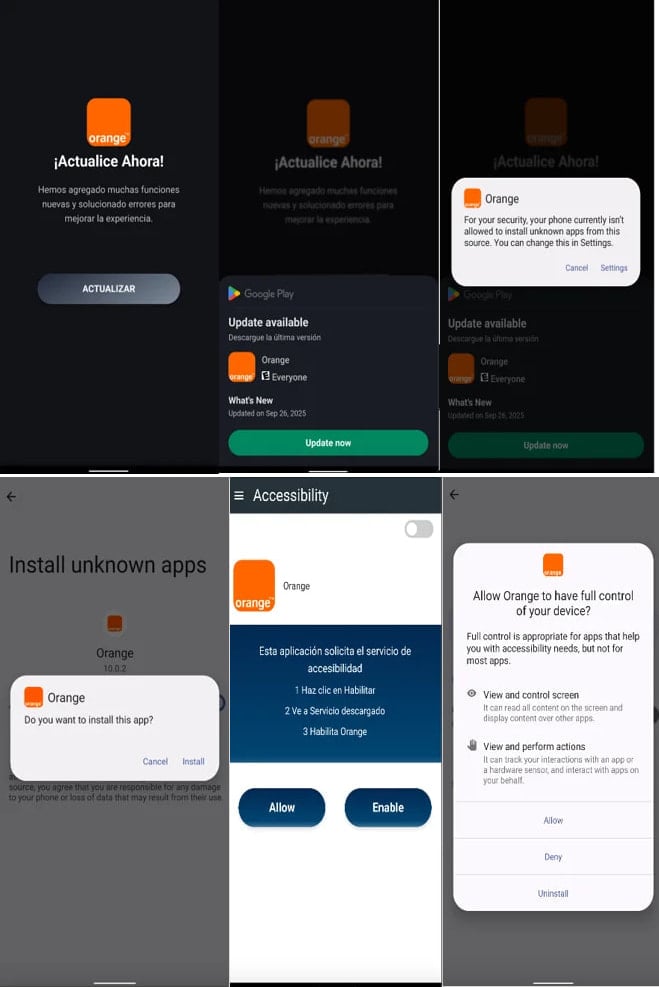
In a report today, Zimperium says that the “infection starts with a dropper that deceives the user into installing the secondary payload that contains the actual malware.”
Source: Zimperium
The malicious apps introduce the main payload via an update request and then ask for Device Admin and Accessibility Services permissions, which let it to perform fraudulent activities.
Some of the actions it can take are wiping the device, locking it, changing the PIN, password, or biometric data to prevent the user from accessing the device.
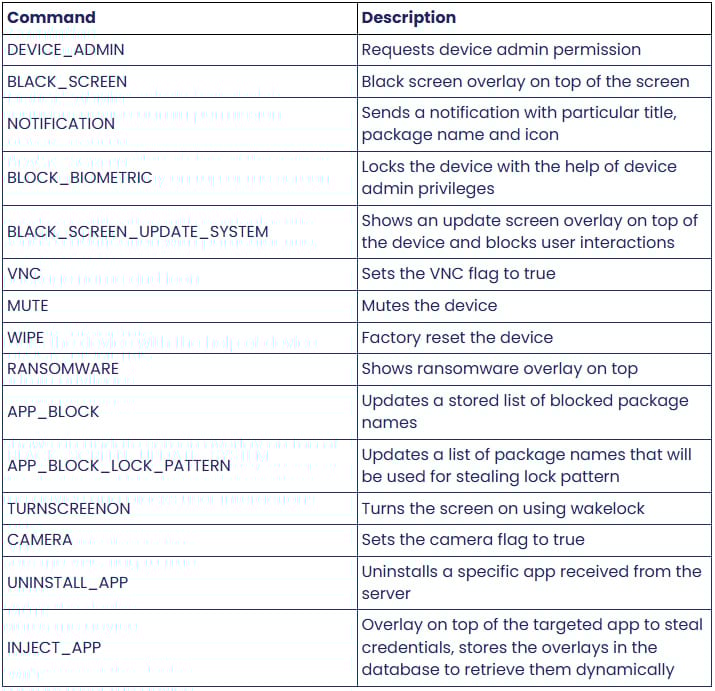
Zimperium’s analysis discovered that DroidLock supports 15 commands that let it send notifications, place an overlay on the screen, mute the device, reset it to factory settings, start the camera, or uninstall apps.
Source: Zimperium
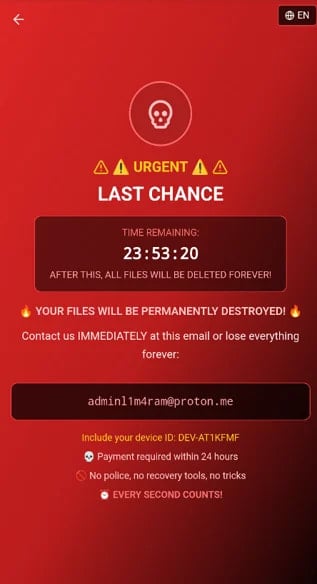
The ransomware overlay is served via WebView immediately after the corresponding command is received, instructing the victim to contact the threat actor at a Proton email address. If the user does not pay a ransom in 24 hours, the actor threatens to permanently destroy the files.
Source: Zimperium
Zimperium clarifies that DroidLock does not encrypt files, but by threatening to destroy them unless a ransom is paid, the same purpose is achieved. Additionally, the threat actor can deny access to the device by changing the lock code.
DroidLock can steal the lock pattern through another overlay loaded from the malicious APK’s assets. When the user draws the pattern on the cloned interface, they send it directly to the attacker. The purpose of this feature is to allow remote access to the device through VNC at idle times.
Being a member of Google’s App Defense Alliance, Zimperium shares new malware findings with the Android security team, so Play Protect detects and blocks this threat from up-to-date devices.
Android users are advised not to side-load APKs from outside Google Play unless the publisher is a trusted source. They should always check if the permissions required by an app serve its purposes, and periodically scan their device with Play Protect.

Broken IAM isn’t just an IT problem – the impact ripples across your whole business.
This practical guide covers why traditional IAM practices fail to keep up with modern demands, examples of what “good” IAM looks like, and a simple checklist for building a scalable strategy.