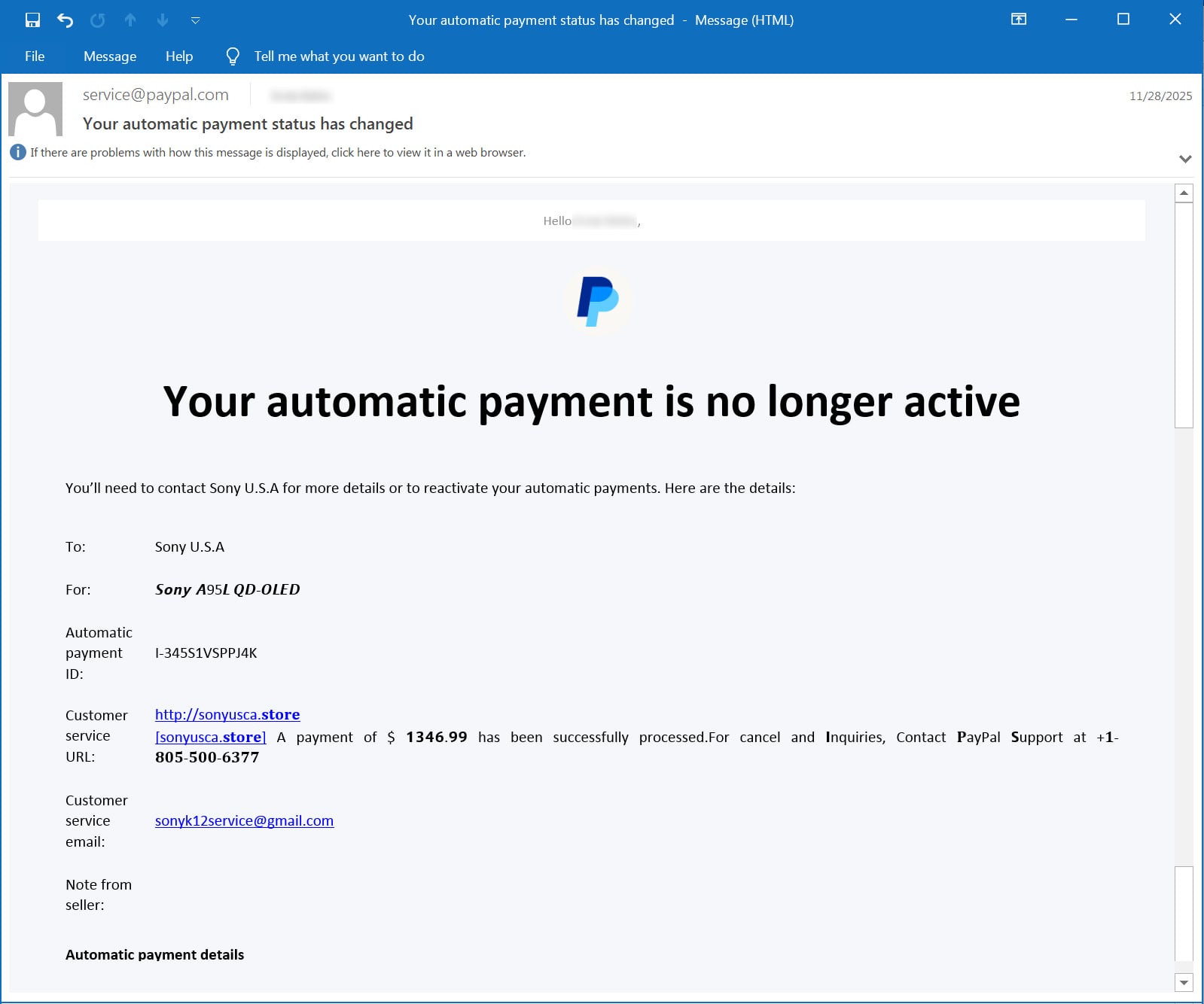
An email scam is abusing abusing PayPal’s “Subscriptions” billing feature to send legitimate PayPal emails that contain fake purchase notifications embedded in the Customer service URL field.
Over the past couple of months, people have reported [1, 2] receiving emails from PayPal stating, “Your automatic payment is no longer active.”
The email includes a customer service URL field that was somehow modified to include a message stating that you purchased an expensive item, such as a Sony device, MacBook, or iPhone.
This text includes a domain name, a message stating that a payment of $1,300 to $1,600 was processed (the amount varies by email), and a phone number to cancel or dispute the payment. The text is filled with Unicode characters that make portions appear bold or in an unusual font, a tactic used to try and evade spam filters and keyword detection.
“http://[domain] [domain] A payment of $1346.99 has been successfully processed. For cancel and inquiries, Contact PayPal support at +1-805-500-6377,” reads the customer service URL in the scam email.
Source: BleepingComputer
While this is clearly a scam, the emails are being sent directly by PayPal from the address “service@paypal.com,” leading people to worry their accounts may have been hacked.
Furthermore, as the emails are legitimate PayPal emails, they are bypassing security and spam filters. In the next section, we will explain how scammers send these emails.
The goal of these emails is to trick recipients into thinking their account purchased an expensive device and scare them into calling the scammer’s “PayPal support” phone number.
Emails like these have historically been used to convince recipients to call a number to conduct bank fraud or trick them into installing malware on their computers.
Therefore, if you receive a legitimate email from PayPal stating your automatic payment is no longer active, and it contains a fake purchase confirmation, ignore the email and do not call the number.
If you are concerned that your PayPal account was compromised, log in to your account and confirm that there was no charge.
How the PayPal scam works
BleepingComputer was sent a copy of the email from someone who received it and found it strange that the scam originated from the legitimate “service@paypal.com” email address.
Furthermore, the email headers indicate that the emails are legitimate, pass DKIM and SPF email security checks, and originate directly from PayPal’s “mx15.slc.paypal.com” mail server, as shown below.
ARC-Authentication-Results: i=1; mx.google.com;
       dkim=pass header.i=@paypal.com header.s=pp-dkim1 header.b="AvY/E1H+";
       spf=pass (google.com: domain of service@paypal.com designates 173.0.84.4 as permitted sender) smtp.mailfrom=service@paypal.com;
       dmarc=pass (p=REJECT sp=REJECT dis=NONE) header.from=paypal.com
Received: from mx15.slc.paypal.com (mx15.slc.paypal.com. [173.0.84.4])
        by mx.google.com with ESMTPS id a92af1059eb24-11dcb045a3csi5930706c88.202.2025.11.28.09.14.49
        for
        (version=TLS1_3 cipher=TLS_AES_256_GCM_SHA384 bits=256/256);
        Fri, 28 Nov 2025 09:14:49 -0800 (PST)
After testing various PayPal billing features, BleepingComputer was able to replicate the same email template by using PayPal’s “Subscriptions” feature and pausing a subscriber.
PayPal subscriptions are a billing feature that lets merchants create subscription checkout options for people to subscribe to a service for a specified amount.
When a merchant pauses a subscriber’s subscription, PayPal will automatically email the subscriber to notify them that their automatic payment is no longer active.
However, when BleepingComputer attempted to replicate the scam by adding text other than a URL to the Customer Service URL, PayPal would reject the change as only a URL is allowed.
Therefore, it appears the scammers are either exploiting a flaw in PayPal’s handling of subscription metadata or using a method, such as an API or legacy platform not available in all regions, that allows invalid text to be stored in the Customer service URL field.
Now that we know how they generate the email from PayPal, it’s still unclear how it’s being sent to people who didn’t sign up for the PayPal subscription.
The mail headers show that PayPal is actually sending the email to the address “receipt3@bbcpaglomoonlight.studio,” which we believe is the email address associated with a fake subscriber created by the scammer.
This account is likely a Google Workspace mailing list, which automatically forwards any email it receives to all other group members. In this case, the members are the people the scammer is targeting.
This forwarding can cause all subsequent SPF and DMARC checks to fail, since the email was forwarded by a server that was not the original sender.
When BleepingComputer contacted PayPal to ask if this issue was fixed, they declined to comment and shared the following statement instead.
“PayPal does not tolerate fraudulent activity and we work hard to protect our customers from consistently evolving scam tactics,” PayPal told BleepingComputer.
“We are aware of this phishing scam and encourage people to always be vigilant online and mindful of unexpected messages. If customers suspect they are a target of a scam, we recommend they contact Customer Support directly through the PayPal app or our Contact page for assistance.”

Broken IAM isn’t just an IT problem – the impact ripples across your whole business.
This practical guide covers why traditional IAM practices fail to keep up with modern demands, examples of what “good” IAM looks like, and a simple checklist for building a scalable strategy.