- How hybrid work increased Active Directory Password Reset Issues
- Cached credentials and remote connectivity drive account lockouts
- Security policies increase password reset frequency for remote users
- The real cost of password resets for IT helpdesks
- Why self-service password reset is essential for hybrid Active Directory environments
- What to look for in a self-service Active Directory password reset tool

Back when everyone worked in the office, password resets were annoying but manageable. If someone forgot their credentials, they walked down the hall to IT and got back to work within minutes. The interaction was quick, the fix was immediate, and life went on.
But hybrid work changed that. Now, when employees can’t access their accounts, they’re sitting at home or in a coffee shop, unable to work until IT gets around to their ticket.
The helpdesk can’t just walk over to troubleshoot; they’re fielding calls from people scattered across cities, time zones, and home networks with varying levels of connectivity.
What used to be a minor interruption has become a productivity drain that costs organizations far more than most realize.
How hybrid work increased Active Directory Password Reset Issues
The shift to distributed work isn’t a temporary trend waiting to reverse itself. Since 2022, work location patterns have remained remarkably stable. Today, 51% of remote-capable US employees work in a hybrid model, with hybrid workers spending an average of 2.3 days per week in the office.
This is the new normal, and the operational challenges that came with this shift caught many IT teams off guard.
Password resets, which Gartner found already accounted for 40% of helpdesk calls, have gotten worse in distributed work environments. The reason isn’t that people suddenly became more forgetful. It’s that the technical landscape has changed.
Verizon’s Data Breach Investigation Report found stolen credentials are involved in 44.7% of breaches.
Effortlessly secure Active Directory with compliant password policies, blocking 4+ billion compromised passwords, boosting security, and slashing support hassles!
Try it for free
Cached credentials and remote connectivity drive account lockouts
Remote employees experience more lockouts because credentials cached on their laptops become outdated when they aren’t consistently connected to the corporate network.
For example, an employee may change their password while connected via a virtual private network (VPN), then try to log in the next morning using cached credentials on their local machine.
The result is a lockout that requires a helpdesk call. Employees working across multiple locations and devices are also more likely to forget which password goes with which account, especially when they aren’t in their usual work environment with familiar login routines.
Security policies increase password reset frequency for remote users
Security concerns have also forced IT teams to mandate more frequent password changes for remote access.
Nearly half of CISOs cite hybrid and remote employees as a top security risk, and many respond by increasing password rotation requirements. But every mandatory change creates another opportunity for someone to forget their new credentials or fail to update them across all their devices.
The real cost of password resets for IT helpdesks
Forrester estimates that each password reset costs $70 in IT time and resources. And for organizations still handling these manually, that adds up fast.
Recent data from over 700 organizations using Specops’ self-service password reset tools shows the average company processes 923 password resets per year. At $70 each, that’s roughly $65,000 in annual reset costs.
But the help desk cost is only the visible part of the problem. The hidden expenses fall on employees who can’t work while they wait for IT to respond.
Consider what happens when someone gets locked out at 9AM on a Tuesday: they submit a ticket and wait. If they’re lucky, IT might respond in 20 minutes. Or if the helpdesk is backed up, it may take two hours. During that time, the employee can’t attend meetings, can’t access files, and may be holding up colleagues who need their input.
That lost productivity doesn’t show up on any IT budget report, but it’s real money walking out the door.
The math gets worse when you factor in employees who constantly reset their passwords. Specops’ analysis of password reset data found ten individuals responsible for 5,703 resets in a single year.
These outliers, who either face chronic technical issues or have developed terrible password habits, can each cost an organization thousands of dollars annually if every reset goes through the helpdesk.
Even though no study has quantified the exact increase in resets per remote worker, we see hybrid work stabilizing as the dominant model, CISOs identifying remote workers as security risks, and IT teams reporting being “bombarded” with VPN and password-related tickets. The pattern suggests the connection.
Why self-service password reset is essential for hybrid Active Directory environments
The solution isn’t building a time machine to go back to 2019; hybrid work isn’t going away, and neither are the technical challenges that come with it. The fix is removing the helpdesk from the equation for routine password issues.
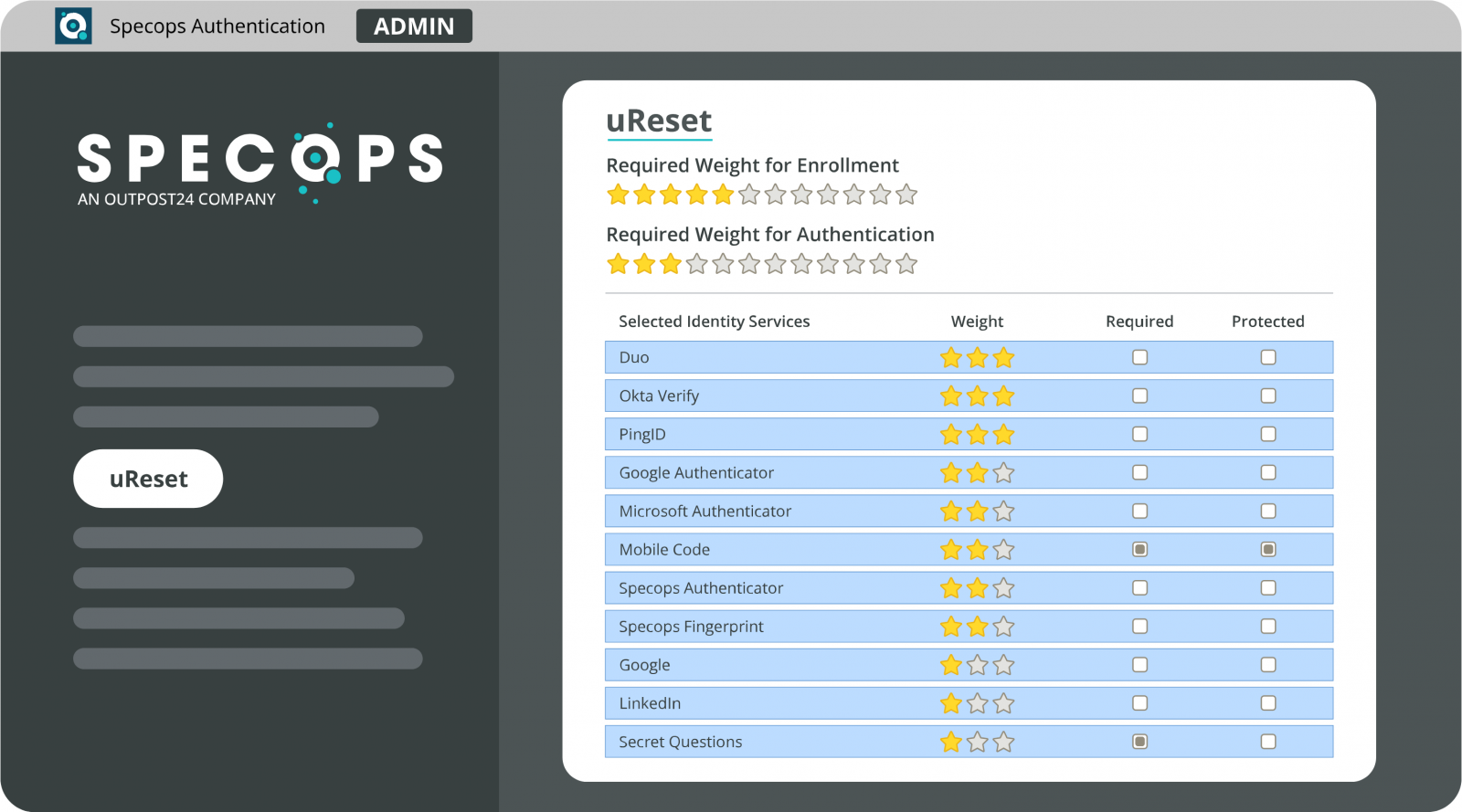
Self-service password reset tools let employees securely reset their own credentials and unlock their accounts without waiting for IT intervention. The technology verifies identity through methods like SMS codes, authenticator apps, or security questions.
Once verified, users can create a new password that immediately syncs across their devices, including updating cached credentials on local machines.
For hybrid organizations, this eliminates the biggest frustration: employees getting locked out while working remotely and losing hours of productivity waiting for help.
It also frees helpdesk staff to focus on problems that actually require their expertise rather than spending time on password resets.
The organizations that have deployed these solutions see measurable results. Data shows companies save an average of $65,000 annually on resets alone, plus another $48,000 on account unlocks. More importantly, employees return to work in minutes rather than hours.
What to look for in a self-service Active Directory password reset tool
Not every self-service solution handles the hybrid work challenge equally well. Look for tools that specifically address cached credential updates for remote users and integrate with your existing Active Directory infrastructure.
A solution like Specops uReset is designed for this exact problem, allowing secure self-service while ensuring password changes propagate properly across all devices, whether employees are on the corporate network or working from anywhere.
The explosion in password reset incidents isn’t slowing down. The question is whether your organization will keep treating it as an inevitable cost of hybrid work or start treating it as a solvable problem.
Speak to a Specops expert about how to meet your unique challenges.
Sponsored and written by Specops Software.