
If you have ever received a boring email about a business contract or a ‘request order,’ you might have clicked it without thinking twice. But a new report suggests that these routine messages are now part of a planned scam.
Cybersecurity researchers at Forcepoint have discovered a new phishing scam in which attackers are using a “multi-stage” process to stay invisible and achieve their true goal of stealing your login details.
Most email scams are caught by filters because they contain malicious links or viruses. This one is different. It starts with a professional-looking email, usually about a “tender” or “procurement” deal. The email itself is completely clean. It relies on a PDF attachment to do the dirty work.
According to X-Labs’ investigation, shared with Hackread.com, these PDFs use technical settings like AcroForms and FlateDecode. Simply put, this allows the scammers to hide clickable buttons inside a document that looks like a normal office file. Because we generally trust PDFs more than links in an email, the attackers are banking on that.
A well-coordinated scam
Once a user clicks the link inside the PDF, they are sent to a second document. This second file is hosted on Vercel Blob storage, a legitimate cloud service. Kumar notes in the blog post that by using a “trusted cloud infrastructure,” the scammers manage to bypass security software that usually blocks unknown or suspicious websites.
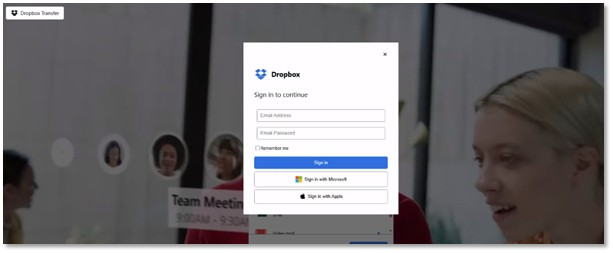
This cloud-hosted file finally leads victims to a fake Dropbox login page, which is designed to look exactly like the real thing. However, behind the scenes, a script is working to steal your email, password, and your exact IP address. It even logs your location, including your city and country, and the type of device you are using.
Where the Data Goes
So, what happens to your password? The research reveals that the stolen data is sent directly to a private channel on Telegram.
“The script is designed to capture user credentials,” Kumar explains, before sending them to a “hardcoded” Telegram bot controlled by the hackers. To keep the victim in the dark, the fake site is set up to always show an error message, making you think you just typed your password wrong while the hackers are already walking away with your data.

While Forcepoint has updated its systems to block these files, it’s a good reminder for the rest of us: if a business document suddenly asks for a login, it might be time to double-check the sender.