Apple has overhauled the child-safety tools that ship across iPhone, iPad, and Mac. One idea runs through the redesign. Give a child a device that does very little, then open it up as they’re ready. The tools went live on September 14, after a preview in June, and they require iOS 27, iPadOS 27, or macOS 27.
The Child Account is the foundation
Everything hangs off the Child Account, set up through Family Sharing. It’s mandatory for children under 13 and available up to 18, and it’s what switches on the age-based protections across the system. Apple’s pitch is that without one, none of the rest applies. A kid signed into a hand-me-down device under someone else’s Apple Account gets none of these protections.
Setup now happens earlier in the process. In Setup Assistant, a parent picks which built-in apps exist on the device at all: a handful of essentials, a recommended set, or a custom selection.
Permission
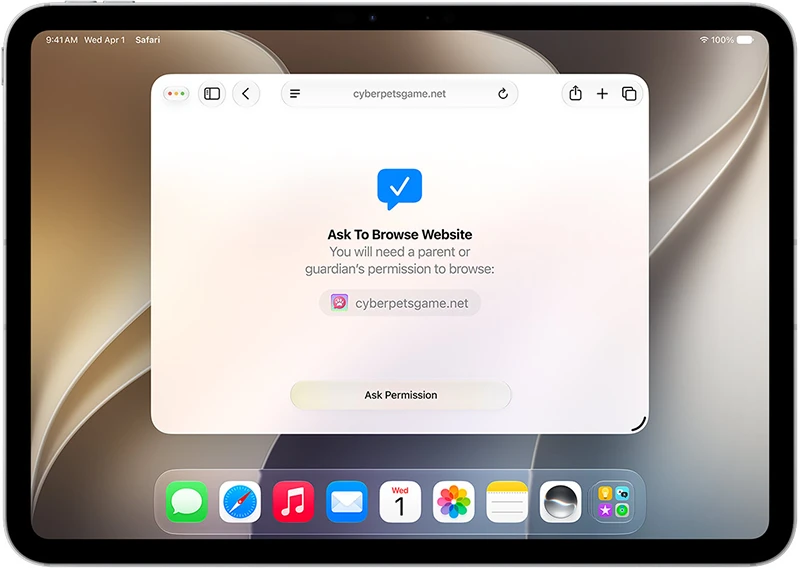
Two features extend the existing Ask to Buy model. Ask to Buy already routes app downloads and in-app purchases to a parent’s Messages for approval. Ask to Browse does the same for the web. A child requesting a new site in Safari sends the request to a parent, who can look at it before deciding. Apple lists it for Safari and other WebKit browsers after upgrading Screen Time. On Apple Watch and Vision Pro, only approved sites appear.
Contacts work the same way. New numbers and accounts need approval before a child can reach them through Phone, FaceTime, or Messages.
Screen Time gets a schedule
The most substantive change is Time Allowances, which replaces rigid per-app caps with a daily budget spread across categories like games, entertainment, and social media. Parents set a total, then adjust individual categories. Apple supplies age-tailored starting points and says they are a starting point rather than a prescription.
The guidance behind those numbers comes from online safety and health experts, Apple says, including the American Academy of Pediatrics. Apple is working with the AAP to adapt its Family Media Plan into a reference parents can use on Apple devices.
Schedules layer on top: different app sets for before school, during school, and after. Parents can pause a device mid-meal or grant extra minutes without dismantling the other protections, and a child hitting their limit gets a prompt to ask for more.
Communication Safety widens its scope
Communication Safety already caught detected nudity in shared images and videos. It now blocks gore and violent content as well, and the check extends to live FaceTime calls rather than just still images and recordings.
Also new: parents can share a child’s age range with third-party apps in what Apple describes as a privacy-protective way, letting developers tailor experiences without handing over a birthdate. It’s opt-in and reversible.
One catch before you start
The Screen Time update has a strict prerequisite. Every device in a Family Sharing group has to be updated, not just the child’s and the parent’s. Apple lists iOS 27, iPadOS 27, macOS 27, watchOS 27, and visionOS 27, which means a forgotten iPad or an Apple Watch left on an older release will hold up the whole group. Apple also notes that some features may not reach every region, language, or model.