A stealthy data theft technique in Microsoft 365 that abuses Outlook add-ins to exfiltrate email content without leaving meaningful forensic traces.
The technique, dubbed “Exfil Out&Look,” takes advantage of how Outlook Web Access (OWA) handles add-ins and audit logging, creating a blind spot that traditional Microsoft 365 monitoring cannot see.
Outlook add-ins are small web-based apps (HTML, CSS, JavaScript) that run inside Office products and are defined by an XML manifest.
They can display custom UI, react to user actions such as sending an email, and call external APIs like Microsoft Graph.
Users can install them individually from the Microsoft Store or by uploading a manifest, while administrators can deploy them tenant-wide to all mailboxes for productivity or compliance tools.
Varonis found that this flexibility comes with a serious visibility gap in OWA. When an add-in is installed in Outlook Desktop, Windows logs the event locally.
But when the same add-in is installed via Outlook Web, Microsoft 365’s Unified Audit Log does not record the installation or its execution, even in E5 environments with auditing enabled.
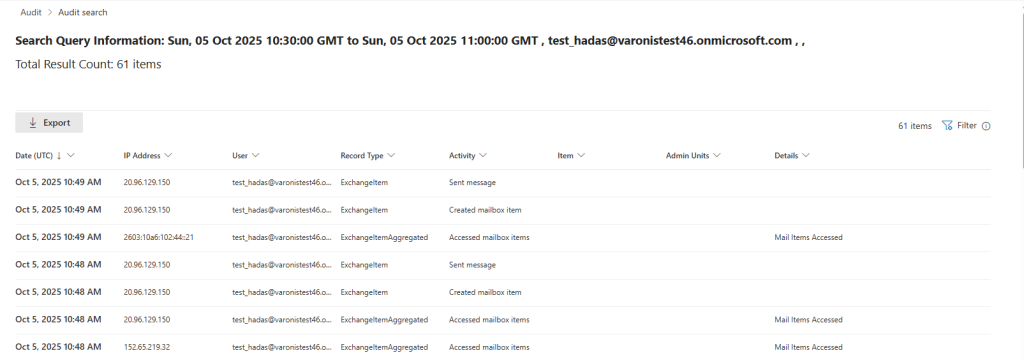
After deployment, the platform logs only generic mailbox events such as item creation or updates, with no indication that an add-in accessed or transmitted message content.
The Exfil Out&Look proof-of-concept shows how an attacker can turn this into a zero-trace exfiltration channel.
Using Microsoft’s official Yeoman generator, the researchers created a basic Outlook add-in whose manifest requests minimal permissions: access only to the currently active item.
That level of access does not trigger a consent prompt, yet still allows the add-in to read the subject, body, recipients, and timestamp of an outgoing email.
A LaunchEvent configuration in the manifest hooks into the OnMessageSend event so the add-in automatically executes whenever a user sends an email.
The JavaScript payload, hosted on a remote server, intercepts the email, extracts its contents, and silently sends the data to an external server using a simple asynchronous fetch() call.

Because this behavior is supported under Outlook’s default add-in model and uses minimal permissions, it is indistinguishable from many legitimate add-ins that already send full email content to cloud services for translation, summarization, or AI processing.
The risk escalates when administrators are involved. A global or Exchange admin can upload the malicious manifest in the Microsoft 365 Admin Center and deploy it as “Fixed” to “Everyone.”
In that scenario, every outgoing email from every mailbox in the tenant is intercepted and exfiltrated, and users cannot remove the add-in.
Initial deployment may create entries such as “Added Service Principal” or “Created New App,” but subsequent message interception and data transfers remain invisible to the Unified Audit Log.
This combination of minimal permissions, automatic execution on send, and lack of logging in OWA enables multiple attack scenarios: insider misuse, persistence after account compromise, abuse of privileged roles for mass exfiltration, and supply chain risk through seemingly legitimate third-party add-ins with hidden behavior.
Varonis reported the issue to Microsoft on September 30, 2025. Microsoft classified it as a low-severity product bug or suggestion and does not plan an immediate fix, but allowed public disclosure.
With no patch on the way and the technique already viable, organizations are urged to tighten governance around Outlook add-ins: restrict who can upload custom manifests, regularly review organization-wide add-ins and associated service principals, and rely on network monitoring to spot unusual outbound traffic from Outlook clients.
Follow us on Google News, LinkedIn, and X to Get Instant Updates and Set GBH as a Preferred Source in Google.