“BluePhishing,” a technique that extends OAuth consent phishing to Microsoft Entra’s AI agent model.
The attacker needs only one consent click to create persistent agent identities inside a victim tenant. Proofpoint says this is a research-based proof of concept and it has not identified any in-the-wild activity
Microsoft Entra Agent ID extends Entra to AI agents and closely mirrors the application model. An agent blueprint is the equivalent of an app registration, and a blueprint principal is the equivalent of a service principal.
An agent identity is a specific instance created from a blueprint. Microsoft’s documented limit is 250 agent identities per non-Microsoft-managed blueprint in a tenant.
That is a much larger blast radius than an app registration, which maps to a single service principal per tenant.
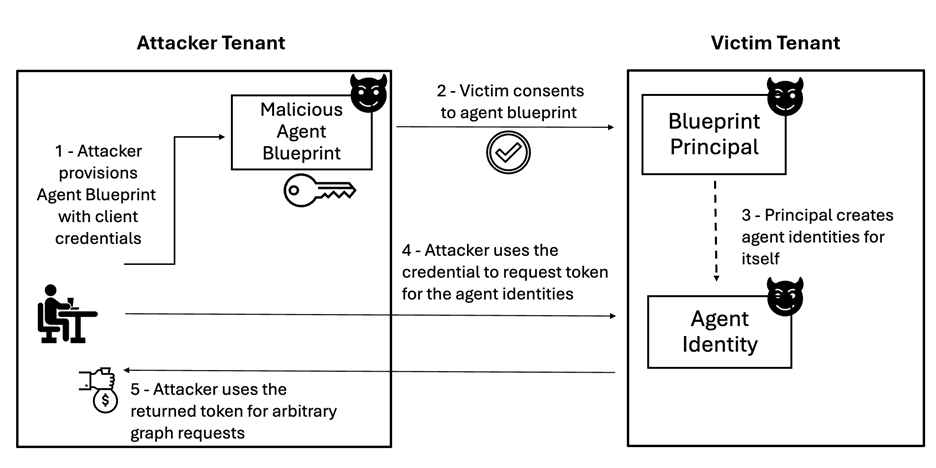
The attacker configures a blueprint in a tenant they control. They set the sign-in audience to AzureADMultipleOrgs, add a client secret, and define permissions through requiredResourceAccess (RRA) and inheritable permissions.
The audience setting cannot be changed in the Entra portal. It must be set through Microsoft Graph, PowerShell or the manifest.
The attacker then sends a consent link, such as an adminconsent URL that uses the .default scope. This requests everything pre-configured in the blueprint.
When the victim approves, a blueprint principal appears in the victim tenant. It receives the AgentIdentity.CreateAsManager application permission, which Proofpoint says cannot be revoked from the principal.
With that permission, the attacker uses the blueprint credentials to request a client-credentials token against the victim tenant’s token endpoint.
Proofpoint also notes that, Microsoft 365 Message Center post MC1506733 says default Entra users will be able to create agent blueprints from November 2026, which widens exposure.
BluePhishing Attack
The attacker presents that token to Microsoft Graph to create agent identities. Creating one requires a sponsor, meaning a victim-tenant user’s object ID.
The attacker then authenticates through the autonomous agent flow, using the fmi_path parameter, to obtain Graph tokens for those identities.
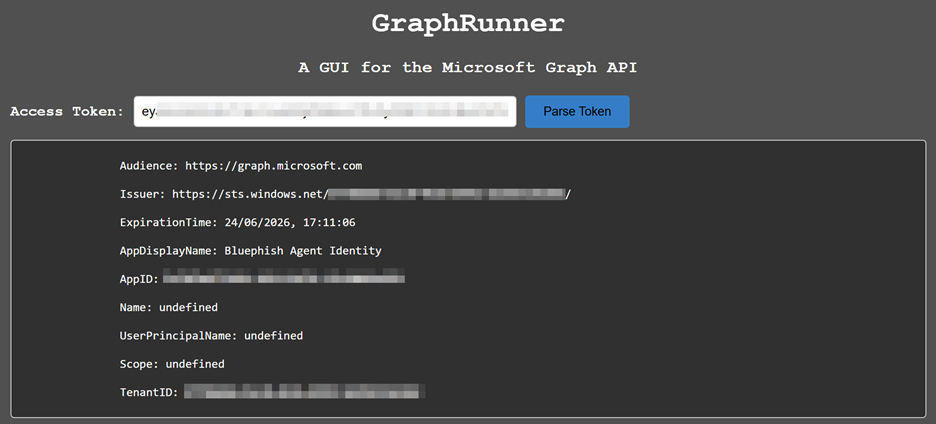
In testing, Proofpoint used application permissions such as User.Read all and Group.Read.All with GraphRunner to issue arbitrary Graph requests.
The attacker needs the blueprint application ID and secret, which come from their own tenant. They also need the victim’s tenant ID and a sponsor user.
The GetCredentialType endpoint can enumerate users, and the OpenID Connect configuration endpoint returns the tenant ID.
Admin consent is the more dangerous path because application permissions apply across the whole tenant, though the phished user must be able to grant it.
User consent yields only delegated permissions, which cannot be redeemed autonomously and need further consent through the on-behalf-of flow.
Proofpoint observed silent inheritance only for delegated permissions granted through user consent.
Microsoft’s documentation says inherited permissions are not visible in the Entra portal or Graph, only in runtime token contents. That limits auditing.
Agent activity also blends in, because autonomous behavior is expected from agents, and agent consent controls are less mature than app consent controls.
Organizations should train users on the risks of consenting to third-party agents. Existing user consent settings also cover agent blueprints, and permission classifications can restrict what users may approve.
Microsoft already blocks high-risk Graph permissions such as User.ReadWrite.All for agents.
For detection, the blueprint ID is identical in every tenant that consents to it. That makes it a reliable indicator for hunting and removing a known malicious blueprint.
Defenders should also apply least privilege, Conditional Access policies for agents and Entra ID Protection for agents.
They should monitor audit logs for “Add application” (blueprint creation) and “Add service principal” (agent identity creation) events.
Stops Cyber threats before impact with 21 min faster MTTR. Integrate ANYRUN’s Sandbox in your SOC.