Andrzej Matykiewicz |
Thursday, 15 October 2026 at 10:09 UTC
Launch Burp AT now Find out more about Burp AT
Since we launched Burp AT at Black Hat USA, it’s been great to see the different ways you’ve all been incorporating it into your workflows. We’ve also had a lot of feedback, so thank you to everyone who took the time to tell us what they’ve liked and, more importantly, what we could improve.
We’ve taken that feedback straight back into the product, shipping new and improved capabilities that give you more say over how Burp AT works, more control while it’s running, and more ways to give it the context it needs. And there’s more exciting stuff in the works already.
In case you’ve missed it. Here’s a roundup of the highlights.
Teach Burp AT your own methodology
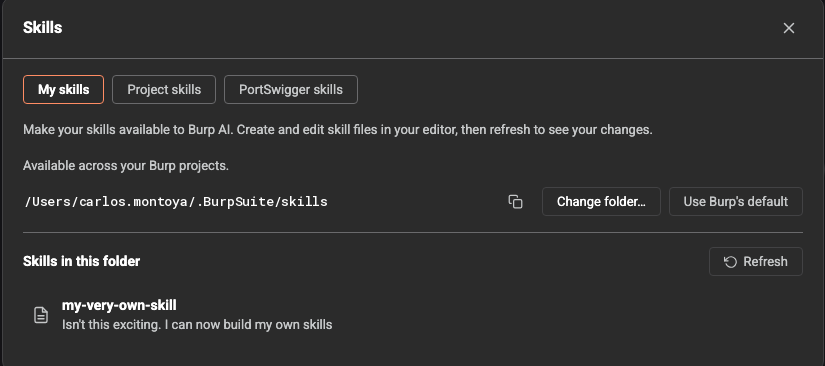
Customization has always been a core element of Burp Suite, and you can now add your own skills to Burp AT to supplement the ones developed by PortSwigger Research. This means you can tell Burp AT exactly how to approach a particular kind of task, and ensure it does so more consistently.
If you find yourself repeating the same steps, turn that process into a skill once, and Burp AT can follow it on every engagement.
In the long run, this enables you to gradually document your own methodology and teach Burp AT how to follow it.
Call skills directly with slash commands
Type / in the Burp AT prompt box to select from all of your available skills.
Although Burp AT can decide for itself when to use a skill, slash commands give you the freedom to choose, so you get exactly the approach you want. This is particularly useful as you build up a larger and larger library to choose from.
Set an outcome with /goal and leave Burp AT to it
With the new /goal command, you can set a desired objective for the task. The agent keeps working relentlessly towards this goal across multiple steps. It keeps going until it gets there, decides it can’t, or hits a set limit, without you needing to prompt it to continue at each stage.
This is especially useful for attempting exploitation. You know those times when you think you’re onto something but can’t work out how to bypass a WAF or some other defenses? Rather than banging your head against a wall manually trying every payload variation or obfuscation technique you can think of, you can instead use /goal to tell Burp AT to prove your hunch is exploitable, then leave it to crack on.
Streamline approvals and redirect agents
Burp AT is designed to let you outsource tasks to agents, while keeping you firmly in control. With this in mind, when Burp AT asks you to approve a tool call, you can now reject it and tell it what to do instead. This means you can redirect agents to ensure they stay on track with your current thinking.
You can also now choose to approve a given action for the rest of the task. That means fewer interruptions when Burp AT needs to do the same thing many times, and you still decide which tools get that freedom.
Hand over investigations with the context agents need
There are now multiple ways you can provide additional context to a task.
You can send requests to Burp AT from anywhere in Burp, streamlining the transition between what you’re working on manually and handing an investigation over to agents. Likewise, you can send issues from the project file straight to Burp AT for follow-up analysis.
Finally, you can upload documents to a task, such as a scoping document, previous reports, or an API spec.
Queue up your next prompt while Burp AT works
You no longer have to wait for Burp AT to finish before giving it your next instruction. Send a prompt while a task is running and it joins a queue. Queued prompts run one at a time, in order, once the current work finishes. This means you can keep up with your own train of thought, instead of holding on to the next idea until Burp AT is free.
Try it for yourself
Already using Burp AT? Check out the latest improvements and let us know how you get on. Your feedback helps shape what we build next.
If you haven’t tried it yet, all Burp Suite Professional users get free monthly usage, so give it a go today.
Launch Burp AT now
Find out more about Burp AT