We found a wave of websites posing as Calendly booking pages for job interviews at Meta. Visitors pick a slot for a 30-minute phone call with a recruiter, fill in their details, and pass what looks like a CAPTCHA.
Then the page asks them to log in to Facebook.
The interview is fake. The pages are designed to steal the visitor’s Facebook login details, including the two-factor authentication (2FA) codes meant to protect the account. Visitors are then asked to sign in to their Google account too, supposedly “for security.”
These pages are not affiliated with Meta, Calendly, or Google. If you’ve already entered a password or approved a sign-in prompt, secure the affected accounts straight away. See “How to stay safe” below.
Why Calendly makes a convincing disguise
Calendly is a widely used scheduling tool, and recruiters use it to book interviews. Clicking a booking link, picking a time, and typing in your name and email is something people do without a second thought. There’s no account to create and nothing to download.
That routine makes it a good disguise. By the time the page asks for something unusual, the visitor has already picked a slot and shared their details. Going along with one more step can feel easier than starting to doubt the whole thing.
For someone who has sent out application after application without hearing back, an invitation to interview at Meta may be exactly the kind of message they hope for. Excitement, and the fear of missing a rare chance, can push people to move quickly instead of checking who actually sent the link.
Job seekers are also used to sharing personal details with strangers. Handing your name, email, and phone number to a recruiter you’ve never met is a normal part of applying, so a form asking for them may not raise any alarms.
A job interview that starts with a calendar
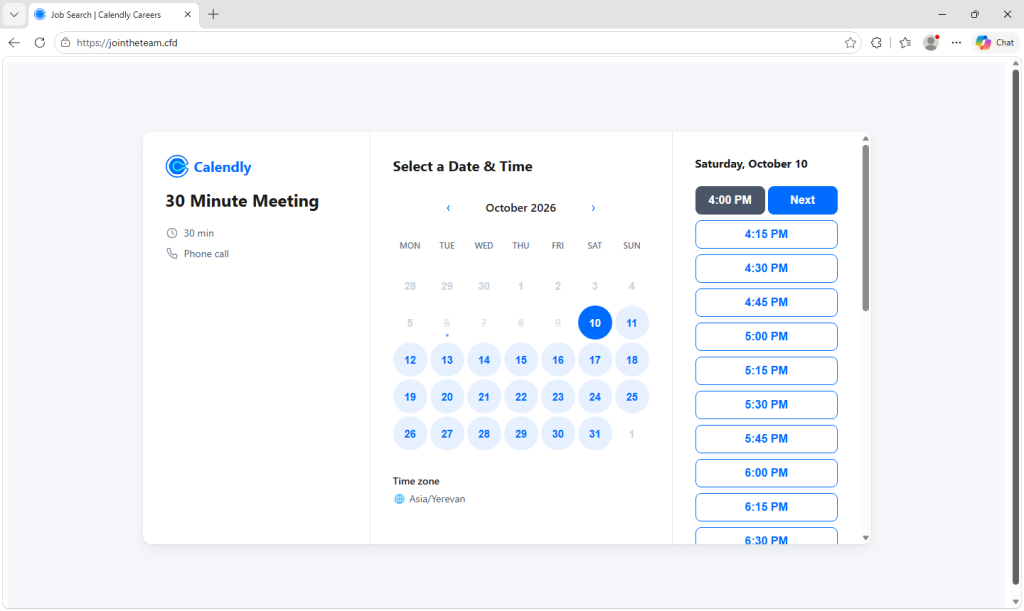
The fake page copies Calendly’s booking screen, titled “Calendly | Meta Careers.” It shows a monthly calendar, a time zone picker, and a 30-minute “Phone call.” The available times are loaded from the attackers’ server, so the calendar looks like a real recruiter’s schedule.
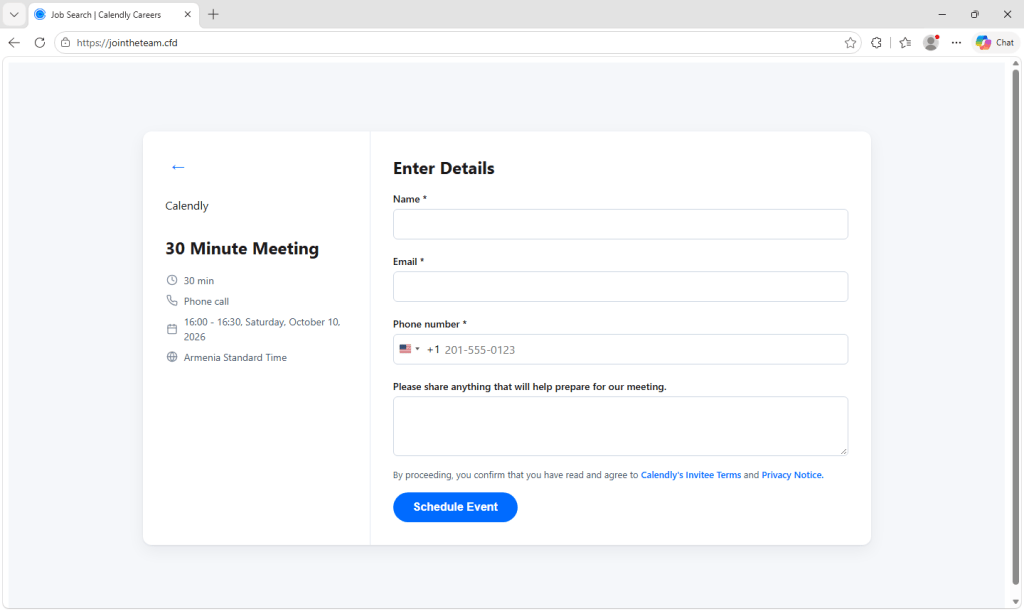
After the visitor picks a time, the page walks them through a series of steps:
- Your details. A form asks for your name, email address, and phone number, plus anything that “will help prepare for our meeting.”
- A fake CAPTCHA. A grid of images asks you to “Select all images with…”. It makes the page feel legitimate, and it may also stop automated security scanners from seeing what comes next.
- A Facebook login. A window within the page copies Facebook’s login page. It even draws its own fake address bar showing a Facebook web address, so it looks like a genuine browser pop-up. The copy comes complete with realistic error messages such as “The login information you entered is incorrect.” The page also asks visitors to sign up for a “Career Profile.”
- Your Facebook security code. If the account has 2FA, the page asks for the code from your authentication app, text message, WhatsApp, or email.
- A Google sign-in. The page claims “Facebook requires you to sign in to the Gmail address” on your account. To make the request seem harmless, the page adds that “Facebook will not share any of your data with your Google Account.” Fake Google screens, again under a fake address bar, ask for your password and then whatever Google asks for: a tap on a phone prompt, a code from Google Authenticator, a text message code, or your recovery email address. Everything you type into these screens, including the Google password, is sent to the attackers’ collection server.
- A fake confirmation. Finally, the page says a calendar invitation has been sent and that you’ll hear back within 90 minutes. By the time you start wondering, the attackers may already be inside your accounts.
How the scam can get past two-factor authentication
Many phishing pages simply collect a password and stop. This one keeps going.
While the visitor is on the page, it keeps checking in with the attackers’ server and waits to be told which screen to show next. That allows the attackers to try the stolen password on the real Facebook site right away. If Facebook asks for a code, the fake page asks the visitor for the same code, and the attackers can use it before it expires. If the code doesn’t work, the page simply says “Incorrect code. Please try again.”
The Google screens support the same approach. If Google sends a sign-in prompt to the visitor’s phone, the fake page can tell them to “tap Yes,” potentially approving the attackers’ login.
The visitor sees the fake page while the attackers attempt to sign in to the real service out of sight.
Codes and phone prompts still make accounts much harder to take over, so keep them turned on. But a code entered into a fake page, or a prompt approved for someone else’s login, can let attackers in. Passkeys and compatible hardware security keys are tied to the genuine website, so a fake page like this cannot relay them in the same way. That protection won’t help if you instead choose a password-and-code fallback and give those details to the attackers.
Signs of a reusable phishing kit
The code carries a version number (0.8.0), detailed error logging, and a “campaign key” sent with every message to the attackers’ server. These features suggest a reusable kit with support for identifying different campaigns.
The collection address uses Amazon API Gateway in AWS’s Singapore region, ap-southeast-1. A comment left in the code is written in Vietnamese. It translates to:
“Change the key here when deploying to production.”
Neither the hosting region nor the language of a code comment establishes who is behind the pages or where they operate.
Facebook accounts, especially those linked to business pages or ad accounts, are valuable to criminals. Taking over the Google account as well could expose email and other data, and let attackers reset passwords for accounts linked to that address.
The domains are another warning sign. All 11 follow the same pattern: join plus a recruiting-sounding word, such as joinhire, joinquest, or jointheteam, on the .cfd, .info, and .works top-level domains. None mention Calendly or Meta. These generic names could also be reused for other companies’ job lures.
How to stay safe
- Check the address, not the design. Direct Calendly booking links use
calendly.com, although legitimate forms can also be embedded on other websites. Treat an unfamiliar recruiting domain as a reason to verify the invitation independently. - Don’t give a booking page your Facebook password. Scheduling a call doesn’t require handing your social media password to a recruiter. If a booking flow suddenly asks you to sign in elsewhere, verify both the request and the actual login domain.
- Look at your browser’s real address bar. These fake login windows draw their own address bars showing Facebook or Google web addresses. For a separate pop-up, check the address displayed by the browser itself. A login window that cannot be dragged outside the webpage may be part of the page rather than a separate browser window.
- Verify the recruiter and role. Go directly to the company’s official careers site. A genuine job listing doesn’t prove the person contacting you represents the company, so verify unexpected invitations through an independent contact.
- Don’t share codes or approve unexpected prompts. Only enter a code on the genuine service for a login you initiated. Never approve a phone prompt just because a recruiter or booking page tells you to.
- Use passkeys or a security key where you can.They resist this kind of phishing. Be wary if a page pushes you to use a password and code instead.
- Already entered a password or approved a prompt? From a trusted device, go directly to the affected service and change your password. Sign out other sessions and check your security methods, recovery email, and phone number. If both accounts were affected, secure your Google account promptly because email access can help attackers reset other passwords. Check Gmail for unfamiliar forwarding rules and filters, and review any Facebook business pages or ad accounts you manage. Change the password anywhere else you reused it.
- Locked out of your account? Use Meta’s account recovery support or Google’s compromised-account guidance. If you only shared contact details, watch for follow-up scams that use them to sound convincing.
How Malwarebytes helps
Malwarebytes Browser Guard can block phishing and scam sites before you interact with them. That matters in campaigns like this one, where the page closely copies a service people use every day.
If you receive an interview link and aren’t sure about it, Malwarebytes Scam Guard can help assess the link before you click.
Indicators of compromise
Phishing domains
joinconnect[.]cfdjoinconnect[.]worksjoinhire[.]cfdjoinhire[.]infojoinquest[.]cfdjoinquest[.]infojoinquest[.]worksjointhetalent[.]cfdjointhetalent[.]infojointhetalent[.]worksjointheteam[.]cfd
Collection endpoint
rkrt01c0mc[.]execute-api[.]ap-southeast-1[.]amazonaws[.]com
Stop threats before they can do any harm.
Malwarebytes Browser Guard blocks phishing pages and malicious sites automatically. Free, one click to install. Add it to your browser →