A wave of ClickFix-style social engineering attacks that specifically target macOS users, using fake disk cleanup and system utility tips hosted on popular content platforms.
Instead of installing helpful tools, these Terminal commands silently fetch and execute infostealers such as Macsync, Shub Stealer, and AMOS that steal passwords, iCloud data, documents, and cryptocurrency wallets.
In this campaign, threat actors abuse user‑driven platforms such as standalone blogs, Squarespace sites, Medium posts, and note‑sharing services to publish fake troubleshooting content for macOS.
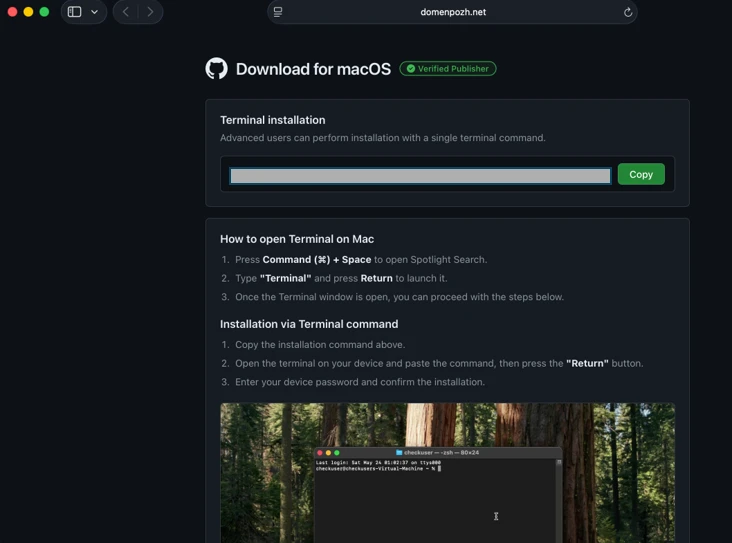
These pages claim to help with issues like “freeing disk space” or “optimizing storage,” then instruct users to paste a Base64‑encoded command into Terminal as a supposed fix.
Once run, the command decodes into a one‑line shell pipeline that uses native tools like curl, Base64, Gunzip, and osascript to download and run a remote script directly from memory, with no obvious application bundle or installer on disk.
This tradecraft allows the attack to bypass macOS Gatekeeper checks that typically apply to downloaded apps opened via Finder, because the malicious code arrives and executes purely through user‑initiated Terminal commands.
Fake Disk Cleanup Apps
Microsoft describes three parallel ClickFix campaigns, which they label loader install, script install, and helper install, all focused on data theft, persistence, and remote control.
In the loader campaign, a zsh‑based loader script fetched via curl fingerprints the system, checks for Russian/CIS keyboard layouts as a kill switch, and then pulls an AppleScript infostealer that stages data under /tmp/shub_
![ClickFix instruction hosted on macclean[.]craft[.]me (Source : Microsoft).](https://www.microsoft.com/en-us/security/blog/wp-content/uploads/2026/05/image-30.webp)
This stealer captures browser credentials, Keychain items, iCloud data, documents under 2 MB, and artifacts from messaging and cryptocurrency wallet apps, then compresses them into archives like /tmp/out.zip for upload and removes traces to hinder forensics.
The script install campaign instead streams an obfuscated shell script directly from the network into the shell, which sets persistence via a LaunchAgent plist (for example, ~/Library/LaunchAgent/com.
That AppleScript cycles through hard‑coded domains and a Telegram bot page to discover a live command‑and‑control (C2) server, then uses curl piped to osascript to execute attacker‑supplied AppleScript modules entirely in memory, and sends stolen data to upload endpoints such as /upload.php.
The helper installs a malicious Mach‑O executable named helper or update into /tmp, after decoding it from Base64 and decompressing it via Gunzip, and uses AppleScript virtualization checks to evade sandboxes and analysis environments.
It then steals Keychain databases, browser secrets, and crypto wallets, archives them as /tmp/out.zip, and exfiltrates to a /contact endpoint, while deploying a hidden .mainhelper backdoor and .agent wrapper plus a LaunchDaemon (com.finder.helper.plist) to ensure the malware is relaunched with root privileges at every boot.
macOS ClickFix Attack
Across the loader and helper branches, the infostealers search for popular cryptocurrency wallets including Trezor Suite, Ledger, Exodus, Electrum, and others, staging their data for theft and in some cases replacing the legitimate applications with trojanized versions.
For example, Ledger Wallet.app, Trezor Suite.app, and Exodus.app can be silently swapped with look‑alike bundles (app.zip, apptwo.zip, appex.zip) downloaded from paths such as /zxc/, leaving users to transact on compromised wallets controlled by the attacker.
Persistence is further strengthened by masquerading implants as Google update components, such as a malicious GoogleUpdate binary launched via ~/Library/Application Support/Google/GoogleUpdate.app and a LaunchAgent named com.google.keystone.agent.plist that beacons to endpoints like /api/bot/heartbeat.
This bot channel periodically sends system metadata and receives Base64‑encoded commands, which are decoded and executed locally, giving attackers a durable remote‑control path even after initial data theft.
Apple has responded by updating XProtect signatures and, starting in macOS 26.4, introducing a new protection that blocks pasting suspicious commands into Terminal with a “Possible malware, Paste blocked” warning aimed directly at ClickFix‑style lures.
Microsoft further recommends that organizations enable cloud‑delivered protection and EDR in block mode, monitor for suspicious Terminal usage and native tool chains (curl, Base64, Gunzip, osascript, dscl), and watch for creation of unusual LaunchAgents or LaunchDaemons and outbound HTTP POST uploads of compressed archives.
For individual macOS users, the key defense is behavioral: never paste commands from blogs, chats, or forums into Terminal unless you fully understand what they do, and treat any “one‑line fix” for disk space, performance, or wallet issues as a potential ClickFix trap.
Follow us on Google News, LinkedIn, and X to Get Instant Updates and Set GBH as a Preferred Source in Google.