A large-scale phishing operation is abusing trusted Google services as a multi-stage redirect network to bypass email security controls, deliver highly personalized credential-harvesting pages, and, in some cases, install ScreenConnect remote-access software.
The campaign’s central advantage is that it presents trusted Google-owned domains at nearly every point a gateway, proxy, or analyst is likely to inspect.
Rather than relying on a malicious URL evading detection, the actors use legitimate redirect and tracking functionality as a trust proxy, delaying exposure of the final phishing destination until after initial inspection.
One observed chain begins with Google Meet’s linkredirect endpoint, transitions through Google Search, and then uses a DoubleClick click-tracking URL.
Other variants use Google Custom Search redirects, regional Google Image Search domains, Tag Manager debug functionality, or Analytics parameters.
This approach creates numerous URL permutations while retaining the reputation benefits of Google infrastructure.
Messages impersonate familiar brands including DocuSign, Microsoft, OneDrive, FedEx, Intuit QuickBooks, and government services, exploiting the routine business workflows recipients are accustomed to seeing in corporate inboxes.
A key evasion mechanism is the use of URL hash fragments to carry the target’s email address.
In some cases, the address is Base64-encoded; because browsers do not send the fragment portion of a URL to servers, the victim identifier remains absent from server-side logs and many URL-scanning workflows.
The final phishing page decodes the value locally and uses it to build a customized login experience.
After passing through the redirect chain, victims may encounter attacker-controlled .vu domains, compromised sites, or Cloudflare Workers endpoints.
KnowBe4 Threat Lab researchers found that, the operation routes targets through Google Meet, Google Search, DoubleClick, Custom Search, Image Search, Google Tag Manager, and Google Analytics before directing browsers to attacker-controlled infrastructure.
Some pages first display an interstitial message or a fake “Human Scan Process” CAPTCHA challenge, likely intended to frustrate automated sandboxing and URL detonation.
Global Phishing Campaign
The phishing kit profiles visitors before displaying the credential form. It collects IP address and geolocation data, fingerprints browser settings and language, and queries Google Public DNS for MX records associated with the victim’s email domain.
The MX validation check helps operators distinguish legitimate corporate targets from researcher-controlled or sandbox domains that lack valid mail infrastructure.
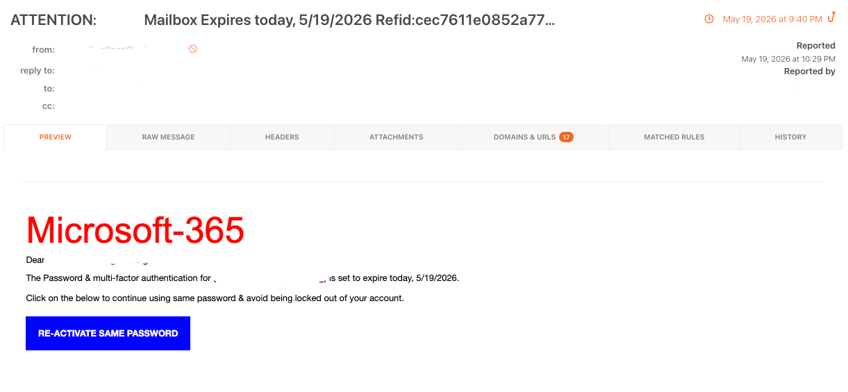
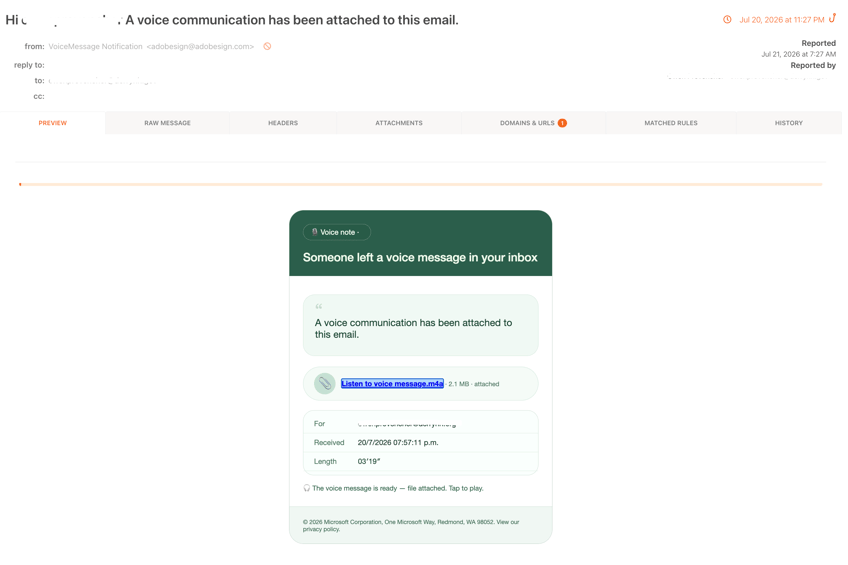
The campaign targets organizations in the manufacturing, government, finance, and non-profit sectors using document review, Microsoft 365 expiration, FedEx delivery, QuickBooks payment, Social Security, and voicemail lures.
The final page is built dynamically from the victim’s email address. The kit can retrieve the organization’s logo from Clearbit, use Google’s favicon service as a fallback, and load a live screenshot of the target organization’s public website as the login page background.
It also pre-fills the victim’s email address, sets the browser tab title to the company name, and localizes the interface across 16 languages.
This level of branding removes common warning signs. Instead of landing on a generic Microsoft 365 clone, a user sees their own company’s visual identity, email address, and web presence wrapped around a familiar sign-in prompt.
The infrastructure supports two monetization paths. The first directs targets to Microsoft sign-in or fraudulent OneDrive document portals designed to capture passwords or intercept device-code authorization flows.
Submitted credentials are reportedly sent to an attacker-controlled Telegram bot alongside the victim’s IP address, location, browser details, and MX-record status.
The harvester can also force a second password submission by intentionally showing an “Invalid password” error after the first attempt.
On the second entry, victims are redirected to their real corporate website, creating the appearance of a transient authentication issue while giving operators two captured submissions.
The second path uses fake document-access or identity-verification prompts to deploy ScreenConnect, a legitimate remote monitoring and management tool.
Successful installation gives attackers persistent interactive access to the endpoint, a far more durable foothold than a password alone because it can survive password resets and sidestep MFA protections at the compromised device.
Defenders should not treat a Google-hosted link as inherently benign. Security teams should inspect full redirect chains, alert on unusual Google redirect parameters, and hunt for outbound connections to Telegram’s Bot API from user endpoints.
Organizations should also investigate unauthorized ScreenConnect deployments, especially those not associated with approved IT administration workflows.
Known phishing infrastructure in the campaign includes vazquezfleytas[.]com, zh-l-haixing[.]com, several .vu domains, and malicious Cloudflare Workers endpoints.
KnowBe4 recommends blocking identified IOCs across DNS, proxy, and SIEM layers, reviewing users who received relevant lures, and resetting potentially exposed credentials.
IOCs
| IOC Type | Indicator | Category | Notes |
|---|---|---|---|
| Domain | vazquezfleytas[.]com | Credential harvester | Terminal destination – URL chain 1 |
| Domain | zh-l-haixing[.]com | Credential harvester | Terminal destination – URL chain 2 |
| Domain | odahlzr5lm[.]reliabilityinoperations[.]de | Credential harvester | Fake OneDrive portal |
| Domain | cloudbemismanufacturingcompanygroup[.]rydezyhrsysteminc[.]vu | Credential harvester | M365 harvester with interstitial gate |
| Domain | servicetriumphgroupsimplyappraisals[.]spectrhwqumbrands[.]vu | Credential harvester | .vu TLD harvester infrastructure |
★ Learn 7 Metric-Gated AI SOC Deployment Phases – Download Free AI SOC Deployment Playbook 2026.