Google is expanding support for its Android’s in-call scam protection to multiple banks and financial applications in the United States.
The announcement specifically mentions the addition of fintech app Cash App, which has 57 million users, and the JPMorganChase mobile banking app, which has more than 50 million downloads on Google Play.
In-call scam protection is a new feature that was announced in May and introduced in Android 16, Its purpose is to warn users of a potential danger when they launch a financial app and are sharing their screen while in a call with an unknown number.
Google says that this security feature defends against a popular scam where cybercriminals are “impersonating banks or other trusted institutions on the phone to try to manipulate victims into sharing their screen in order to reveal banking information or make a financial transfer.”
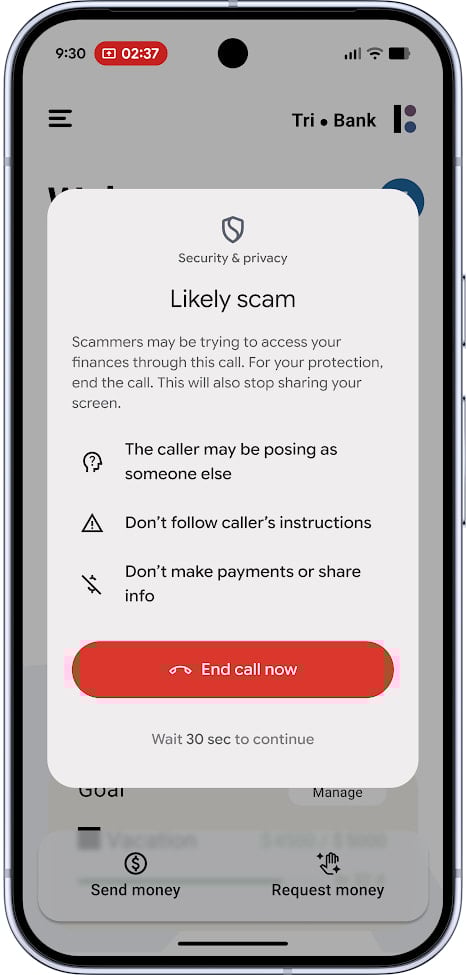
In this scenario, an alert is shown, informing the user that the caller may be an impersonator and that the instructions they convey should be ignored. The user is also advised not to share any information or make any payments.
The warning pop-up persists for 30 seconds and the only option is to end the call. Google notes that the 30-second pause should break the attacker’s social-engineering “spell,” and disrupt the false sense of urgency and panic that are required for the scam to be successful.
Source: Google
The in-call scam protection system only works on Android 11 and later and started as a trial in the U.K., where apps from most major banks are enrolled.
After helping “thousands of users end calls that could have cost them a significant amount of money,” the company expanded the pilot with financial apps in Brazil and India.
Today, the system expands to U.S., where users of several popular fintech and bank apps, among them CashApp and JPMorgan Chase, are supported. The protection system continues to run in testing phase.
Users should be aware of risky actions required of them from unknown callers, such as installing APKs from unofficial sources, granting accessibility permissions to malware apps, and disabling Play Protect on the device.
As part of good security practices, users should avoid sharing personal information with unknown callers and never jump into action before confirming the status of their accounts by contacting their bank directly.

Broken IAM isn’t just an IT problem – the impact ripples across your whole business.
This practical guide covers why traditional IAM practices fail to keep up with modern demands, examples of what “good” IAM looks like, and a simple checklist for building a scalable strategy.