Published: Wednesday, 23 September 2026 at 14:00 UTC
Updated: Wednesday, 23 September 2026 at 14:00 UTC

How many bugs have you missed because you didn’t send quite enough HTTP requests?
Turbo Intruder now supports HTTP/3, can comfortably exceed 100,000 requests per second over Wi-Fi, and auto-tunes for maximum performance. With our new HTTP/3 Adapter plugin, Burp Suite now supports HTTP/3 too.
Read on to learn how to use this new toolkit to:
- Achieve maximum speed
- Exploit HTTP/3 Race conditions
- Exploit HTTP/3 downgrading
- Test HTTP/3 only targets
In Embracing the Billion Request Attack we were able to hit 30,000 requests per second (RPS) over HTTP/1.1. From my laptop while using the HTTP3 engine, I was able to hit 100,000 RPS to a remote host over Wi-Fi.
When fuzzing over any protocol, you’ll first want to minimise the size of your request and response (using the HEAD method, or Range header).
GET / HTTP/1.1

Range: bytes=-1 //Only return the last byte
HTTP/1.1 206 Partial Content

Content-Range: bytes 9999-9999/10000

Content-Length: 1
>
The
Hostheader can be skipped when using theHTTP3engine because the:authoritypseudo header is implied by the target.
Next, you’ll want to adjust the engine’s configuration. If you’re using Burp Suite Professional, you can simply swap to the AUTO engine, which will automatically select the highest HTTP version available and then dynamically tune the required settings as your attack runs. This is particularly powerful for long-running attacks, where the network state may degrade or improve over time.
HTTP/1.1’s pipelining feature is not supported in the
AUTOengine. You may be able to achieve higher RPS over HTTP/1.1 when using theTHREADEDengine if you enable pipelining manually.
If you’re attempting a desync attack,
AUTOis not recommended. Instead use theBURPengine which uses HTTP/1.1 with connection reuse disabled.
If you’re using the Community Edition, you’ll need to configure each setting manually depending on the engine. For each setting you want to increase its value until the RPS counter plateaus, or you start seeing failures. The only exception to this, is when using the THREADED engine’s pipeline option, which should be set to True if the server supports it.
Available tuning options:
| Engine | Tuning Options |
|---|---|
| THREADED | concurrentConnections requestsPerConnection pipeline=True |
| BURP2 | concurrentConnections |
| HTTP3 | concurrentConnections |
If you require more speed, run the attack from a box in the cloud that’s hosted in the same region as your target to push the RPS even higher. My best result so far was ~180,000 RPS.
To complement the HTTP3 engine, you can now try out two new race condition techniques. The Single Datagram Attack from QUIC-er Races: HTTP/3 won’t save you from TOCTOU vulnerabilities and Server-Side Race Orchestration via the QPACK Blocked Streams technique from Chaos by Design: The Death of Stochastic Race Conditions in HTTP/3. These techniques will give you better groupings than the already blazingly fast Single-Packet attack if the target supports HTTP/3 so you can hit smaller race windows.
Both are only accessible when using the HTTP3 engine and are built into the existing gate system. Turbo Intruder will select the race technique automatically and it only uses the QPACK method if the server supports it. Set gateMode to force one of the options.
You can use the race-http3.py example script to get started.
def queueRequests(target, wordlists):

engine = RequestEngine(endpoint=target.endpoint,

concurrentConnections=1,

engine=Engine.HTTP3,

gateMode="auto" #Select the correct technique for me

)
for i in xrange(20):
engine.queue(target.req, gate="race1")
engine.openGate('race1')
def handleResponse(req, interesting):
table.add(req)
Turbo Intruder also supports kettled request syntax in the HTTP3 engine in exactly the same way as the BURP2 engine. This is achieved via a set of special character escapes. For a request to be kettled, you must now specify engine.queue(target.req, kettled=True).
It’s worth noting that kettled requests undergo some implicit transformations.
- The
:pathand:methodpseudo headers are implied by the HTTP/1 style request line - The
:authorityand:schemepseudo headers are implied by the request target
To override pseudo headers yourself:
GET / HTTP/1.1

:scheme: httpx

:authority: intranet.example.com
Additionally, you can add the binary representations of special characters using the following escapes:
| Character | Escape |
|---|---|
| CRLF | ^~ |
| space | ^s |
| null | ^0 |
| CR | ^r |
| LF | ^n |
| Any hex code e.g. 0x02 | ^x02 |
| Literal ^ character | ^^ |
For example, if you wanted to attempt a HTTP/3 downgrade header injection you could try:
GET / HTTP/1.1

foo: bar^~Transfer-Encoding:^schunked
engine.queue(target.req, kettled=True)
This would attempt to inject the Transfer-Encoding: chunked header once the target downgrades the request from HTTP/3 to HTTP/1.
GET / HTTP/1.1

Host: example.com

Foo: bar

Transfer-Encoding: chunked
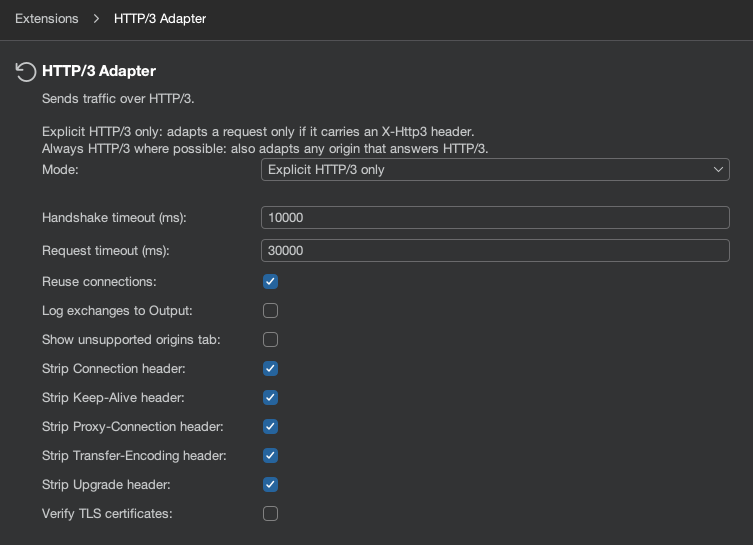
I’m also introducing support for HTTP/3 traffic across all of Burp Suite’s tooling in another extension, the HTTP/3 Adapter.
The extension will convert all traffic from HTTP/1.1 or HTTP/2 to HTTP/3 and reverse the operation for responses. This means that you can now test sites that only support HTTP/3 and reach a new attack surface that was previously hidden.
Core Usage
Load the extension and pick a mode.
| Mode | Explanation |
|---|---|
| Explicit HTTP/3 only | Only requests carrying the X-Http3: 1 header are sent over HTTP/3 |
| Always HTTP/3 where possible | Every request tries HTTP/3 first and falls back to its original protocol |
In Explicit HTTP/3 only mode, the following will force the request over HTTP/3.
GET / HTTP/1.1

Host: example.com

X-Http3: 1
HTTP/1.1 200 OK

X-Http3: 1
In Always HTTP/3 where possible the X-Http3: 1 header is not required. If the host supports HTTP/3, the request will be sent over HTTP/3.
GET / HTTP/1.1

Host: example.com
HTTP/1.1 200 OK

X-Http3: 1
Key Settings
The adapter’s settings can be found under a settings panel named HTTP/3 Adapter. If a request is misbehaving, turn on the Log exchange to output option to log both the original and converted request to the extension output pane.
You can also enable a new Burp Suite tab called Show unsupported origins tab, which is useful when testing multiple different domains using the Always HTTP/3 where possible mode. This view will tell you which domains are failing their HTTP/3 handshake.
I’ve introduced HTTP/3 support in Turbo Intruder and Burp Suite as well as the all new AUTO engine, allowing you to fuzz targets at insane speeds, exploit HTTP/3 exclusive race conditions and target previously hidden attack surfaces. You can get your hands on both extensions at the links below and in the BAPP store.
Back to all articles