Overview
For executive leadership, the emergence of Kyber ransomware represents a significant and immediate threat due to its specialized, dual-platform deployment capability targeting mission-critical virtualization infrastructure (VMware ESXi) and core Windows file systems. This cross-platform approach, coupled with effective anti-recovery measures, drastically elevates the risk of a total operational disruption. Organizations should treat Kyber not merely as another ransomware strain, but as a specialized tool capable of causing a complete operational blackout. Recent real-world incidents have demonstrated that this approach can result in large-scale operational impact across enterprise environments.
During a March 2026 incident response engagement, Rapid7 recovered two Kyber ransomware payloads deployed in the same environment, one targeting VMware ESXi infrastructure and the other Windows file servers. This provided a rare opportunity to analyze both variants side by side. In March 2026, Rapid7 recorded over 900 ransomware incidents being publicly reported.
The ESXi variant is specifically built for VMware environments, with capabilities for datastore encryption, optional virtual machine termination, and defacement of management interfaces. The Windows variant, written in Rust, includes a self-described “experimental” feature for targeting Hyper-V.
Despite these differences, both samples share a campaign identifier and Tor-based ransom infrastructure, confirming coordinated cross-platform deployment. Notably, the ransomware’s cryptographic claims are not consistent across variants. The ESXi sample advertises “post-quantum” encryption using Kyber1024, but in practice relies on ChaCha8 with RSA-4096 key wrapping, while the Windows variant does implement the advertised hybrid scheme. As usual, ransom notes prove to be more aspirational than accurate.
Kyber is a relatively new ransomware group that has recently gained visibility. Despite this, public technical analysis of the malware remains limited. The lack of spotlight on the group presented an opportunity to share our findings with the community.
Technical analysis
Kyber is a cross-platform ransomware family targeting Linux/ESXi and Windows environments. Both variants share Tor infrastructure and a campaign ID, but differ in programming language they are written, crypto, and features. While both reference the same encryption scheme in their ransom notes, only the Windows variant appears to implement it as described.
Property | ELF (Linux/ESXi) | PE (Windows) |
Language | C++, GCC 4.4.7 (2012) | Rust, MSVC 19.36 / VS2022 |
Actual crypto | ChaCha + RSA-4096 | AES-256-CTR + Kyber1024 + X25519 |
Note claims | AES + X25519 + Kyber | AES + X25519 + Kyber |
Extension | .xhsyw | .#~~~ |
Ransom note | readme.txt | READ_ME_NOW.txt |
VM targeting | Native esxcli | PowerShell Get-VM (experimental) |
Anti-recovery | None | 11 commands (elevation required) |
⠀
In addition, both variants share a common campaign ID and Tor-based infrastructure, including a negotiation portal and leak site, indicating coordinated operations across platforms.
Campaign ID: 5176[REDACTED]
Tor chat: Mlnmlnnrdhcaddwll4zqvfd2vyqsgtgj473gjoehwna2v4sizdukheyd[.]onion
Tor blog: Kyblogtz6k3jtxnjjvluee5ec4g3zcnvyvbgsnq5thumphmqidkt7xid[.]onion
Chat path: /chat/5176[REDACTED]
Linux/ESXi variant
The Linux/ESXi variant SHA-256: 6ccacb7567b6c0bd2ca8e68ff59d5ef21e8f47fc1af70d4d88a421f1fc5280fc is a 64-bit ELF executable, not stripped, written in C++ and statically linked against OpenSSL 1.0.1e-fips.
The sample was developed to target ESXi environments. As shown in Figure 2, the help text for the required path argument explicitly references the datastore path /vmfs/volumes, the root directory in VMware ESXi hosts where VMFS (Virtual Machine File System) datastores are mounted. The malware also relies on ESXi-native tooling esxcli and targets VMware-specific paths and artifacts.
Figure 1: The binary’s help text names /vmfs/volumes as the intended target path.
⠀
The execution flow is straightforward:
Parse CLI arguments (path required, size validated 0–100)
Initialize logging (optional)
Optionally enumerate and terminate VMs (vmkill)
Load embedded RSA-4096 public key
Initialize thread pool (capped at 12 threads)
Traverse directories and submit encryption jobs
Background execution
To ensure encryption continues after an SSH session ends, the malware implements a detach flag. When enabled, it forks and exits the parent process, allowing the child to run in the background. The child then calls setsid() to detach from the controlling terminal, avoiding the SIGHUP signal typically sent when a session closes.
This allows the attacker to disconnect safely while encryption of /vmfs/volumes datastores continues uninterrupted in the background.
Targeting VMware
If the vmkill flag is set, the binary enumerates all running VMs before starting encryption. It forks a child process that executes the ESXi-native management command esxcli vm process list, redirecting its output to a temporary file via dup2(). The output is then parsed line by line to extract Display Name and World ID pairs.
If a whitelist is provided via the whitelist argument, matching VMs are skipped. All other VMs are terminated sequentially using esxcli vm process kill type=soft world-id
Two implementation choices stand out here. First, the ransomware uses fork/execlp rather than system(). By calling fork() and then execlp() directly, ransomware developers bypass the shell entirely. This means the arguments are passed as a null-terminated array of strings (argv) directly to the execve system call. If a VM name contained a space or a special character, a system() call might crash or behave unexpectedly, but execlp ensures the command is executed exactly as intended. This suggests the developer is familiar with low-level system programming.
Second, the use of type=soft requests a graceful shutdown rather than a forced termination. This likely reduces the risk of corrupting VM disk state prior to encryption. After issuing shutdown commands, the binary sleeps briefly for about ~2 seconds before continuing, allowing ESXi to complete the operation.
Directory traversal
The malware performs a recursive directory walk to identify targets. Interestingly enough, it drops a readme.txt ransom note into every folder before the encryption routine begins. The traversal logic does not follow symbolic links, as traversing them can lead to unexpected areas of the filesystem. The sample does not implement an extension allowlist. Files are encrypted unless explicitly excluded.
The binary explicitly ignores files with the following extensions or names:
.xhsyw (already encrypted)
.locksignal, .processing, .cryptdata_backup
.tmp, readme.txt
.sf (VMware System Files)
Figure 2: Confirmed exclusion list from protecting in-progress files, already-encrypted files, and VMware system files from double-processing.
⠀
Encryption: marketing vs reality
The ransom note claims that for encryption it uses AES-256-CTR, X25519 and Kyber1024 algorithms.
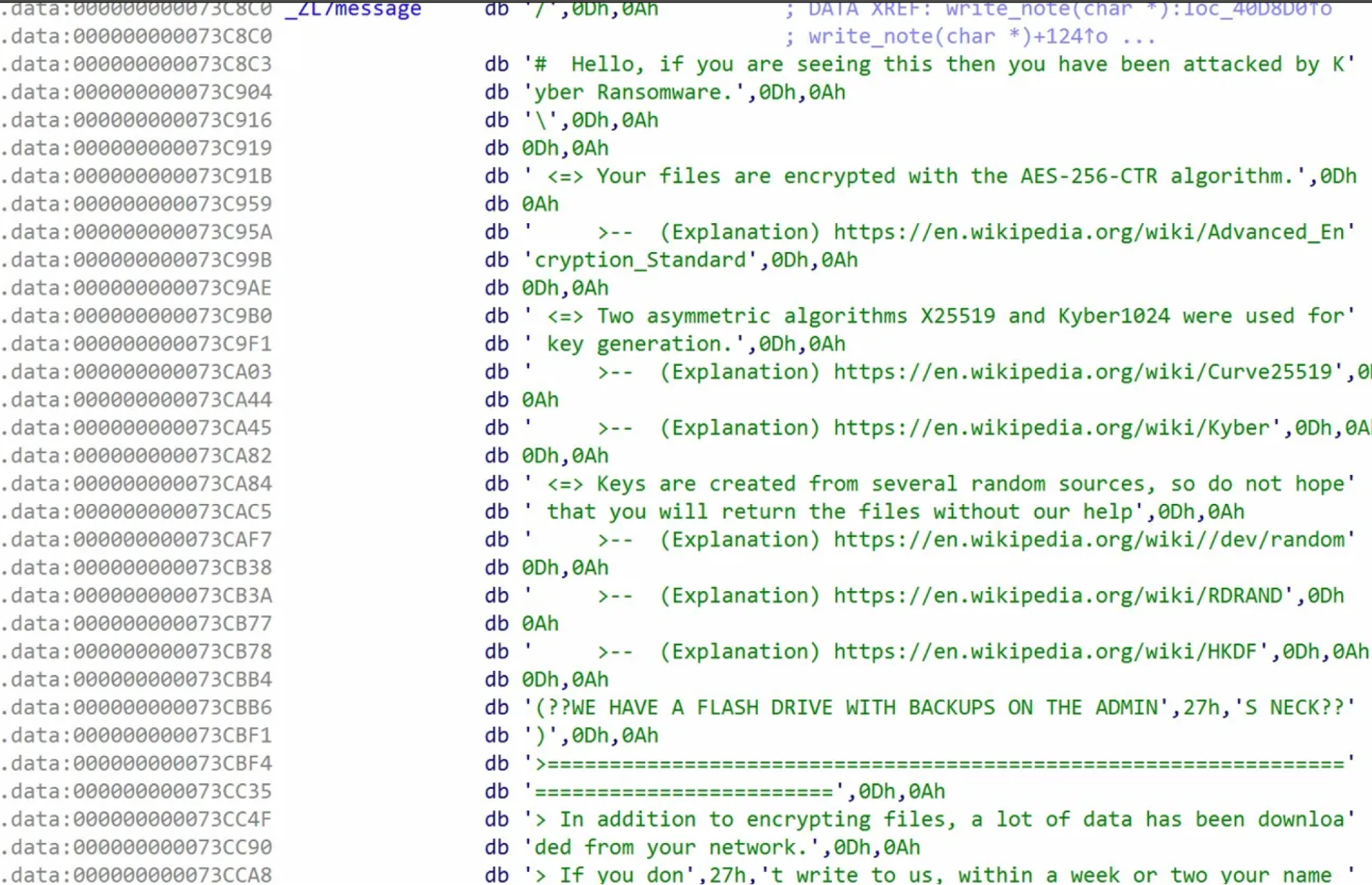
Figure 3: Ransom note embedded in the ELF binaries claims AES-256-CTR and X25519/Kyber1024 algorithms.
⠀
Our technical analysis, however, says otherwise. Decompilation of the core encryption logic shows the cipher is actually ChaCha8. Two indicators support this conclusion. First, in the ECRYPT_encrypt_bytes subroutine (Figure 5) the loop executes 8 rounds (i = 8; i > 0; i -= 2), and the code applies 32-bit right rotations with constants 16, 20, 24, and 25. These correspond to the standard ChaCha left-rotation constants (16, 12, 8, and 7) defined in RFC 8439.
⠀
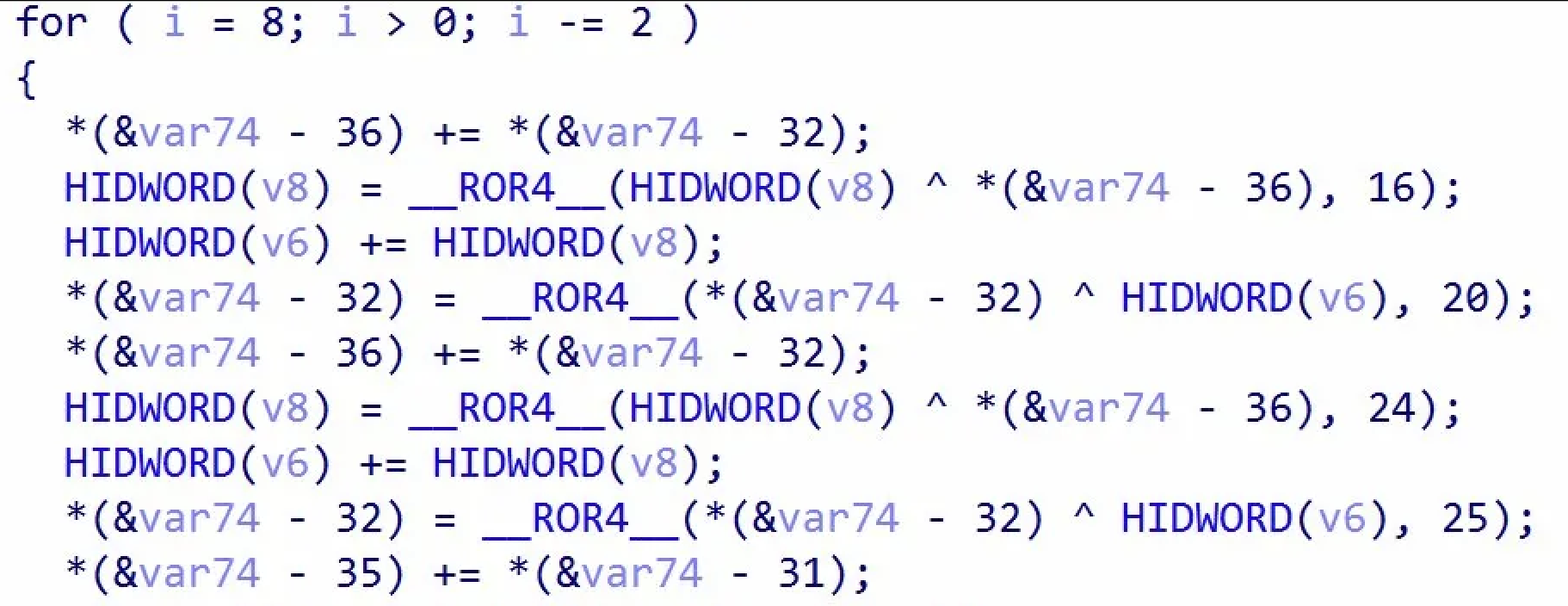
Figure 4: IDA decompilation of ECRYPT_encrypt_bytes function
⠀
Second, the ECRYPT_keysetup function (Figure 6) uses the “expand 32-byte k” sigma constant. For 256-bit keys, the malware initializes its state by placing this constant in words 0–3 and the key in words 4–11 — mirroring the standard ChaCha layout.
⠀
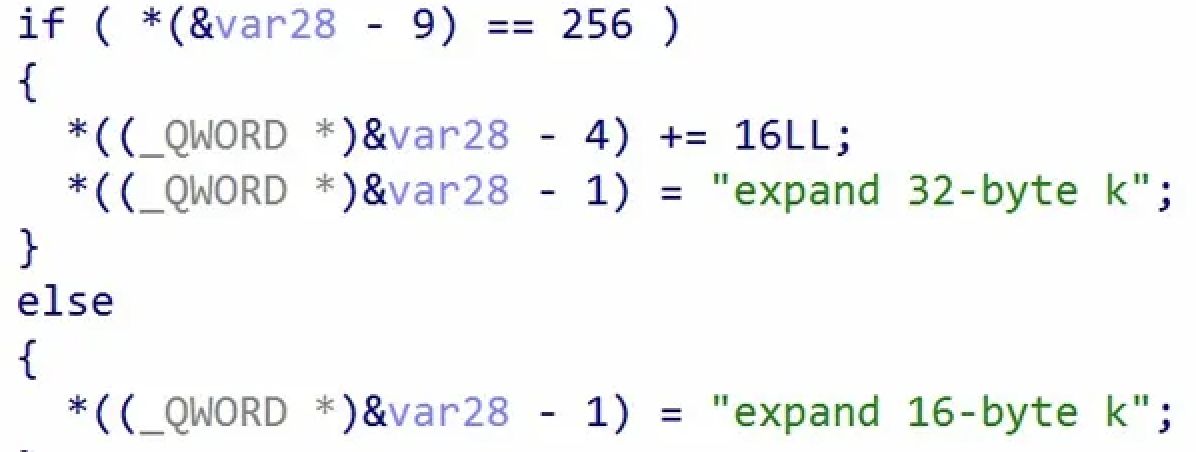
Figure 5: IDA decompilation of ECRYPT_keysetup function
⠀
OpenSSL is statically linked but only handles RSA-4096 key wrapping. We did not find any “post-quantum”. The operator likely just copy-pasted the ransom note from a Windows variant that actually supports Kyber1024.
Partial encryption strategy
Partial encryption logic is size-based encryptFilePartly() function.
Files under 1MB: entire file encrypted
Files between 1MB and 4MB: first 1MB encrypted
Files above 4 MB: only a calculated portion of each file is encrypted, with the proportion controlled by size; the program validates this value as 0–100 in main(), and the default observed setting is 10.
This approach significantly reduces encryption time while still rendering large files (e.g., VMDKs) unusable.
Encryption workflow
Each file is encrypted with a unique ChaCha8 key. Before encrypting the file, the binary creates a .locksignal file and renames the original to .processing to prevent concurrency. It then checks the last 535 bytes for a metadata trailer containing the markers KYBER, CDTA, and ATDC. If these are present, the file is skipped as already encrypted.
For new targets, the malware generates a 40-byte key/IV set and wraps it using an embedded RSA-4096 public key. This metadata is appended to the file and verified before encryption begins. A redundant copy is also saved as
Defacing every entry point
Even before encryption, ransomware binary replaces three specific files:
SSH Access replaces /etc/motd (Message of the Day), displaying the ransom note immediately to anyone logging in via SSH.
Web Management replaces the VMware web UI index pages at both /usr/lib/vmware/hostd/docroot/index.html and the Host Client interface at /usr/lib/vmware/hostd/docroot/ui/index.html.
Whether an administrator logs in via SSH or hits the web management portal, they are immediately met with the ransom note. On non-ESXi systems where these paths don’t exist, the rename fails gracefully and execution continues.

Figure 6: Execution log from REMnux test: defacement fails gracefully on non-ESXi, encryption proceeds.
⠀
Windows variant
The Windows sample SHA-256: 45bff0df2c408b3f589aed984cc331b617021ecbea57171dac719b5f545f5e8d is a 64-bit PE executable written in Rust and compiled with MSVC (VS2022). Much like the ESXi variant, the Windows binary as well is not packed, obfuscated, or even stripped. It retains full Rust panic strings and cargo dependency paths, including the build path C:Usersuser.cargoregistrysrcindex.crates.io-6f17d22bba15001f.
Additionally, the binary’s version flag reveals the project name as win_encryptor 1.0.
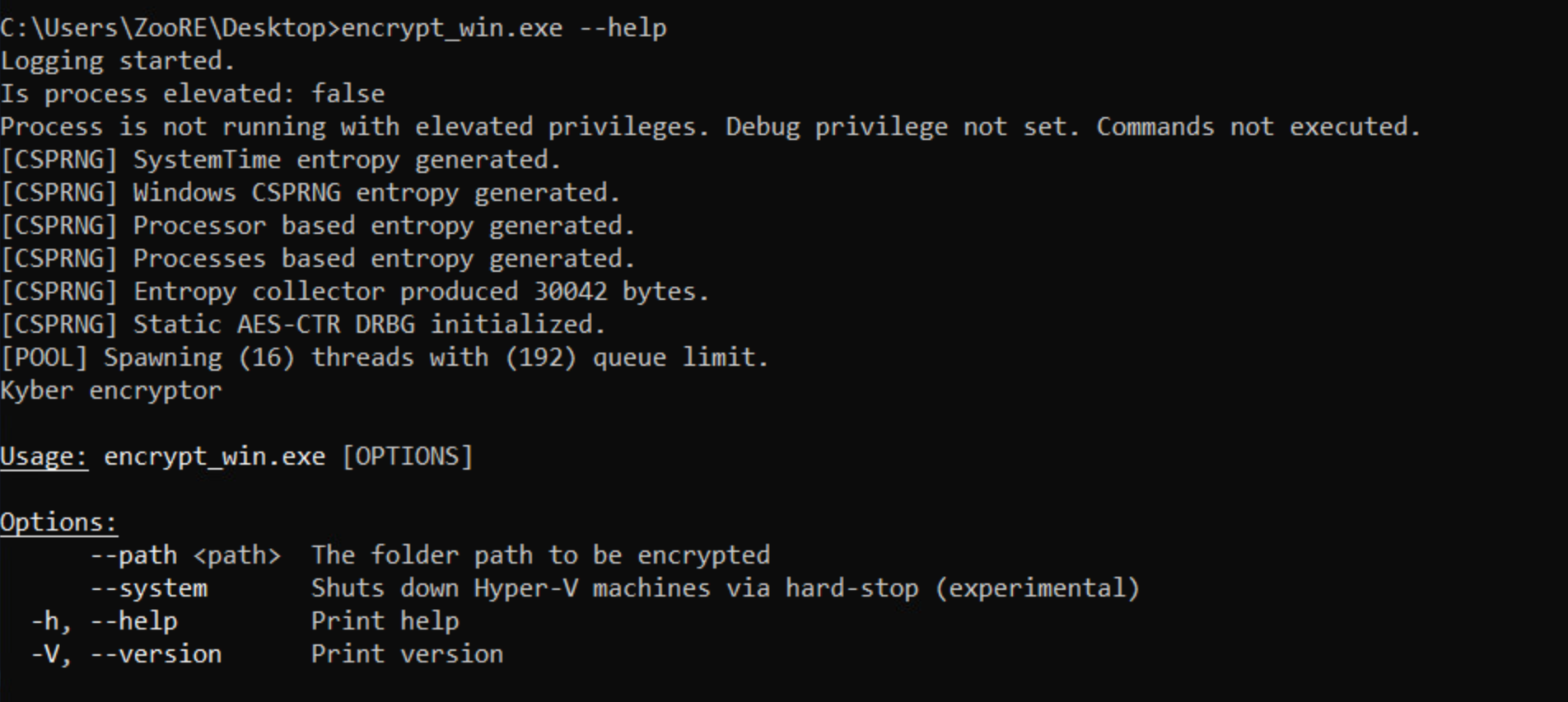
Figure 7: Ransomware’s CLI interface
⠀
The Windows binary exposes a minimal CLI (Figure 8), requiring the path argument to specify the target directory. It also includes system flag which is self-described as “experimental” and intended to enforce a hard-stop on Hyper-V virtual machines.
Ransomware initializes full runtime initialization, even if invoked with just help flag. It aggregates entropy from four sources: system time, Windows CSPRNG, processor-based entropy via RDRAND, and running process data and producing ~30 KB of randomness to seed an internal AES-CTR DRBG. Unlike typical ransomware, which often relies only on BCryptGenRandom, this strain implements a custom entropy pipeline which suggests the developer cared about key material quality.
After initialization, the binary checks whether it is running with elevated privileges by attempting to acquire SeDebugPrivilege and logs are printed to the console (see Figure 8).
This privilege check determines if the destructive commands will be executed. Without elevation, the binary only does file encryption. With elevation, it unlocks its full toolkit: killing services, modifying the registry, and wiping shadow copies to prevent recovery.
Service termination and anti-recovery
When running with elevated privileges the binary first terminates services matching five patterns: msexchange, vss, backup, veeam, and sql using OpenSCManagerA, EnumServicesStatusA, and ControlService API calls. The malware forces the system locale to en-US before service enumeration. This normalization makes certain that pattern matching for service names remains reliable regardless of the victim’s native system language.
It then executes 11 commands via CreateProcessW that you can see in the table below
# | Command | Purpose |
1 | powershell -ep bypass -nop -c “Get-WmiObject -Class Win32_ShadowCopy | ForEach-Object { $_.Delete() }” | Delete VSS shadow copies via WMI |
2 | wmic.exe SHADOWCOPY DELETE /nointeractive | Delete shadow copies via WMIC |
3 | vssadmin.exe Delete Shadows /all /quiet | Delete shadow copies via vssadmin |
4 | bcdedit.exe /set {default} recoveryenabled No | Disable Windows Recovery Environment |
5 | bcdedit.exe /set {default} bootstatuspolicy ignoreallfailures | Suppress boot failure prompts |
6 | wbadmin DELETE SYSTEMSTATEBACKUP | Delete system state backups |
7 | wbadmin DELETE SYSTEMSTATEBACKUP -deleteOldest | Delete oldest system state backup |
8 | iisreset.exe /stop | Stop IIS to release locked web files |
9 | reg add HKLMSYSTEMCurrentControlSetServicesLanmanServerParameters /v MaxMpxCt /d 65535 /t REG_DWORD /f | Increase SMB concurrent connections |
10 | for /F “tokens=*” %i in (‘wevtutil el’) do wevtutil cl “%i” | Clear all Windows event logs |
11 | rd /s /q C:$Recycle.Bin | Empty the Recycle Bin |
Table 2: 11 commands executed by ransomware if it ran with elevated privilege
Hyper-V shutdown
If system flag is set, the binary enumerates Hyper-V virtual machines via PowerShell before encryption:
Get-VM | select VMId, Name | ConvertTo-Json
Stop-VM -Force -TurnOff
Figure 8: PowerShell commands used for Hyper-V termination.
Each VM is terminated with a “hard stop” (-TurnOff) which forces an abrupt shutdown, releasing file locks so the malware can encrypt. As noted in the CLI help text, the developer currently considers this Hyper-V functionality “experimental.”