Logitech’s Options+ and G Hub apps on macOS stopped working after their code-signing certificate expired, leaving users unable to launch them on Apple systems.
Options+ is Logitech’s input device configuration app, while G HUB is a similar app focused on customizing compatible Logitech G gaming peripherals. Both allow setting app profiles, button remapping, lighting options, scroll wheel, and sensor sensitivity.
Multiple users reported that Logitech apps on macOS did not load, making custom gestures, mappings, and scroll settings unavailable, and forcing them to use basic input functions.

Impacted users expressed their frustration with the sudden loss of productivity-enhancing customizations, while many wasted time re-installing the Logitech apps, trying out Safe Mode, or wiping their configuration files.
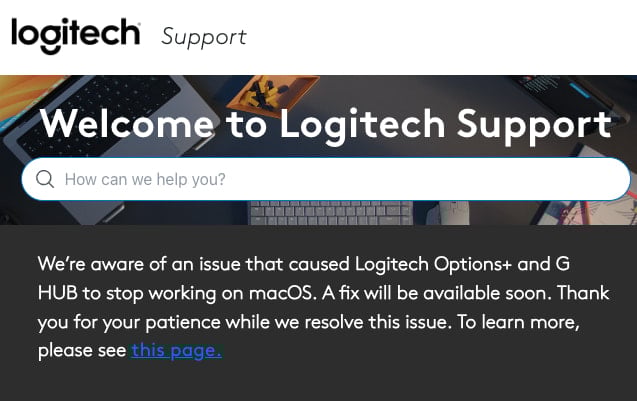
Eventually, Logitech published a statement on its support portal, admitting that the issue was caused by a certificate that had expired.
Source: BleepingComputer
“Logitech Options+ and G HUB are currently not working on macOS due to an expired certificate required for the apps to run,” the company states, adding that it was working on a fix that was expected to become available soon.
The computer peripherals giant said it would push a new installer for macOS without bumping the version number, promising that all user profiles and saved customizations will remain intact. However, the company did not provide any estimation for addressing the issue.
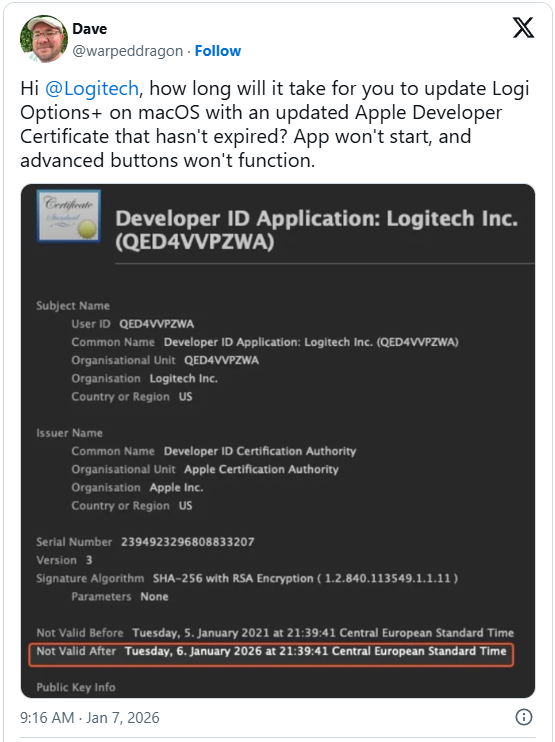
Meanwhile, users started to share potential solutions, which may have some functional drawbacks or limitations.
Some of them include setting the system date to January 5 or earlier so the certificate is treated as still valid, installing an older version of the Logitech apps and disabling automatic updates, or blocking internet access to the app to bypass certificate validation.
BleepingComputer has not tested any of these workarounds and cannot attest to their efficiency or safety.
We have contacted Logitech to ask when they will release the new Options+ and G Hub applications, but we have not received a response yet.
Until the official fix becomes available, it is recommended not to wipe configuration files and saved profiles, as this will result in losing custom options when the apps are working again.

As MCP (Model Context Protocol) becomes the standard for connecting LLMs to tools and data, security teams are moving fast to keep these new services safe.
This free cheat sheet outlines 7 best practices you can start using today.