During our threat hunting, we found a campaign using the same malware loader from our previous research to deliver a different threat: Needle Stealer, data-stealing malware designed to quietly harvest sensitive information from infected devices, including browser data, login sessions, and cryptocurrency wallets.
In this case, attackers used a website promoting a tool called TradingClaw (tradingclaw[.]pro), which claims to be an AI-powered assistant for TradingView.
TradingView is a legitimate platform used by traders to analyze financial markets, but this fake TradingClaw site is not part of TradingView, nor is it related to the legitimate startup tradingclaw.chat. Instead, it’s being used here as a lure to trick people into downloading malware.
What is Needle Stealer?
Needle is a modular infostealer written in Golang. In simple terms, that means it’s built in pieces, so attackers can turn features on or off depending on what they want to steal.
According to its control panel, Needle includes:
- Needle Core: The main component, with features like form grabbing (capturing data you enter into websites) and clipboard hijacking
- Extension module: Controls browsers, redirects traffic, injects scripts, and replaces downloads
- Desktop wallet spoofer: Targets cryptocurrency wallet apps like Ledger, Trezor, and Exodus
- Browser wallet spoofer: Targets browser-based wallets like MetaMask and Coinbase, including attempts to extract seed phrases
The panel also shows a “coming soon” feature to generate fake Google or Cloudflare-style pages, suggesting the attackers plan to expand into more advanced phishing techniques.
Analysis of the TradingClaw campaign
In this campaign, the malware is distributed through a fake website advertising TradingClaw as an AI trading tool.
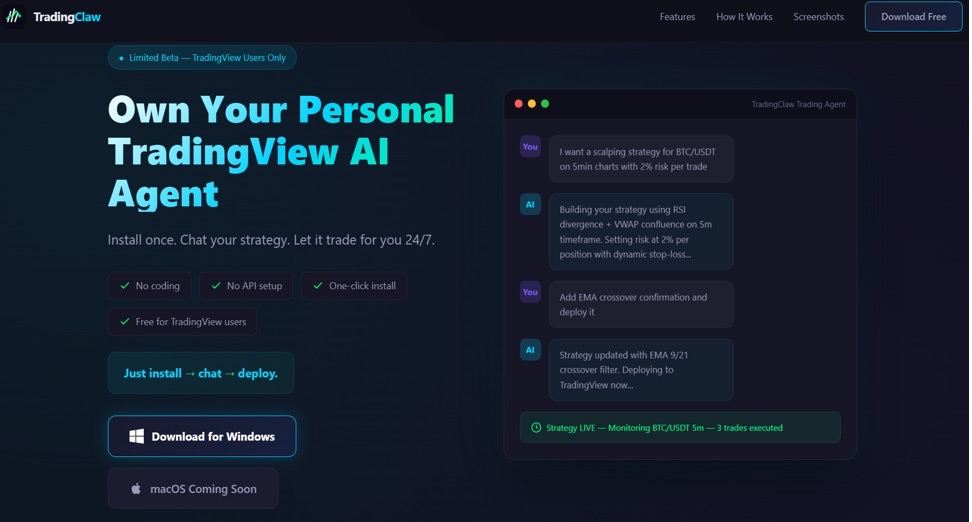
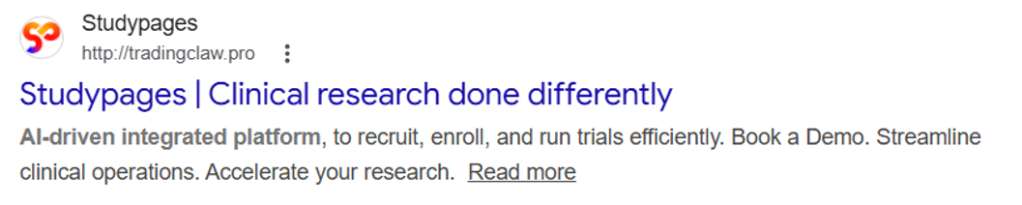
The site itself behaves selectively. In some cases, visitors are shown the fake TradingClaw page, while in others they are redirected to a different site (studypages[.]com). This kind of filtering is commonly used by attackers to avoid detection and only show the malicious content to intended targets. Search engines, for example, see the Studypages version:
If a user proceeds, they are prompted to download a ZIP file. This file contains the first stage of the infection chain.
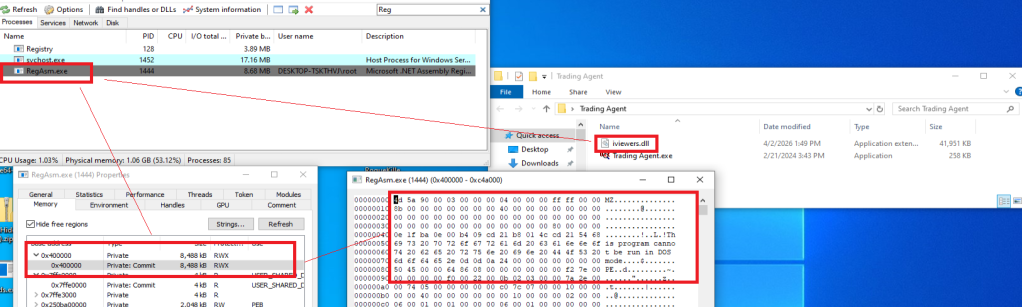
Like in the previous campaign, the attack relies on a technique called DLL hijacking. In simple terms, this means the malware disguises itself as a legitimate file that a trusted program will load automatically. When the program runs, it unknowingly executes the malicious code instead.
In this case, the DLL loader (named iviewers.dll) is executed first. It then loads a second-stage DLL, which ultimately injects the Needle Stealer into a legitimate Windows process (RegAsm.exe) using a technique known as process hollowing.
The stealer is developed in Golang, and most of the functions are implemented in the “ext” package.
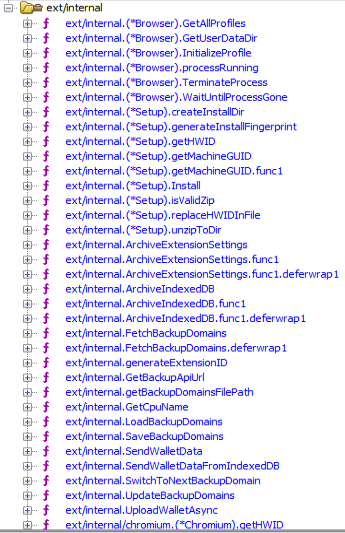
What the malware does
Once installed, the Needle core module can:
- Take screenshots of the infected system
- Steal browser data, including history, cookies, and saved information
- Extract data from apps like Telegram and FTP clients
- Collect files such as .txt documents and wallet data
- Steal cryptocurrency wallet information
One of the more concerning features is its ability to install malicious browser extensions.
Malicious browser extensions
The stealer also supports the distribution of malicious browser extensions, giving attackers a powerful way to take control of the victim’s browser.
We identified multiple variations of these extensions, each with slightly different file structures and components. Behind the scenes, the malware uses built-in Golang features to unpack a hidden ZIP archive (often named base.zip or meta.zip) that contains the extension files, along with a configuration file (cfg.json).
Partial cfg.json config file:
{
  "extension_host": {},
  "api_key": "…
  "server_url": "https://C2/api/v2",
  "self_destruct": true,
  "base_extension": true,
  "ext_manifest": {
    "account_extension_type": 0,
    "active_permissions": {
      "api": [
        "history",
        "notifications",
        "storage",
        "tabs",
        "webNavigation",
        "declarativeNetRequest",
        "scripting",
        "declarativeNetRequestWithHostAccess",
        "sidePanel"
      ],
      "explicit_host": [
        ""
      ],
      "manifest_permissions": [],
      "scriptable_host": [
        ""
      ]
    },
    "commands": {
      "_execute_action": {
        "was_assigned": true
      }
    },
…
This configuration file is key. It tells the malware where to send stolen data (the command-and-control server), which malicious extension to install, and which features to enable.
The stealer extension is dropped in a random folder in the path %LOCALAPPDATA%PackagesExtensions. The folder contains three main files popup.js, content.js, and background.js.
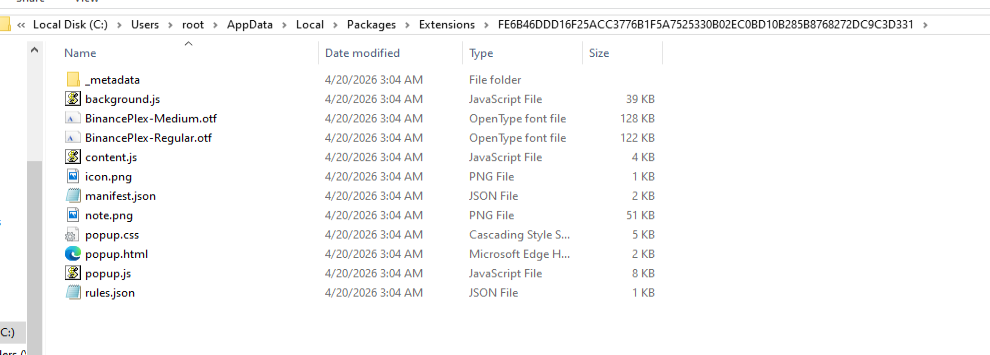
The extensions analyzed have Google-related names.
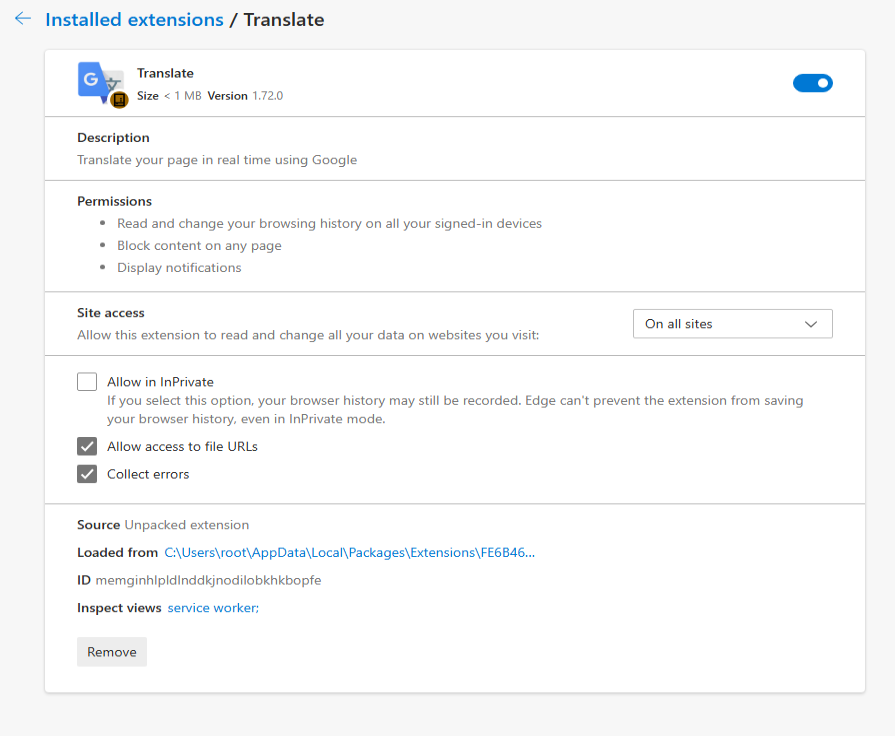
What the malicious extensions can do
The extension gives attackers near full control over the browser, with capabilities that go far beyond typical malware.
It can:
- Connect to a remote server using a built-in API key and regularly check in for instructions. It can also switch to backup domains if the main server goes offline.
- Generate a unique ID to track the infected user over time.
- Collect full browsing history and send it to a remote server (
/upload). - Monitor what you’re doing in real time, including which sites you visit, and apply attacker-controlled redirect rules. This allows it to silently send you to different websites or alter what you see on a page, including injecting or hiding content.
- Intercept downloads, cancel legitimate files, and replace them with malicious ones from attacker-controlled servers.
- Inject scripts directly into web pages, enabling further data theft or manipulation.
- Display fake browser notifications with attacker-controlled text and images.
How it communicates with attackers
The stealer and its extension communicate with command-and-control (C2) servers using several API endpoints. These are essentially different “channels” used for specific tasks:
/backup-domains/active—retrieves backup servers to stay connected if the main one is blocked/upload—sends stolen data back to the attackers/extension—receives instructions for redirects, downloads, and notifications/scripts—downloads malicious code to inject into web pages
How to stay safe
Scammers are increasingly using AI-themed tools to make fake websites look legitimate. In this case, a supposed “AI trading assistant” was used to trick people into installing malware.
To reduce your risk:
- Download software only from official websites. If a tool claims to work with a well-known platform, check the platform’s official site to confirm it’s real.
- Check who created the file before running it. Look at the publisher name and avoid anything that looks unfamiliar or inconsistent.
- Review your browser extensions regularly. Remove anything you don’t recognize, especially extensions you didn’t knowingly install.
What to do if you think you’ve been affected
If you think you may have downloaded this infostealer:
- Check EDR and firewall logs for communications with the C2s listed in the IOCs part.
- From a different, clean device, sign out of every active session on your important accounts: Google, Microsoft 365, any banking portal, GitHub, Discord, Telegram, Steam, and your crypto exchange. Change all passwords and enable 2FA for accounts you have accessed from this machine.
- Check the folder
%LOCALAPPDATA%PackagesExtensionsand suspicious browser extensions. - If you have cryptocurrency wallets on the machine, move the funds from a clean device immediately. This is what these operators monetize first.
- Run a full scan with Malwarebytes.
Indicators of Compromise (IOCs)
HASH
95dcac62fc15e99d112d812f7687292e34de0e8e0a39e4f12082f726fa1b50ed
0d10a6472facabf7d7a8cfd2492fc990b890754c3d90888ef9fe5b2d2cca41c0
Domains
Tradingclaw[.]pro: fake website
Chrocustumapp[.]com: related to malicious extension
Chrocustomreversal[.]com: related to malicious extension
google-services[.]cc: related to malicious extension
Coretest[.]digital: C2 panel
Reisen[.]work: C2 panel
IPs
178[.]16[.]55[.]234: C2 panel
185[.]11[.]61[.]149: C2 panel
37[.]221[.]66[.]27: C2 panel
2[.]56[.]179[.]16: C2 panel
178[.]16[.]54[.]109: C2 panel
37[.]221[.]66[.]27: C2 panel
209[.]17[.]118[.]17: C2 panel
162[.]216[.]5[.]130: C2 panel
We don’t just report on threats—we remove them
Cybersecurity risks should never spread beyond a headline. Keep threats off your devices by downloading Malwarebytes today.