We are used to clicking through human verification tests and browser updates without second thoughts, but a new threat is using these habits against us.
Cybersecurity researchers at Point Wild’s Lat61 Threat Intelligence Team have discovered a malware campaign that relies on a social engineering trick known as ClickFix. This method involves deceiving people into manually running damaging commands that, in this case, lead to the installation of DarkGate remote-access malware.
How the Trap Works
The trouble starts when a user sees a fake message claiming the “Word Online” extension is missing. To view the document, the site tells you to click the “How to fix” button. As we know it, it is easy to fall for this when you are in a hurry. However, this button doesn’t fix anything; instead, it uses JavaScript to stealthily put a PowerShell command onto your clipboard.
The attackers then guide the user through a series of steps to finalise the infection. They ask you to press Windows+R to open the Run box and then CTRL+V to paste the copied text. Because the user starts this process, the computer’s security might not flag it as a threat.
Point Wild’s threat analyst, Onkar Sonawane, noted in the blog post, shared exclusively with Hackread.com, that this sequence is “designed to prompt the execution of a PowerShell script previously copied to the clipboard without the user realising its malicious intent.”
Behind the Scenes: DarkGate Infection
Once the script runs, it reaches out to linktoxic34.com to download and execute a remote HTA file (an HTML application) named nC.hta. This file is saved locally at c:userspublicnC.hta. Researchers identified that hackers use multiple layers of base64-encoded scripts and “reverse functions” to avoid being caught.
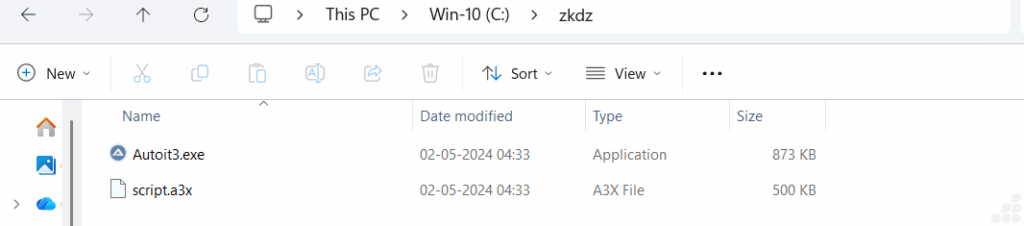
Upon execution of the PowerShell script, a directory is automatically created on your C drive. Into this folder, an AutoIt executable and script (such as script.a3x) are deployed. These components then launch “without user interaction,” continuing the attack chain silently.
Once DarkGate is operational, it performs several malicious actions:
- It establishes persistence to stay on your computer even after a reboot.
- It gathers and exfiltrates sensitive user information to the hackers.
- It uses DES encryption to hide additional files that it drops into new secondary folders.
Signs of Infection and How to Stay Safe
An infected system might start freezing, crashing, or showing unauthorised toolbars. You might also notice a high volume of pop-up ads. Researchers suspect that “traditional antivirus software may not immediately detect the initial action” because the system thinks the user is performing a legitimate task. Therefore, to stay safe, never copy and paste code provided by a website to “fix” a browser issue.
As Dr. Zulfikar Ramzan, CTO of Point Wild, and Head of the Lat61 Threat Intelligence Team, explains, “ClickFix turns the victim into the installer. A single ‘How to fix’ click seeds the clipboard and, within seconds, DarkGate is running under the guise of a helpful fix.”