- Patch Optimization: The Primary Performance Multiplier
- Global Certificate Support: Simplifying Caching Adoption
- Scaling Connectivity: Configurable Concurrency and Load Distribution
- Load-Balanced Deployments
- Active-Standby Deployments
- Strengthening Gateway Security with Authentication and Authorized IP Controls
- QGS Proxy Authentication
- Extended Authorized IP Controls Across All Modes
- Enabling Secure Connectivity for Restricted and Legacy Environments
- Operational Visibility and Appliance Reliability Improvements
- Appliance Monitoring Alerts
- Enhanced Connection Metrics
- Remote Troubleshooting
- Update and Manifest Status Indicators
- Built-In Bandwidth and Speed Testing
- QGS Audit Logging for Operational Governance
- Expanded Deployment Flexibility

Unpatched vulnerabilities remain one of the largest drivers of cyber risk, accounting for nearly 60% of cyber compromises. Modern security programs are therefore measured not only by how quickly they discover risk, but also by how efficiently they remediate it. As organizations scale vulnerability management and patching operations, network efficiency, bandwidth utilization, and connectivity constraints can become limiting factors. The Qualys Gateway Service (QGS), included with the VMDR license, plays a critical role in optimizing the Qualys Cloud Agent ecosystem, accelerating patch delivery, improving reliability, and extending connectivity to environments that were previously difficult to manage within the Qualys TruRisk Platform.
This blog explores how QGS enhances the risk discovery and remediation lifecycle, with a particular focus on patch optimization, and highlights new platform capabilities introduced over the past year.
The Qualys mission is to discover risk and enable rapid remediation. While discovery relies on continuous agent communication with the Qualys TruRisk Platform, remediation, especially patch deployment, can introduce significant bandwidth and connectivity challenges. Patch payloads are often large, and distributing them repeatedly across thousands of endpoints can strain both internal networks and internet links.
QGS addresses this challenge by acting as a local caching and proxy layer between Cloud Agents and the Qualys TruRisk Platform. Instead of every asset downloading the same patch files individually from the internet, agents retrieve the payload from QGS once, dramatically reducing bandwidth consumption and accelerating remediation timelines.
Beyond patching, QGS also optimizes:
- Cloud Agent upgrades
- Configuration downloads
- Manifest updates and platform resources
- Agent communication for restricted or non-Internet-connected environments
This ensures both risk discovery and remediation workflows remain fast and resilient, even in complex enterprise networks.
Patch Optimization: The Primary Performance Multiplier
Patch Management workloads benefit the most from QGS caching mode. When enabled:
- Patch binaries are downloaded once and reused across all agents
- Network congestion during patch cycles is minimized
- Large, distributed environments achieve significantly faster remediation coverage
- Remote or low-bandwidth locations experience improved reliability
Organizations that previously relied on tunnel mode often missed these caching benefits due to the complexity of certificate deployment. Recent enhancements have removed this barrier entirely.
Global Certificate Support: Simplifying Caching Adoption
One of the most impactful improvements to QGS is the introduction of global certificate support, eliminating the operational overhead that previously discouraged customers from enabling caching mode.
Key enhancements include:
- Global certificates are now bundled directly with newer Cloud Agent versions.
- New QGS appliances use the global certificate by default, removing manual certificate distribution requirements.
- Administrators can easily switch certificates through the QGS UI using the Change Certificate workflow.
- Compatibility is supported starting with Cloud Agent for Windows 6.2, with Cloud Agent for Linux support coming in 7.4.
By removing certificate lifecycle complexity, organizations can now adopt caching mode quickly and realize immediate performance benefits, especially for patch management.
Scaling Connectivity: Configurable Concurrency and Load Distribution
Large environments sometimes encounter concurrency limits during peak communication windows. Previously capped at 2,000 simultaneous connections, QGS now allows customers to scale the limit to 10,000 concurrent connections via a support request, enabling significantly larger deployments per appliance.
To further improve scalability and resiliency, QGS supports both load-balanced and active-standby deployment models, allowing organizations to choose the architecture that best aligns with their performance and availability requirements.
Load-Balanced Deployments
In a load-balanced architecture, agent traffic is distributed across multiple QGS appliances to maximize throughput and prevent connection bottlenecks. Proxy randomization, introduced in Cloud Agent for Windows 6.4 and Cloud Agent for Linux, enables agents to automatically distribute their connections across two or more configured QGS appliances, effectively balancing traffic and improving overall performance. This model is ideal for large-scale environments that require higher connection capacity and consistent traffic distribution.
Active-Standby Deployments
For environments focused primarily on high availability, customers can deploy QGS appliances in an active-standby configuration. In this model, agents communicate with the primary appliance under normal conditions and automatically fail over to the secondary appliance if the primary becomes unavailable. This ensures uninterrupted agent communication while maintaining a simpler traffic model than full load balancing.
By supporting both load-balanced and active-standby configurations, QGS allows organizations to scale performance where needed while maintaining strong redundancy and operational resilience.
Strengthening Gateway Security with Authentication and Authorized IP Controls
Recent enhancements to QGS introduce additional security controls that allow organizations to tightly manage which assets can communicate through the gateway and how that communication is authenticated.
QGS Proxy Authentication
QGS now supports authenticated proxy communication, enabling administrators to require Cloud Agents to authenticate before using the gateway. By configuring a username and password directly within the QGS Text UI (System Configuration → Authentication), organizations can restrict unauthorized systems from leveraging the gateway infrastructure and ensure that only approved agents communicate through the appliance.
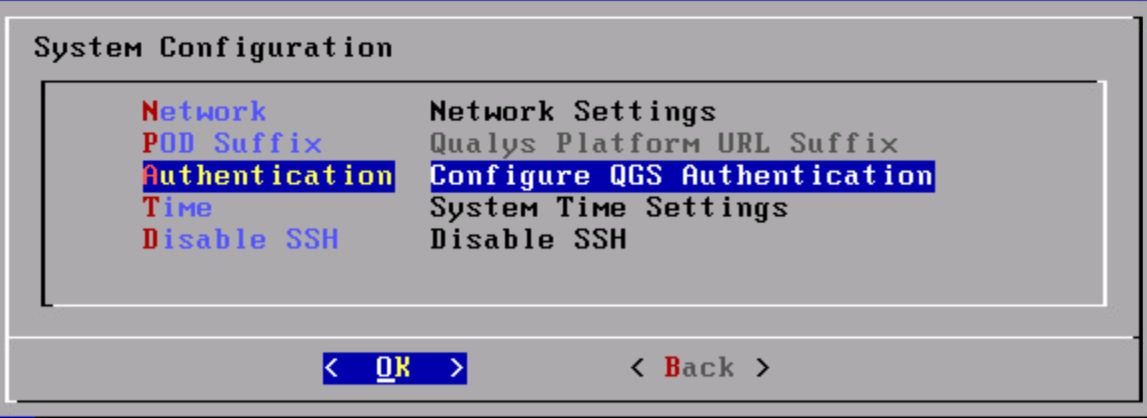
This capability is especially valuable in shared network environments or highly regulated infrastructures where strict control over proxy usage is required.
Extended Authorized IP Controls Across All Modes
Authorized IP enforcement has also been expanded to cover Tunnel, Cache, and Patch modes, providing consistent access control across all gateway communication scenarios. The Authorized IP configuration has been relocated to the Security Configuration → Authorized IPs page, centralizing gateway access management and simplifying administration.
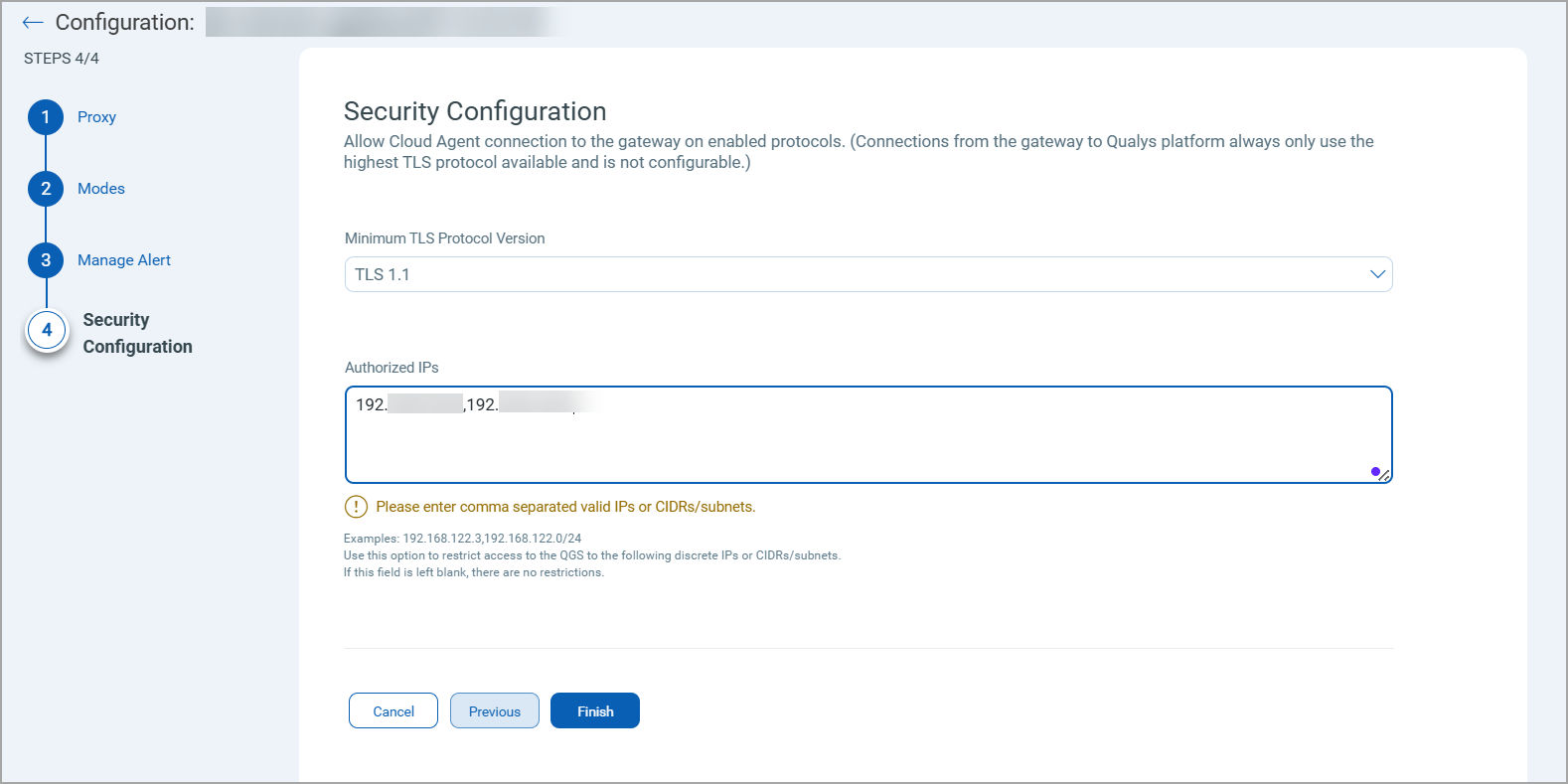
Together, authentication and authorized IP controls provide a stronger security posture for QGS deployments by ensuring that only trusted systems can access gateway services while maintaining the performance and scalability benefits of caching and proxy optimization.
Enabling Secure Connectivity for Restricted and Legacy Environments
QGS also extends the Qualys TruRisk Platform’s reach into environments where direct internet communication is not possible, or legacy systems cannot support modern TLS standards.
Key use cases include:
- Proxying communications for air-gapped or restricted-network assets.
- Supporting TLS bump-up scenarios, enabling legacy operating systems to communicate securely even when they cannot natively support TLS 1.2 or TLS 1.3.
- Centralizing outbound communication through controlled gateway points for compliance-sensitive environments.
This ensures risk discovery remains continuous across all asset classes, not just internet-accessible systems.
Operational Visibility and Appliance Reliability Improvements
Recent releases introduced multiple operational enhancements that strengthen appliance monitoring and lifecycle management:
Appliance Monitoring Alerts
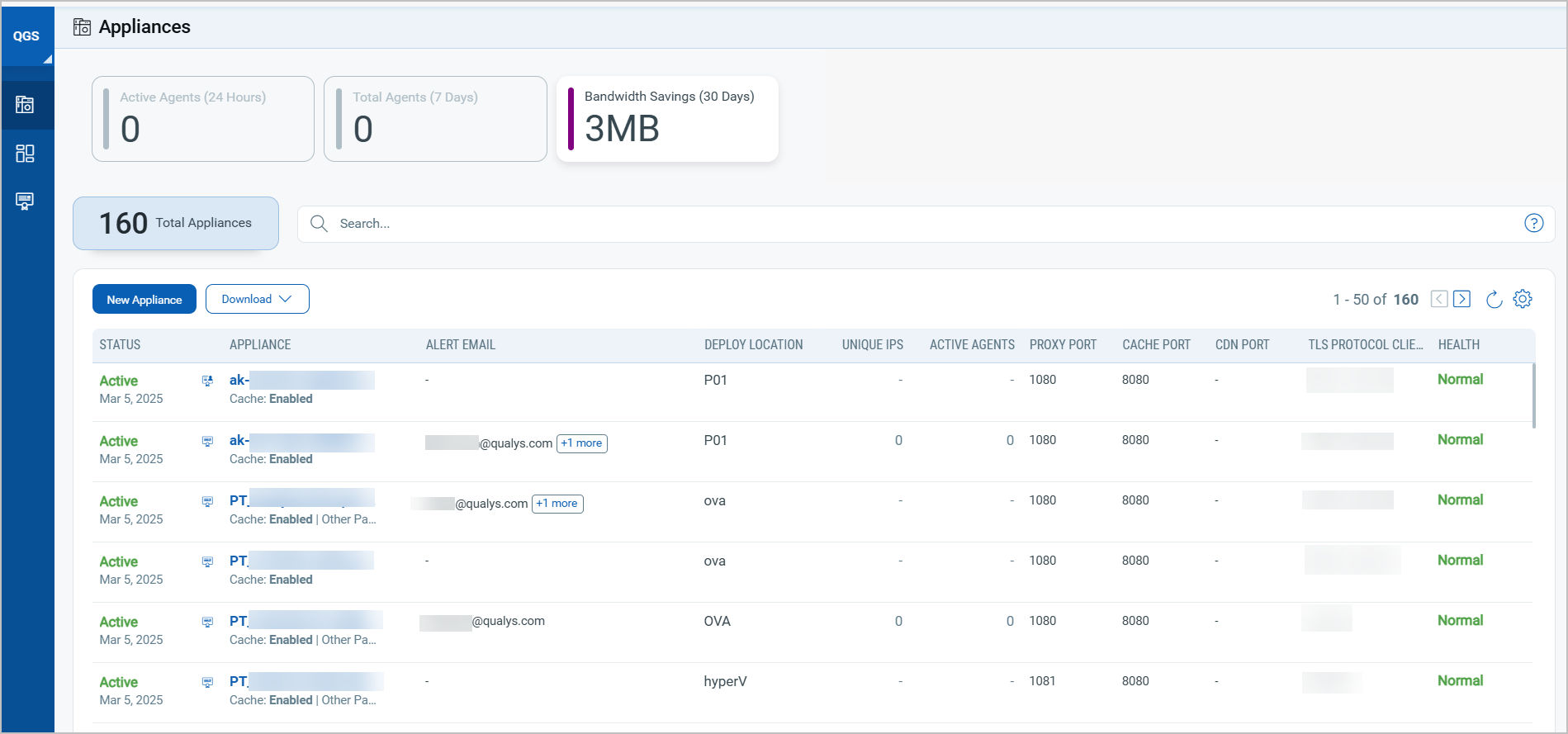
Administrators can now configure proactive email notifications when an appliance becomes inactive. Up to ten recipients can be configured per appliance, improving operational awareness and reducing downtime risk.
Enhanced Connection Metrics
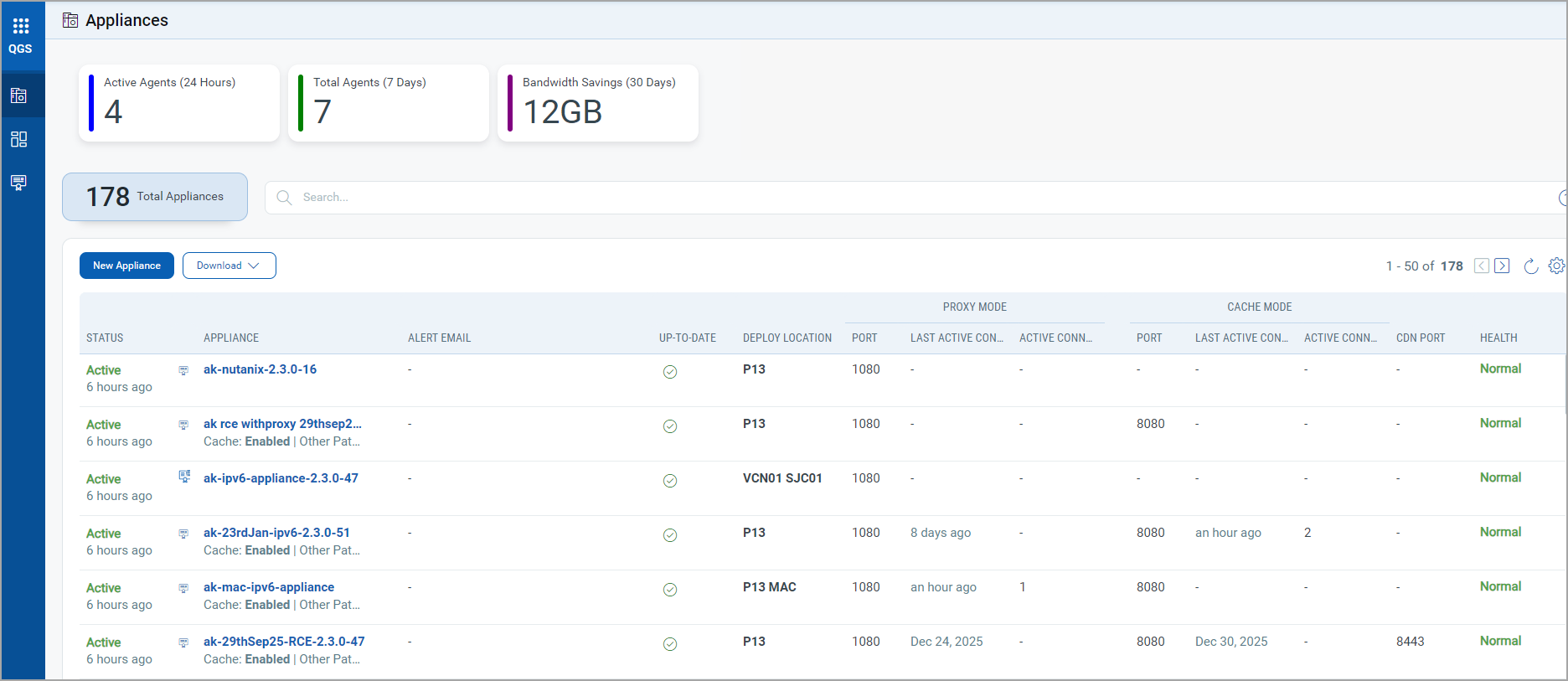
The Home page now provides improved visibility into appliance activity by separating Proxy Mode and Cache/Patch Mode metrics into dedicated columns.
| Proxy Mode | Last Active Connection: Shows when the last IP was connected to the QGS appliance in Proxy mode. Active Connections in the Last 24 Hours: Shows the count of unique agent UUIDs connected in the last 24 hrs. |
| Cache/Patch Mode | Last Active Connection: Shows when the last IP was connected to the QGS appliance in Cache/Patch mode. Active Connections in the Last 24 Hours: Shows the count of unique agent UUIDs connected in the last 24 hrs. |
Remote Troubleshooting
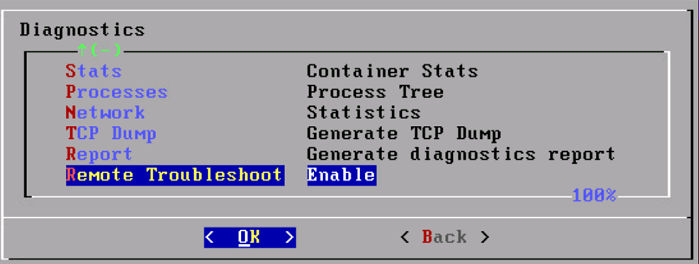
A new Remote Troubleshooting capability allows Qualys Support to securely execute approved diagnostic commands when the customer enables it, eliminating manual SSH setup and accelerating issue resolution.
Update and Manifest Status Indicators
Improved UI indicators now highlight appliances that are not running current manifests or image versions, enabling faster compliance tracking and operational hygiene.

Built-In Bandwidth and Speed Testing
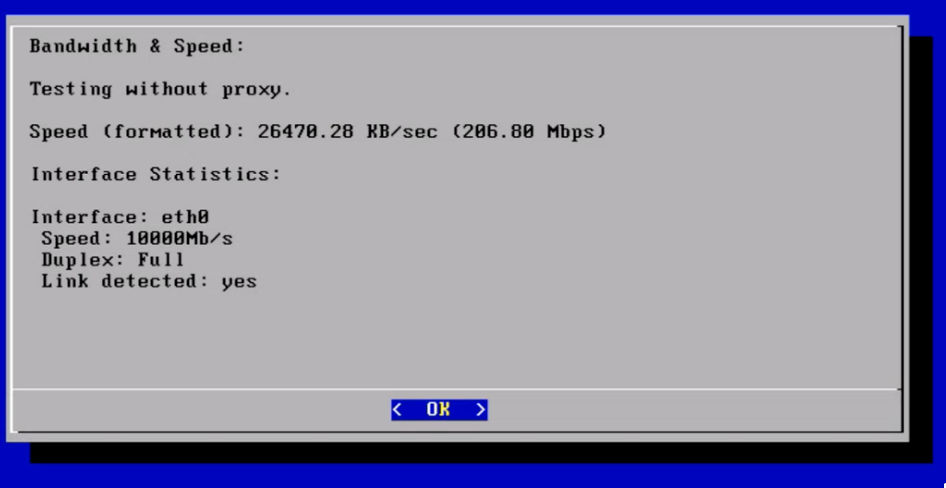
To simplify network diagnostics, QGS now includes a Bandwidth and Speed Testcapability directly within the TextUI. This feature allows administrators to quickly validate network performance and understand the available throughput and supported Gbps capacity within their environment.
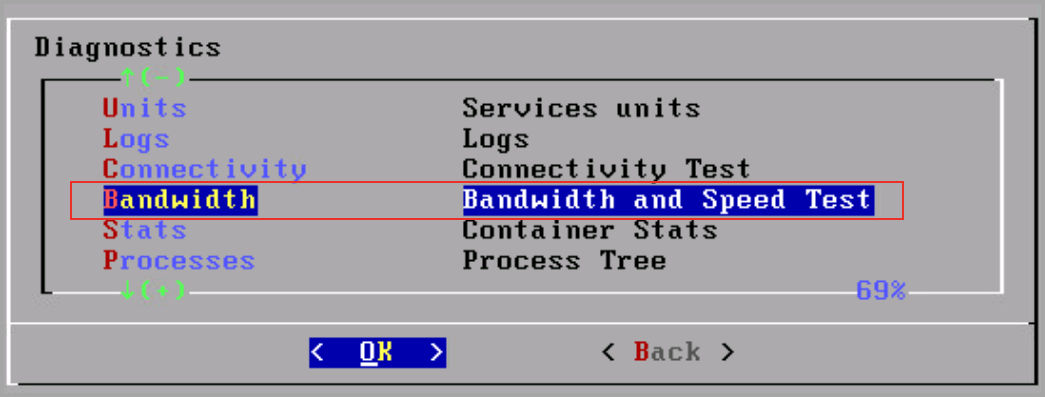
The test can be accessed from the Diagnostics section in the QGS TextUI by selecting Bandwidth, where administrators can view real-time bandwidth details for the appliance. This built-in tool makes it easier to verify network readiness, troubleshoot connectivity issues, and ensure the infrastructure can support large workloads such as patch distribution.
QGS Audit Logging for Operational Governance
QGS now provides audit logging for all gateway configuration activities, enabling administrators to track operational changes directly from Administration > Activity Logs. Using the moduleCode: QGS filter in QQL allows teams to quickly isolate QGS-specific events.
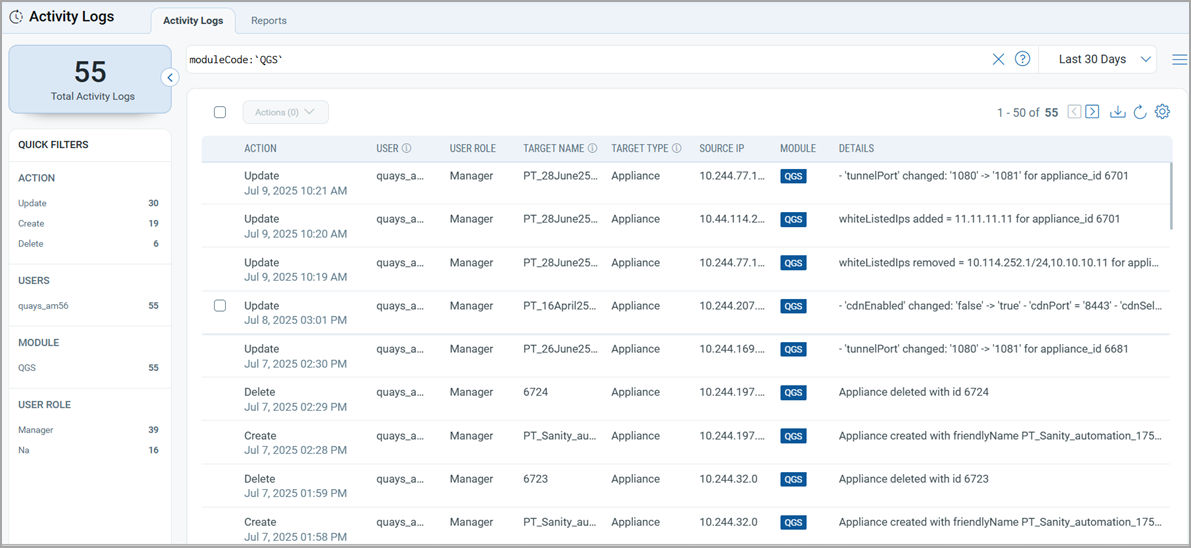
The audit trail captures key actions such as appliance creation or deletion, certificate updates, mode configuration changes (Tunnel, Cache, Patch), port and TLS updates, authorized IP modifications, and notification of email changes. This capability improves governance, accountability, and troubleshooting visibility across QGS deployments.
Expanded Deployment Flexibility
QGS platform coverage has also expanded beyond Hyper-V, VMWare, and Cloud Platforms AWS, Azure, GCP to additional virtualization and cloud environments, including:
- KVM
- OpenStack
- Alibaba Cloud
- Nutanix
- Oracle Cloud Infrastructure (OCI)
- OpenShift Virtualization
- Proxmox
This broader infrastructure support enables customers to standardize gateway optimization across hybrid and multi-cloud environments.
The Qualys Gateway Service is no longer just a network optimization component; it is a strategic performance layer that directly improves the speed, reliability, and scalability of both risk discovery and remediation workflows across the Qualys TruRisk Platform.
With simplified certificate management, scalable concurrency, improved monitoring, and expanded deployment coverage, QGS enables organizations to:
- Reduce patch distribution bandwidth requirements
- Accelerate remediation timelines
- Maintain consistent agent communication across complex environments
- Extend platform coverage to restricted or legacy systems
Now is the ideal time to get started with TruRisk Eliminate on the Qualys TruRisk Platform and deploy QGS to maximize performance and efficiency. By combining automated patching with QGS caching and gateway optimization, organizations can significantly reduce remediation time while minimizing network impact turning continuous risk discovery into faster, measurable risk reduction.