The “third-party.com” domain, commonly used as a placeholder in developer documentation and code examples, is serving a fake Cloudflare verification page that attempts to trick Windows users into executing PowerShell commands.
The domain third-party.com has long been used in documentation to represent an arbitrary external website, API, or service, similar to how developers use domains such as example.com.
However, unlike example.com, example.net, and example.org, which IANA reserves specifically for documentation, third-party.com is a normally registered domain whose content its owner can control.
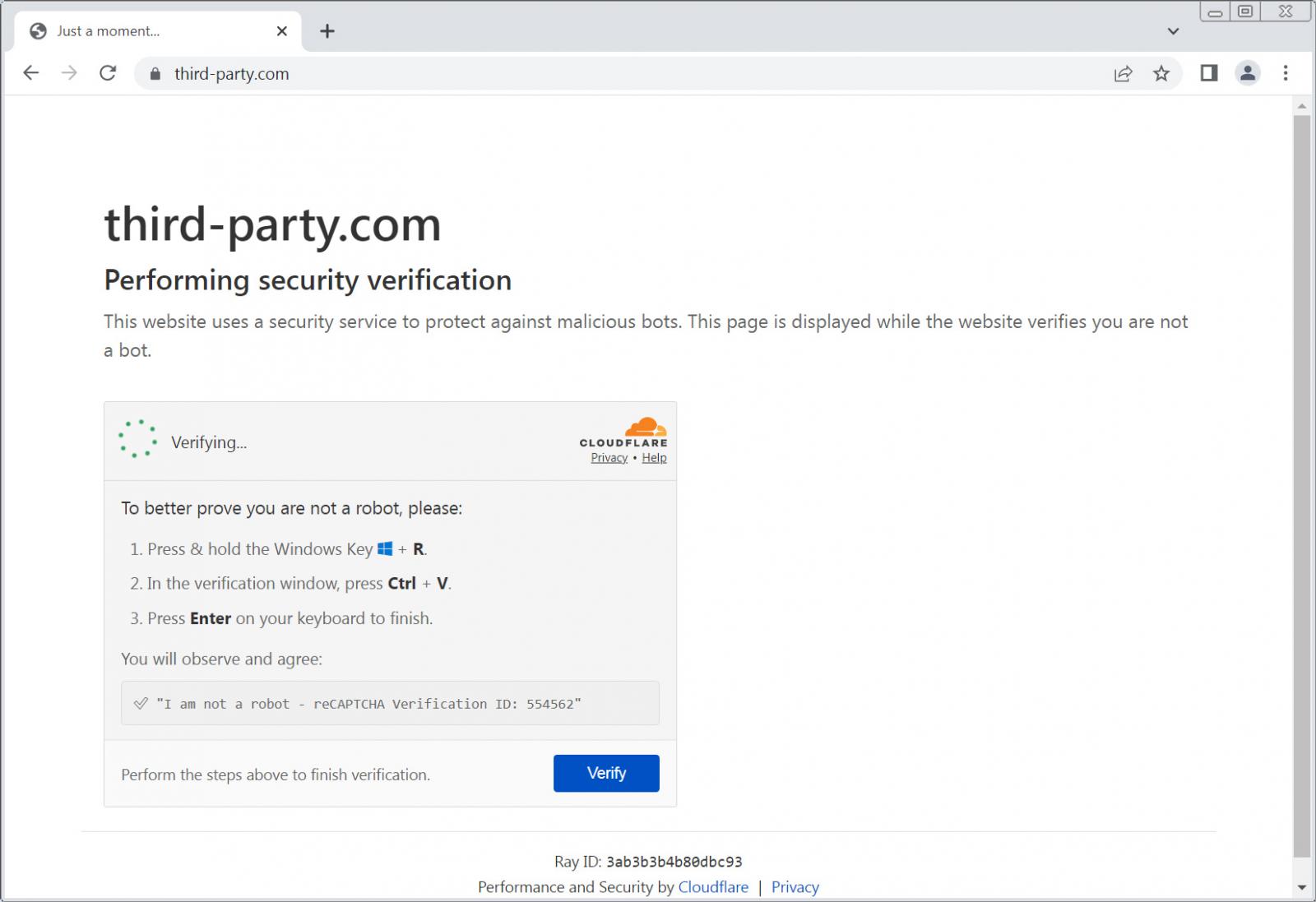
This difference is now a security concern after the domain began serving a ClickFix attack that impersonates a Cloudflare security check.
Manifold Security first reported the malicious use of the domain after discovering it while examining public AI skills and MCP server documentation that referenced the domain.
BleepingComputer has since confirmed that the page displays a fake Cloudflare “Performing security verification” CAPTCHA screen containing a “Verify you are human” prompt.
After the user clicks the verification box, the site copies a malicious PowerShell command into the Windows Clipboard, and then instructs the user to press the Windows key + R, paste the contents of their clipboard using Ctrl+V, and press Enter.
Source: BleepingComputer
When the PowerShell command runs, it reconstructs the payload URL elxxvvx[.]xyz/f, downloads a PowerShell script from that address, and then executes it.
This technique is commonly known as ClickFix, where attackers use fake errors, CAPTCHA prompts, or verification pages to convince victims to manually execute commands copied to their clipboard.
ClickFix attacks have become a popular way to distribute malware, as the malware is installed via commands executed by the user rather than downloaded from websites or as email attachments. In some cases, this could allow malware to install while bypassing traditional antivirus software.
At the time of BleepingComputer’s testing, elxxvvx[.]xyz no longer resolved, leaving the current attack chain broken.
However, a Hybrid Analysis report from May 2, 2026, shows the site distributed a PowerShell script configured to download a 134MB zip archive from:
https://elxxvvx[.]xyz/update2.zipThe PowerShell script saved the archive as update26.zip, extracted it, and then attempted to launch an executable named draw.io.exe.
Because the update2.zip archive is no longer available, BleepingComputer couldn’t determine what the payload does.
Manifold’s Ax Sharma says the attack specifically targets Windows users, and Linux and Mac visitors will see errors stating their operating system is unsupported.
“A macOS or Linux user-agent gets none of that. It gets a near-identical page that stops at an error: “macOS is not supported. This website requires a Windows PC to access.” No clipboard poisoning, no payload,” explains Sharma.
“The attacker only shows the weapon to the targets it works against, which is precisely why a casual look, or a scanner on a Linux datacenter IP, sees nothing wrong.”
A placeholder that wasn’t reserved
The more interesting aspect of the attack is the third-party.com domain chosen to host the ClickFix page.
Public developer documentation has treated third-party.com as a generic example hostname for many years.
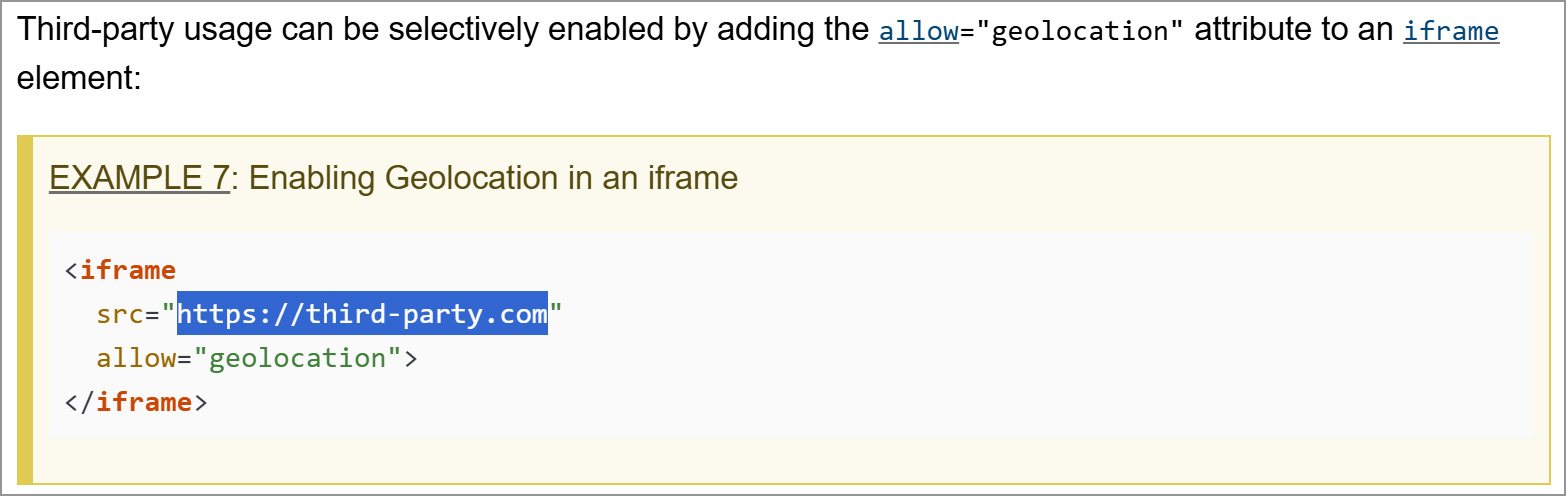
For example, the W3C Geolocation specification currently demonstrates granting geolocation permissions to an external iframe using third-party.com as a placeholder domain:
The W3C Compute Pressure specification similarly uses the domain when demonstrating how a website can enable the API for remote content:
Chromium’s documentation for its Telemetry Extension API also uses third-party.com as an example website permitted to communicate with a Chrome extension:
Other examples go further and use the domain in code that would actually make network requests if copied literally.
A PrivacyCG proposal on GitHub also uses the domain as the destination of a JavaScript fetch() request from a service worker.
Posts online indicate that developers have copied these and similar examples into their own code and projects.
In a 2015 Stack Overflow question, a developer said they had applied an asynchronous loading example containing https://third-party.com/resource.js to their website before discovering that it did not behave as expected after publishing the site.
These examples do not mean that the associated projects or documentation are compromised.
However, applications or test code that copied such placeholder URLs could now cause a browser or automated tool to contact the real third-party.com domain and potentially display the ClickFix attack in a browser or application.
Unlike example.com, which IANA maintains for documentation and does not allow to be registered or transferred, the third-party.com domain has no such protection, and was clearly hijacked or registered at some point to conduct these ClickFix attacks.
“third-party[.]com has been a generic documentation placeholder for years, the same role example.com plays,” explains Manifold.
“A public code search turns it up in skills, MCP-server docs, and over 1,500 files across 1,700+ repositories from names as trusted as Chromium, Sanity, and Vercel. Since at least June 2026 it’s been serving the ClickFix lure.”
While the widespread use of third-party.com as a placeholder in documentation makes the domain attractive to attackers, there is no evidence that it was registered for malicious purposes.
The domain was first registered in 1996, long before the current campaign, and BleepingComputer has not determined when or how control of the site changed.
At this time, there have been no reports that these references to third-party.com have actually resulted in ClickFix attacks being executed on developer’s devices or within their applications/webpages.
However, as the domain remains live, it could easily be switched to a new, live payload domain and actively utilized in future attacks.

Join Mikko Hyppönen and security leaders from the NFL, CHANEL, and Atlassian for a two-hour digital summit on what AI-speed attacks change, what defenders should stop doing, and how to validate, decide, fix, and re-validate at machine speed.
Save your seat