Microsoft 365 makes sharing so convenient it can quickly get out of control. Most organizations have no idea what their users are sharing or with whom, putting company data at risk. Learn how to regain control of shared content with access reviews for M365.
Cloud collaboration has become a cornerstone of the modern workplace. Millions of companies rely on platforms like Microsoft 365 to enable seamless sharing for their staff. Microsoft Teams alone counts 320 million active users worldwide: a figure that comes close to the entire US population.
It’s easy to see what makes cloud suites so appealing. Send a presentation to your coworker and discuss their feedback. Hop on a video call with your team and drop the updated slide deck in the meeting chat – all while making lunch plans over Teams. It’s never been easier to share documents on the fly.
The problem with making sharing so convenient for end users is that it’s impossible for security teams to keep up. With hundreds of users sending links and inviting guests, organizations quickly lose track of what their employees are sharing.
Cloud suites empower your staff to make decisions about access without any oversight from IT or security teams: Just click “Share” and tag in coworkers, business partners, contractors or anyone you feel like.
Oversharing: When cloud access goes too far
Without suitable guardrails, the use of cloud suites like Microsoft 365 leads to oversharing: Content that is shared longer than necessary or with more people than actually need it.
Whether this happens due to carelessness or is done with malicious intent, oversharing is a massive security risk that leaves cloud documents exposed and sensitive data vulnerable to theft, leaks, or breaches.
Problematic sharing often starts out innocent, with access that serves a clear business purpose but goes unchecked for too long. Here are just some examples of what oversharing can look like in practice. Perhaps you recognize similar scenarios from your own workplace.
What oversharing in Microsoft 365 looks like:
- A freelancer receives access to certain files to assist with a project. When the project ends, nobody remembers to cut them out. They retain access indefinitely.
- You set up a spreadsheet to coordinate with your PR agency. You switch agencies the following year, but never delete the original sheet.
- New members join a Microsoft Teams channel. They receive access to everything shared through the Files tab, including sensitive documents you didn’t realize were in there.
- You create a folder in SharePoint to share files with one of your suppliers. Over time, users begin storing other documents in the folder without considering who has access to it.
- The list goes on: sharing links pasted into email chains, inactive accounts that are never removed from cloud documents, etc. etc.
tenfold is the first Identity Governance solution to offer in-depth access reviews for shared content in Microsoft 365. From SharePoint sites to Teams channels and one-on-one chats: Gain full visibility into what your users are sharing and prompt them to revoke outdated cloud access.
Book your personal tenfold demo to see it in action!
Book your personal demo
Native M365 tools: No visibility, no control
Microsoft 365 makes it very easy for users to share documents, but almost impossible for organizations to figure out what their users are sharing. Microsoft 365’s own tools offer no visibility into this problem.
Information about what users are sharing is split across SharePoint sites, Teams channels and each user’s personal OneDrive. There is no centralized reporting for cloud privileges, leaving organizations completely in the dark when it comes to oversharing.
The lack of suitable controls is one of the main drivers behind cloud access risks. Even third-party tools or paid add-ons are not up to the task. For example, while Entra ID Governance does include access reviews, they only cover accounts and group memberships – not shared content.
The result is a huge security blind spot that leaves organizations vulnerable to both accidental leakage and targeted data exfiltration. Only in-depth governance for cloud privilege and shared content can address this risk.
The silver lining: M365 access reviews with tenfold
If you’re one of the many organizations struggling to control shared content, there is good news: Our Identity Governance solution tenfold is the first of its kind to offer access reviews for shared content.
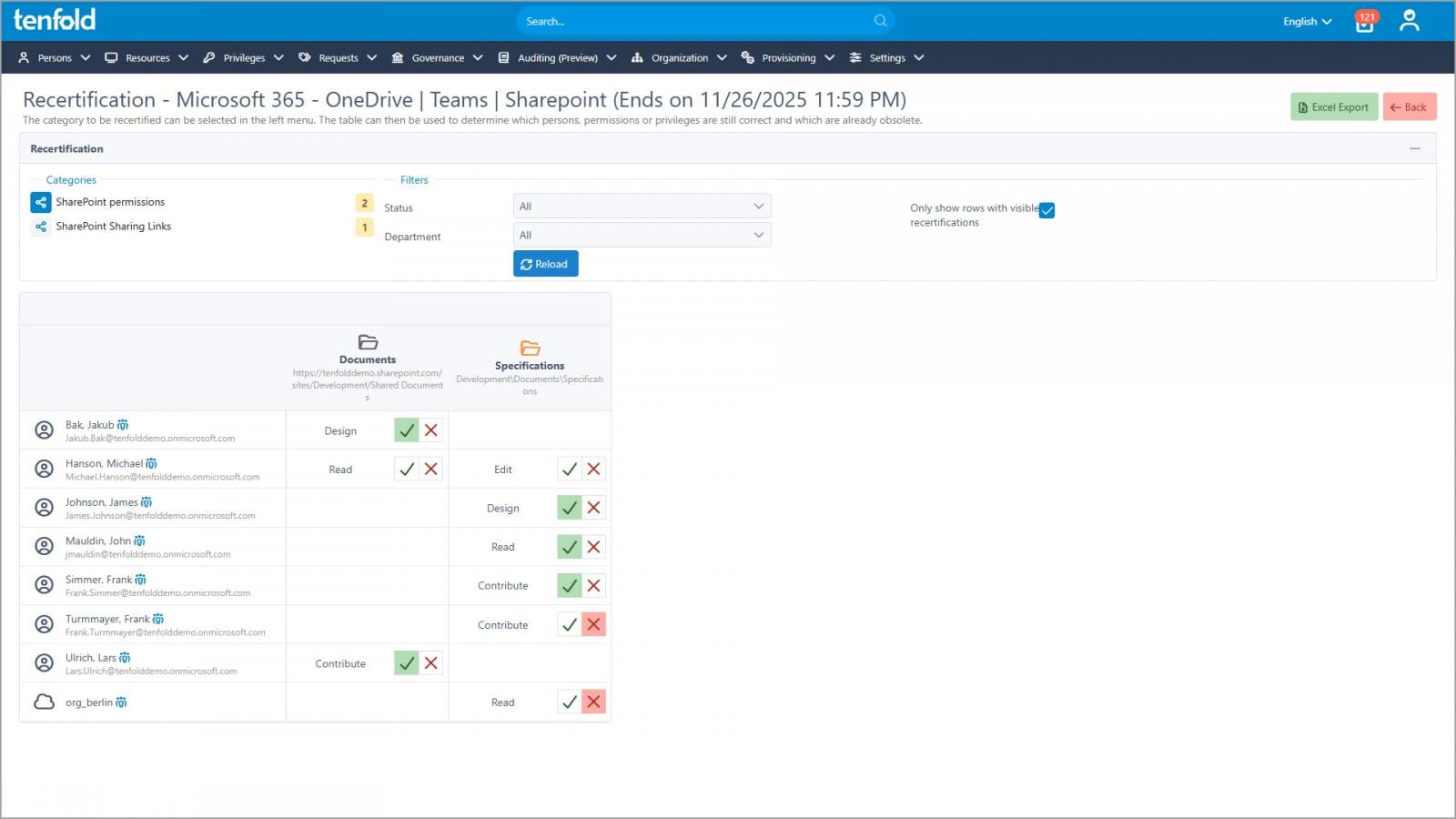
Not only does tenfold give you in-depth visibility into what your users are sharing – providing a central overview of shared content across Teams, OneDrive and SharePoint – it also allows you to prompt users and channel/site owners to review sharing links and permissions.
Microsoft 365 governance features in tenfold:
- Role-based access, lifecycle management & in-depth reporting for cloud and on-prem
- Central overview of shared content across Teams, OneDrive & SharePoint
- Access reviews for M365 users, groups and shared content
- Streamlined review execution with personalized review dashboards
- Complete audit trail of requests, changes and reviewer decisions
- Automated enforcement of review outcomes
Each user receives a link to their personal review dashboard, which shows all items they are currently sharing and allows them to confirm or remove them with a single click. tenfold automatically revokes any sharing links or permissions that do not pass the review.
Stop oversharing once and for all: With regular access reviews for shared content, you can close the security gap created by unmanaged cloud access and make full use of Microsoft 365’s sharing features without worrying about leaks or breaches.
Book your personal tenfold demo to see it in action.
Sponsored and written by Tenfold Software.