A cluster of fraudulent websites impersonating Microsoft is using fake “security scans” to pressure victims into uninstalling antivirus products, disclosing personal and banking information, and granting remote access to their computers.
The sites, branded as SysScan, claim to assess whether an antivirus product is functioning properly. Their conclusion is predetermined: the victim’s computer is allegedly at risk because Windows no longer supports third-party antivirus software.
That claim is false. Microsoft Defender Antivirus is designed to coexist with non-Microsoft security products; depending on configuration, Defender may enter a passive or disabled state while a registered third-party antivirus acts as the primary protection.
Researchers identified eleven SysScan-themed domains hosted on a single server.
While the branding and names vary, the workflow is consistent: display a convincing scan, report severe but fabricated security failures, instruct the visitor to turn off their antivirus, capture “refund” information, and prepare the target for a phone-based social engineering attack.
The fraudulent scanner harvests browser-accessible information such as the user-agent string, display resolution, device memory, processor count, permissions, networking information, available browser features, and page-performance metrics.
However, its security verdicts are not derived from those values. The code reportedly contains 50 static findings grouped in developer-labelled “fake checks,”.
A browser cannot reliably inspect those system-level controls, determine antivirus health, identify firmware settings, confirm Windows patch status, or detect memory-hardware vulnerabilities.
One purported patch-lag result is generated from a random number, producing different answers when the scan is repeated.
The scoring logic reinforces the deception. The reported score is constrained to a range of 13 to 30 out of 100, meaning a passing result is structurally impossible.
Microsoft Refund Scam
Even normal browser behavior is recast as risk: enabled cookies become a warning, disabled cookies become a failure, and encrypted connections are described as downgrade exposure.
Claims of a compromised browser sandbox, inactive kernel page-table isolation, missing TPM hardware, Rowhammer exposure, WebRTC local-IP leakage, and CPU thermal throttling.
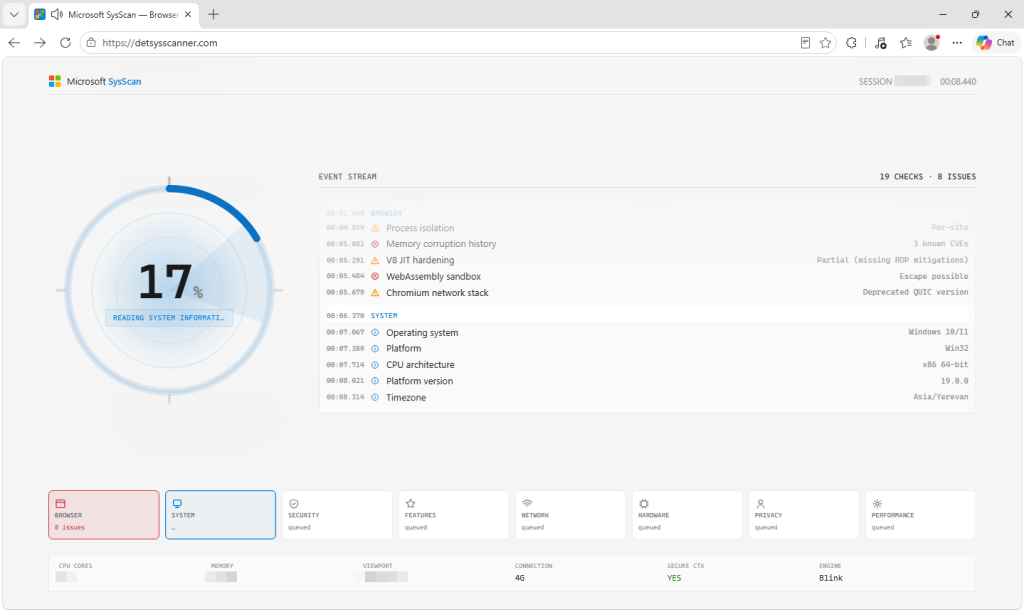
The instruction to uninstall antivirus software is the campaign’s most dangerous step. It can weaken endpoint defenses before scammers attempt to deploy remote-management tools or other payloads. It also identifies the product protecting the victim’s device.
The form reportedly lets operators select from 28 antivirus products, including enterprise security tools, plus an “Other” option.
That detail suggests the operation may be prepared to handle business users and workplace devices, not solely home systems.
Malwarebytes Researchers said that, the scam exploits a real Windows behavior: when a compatible third-party antivirus product is installed and registered, Microsoft Defender Antivirus may step aside to avoid conflicts.
This does not mean Windows has stopped supporting third-party security products.
After displaying the fabricated scan results, the sites request names, addresses, phone numbers, email addresses, refund amounts and reasons, bank names, cryptocurrency usernames, installed antivirus products, and remote-access session credentials. Victims can reportedly choose among 30 remote-access tools.
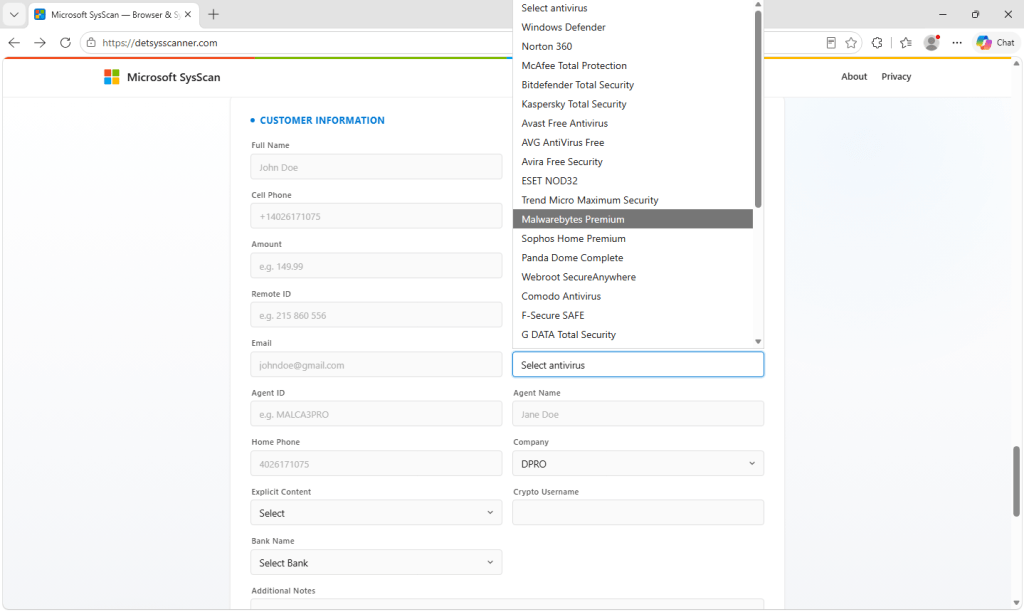
The form additionally requests Agent ID, Agent Name, and Company fields an unusual design choice for a consumer-facing refund process.
These fields indicate the page may be intended for a call-center operator who is guiding the victim through the workflow or observing their screen.
Submitted data is bundled into a single message and sent directly to Telegram through its bot API, eliminating the need for a traditional backend.
The approach makes the infrastructure inexpensive to operate and disposable when domains are reported or blocked.
The pages reportedly claim that no data is collected, despite contacting external IP and geolocation services and exfiltrating submitted form data.
If remote-access software was installed or a scammer controlled the device, disconnect it from the internet, remove the remote-access tool, run a trusted antivirus scan, change passwords from a separate clean device, and contact the bank or payment provider.
A later waiting page promises that a “refund manager” will call within three to five minutes, creating a handoff point for the next stage of the fraud.
Users should immediately close any webpage claiming to conduct a deep security assessment from within a browser.
A legitimate refund process will not require antivirus removal, remote access, cryptocurrency details, or banking credentials.
The FTC warns that legitimate refund administrators never request remote access to a computer or demand payment to issue a refund.
Indicators of compromise
| IOC Type | Value |
|---|---|
| IPv4 Address / Hosting | 157.230.180.90 |
| Domain | detectsysscanner[.]at |
| Domain | detectsysscanner[.]com |
| Domain | detectsysscanner[.]de |
| Domain | detectsysscanner[.]in[.]net |
| Domain | detectsysscanner[.]xn--q9jyb4c |
| Domain | detsysscanner[.]com |
| Domain | detsysscanner[.]de |
Note: IP addresses and domains are intentionally defanged (e.g., [.]) to prevent accidental resolution or hyperlinking. Re-fang only within controlled threat intelligence platforms such as MISP, VirusTotal, or your SIEM.
★ Which Security Tools Should You Cut? Score Them on One Page – Download the Inherited Security Stack Guide