The 2026 SANS CTI survey found the main blockers for 44% of CTI teams are lack of time and funding. SOCs are stretched by triaging alerts; analysts need to quickly operationalize new intelligence. This time pressure matters when responding to a threat campaign exploiting a zero-day flaw. Defenders need to quickly block known malicious indicators. But they also need a fast way to look back at historical logs and check if these indicators touched their systems before a patch was rolled out.
This situation arose when the threat cluster known as ShinyHunters began exploiting a critical unauthenticated remote code execution (RCE) zero-day flaw in PeopleSoft Enterprise PeopleTools. On June 10, Oracle released patches for the zero-day RCE, tracked as CVE-2026-35273. ShinyHunter had been exploiting the flaw since late May and continued activity after Oracle released patches. The group has claimed to have breached 110 U.S. education organizations, with more victims in government and commercial sectors, the European Council among them.
After Oracle’s disclosure and patch release, organizations should have urgently patched PeopleSoft and restricted external access to exposed endpoints. But as many readers here would know, applying patches doesn’t help identify whether a breach occurred before that point, nor does it help to determine its scope.
Many organizations will be asking: Were we breached before we patched? The good news is that analysts can quickly answer this question using the newest capability built directly in our reports. This blog walks through the steps of an investigation and a working solution to determine if an organization was breached before applying patches. This process often begins with a new intelligence report.
Block IOCs and search historical logs
The typical process after a campaign is discovered is to identify reported IOCs — such as domains, binaries, IPs and artifacts — enrich them and push them into the SIEM and the EDR to block threats going forward. The “block and tackle” playbook prevents the next attack, but it doesn’t answer questions about intrusions that have already occurred. In this case, potential breaches that predated patching and mitigations.
This ShinyHunters campaign demonstrates the value of looking back at logs after new intelligence arrives. For this blog, we’re using indicators embedded in our recent report (login required): Inside ShinyHunters group’s Oracle PeopleSoft campaign: Initial access, post-exploitation, victimology. The group deployed stealth techniques for data exfiltration and deployed ransomware where exfiltration couldn’t be completed. After exploiting the RCE, the actors used living-off-the-land (LOTL) tactics to blend into normal cloud traffic, deploying agents based on the MeshCentral open-source remote administration tool disguised as Microsoft Azure services and used them for command-and-control. It’s likely the activity didn’t trigger IOC-based alerts in late May.
On June 10, 2026, the user @nahamike01 posted on X details of several exposed directories of ShinyHunters, revealing ongoing targeting of PeopleSoft ERP environments that enabled Google Mandiant to triage the actor’s operations. The directories were hosted on the IP addresses 142.11.200[.]186, 142.11.200[.]187, 142.11.200[.]188, 142.11.200[.]189 and 142.11.200[.]190. The exposed directories allegedly revealed a file called .bash_history that contained staging materials, customized agents and attacker command histories.
Analysis of files in the open source directory revealed preconfigured Windows MeshCentral agent binaries disguised as Microsoft Azure services, specifically:
- meshagent32-azure-ops.exe with SHA-256 c7e9332731b06644fc73e0046a2a89eaa59b09f54250e9bd622467187351711f
- meshagent64-azure-ops.exe with SHA-256 f02a924c9ff92a8780ce812511341182c6b509d45bc59f3f7b522e37225d24fc
- meshagent64-v2.exe with SHA-256 d83fdb9e53c5ff03c4cb0451ea1bebd79b53f29eadc1e2fa394c7af13a86ce2f
Analysis of the .bash_history file (SHA-256 2ab684d93c1553fad87041b4dea97188a97e78589deee2a7bacff905564f3a35) revealed a command history that included installation and operational use of a MeshCentral remote management server, reconnaissance of Oracle PeopleSoft infrastructure, secure shell (SSH)-based lateral movement attempts, placement of an extortion-themed marker file and preparation of data for potential exfiltration.
Filetree of the open directory on 142.11.200[.]186 captured 9 June 2026.
Retro-matching ShinyHunter IOCs
Retroactive Threat Detection (RTD), a capability built into intelligence reports on the Verity471 platform, is designed to help this phase of the investigation. After reading a report, analysts typically need to manually extract IOCs, map them to their tools and data sources, translate them into query logic for each tool (specific SIEM, EDR or XDR platform), execute the queries, and assess the results. This process of query building can be prone to errors and would take hours to complete; analysts often don’t have the time or detection engineering resources to act upon indicators until they’ve gone stale.
RTD cuts out these manual processes and generates ready-to-run, tool-native IOC-based queries within seconds for over 20 platforms including Splunk, Microsoft Defender and Sentinel, Elastic, SentinelOne and more. RTD applies aggregation, tabling, and projections, so the analyst understands what they need to look at as they work through the next steps. For example, we don’t use every indicator at every log with an IP field. If we’re looking for the above file hash values, RTD generates queries for looking in the process-creation dataset and image-load events, which are a much more accurate and efficient query to look back for those artefacts. Similarly, RTD uses network indicators for queries targeting network connections, DNS, and firewall data.
For the ShinyHunters IOC set, we’ll focus on the C2 infrastructure — IP addresses in the 142.11.200[.]186–190 range plus 176.120.22[.]24, and the attacker-controlled azurenetfiles[.]net domain — matched for network connections, DNS answers, and firewall logs. This is a good candidate to run first because it seeks out the attacker domain that masqueraded as a legitimate Microsoft Azure domain. That fake-Azure domain is designed to go unnoticed by a busy analyst. RTD aggregates IOCs by host and provides the analyst the answer organized by where to look.
In a few clicks within the report, RTD generates the Network Connections query for Microsoft Defender EDR below:

The final step: Scheduled detections with behavioral hunts
Running the queries in your environment across the zero-day window or further back will deliver two outcomes that are both potentially useful.
If the query finds nothing, this can be a good indicator your environment has not interacted with the reported IOCs and your organization may not be affected. Teams can use the content as a scheduled detection and monitor for the IOCs going forward. They also have full context. Being generated in the report, the RTD query and the IOCs carry the context of which campaign the IOCs belong to. The alert isn’t just an IP address or domain, but is associated with the Verity471 report, which helps make the next step clearer for analysts.

Image: Queries and IOCs retain the full CTI context from the Verity471 report often lost in IOC aggregation platforms.
If the query identifies a match, an incident can be raised for further investigation. At this point organizations in targeted sectors understand who is targeting them because a DFIR or other investigation has taken place and indicators have been shared with the community. But the organization doesn’t know whether they were the first or the 50th to be hit. Indicators may have only been shared after the 25th organization was breached. Per the Pyramid of Pain model, indicators are disposable. It can take an adversary minutes to generate a new IP or recompile a malicious file, meaning attackers can use a new set of indicators for each target. But what typically stays the same are the more intrinsic behaviors — the tradecraft the attacker uses to gain access, move laterally, and compromise a host.
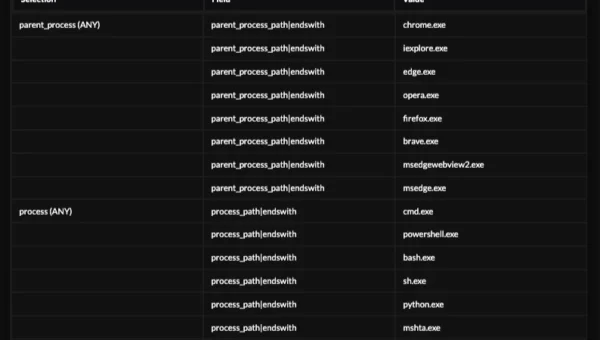
Intel 471’s threat hunters have identified four hunt packages below from HUNTER on Verity471 that can identify ShinyHunters behaviors used in this campaign. Executing these hunt packages can confirm scope and find affected hosts even where indicators differ from the report. The hunt packages also cover broadly used behaviours. For example, the hunt package for identifying “nonstandard SMB communication” has been continually updated since March, 2023. Over that time, the same behavior has been observed in use by APT28, BlueDelta, the Devman Ransomware Group, Fancy Bear, Forest Blizzard, Seashell Blizzard and now ShinyHunters.
Conclusion
Patching closes the door, but doesn’t say who already entered. For the ShinyHunters PeopleSoft campaign — and any zero-day campaign — your team wants to know: Were we hit before we patched? How far did it go? Are we still exposed?
Stretched CTI and SOC teams often lack the time to answer these properly. Retroactive Threat Detection removes manual tasks, so analysts can quickly confirm or rule out compromise, even without dedicated detection engineering support. With Intel 471’s deep insights into adversary techniques, behavioral hunting can target the tradecraft attackers reuse across victims and campaigns.
Together, this procedure closes the loop: block and tackle, look back at your logs, then pivot to adversary behaviors that outlast indicators. This turns new reports on Verity471 from something to read into something immediately acted upon — the key barrier to operationalizing intelligence that most teams face.
Customers with access to HUNTER in Verity471 can use all the hunt packages listed above to identify ShinyHunters behaviors observed in this campaign. Readers without access can sign up for the free HUNTER Community edition to test the hunt packages marked [Community] or contact sales@intel471.com to arrange a demonstration of Retroactive Threat Detections on Verity471.