A financially motivated threat actor tracked as Storm-2561 is running a credential theft campaign that abuses SEO poisoning and fake, signed VPN installers to steal enterprise VPN credentials.
Active since May 2025, Storm-2561 continues to exploit user trust in search results, known VPN brands, and code-signing certificates to distribute malware disguised as legitimate remote access tools.
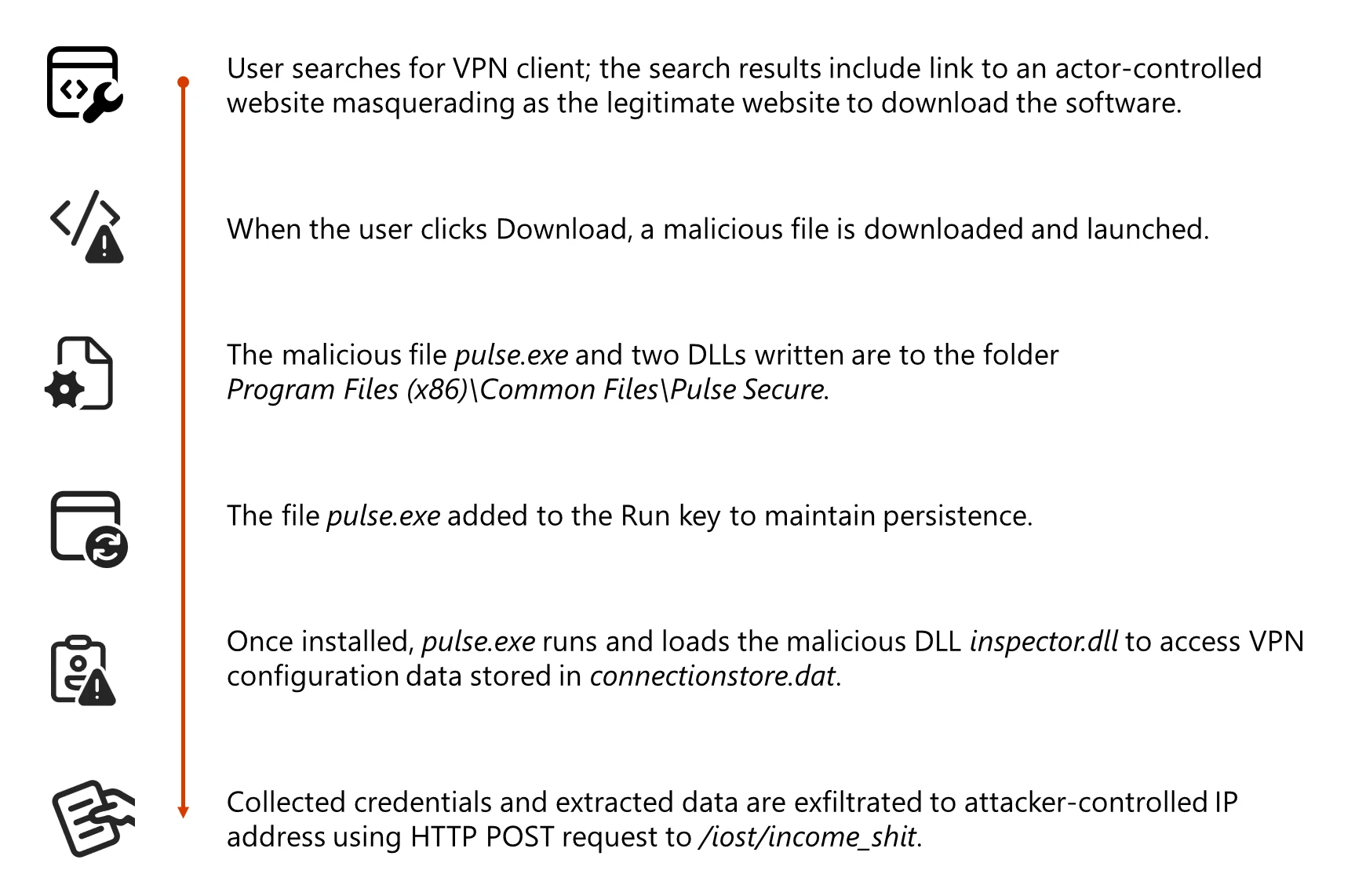
Attackers use SEO poisoning to push malicious pages to the top of search results and then redirect victims to spoofed VPN download sites hosted on attacker-controlled domains like vpn-fortinet[.]com and ivanti-vpn[.]org.
From these fake vendor pages, users are sent to a malicious GitHub repository, now taken down, which hosted a ZIP archive named VPN-CLIENT.zip containing a trojanized MSI installer.
In mid-January 2026, Microsoft Defender Experts uncovered a new Storm-2561 campaign targeting users searching for enterprise VPN software, including Pulse Secure and other popular VPN brands.
The installer pretends to be a legitimate VPN client but actually deploys signed malware components designed to harvest VPN credentials and configuration data.
Storm-2561 Uses SEO Poisoning
When executed, the malicious MSI installs Pulse.exe and drops additional DLLs, including dwmapi.dll and inspector.dll, under a path mimicking a real Pulse Secure installation, such as %CommonFiles%Pulse Secure.
The dwmapi.dll component acts as an in-memory loader that executes embedded shellcode, which then loads inspector.dll, identified as a variant of the Hyrax information-stealing malware.
Hyrax focuses on collecting URI and VPN sign-in details, including stored configuration data from C:ProgramDataPulse SecureConnectionStoreconnectionstore.dat, before exfiltrating them to attacker-controlled command-and-control infrastructure at 194.76.226[.]93:8080.
Microsoft notes that this tradecraft aligns with Storm-2561’s pattern of using SEO poisoning and branded impostor software to monetize stolen credentials.
A key element in this operation is abuse of a legitimate code-signing certificate issued to Taiyuan Lihua Near Information Technology Co., Ltd., which has since been revoked.
Both the MSI and the malicious DLLs are signed, helping them bypass default Windows warnings about unsigned code, potentially slip past application allowlisting that trusts signed binaries, and reduce alerts from security tools tuned to flag unsigned executables.
Microsoft reports that multiple other fake VPN binaries, including samples named Pulse.exe, Sophos-Connect-Client.exe, GlobalProtect-VPN.exe, VPN-Client.exe, and vpn.exe, were also signed with the same certificate, indicating a broader malware distribution effort under the same signing identity.
This systematic code-signing abuse gives the fake installers a veneer of legitimacy that can easily mislead both users and some security controls.
The fake VPN client displays a GUI that closely mimics the legitimate Pulse Secure client and prompts users for VPN credentials.
Instead of creating a VPN tunnel, it immediately captures the entered credentials and exfiltrates them to the Storm-2561 C2 server, then shows a fake error message claiming the installation failed.
Mitigations
To further reduce suspicion, the malware then instructs users to download the genuine VPN client sometimes opening the official vendor site so victims ultimately install a working, legitimate VPN and see no obvious sign of compromise.
Defender for Endpoint also surfaces anomalies such as unexpected DLL side-loading by VPN installers and suspicious changes to autorun registry locations used for persistence.
This redirection pattern, combined with realistic branding, makes it likely that users will blame any issues on routine technical glitches rather than malware.
Persistence on infected systems is maintained by configuring Pulse.exe to run at reboot via the Windows RunOnce registry key.
Microsoft Defender Antivirus detects payloads associated with this campaign as Trojan:Win32/Malgent and TrojanSpy:Win64/Hyrax, while Microsoft Defender for Endpoint in block mode can stop active Malgent and Hyrax activity and alert on VPN processes launching from unusual locations.
To reduce exposure to similar credential theft campaigns, Microsoft recommends enabling cloud-delivered protection and EDR in block mode, turning on network and web protection, enforcing multifactor authentication for all accounts, and disabling storage of corporate credentials inside personal browsers or password vaults.
Organizations should also apply attack surface reduction rules that restrict execution of low-prevalence binaries and use advanced hunting queries to identify files signed by Taiyuan Lihua Near Information Technology Co., Ltd. or malicious DLL activity under Pulse Secure paths.
Follow us on Google News, LinkedIn, and X to Get Instant Updates and Set GBH as a Preferred Source in Google.