- A very convincing Windows update
- Why this campaign is targeting France
- Electron on the outside, Python on the inside
- Two ways it survives a reboot
- Fingerprinting the victim, phoning home, uploading the haul
- Hundreds of processes killed before breakfast
- Why the automated defences gave it a pass
- What this means and what to do next
- How to update Windows safely
- Indicators of Compromise (IOCs)

A fake Microsoft support website is tricking people into downloading what looks like a normal Windows update. Instead, it installs malware designed to steal passwords, payment details, and account access. Because the file looks legitimate and avoids detection, it can slip past both users and security tools.
A very convincing Windows update
We spotted the campaign at microsoft-update[.]support, a typosquatted domain dressed up to look like an official Microsoft support page. The site is written entirely in French (but these campaigns tend to spread quickly) and presents a fake cumulative update for Windows version 24H2, complete with a plausible KB article number. A large blue download button invites users to install the update.
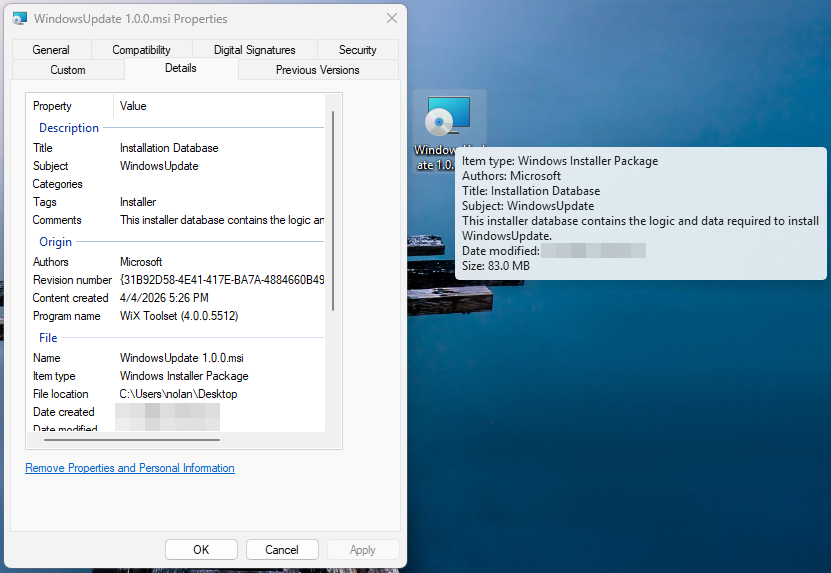
What gets downloaded is WindowsUpdate 1.0.0.msi, an 83 MB Windows Installer package. At first glance, everything looks legitimate. Its file properties are carefully spoofed: the Author field reads “Microsoft,” the title reads “Installation Database,” and the Comments field claims it contains “the logic and data required to install WindowsUpdate.”
The package was built with WiX Toolset 4.0.0.5512, a legitimate open-source installer framework, and was created on April 4, 2026.
Why this campaign is targeting France
The choice to target French-speaking users is not random. France has suffered a historic cascade of data breaches over the past two years, leaving a staggering volume of personal information circulating on criminal marketplaces. The breaches provide the raw data, and campaigns like this one turn that into highly believable scams.
In October 2024, Free, France’s second-largest internet service provider, confirmed that an attacker had accessed personal data for roughly 19 million subscriber contracts, including bank account details. Just weeks earlier, Société Française du Radiotéléphone (SFR) disclosed its own breach exposing customer names, addresses, phone numbers, and banking details.
Earlier in 2024, France Travail, the national public employment service, suffered an intrusion that compromised the records of 43 million people, covering current and past jobseekers spanning two decades. Researchers also discovered an unprotected Elasticsearch server aggregating 90 million records from at least 17 separate French breaches into a single database.
This torrent of leaked data has made France an attractive target for credential theft. KELA’s 2025 infostealer research identified France among the top countries for victims, alongside Brazil, India, the US, Spain, the United Kingdom, and Indonesia.
When attackers already have a victim’s name, address, and ISP from a previous leak, a French-language “Windows update” page becomes a far more convincing lure than a generic English one.
Electron on the outside, Python on the inside
When the MSI executes, it installs an Electron application (essentially a stripped-down Chromium browser bundled with custom JavaScript) to C:Users.
The main binary, WindowsUpdate.exe, is a renamed copy of the standard Electron shell—VirusTotal’s metadata identifies it as electron.exe. Across 69 antivirus engines, it drew zero detections because the executable itself is clean. This suggests the malicious logic lives inside the Electron app’s bundled JavaScript (typically packaged as app.asar).
Alongside the Electron shell sits AppLauncher.vbs, a Visual Basic Script that acts as the initial launcher. The system’s built-in cscript.exe interpreter runs the VBS, which then starts the Electron app—a classic living-off-the-land technique that avoids launching the payload directly and keeps the execution chain looking routine in process logs.
But the Electron wrapper is only the outer layer. Once running, WindowsUpdate.exe spawns _winhost.exe, a renamed Python 3.10 interpreter disguised to resemble a legitimate Windows process. This process unpacks a full Python runtime intoC:Users, including python.exe and supporting libraries.
It then installs a set of Python packages commonly seen in data theft tools:
- pycryptodome, used to encrypt stolen data
- psutil, used to inspect running processes and detect sandbox environments
- pywin32, which enables deep access to the Windows API
- PythonForWindows, used to interact with system internals such as processes and privileges
Analysis of the Electron app’s JavaScript confirms this. Two heavily obfuscated files, processed using techniques like control-flow flattening and opaque predicates, contain the core functionality.
The larger file (~7 MB) is the main stealer payload, with references to pbkdf2, sha256, and AES decryption routines, as well as a campaign expiry check. The smaller file (~1 MB) targets Discord: because Discord runs on Electron, the script modifies its code to intercept login tokens, payment details, and two-factor authentication changes when the app is opened.
Both files returned zero detections across major antivirus engines—the result of malware that hides inside legitimate software and heavily obfuscated code.
Two ways it survives a reboot
The malware sets up two independent persistence mechanisms.
First, reg.exe writes a value called SecurityHealth under the user’s CurrentVersionRun registry key, pointing to WindowsUpdate.exe. The value name impersonates Windows Security Health, the service responsible for Defender notifications. It’s something most users and even IT staff would scroll past without suspicion.
Second, cscript.exe drops a shortcut file named Spotify.lnk into the user’s Startup folder. Anyone who notices it would likely assume Spotify had configured itself to launch at login.
Two persistence mechanisms, two different disguises, each designed to look like something the user would expect to see.
Fingerprinting the victim, phoning home, uploading the haul
Within seconds of launching, WindowsUpdate.exe reaches out to www.myexternalip.com and ip-api.com to discover the victim’s public IP address and geolocation. This kind of reconnaissance is a near-universal trait of infostealers, telling the operator where the victim is and may determine what data gets collected.
The malware then contacts its command-and-control (C2) infrastructure. It reaches datawebsync-lvmv.onrender[.]com, a C2 endpoint hosted on Render, and sync-service.system-telemetry.workers[.]dev, a relay running on Cloudflare Workers. That second domain is particularly crafty: “system-telemetry” is exactly the kind of subdomain a network analyst might dismiss as legitimate monitoring traffic during a quick log review.
For exfiltration, the malware turns to store8.gofile[.]io, a file-sharing service that allows anonymous uploads. Gofile has become a favourite among commodity stealers because it is free, ephemeral, and produces no paper trail for the operator.
Hundreds of processes killed before breakfast
Sandbox telemetry captured more than two hundred separate invocations of taskkill.exe, each launched as an individual process. While the specific target processes were not recorded in the condensed telemetry, the sheer volume and pattern is consistent with infostealers that systematically terminate security tools, browser processes (to unlock credential databases), and competing malware before beginning their collection routine. Kill everything that might interfere, then get to work.
Why the automated defences gave it a pass
At the time of analysis, VirusTotal showed zero detections across 69 engines for the main executable and 62 for the VBS launcher. No YARA rules matched, and behavioural scoring classified the activity as low risk.
This is not a failure of any single tool. It’s the intended result of the malware’s architecture.
The Electron shell is a legitimate binary used by millions of applications. The malicious logic is hidden inside obfuscated JavaScript, which traditional antivirus tools don’t deeply inspect. The Python payload runs under a misleading process name and pulls in components at runtime from what appear to be normal sources.
Individually, each piece looks harmless. It’s only when you follow the full chain—VBS launcher to Electron app to renamed Python process to data collection and exfiltration—that the activity becomes clearly malicious.
Since our analysis, we’ve added detections to protect users from this threat.
What this means and what to do next
The combination of a localized phishing lure, a legitimately built MSI installer, an Electron wrapper, and a runtime-deployed Python payload shows how commodity stealers are evolving. Each layer serves a purpose: the MSI provides a familiar installation experience, the Electron shell helps the file appear clean, and the Python runtime gives flexible access to the operating system. The entire chain is built from off-the-shelf, legitimate components.
The targeting of French users follows a clear pattern. When tens of millions of personal records are already circulating, the cost of creating a convincing localized lure drops significantly. An attacker who already knows which provider a victim uses can tailor a phishing page to match what they expect to see, whether that’s from their ISP or, in this case, Microsoft.
The most important takeaway is that a zero-detection VirusTotal result does not mean a file is safe. It often means the malicious logic is hidden, e.g. inside obfuscated scripts or delivered at runtime, leaving little for traditional detection methods to flag.
If you think you may have installed this update, here’s what to do:
- Check your registry key. To do this, press Windows + R, type
regedit, and press Enter. Go toHKCUSOFTWAREMicrosoftWindowsCurrentVersionRun. Look for an entry namedSecurityHealthpointing toWindowsUpdate.exein your AppData folder, and delete it. - Look for a
Spotify.lnkfile in your Startup folder that you didn’t create, and remove it Delete the folderC:UsersAppDataLocalProgramsWindowsUpdate - Clear the temporary files in
C:UsersAppDataLocalTempWinGettools - Change all passwords stored in your browser—assume saved credentials, cookies, and session tokens may have been compromised
- Enable two-factor authentication, prioritizing email and financial accounts
- Run a full system scan with an up-to-date antimalware tool (ideally one with behavioural detection)
How to update Windows safely
The safest way to update Windows is through the built-in update feature. Open Start, go to Settings > Windows Update, and click “Check for updates.” This should always be your first port of call.
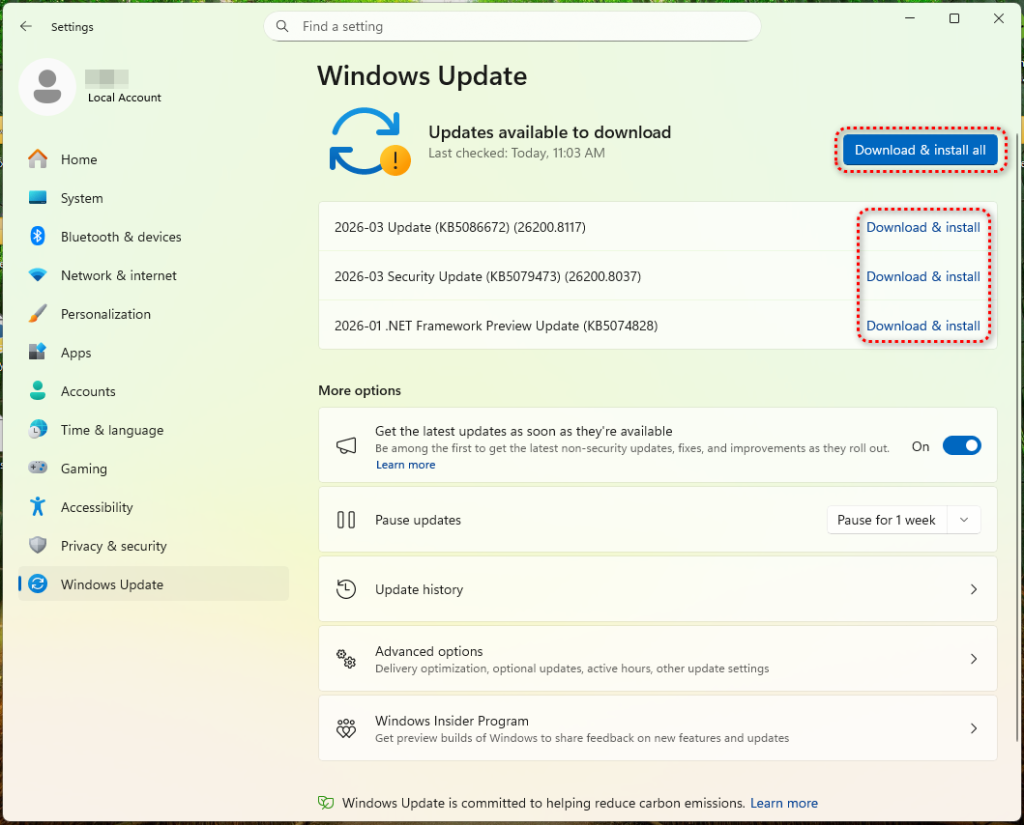
Microsoft does offer standalone update packages through the Microsoft Update Catalog (catalog.update.microsoft.com), but this is the only legitimate source for manual downloads. Any other website offering a Windows update as a file should be treated as suspicious.
Be wary of pages that mimic Microsoft Support or Windows Update. These can look convincing, but the URL is what matters. Legitimate Microsoft pages are only served from domains ending in microsoft.com. A domain like microsoft-update[.]support may look plausible, but it is not connected to Microsoft.
If you receive an email, text, or notification urging you to install an urgent update, don’t click the link. Instead, open Settings > Windows Update and check directly.
Finally, consider enabling automatic updates. This removes the need to download updates manually and reduces the chance of being tricked into installing a fake one.
Indicators of Compromise (IOCs)
File Hashes (SHA-256)
13c97012b0df84e6491c1d8c4c5dc85f35ab110d067c05ea503a75488d63be60(WindowsUpdate.exe)c94de13f548ce39911a1c55a5e0f43cddd681deb5a5a9c4de8a0dfe5b082f650(AppLauncher.vbs)
Domains
microsoft-update[.]support(phishing lure)datawebsync-lvmv[.]onrender[.]com(C2)sync-service[.]system-telemetry[.]workers[.]dev(C2 relay)store8[.]gofile[.]io(exfiltration)www[.]myexternalip[.]com(IP reconnaissance)ip-api[.]com(geolocation)
File System Artifacts
C:UsersAppDataLocalProgramsWindowsUpdateWindowsUpdate.exe C:UsersAppDataLocalProgramsWindowsUpdateAppLauncher.vbs C:UsersAppDataRoamingMicrosoftWindowsStart MenuProgramsStartupSpotify.lnk