Meta has published a new security advisory for messaging app WhatsApp, announcing patches for two vulnerabilities.
WhatsApp has fixed two security flaws that could be abused to interfere with how media and attachments are handled on your device. There is no evidence that either bug has been exploited in the wild.
These bugs don’t automatically infect devices, but they lower the barrier for social engineering and could be chained with other vulnerabilities for more serious attacks.
Malicious messages
The first issue, tracked as CVE‑2026‑23866, affects how WhatsApp processes AI‑generated “rich response messages” that embed Instagram Reels. On affected iOS and Android versions, incomplete validation means a specially crafted message could cause the app to load media from an attacker‑controlled URL. In some cases, this could trigger operating system‑level custom URL scheme handlers.
In other words: a booby‑trapped message could prompt your device to open content from an untrusted source.
How to update WhatsApp for Android
You can easily update WhatsApp from the Google Play Store.
- Open the Google Play Store
- Search for WhatsApp Messenger
- Tap Update
Note: Updates may not be available immediately in all regions.
How to update WhatsApp on iOS
To update WhatsApp on iOS:
- Open the App Store
- Tap your profile icon
- Scroll to find WhatsApp and tap Update
If it’s not listed, search for WhatsApp to check if an “Update” button is available.
Misleading filenames
The second bug, CVE‑2026‑23863, affects WhatsApp for Windows before version 2.3000.1032164386.258709.
In this case, WhatsApp did not correctly handle filenames containing embedded NUL bytes. This could allow a file to appear as a harmless type in the interface while actually being treated as an executable when opened. That’s a classic recipe for social engineering: “click the PDF,” but get an .exe file.
How to update WhatsApp for Windows
You can find your WhatsApp for Windows version number by clicking on your profile picture and selecting Help and feedback.
If your version number is earlier than 2.3000.1032164386.258709, update via the Microsoft Store:
- Click the Start menu and search for Microsoft Store to open it
- Click Library located at the bottom-left corner
- Find WhatsApp Desktop
- Click Get Updates or Update
Once installed, restart the app to apply the changes.
Automatic updates on Windows
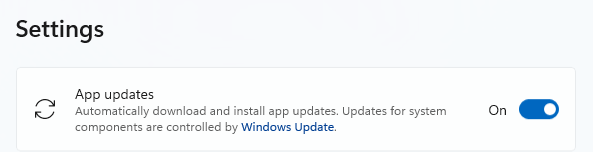
My WhatsApp was already up to date because I have automatic updates turned on. Here’s how to turn it on:
- Click the Start menu and search for Microsoft Store to open it
- Select Profile (your account picture) > Settings
- Make sure App updates is toggled to On
Scammers don’t need to hack you. They just need you to click once.
Malwarebytes Identity Theft Protection catches suspicious activity before it becomes a problem.