- The link looks safe when you hover, but the click says otherwise.
- 41 sites, one destination
- The software lures are even more convincing
- Even the signature advice can mislead you
- The lures include everyday software
- What the sites actually deliver
- Download Studio has relevant history
- Check what you actually downloaded
- How to protect yourself
- Indicators of Compromise (IOCs)

We identified a network of 41 websites impersonating popular games and Windows software, all designed to push visitors towards the same Download Studio installer.
The sites advertise everything from Counter-Strike, Half-Life, Fallout, Roblox, PUBG, and The Witcher to VLC, 7-Zip, Paint.NET, VMware, Total Commander, and Foxit PDF.
They go to surprising lengths to look convincing, using accurate product information, genuine developer resources, and even real download links.
But the link you see isn’t the link you follow.
One site promises Counter-Strike. Hover over its download button and the browser displays a genuine Steam Store address. Click the button, however, and Steam never opens.
The link looks safe when you hover, but the click says otherwise.
One of the oldest web-safety tips is to hover over a link before clicking it and inspect the destination shown by your browser. We even recommend doing this when checking emails for phishing links and scams.
But it isn’t foolproof. This campaign shows how a site can display a legitimate destination when you hover over a link, then send you somewhere completely different when you click it.
On the Counter-Strike page, the download button contains a legitimate Steam Store URL. That is the address the browser displays when you hover over it.
But JavaScript on the page handles the click separately. Instead of following the Steam link, the script cancels the expected navigation and sends the visitor through an affiliate redirect.
The legitimate Steam URL provides reassurance, but isn’t the actual destination.
The page goes further by linking to genuine Steam resources in its footer and presenting itself as a straightforward source of technical information. That veneer disappears the moment the download button is pressed.
41 sites, one destination
The Counter-Strike site isn’t an isolated example.
Across the 41 sites we identified, the branding and advertised downloads change, but visitors are ultimately pushed towards the same software: Download Studio.
One site, GTA 6 PLAY, claims to offer a PC download of Grand Theft Auto VI. It provides installation instructions, system requirements, and everything else you might expect from a real game-download page.

There is one rather significant problem: There is no announced PC version to download.
Rockstar currently lists Grand Theft Auto VI for PlayStation 5 and Xbox Series X|S, with a release date of November 19, 2026. It has not announced a PC release.
After visitors follow the download process, they’re shown instructions telling them to install Download Studio. Here’s an example of that screen from the Counter-Strike site:
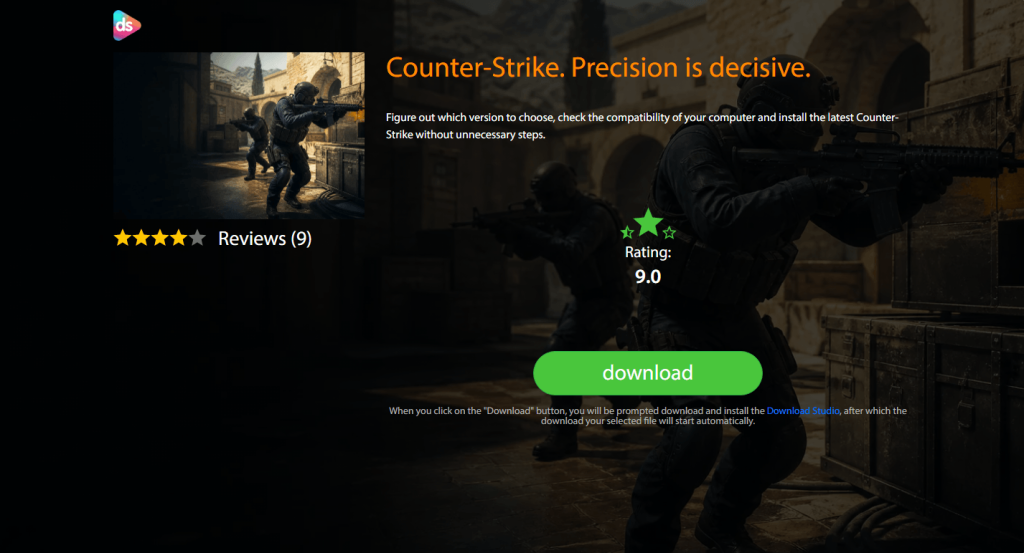
In other words, the advertised software is the lure. Installing Download Studio is the destination.
The software lures are even more convincing
The same technique appears on pages advertising ordinary Windows applications.
A fake VLC Media Player page, for example, places a genuine VideoLAN download address inside its download button. It also identifies VideoLAN’s servers as the source of the file.
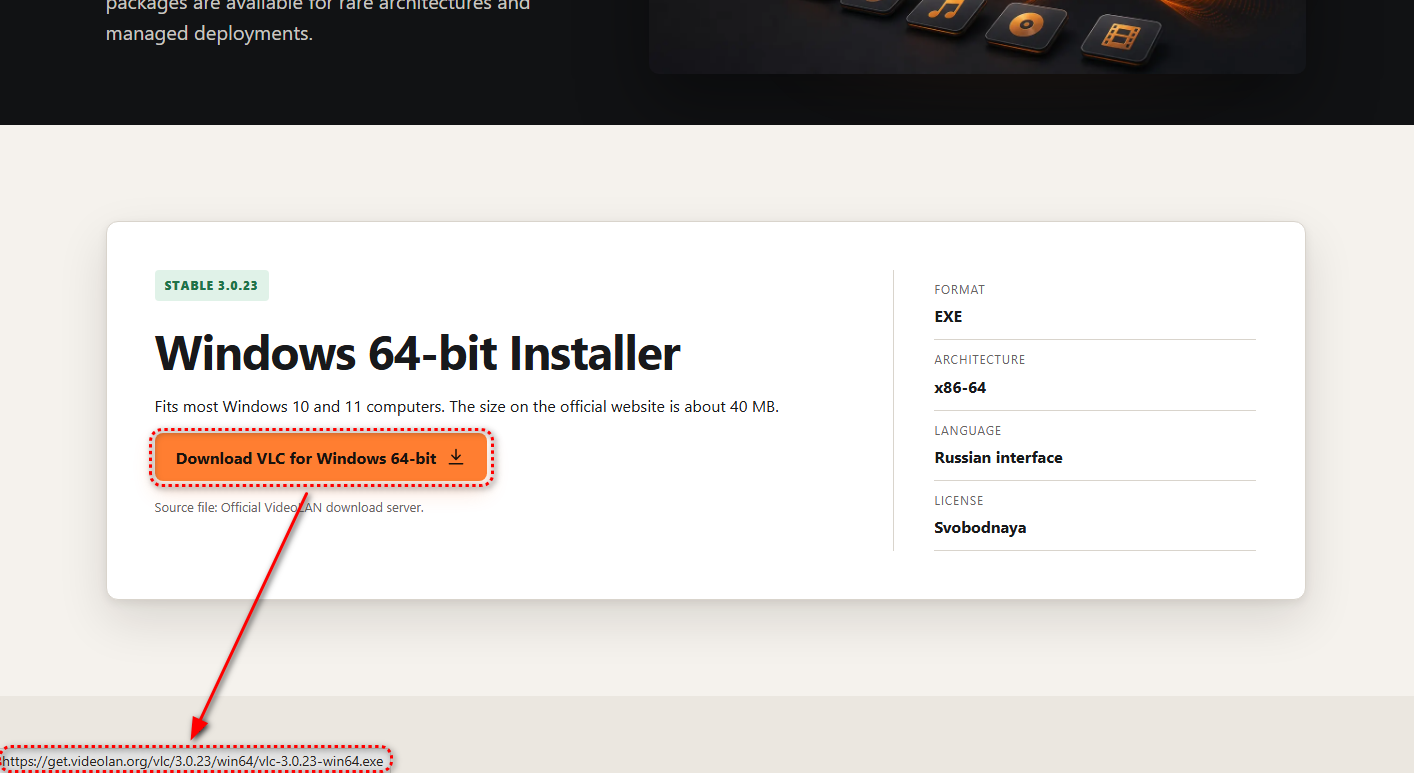
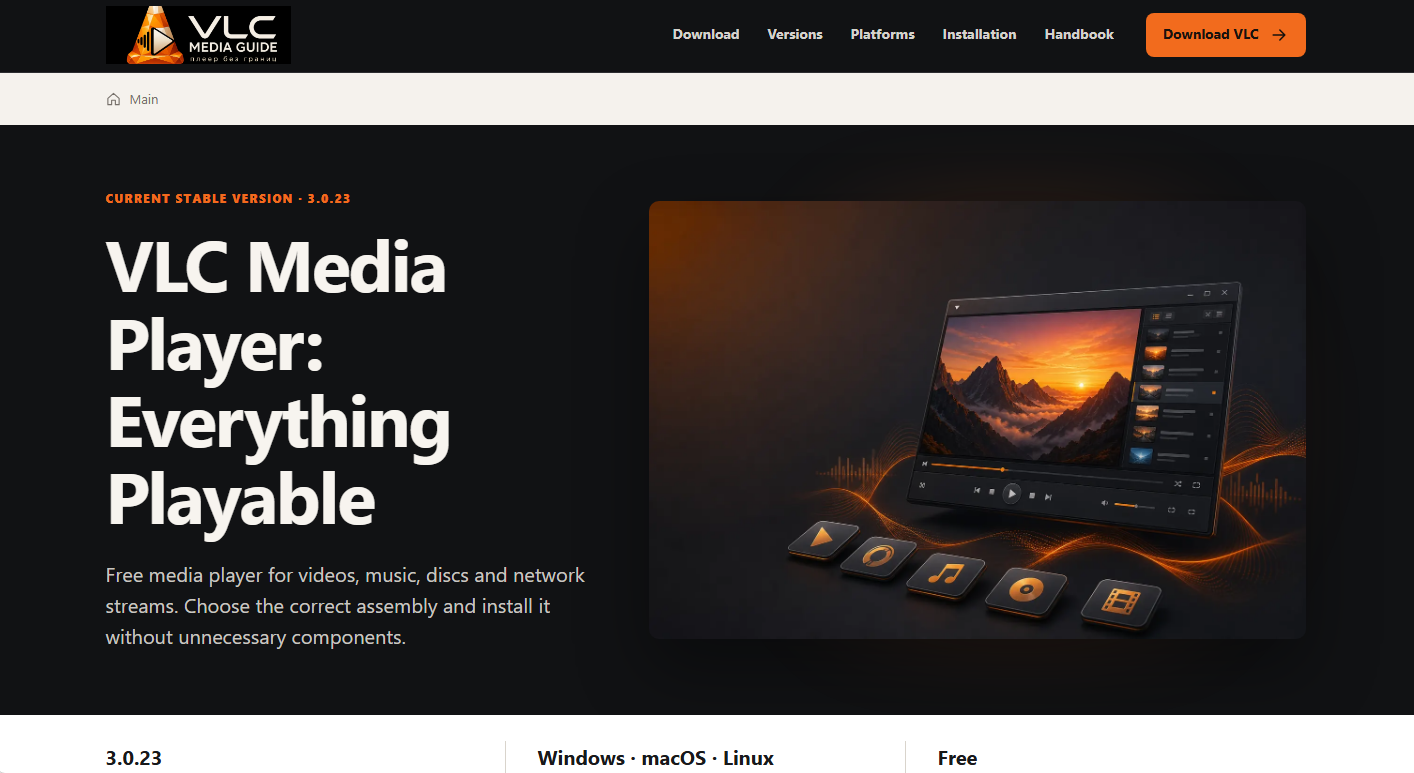
At the time of our research, VLC 3.0.23 was VideoLAN’s current release.
So the information shown to the visitor can be completely accurate. The link can be real. The version can be real. The developer can be correctly identified.
Then the click handler overrides all of it. Instead of allowing the browser to retrieve VLC from VideoLAN, the page sends the visitor toward Download Studio.
Even the signature advice can mislead you
The VLC lure also recommends checking the installer’s digital signature before running it.
A digital signature allows Windows to verify who signed a piece of software and whether the signed file has been changed since it was signed.
To check one, right-click the downloaded file, select Properties, then open the Digital Signatures tab. You can select the signature and click Details to see whether Windows considers it valid and who signed it.
Normally, that’s a useful check. But the Download Studio installer passes it.
The sample we examined is validly signed by Grand Media, TOV. So you could follow the page’s advice, see that Windows considers the signature valid, and still have downloaded something completely different from what you intended.
That’s because a valid signature tells you who signed a file and whether the signed content has been altered. It doesn’t tell you that you’ve downloaded the program you intended to.
Microsoft’s own Authenticode documentation makes the same distinction. Code signing provides information about the publisher and integrity of a file. It does not guarantee that signed software is trustworthy.
The lures include everyday software
This campaign isn’t limited to people looking for unreleased games.
VLC, 7-Zip, Paint.NET, and AIMP are legitimate applications people routinely download. Someone searching for one of them is doing nothing unusual.
Other lures target security, backup, and recovery products, including Avast, Acronis, and Recuva.
Someone looking for everyday software, or even software to protect or recover their computer, can be pushed into installing a program they never asked for.
What the sites actually deliver
The sample delivered during our research is a roughly 73 MB Windows installer for Download Studio.
It is signed by Grand Media, TOV, and the signature validates successfully. Our analysis found Download Studio installing and launching its own interface and torrent components. The program registers torrent and magnet associations, and its installer includes an option to make Download Studio the default torrent client.
The installation also enables its automatic updater.
Importantly, our analysis did not establish that Download Studio itself is malware. What this campaign clearly demonstrates is that people looking for one piece of software are being deceptively funneled into installing another.
The redirect includes affiliate tracking, suggesting there may be a commercial incentive.
Download Studio has relevant history
There is another reason Download Studio’s automatic updater caught our attention.
In 2020, researchers at Avast found that Download Studio’s automatic updates had been used to silently distribute FakeMBAM, a backdoor disguised as a Malwarebytes installer.
Avast monitored Download Studio’s updates and observed the fake Malwarebytes installers being delivered and executed in the same way as legitimate updates, silently in the background and without users knowingly initiating the installation.
The backdoor could download additional malware, and the persistent payloads Avast observed were cryptocurrency miners.
When the researchers contacted Download Studio’s developers, they said they had detected a security incident involving their continuous-integration server, investigated it, and added additional security measures. Avast said the developers did not answer follow-up questions about how many users were affected or whether they had been notified.
The research also named Grand Media, TOV among the companies associated with the applications involved. The Download Studio installer we examined in this campaign is also signed by Grand Media, TOV.
There is no evidence that the Download Studio installer in this campaign is malicious or that the same attack is happening again. But its automatic-update mechanism has previously been abused to distribute malware, making the fact that the current installer enables automatic updates relevant.
Check what you actually downloaded
There is another simple check that exposes the bait-and-switch used by these sites.
Right-click the downloaded executable, select Properties, and open the Details tab.
For the sample we examined, File description and Product name identify Download Studio, Original filename is DS-Setup.exe, and the copyright information names Grand Media.
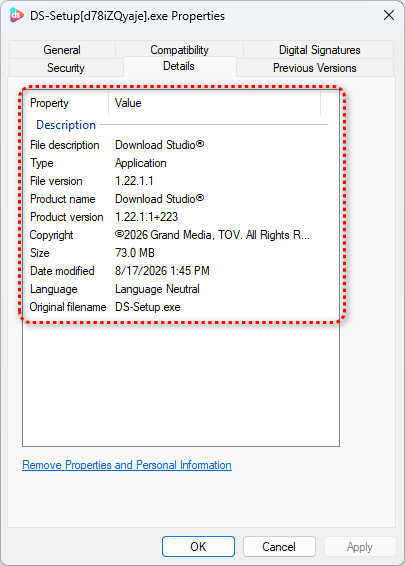
If you clicked a button labelled “Download VLC” and those fields say “Download Studio,” you have an immediate and obvious mismatch.
The Details tab isn’t proof that a file is safe, however. The software publisher controls that information, so a malicious program could use convincing product names and descriptions.
Instead, look at the whole download: Did it come from the developer or a trusted store? Is it signed by the publisher you expected? And does the file identify itself as the program you meant to download?
How to protect yourself
There are a few simple ways to avoid getting caught by this kind of download bait-and-switch:
- Get software directly from the developer’s website or a trusted app store. For games, use a legitimate store such as Steam or the publisher’s own store.
- Don’t rely on hovering over a link alone. As this campaign shows, a page can display a legitimate destination and then send you somewhere else when you click.
- A valid digital signature doesn’t mean you got the right program. Check Properties > Details and confirm the product name matches what you wanted.
- If a download page says you need to install a separate download manager first, close it.
- If a game hasn’t been released for your platform, a site claiming to offer an official download cannot have it.
- If Download Studio is already installed and you didn’t choose it, remove it through Settings > Apps and run a full virus scan.
- Malwarebytes Browser Guard blocks pages like these before they load, which stops the problem before you’ve downloaded anything.
Indicators of Compromise (IOCs)
File hashes (SHA-256)
9a3f6e69c12cb814c45862219ecb17e9ab7744877c9da1c49f3ea046437f8fca (DS-Setup.exe)
Network indicators
r.byteengineering[.]net
apis.downloadstud[.]io
downloadstudio[.]net
dstudio[.]app
getdownloadstudio[.]net
4kvideodownloader[.]ru
acronisportal[.]ru
cristalixmine[.]ru,
crystaldisk24[.]ru
csgodownload[.]ru
cupheadplay[.]ru
fallout24[.]ru
farcryplay[.]ru
faststoneportal[.]ru
formatf[.]ru
foxitpdf[.]ru
get7zip[.]ru
getaf[.]ru
getaimp[.]ru
getavast[.]ru
getbandicam[.]ru
getbluestacks[.]ru
getmovavi[.]ru
getrecuva[.]ru
getultraiso[.]ru
getvmware[.]ru
getvuescan[.]ru
gogetter24[.]ru
gta6-play[.]ru
halflife-play[.]ru
memuemulator[.]ru
paintdotnet[.]ru
pdfxchange[.]ru
poppyplaytimeplay[.]ru
pubgplay[.]ru
rdrplay[.]ru
regorganize[.]ru
roblox-play[.]ru
rust-play[.]ru
tcommander[.]ru
tf2play[.]ru
thewitcherplay[.]ru
uninstalltooll[.]ru
vlcmp[.]ru
windowsmp[.]ru
yandereplay[.]ru
Stop threats before they can do any harm.
Malwarebytes Browser Guard blocks phishing pages and malicious sites automatically. Free, one click to install. Add it to your browser →