Attackers are increasingly abusing Microsoft Teams to impersonate internal IT support and trick employees into handing over remote access and corporate credentials, even as traditional email phishing volumes tied to major platforms like Tycoon2FA decline.
Microsoft’s recent email threat landscape data for Q2 2026 shows a sharp downstream impact from the March disruption of the Tycoon2FA phishing-as-a-service platform.
Tycoon2FA-linked phishing volume dropping roughly 92% from late‑2025 baselines and QR-code and CAPTCHA-gated campaigns falling accordingly.
This has not translated into a reduction in overall social engineering, but rather a channel shift as threat actors increasingly pivot from saturated email defenses into collaboration platforms such as Microsoft Teams, where traffic often bypasses secure email gateways and inherits implicit trust from internal workflows.
At the same time, Microsoft Threat Intelligence and multiple independent researchers report steady growth in Teams‑based phishing and vishing.
Weekly malicious call attempts now approaching ten times mid‑2025 baselines, and attackers timing calls during weekday business hours to blend into normal IT activity.
In the most concerning pattern, adversaries use cross‑tenant Teams chat to pose as IT support or helpdesk staff, warning of imminent account lockouts or security incidents and urging the user to “verify” access or start a remote assistance session.
Rather than pushing obvious malware, attackers rely on legitimate remote support tools such as Quick Assist or similar remote desktop utilities; once a user approves the session, the actor can escalate from basic user privileges to domain admin in minutes and quietly exfiltrate data under the guise of routine IT maintenance.
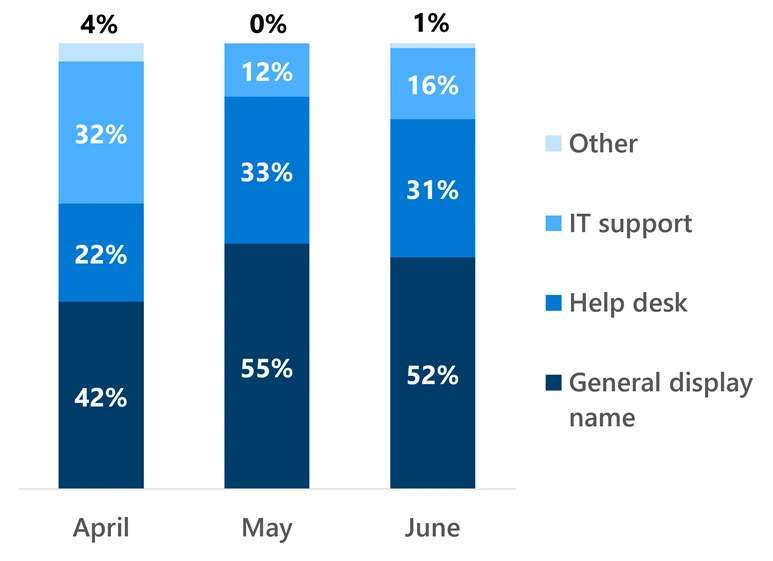
Display names and sender identities have evolved to appear less overtly “IT-branded,” with a growing share of campaigns adopting generic or SaaS‑style naming that aligns with broader “ClickFix”‑like update and scan narratives.
Microsoft Threat Intelligence observed continued growth in Teams-based social engineering, particularly voice phishing (vishing), with weekly malicious call attempts reaching nearly ten times the mid-2025 baseline by the end of the quarter.
This subtle shift helps adversaries bypass simple keyword‑based detections and encourages victims to focus on the urgency of the lockout pretext rather than the authenticity of the contact.
Microsoft Teams Abused
The Teams abuse trend sits against a backdrop of massive, but increasingly optimized, email‑based phishing activity: Microsoft detected around 7.6 billion email phishing threats across Q2 2026, the majority aligned to credential harvesting rather than traditional malware delivery.
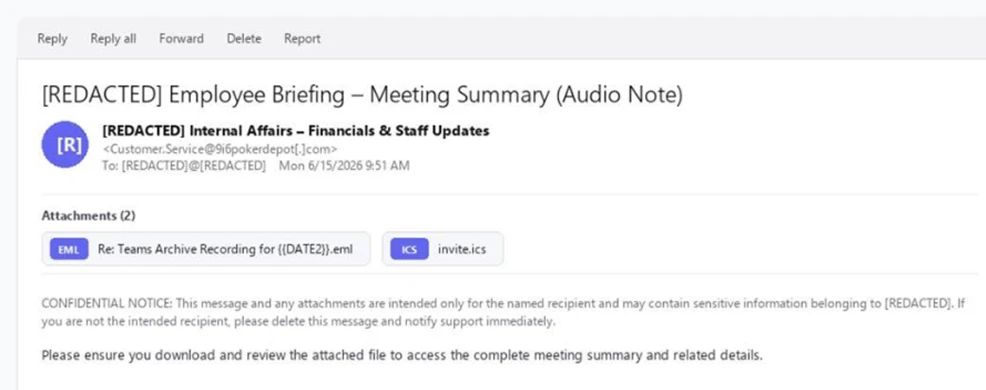
Notable multi‑stage campaigns referenced by Microsoft include code‑of‑conduct‑themed AiTM token compromise chains that combine nested EML files, calendar invitations.
Microsoft authentication redirects, illustrating how adversaries weaponize trusted services and OAuth flows to achieve silent credential or token theft with minimal user friction.
PDF attachments consistently ranked second at 24–31% of attacks. PDF volume was relatively stable in April before declining 41% in May and 4% in June.
Parallel reporting on Tycoon2FA’s decline shows CAPTCHA‑gated and QR‑code phishing volumes collapsing as operators struggle to rebuild infrastructure after being forced off Cloudflare and pushed toward .RU domains, leaving a gap that a single replacement service has not yet filled.
Microsoft Defender Research observed a phishing campaign targeting more than 107,000 users across nearly 19,000 organizations, almost exclusively in the United States.
As the email ecosystem becomes more hostile to large‑scale commodity phishing, moving social engineering into Teams gives attackers a fresher, less instrumented surface with highly contextual, one‑to‑one lures and interactive voice calls.
Defending against Teams‑based IT impersonation requires treating collaboration traffic with the same suspicion and control rigor traditionally reserved for email.
Security teams should tighten external access policies, restrict or harden remote‑support tooling like Quick Assist, and ensure users understand how legitimate IT will contact them, including clear rules for verifying any support request received via chat or call.
Microsoft and standards bodies now strongly recommend phishing‑resistant MFA for privileged roles, using methods such as FIDO2/WebAuthn security keys and built‑in platform authenticators, enforced via Conditional Access policies for admin accounts.
Combined with Defender SmartScreen, Safe Links/Safe Attachments, network protection, and automatic attack disruption across Microsoft 365, these controls help limit the blast radius when a user does approve a malicious remote session or is tricked into visiting a compromised resource during a Teams‑based social engineering attempt.
Indicators of compromise (IOCs)
| Indicator | Type | Description | First seen | Last seen |
| 9i6pokerdepot[.]com | Domain | Sending domain; DKIM-signed by the operator | 2026-06-15 | 2026-06-15 |
| Customer.Service[@]9i6pokerdepot[.]com | Email address | Campaign sender address | 2026-06-15 | 2026-06-15 |
| t90141296286.p.clickup-attachments[.]com | Domain | ClickUp attachment subdomain hosting the stage 2 BAT dropper | 2026-06-15 | 2026-06-15 |
| hxxps://t90141296286.p.clickup-attachments[.]com/t90141296286/fb39c3a9-3161-40ad-847b-0683e0409d6f/Financial_report.bat | URL | Stage 2 BAT dropper download URL | 2026-06-15 | 2026-06-15 |
| hxxps://pixeldrain[.]com/api/file/3v92oJiL | URL | Final installer payload download URL | 2026-06-15 | 2026-06-15 |
| Re: Teams Archive Recording for {{DATE2}}.eml | File name | Nested EML attachment template name; the literal {{DATE2}} indicates an unfilled per-recipient template token | 2026-06-15 | 2026-06-15 |
| Financial_report.bat | File name | Stage 2 dropper batch file delivered from the OAuth error redirect | 2026-06-15 | 2026-06-15 |
Note: IP addresses and domains are intentionally defanged (e.g., [.]) to prevent accidental resolution or hyperlinking. Re-fang only within controlled threat intelligence platforms such as MISP, VirusTotal, or your SIEM.
What Features Should AI SOC Have in 2026? A Complete Checklist : Download the AI SOC Features Checklist