A highly sophisticated phishing campaign leveraging code-of-conduct-themed lures has targeted more than 35,000 users across 13,000 organizations.
The multi-stage attack, observed between April 14 and April 16, 2026, highlights how threat actors are refining social engineering, delivery infrastructure, and authentication abuse to bypass modern defenses.
The campaign primarily impacted users in the United States, accounting for 92% of victims, but also extended across 26 countries.
Industries most affected included healthcare (19%), financial services (18%), professional services (11%), and technology sectors (11%), indicating a broad, non-targeted approach.
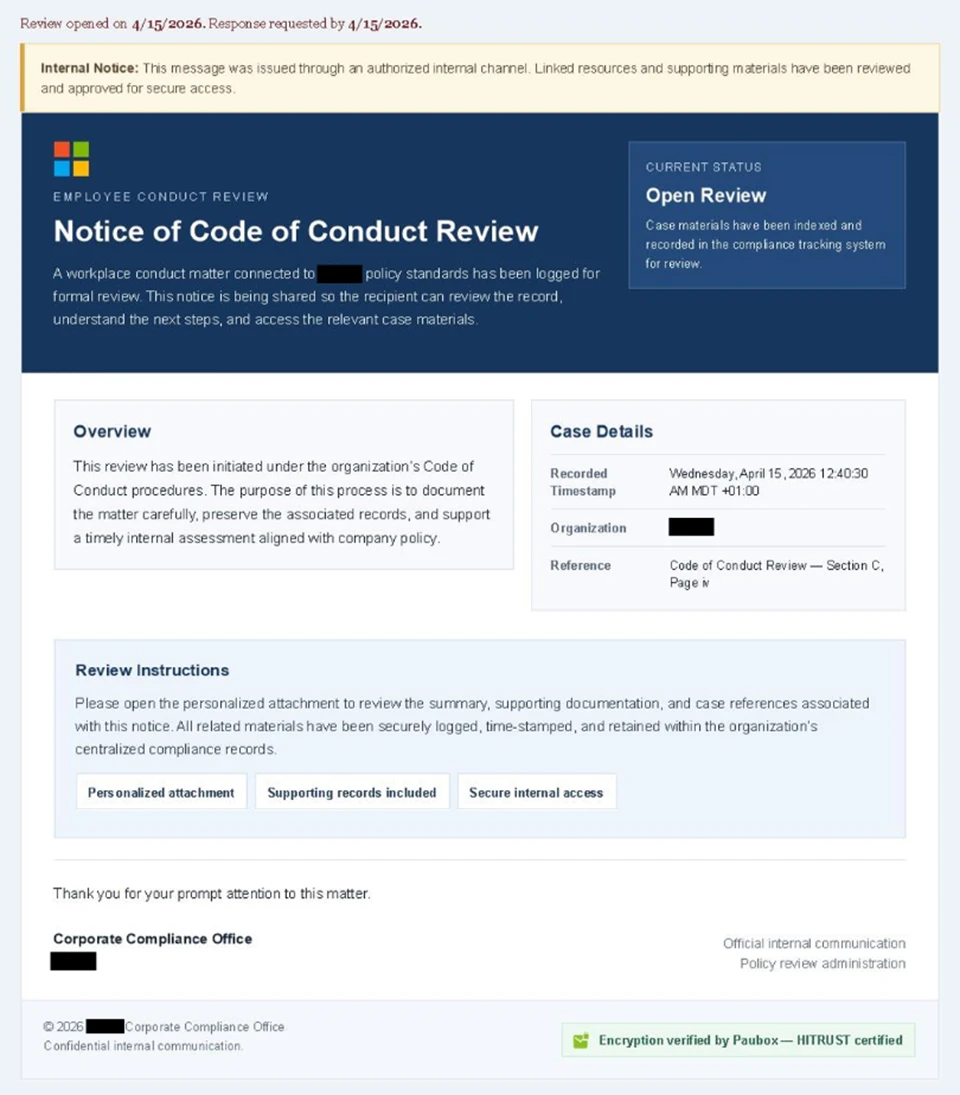
Attackers used convincing internal communication themes, posing as compliance or regulatory notices.
Emails carried display names such as “Internal Regulatory COC” and “Workforce Communications,” with subject lines warning of “non-compliance case logs” or “conduct policy violations.”
The messages were carefully crafted using enterprise-style HTML templates and included reassuring statements such as being “issued through an authorized internal channel.”
A large-scale credential theft campaign observed by Microsoft Defender Research exemplifies this trend, using code of conduct-themed lures.
A green banner referencing Paubox encryption further reinforced legitimacy, especially for organizations familiar with HIPAA-compliant communications.
Each email included a PDF attachment with names like “Disciplinary Action – Employee Device Handling Case.pdf.” The document urged recipients to click a “Review Case Materials” link, initiating the attack chain.
Attack Flow with CAPTCHA Evasion
Clicking the link redirected users to attacker-controlled domains hosted on infrastructure likely backed by cloud-based virtual machines. The attack flow included multiple stages designed to evade detection and increase user trust.
Victims first encountered a Cloudflare CAPTCHA, which acted as a filtering mechanism to block automated security analysis tools.
After passing the CAPTCHA, users were taken to an intermediate page claiming the documents were encrypted and required authentication.
A second CAPTCHA challenge followed, further reinforcing legitimacy while delaying detection. Users were then shown a message confirming “verification success” before being redirected to the final stage.
The final stage presented a Microsoft sign-in page as part of an adversary-in-the-middle (AiTM) attack. Unlike traditional phishing, which steals credentials, AiTM attacks intercept authentication sessions in real time.
After clicking the provided “Review & Sign” button, users were presented with a sign-in prompt requesting their email address.
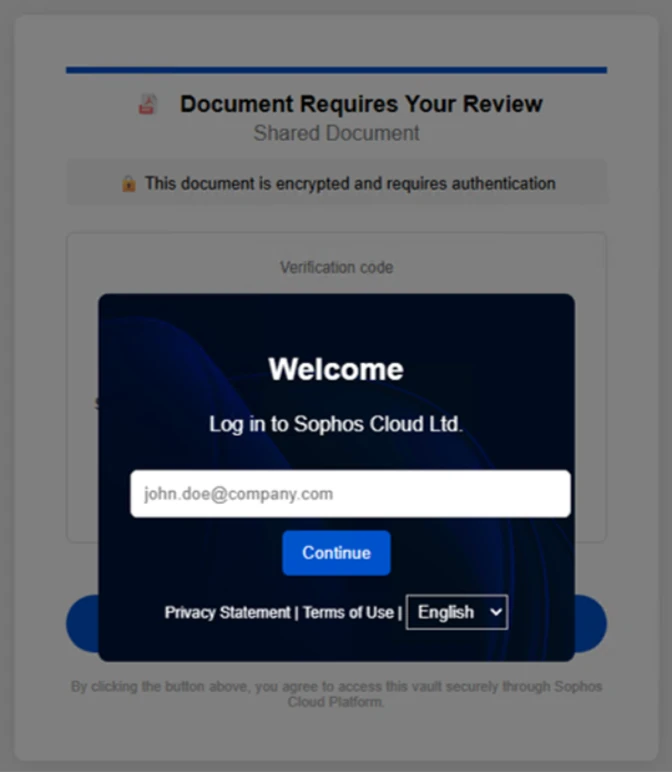
This allows attackers to capture session tokens, effectively bypassing standard multifactor authentication (MFA) protections.
As a result, attackers can gain immediate access to user accounts without needing additional verification.
The campaign also dynamically adjusted behavior based on whether the victim used a mobile or desktop device, demonstrating a higher level of technical sophistication.
Use of Legitimate Services
Notably, the phishing emails were distributed via legitimate email delivery services using attacker-controlled domains. This approach enabled fully authenticated messages, helping them evade traditional email security filters.
Microsoft recommends several defenses to mitigate such threats:
- Deploy advanced email security solutions like Microsoft Defender for Office 365.
- Enable Safe Links, Safe Attachments, and Zero-hour auto purge (ZAP).
- Use phishing-resistant MFA methods such as FIDO keys or passwordless authentication.
- Implement conditional access policies to protect privileged accounts.
- Enable network protection and SmartScreen-supported browsers.
- Conduct regular phishing awareness training and simulations.
Security teams are also advised to monitor for anomalous sign-ins, unusual token activity, and impossible travel events using tools like Microsoft Entra ID Protection and Defender for Cloud Apps.
Follow us on Google News, LinkedIn, and X to Get Instant Updates and Set GBH as a Preferred Source in Google.