- The Challenge: Traditional Scanning Focuses on Known Locations
- Introducing Deep Scan
- Key Capabilities and Operational Controls
- Expanded Coverage
- Customizable Scope
- Performance and Scheduling Controls
- Enhanced Detection Insights with Deep Scan Results
- Initial Technology Coverage
- Visualizing and Reporting Deep Scan Findings
- View Findings Directly in VMDR
- Export Findings for Analysis
- Build Dashboards for Ongoing Visibility
- Generate Detailed Reports
- Coming Soon: Support for API Integration
- Prioritize What Matters Most with TruRisk
- Flexible Remediation with TruRisk Eliminate
- How Deep Scan Complements Software Composition Analysis (SwCA)
- Maximum Visibility Requires a Layered Approach
- Platform Availability
- Strengthen Detection Coverage Across Your Environment
- Get the Capability

Security teams estimate that a significant percentage of enterprise software is installed outside standard system directories or package-managed locations, creating persistent visibility gaps for traditional vulnerability-scanning methods. As environments become more decentralized, with applications spread across different drives, custom installation locations, and unmanaged folders, organizations require more advanced inspection capabilities to maintain clear and accurate visibility into their risks.
The Challenge: Traditional Scanning Focuses on Known Locations
Traditional vulnerability scanning methods, whether network- or agent-based, primarily rely on package manager information, registered software inventories, and common installation directories. While highly effective for standardized deployments, this methodology introduces blind spots when software:
- Is installed outside default system paths
- Resides on secondary drives
- Is deployed using custom installation processes
- Is not registered with operating system software inventories
While techniques such as reviewing running processes or using operating system utilities like `find` and `locate` can help identify software installed in non-standard directories. These methods alone still fall short. They can reveal where binaries exist, but they do not always provide complete vulnerability context, consistent coverage across all locations, or continuous monitoring at scale. As a result, organizations relying solely on these approaches may still experience visibility gaps.
Introducing Deep Scan
Deep Scan is an advanced vulnerability detection capability designed to extend visibility beyond traditional discovery methods by scanning binaries and executable software located outside standard installation locations. By enabling directory-level inspection across multiple drives, Deep Scan helps organizations identify vulnerabilities that would otherwise remain hidden from conventional scanning techniques.
Join us to see how Deep Scan powers TruRisk driven prioritization and remediation.
With Deep Scan, organizations can:
- Detect vulnerabilities in software installed outside package-managed environments
- Scan configurable directories and multiple local drives
- Include or exclude specific system locations to tailor scan coverage
- Balance visibility and performance through configurable resource controls
This extended coverage helps ensure that decentralized installations and non-standard deployment practices do not create unmanaged security exposure.
Key Capabilities and Operational Controls
Deep Scan is designed to provide both expanded visibility and operational flexibility, enabling organizations to deploy deeper inspection without introducing unnecessary system impact.
Expanded Coverage
- Identifies vulnerabilities in software installed outside standard directories
- Extends detection across multiple local drives
- Improves visibility into decentralized and non-standard installations
Customizable Scope
- Define directory-level inclusion and exclusion rules
- Target high-risk application directories while minimizing unnecessary scanning
- Align scan coverage with operational and compliance requirements
Performance and Scheduling Controls
- Configure scan intervals and randomized delays to reduce simultaneous scanning load
- Set scan timeouts to control long-running scans
- Define maximum CPU utilization thresholds to minimize performance impact
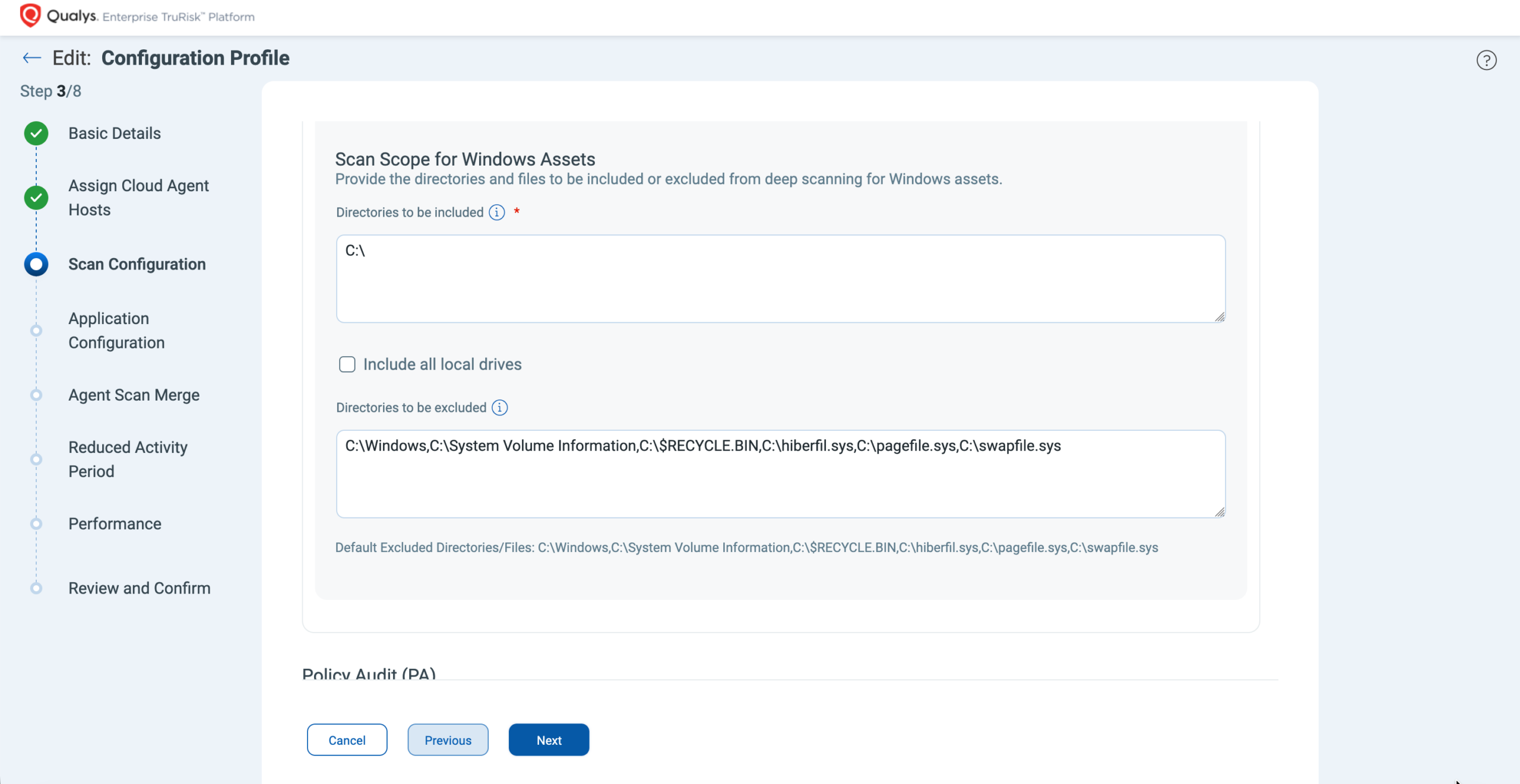
These controls allow security teams to deploy deeper inspection strategically while maintaining predictable system performance.
Enhanced Detection Insights with Deep Scan Results
Deep Scan findings are presented alongside traditional vulnerability detection results within the standard vulnerability details view, ensuring a consistent investigation workflow for security teams. In addition to the traditional detection information, Deep Scan introduces a dedicated Deep Scan Result section that provides enhanced context specific to non-standard software locations.
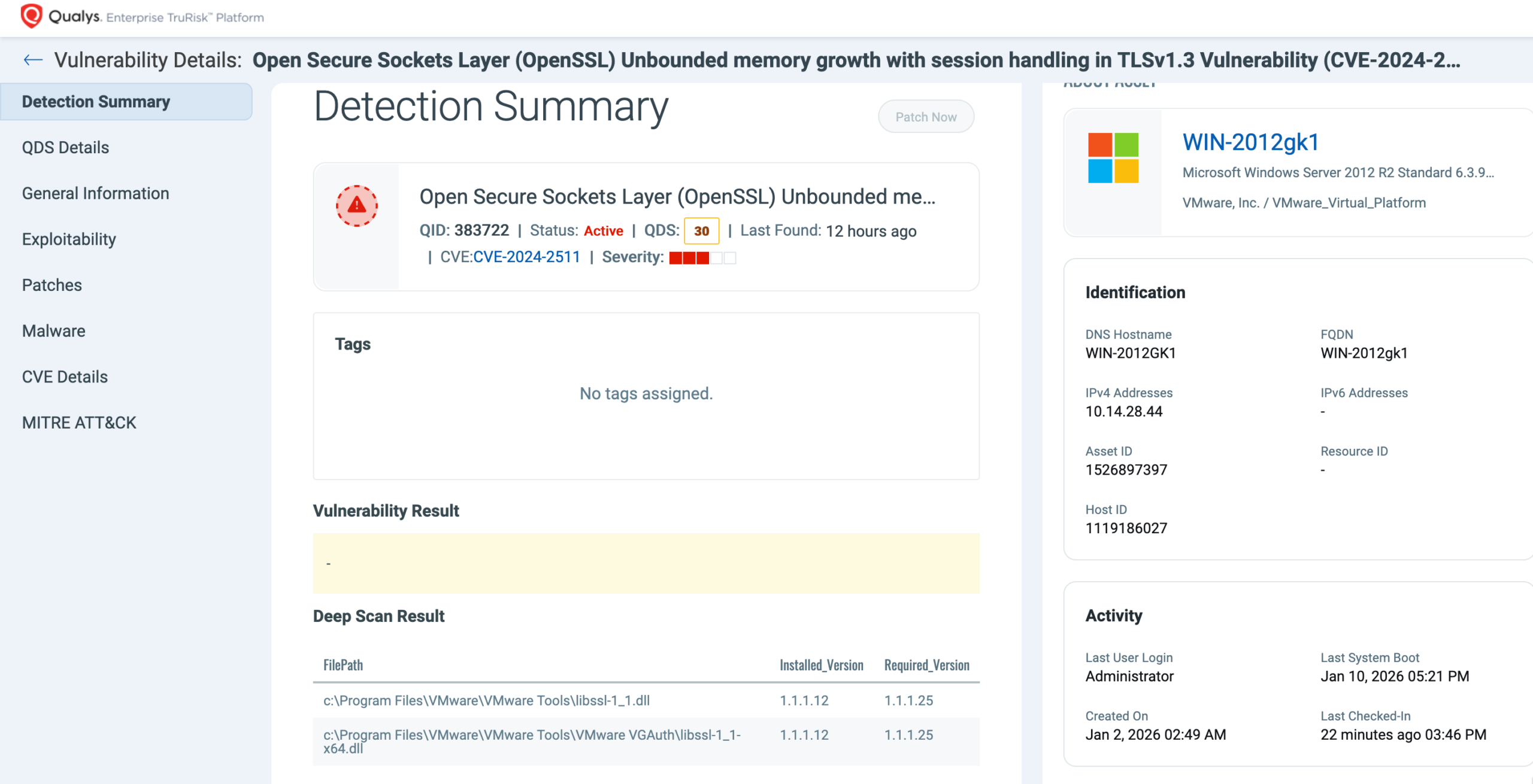
This section includes the full file path where the binary was discovered, the installed software version, and the recommended fixed version required for remediation. Customers can also leverage the Detection Sources capability to clearly identify which vulnerabilities were discovered by Deep Scan versus those detected through traditional scanning methods, enabling more precise analysis of coverage improvements and remediation prioritization. By pinpointing the exact location of vulnerable binaries, especially those placed outside standard directories, Deep Scan allows teams to validate issues faster, take more focused remediation actions, and improve coordination between security and IT operations.

Initial Technology Coverage
Deep Scan launches with strong initial coverage across widely used technologies, including OpenSSL, Notepad++, MongoDB, XnView, Devolutions Server, PHP, Node.js, Opera Browser, and cURL. For every supported technology, vulnerability detection covers all known CVEs going back to the year 2000, providing more than 25 years of historical vulnerability coverage. This comprehensive baseline ensures that both legacy and modern deployments can be accurately assessed from day one, while our research teams continue to expand technology coverage to support additional software ecosystems in future releases.
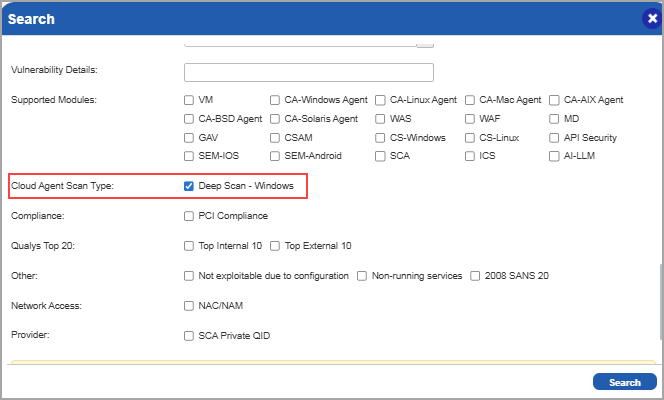
To further support visibility and reporting, customers can easily search and filter Deep Scan–specific QIDs within the KnowledgeBase and Search Lists. A new “Deep Scan – Windows” option has been added under the Cloud Agent Scan Type filter, allowing teams to quickly identify and manage all QIDs associated with Deep Scan detections.
Visualizing and Reporting Deep Scan Findings
Deep Scan results are seamlessly integrated into workflows, allowing security teams to easily investigate, analyze, and share findings using familiar tools.
View Findings Directly in VMDR
Deep Scan vulnerabilities can be viewed directly from the Vulnerabilities tab in VMDR. Customers can quickly filter the results using the QQL query:
vulnerabilities.detectionSource.name:Deep Scan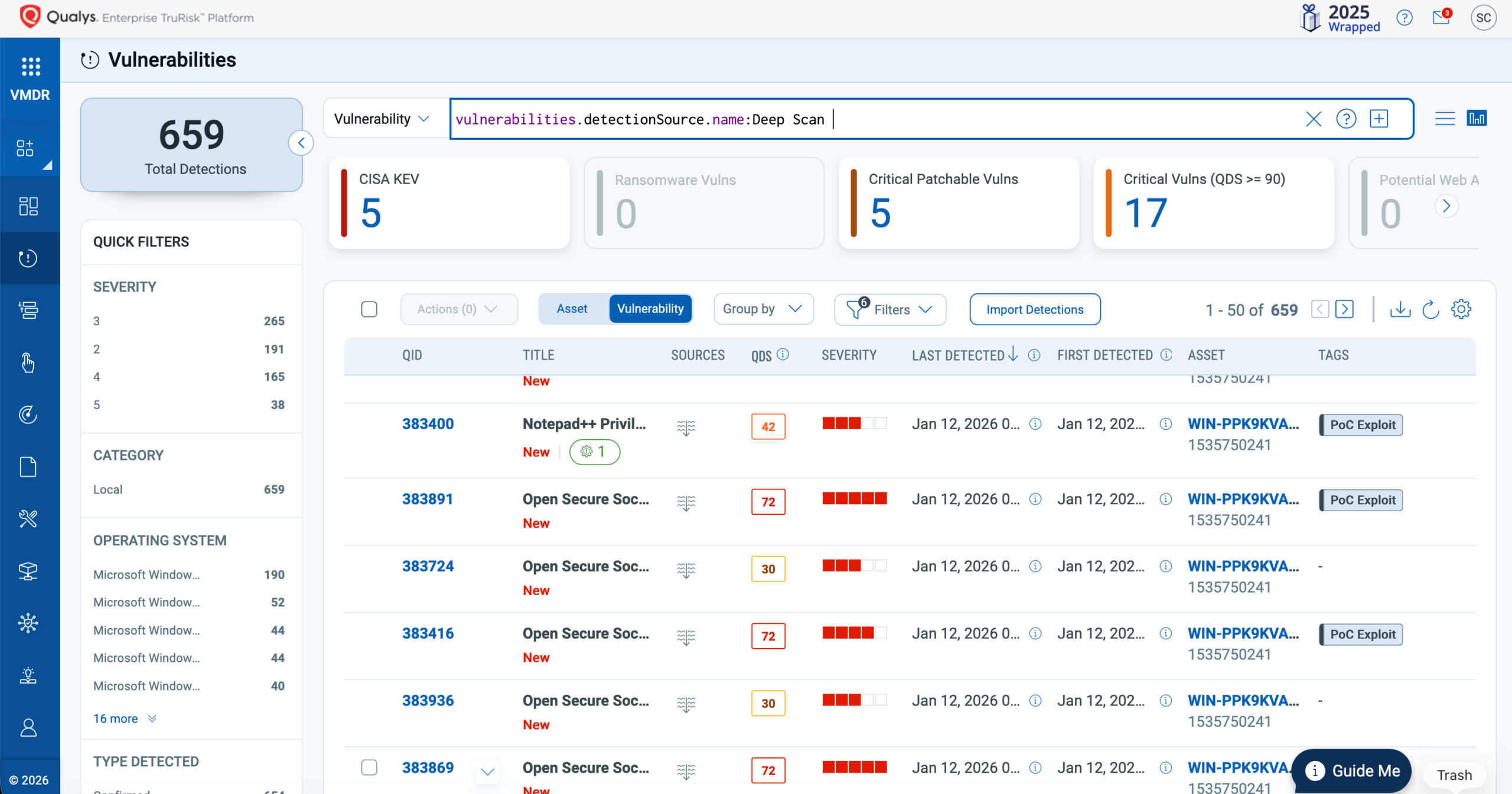
This enables teams to quickly isolate vulnerabilities identified by Deep Scan and compare them with results from traditional scanning methods.
Export Findings for Analysis
Deep Scan results can be exported directly from the Vulnerabilities tab. When downloading these findings, customers can choose to include the Deep Scan results in CSV format.
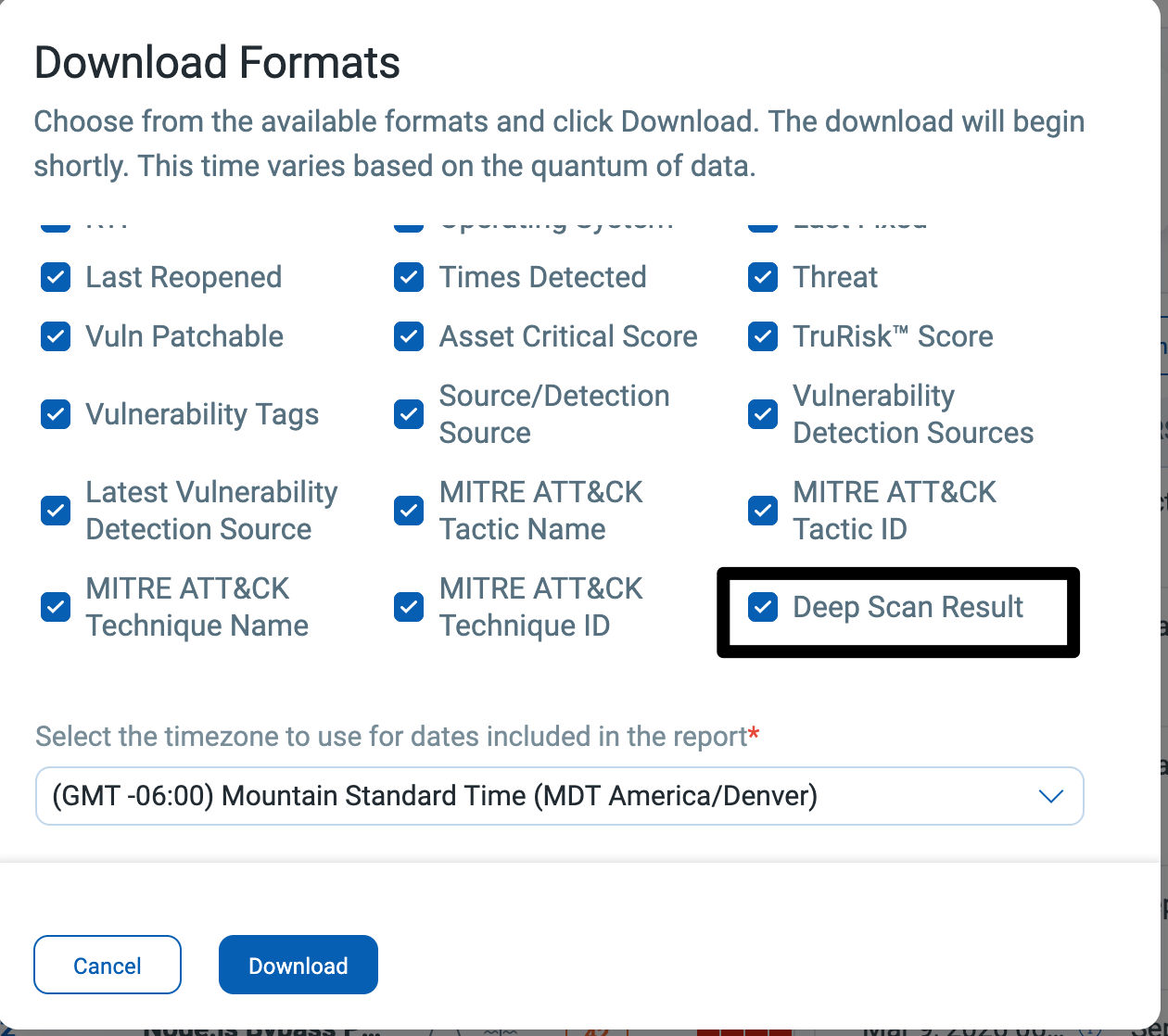
This format provides detailed information, such as the binary location and version details, which can be useful for further analysis or for integrating with external workflows.
Build Dashboards for Ongoing Visibility
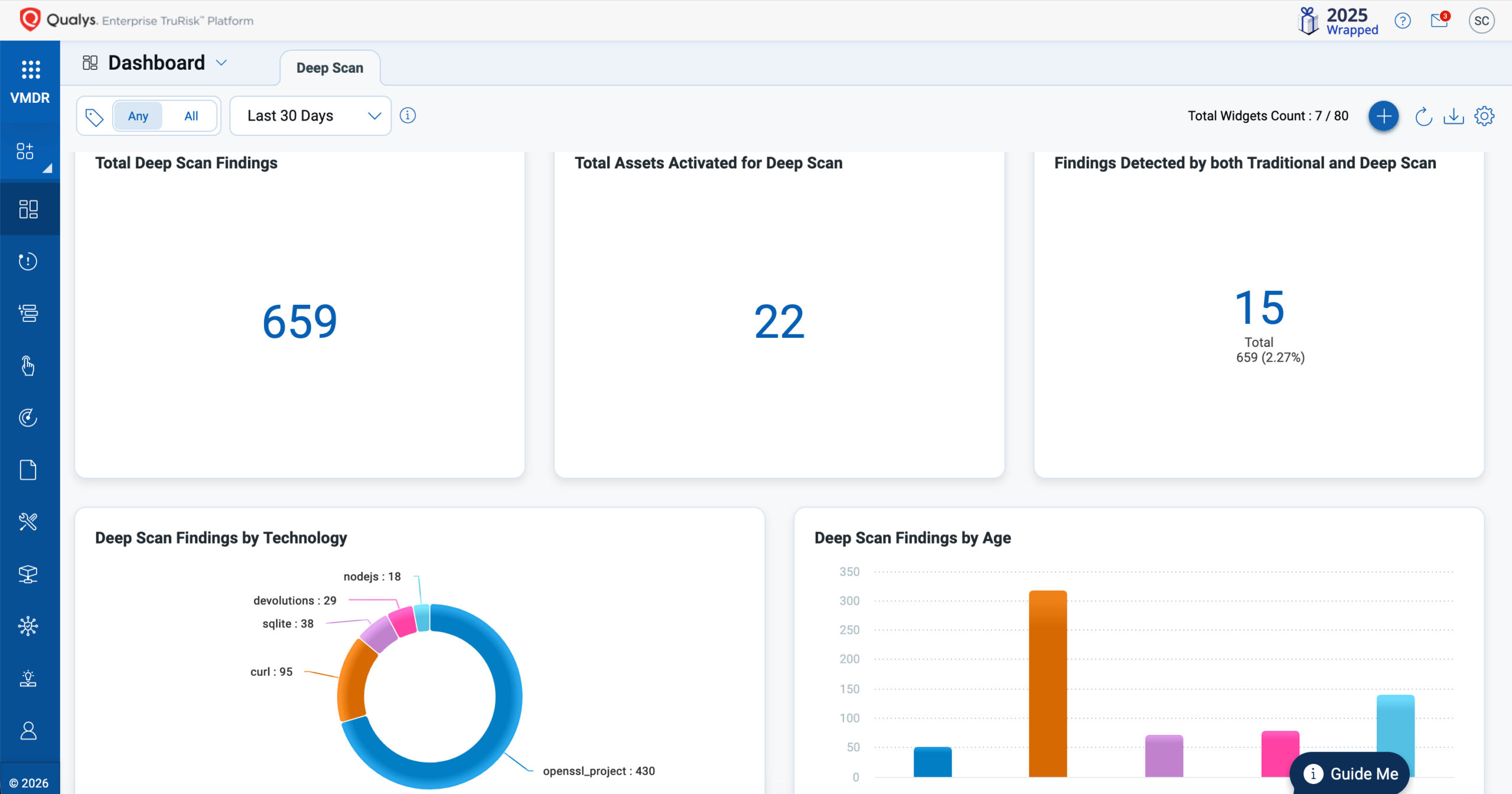
Customers can create dashboards to visualize Deep Scan findings and track trends in their environment. A pre-built dashboard template is available for download, which can be imported into your subscription. This feature accelerates adoption and provides immediate visibility into Deep Scan coverage and findings.
Generate Detailed Reports
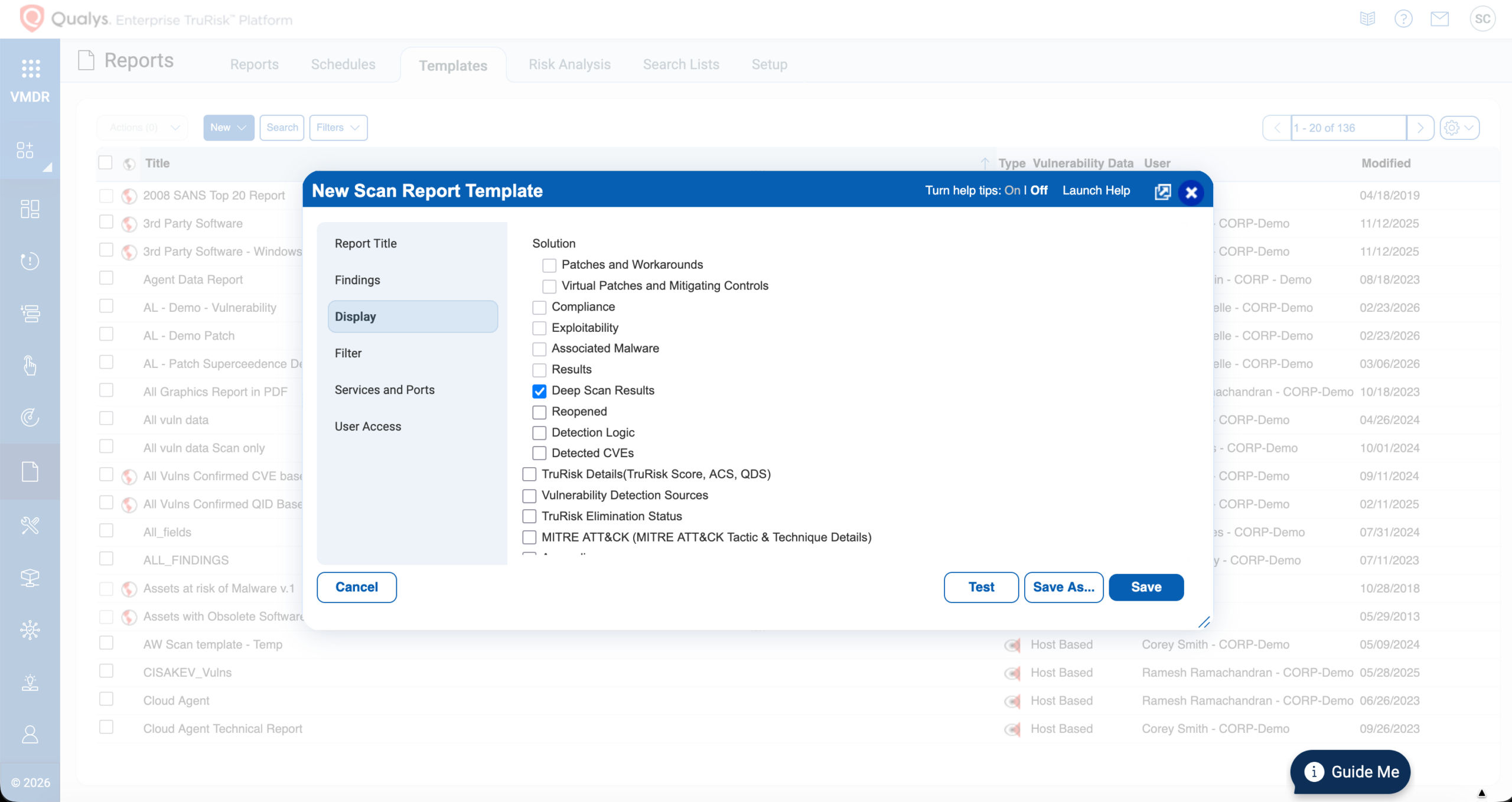
Deep Scan findings can also be included in the Vulnerability reports. By choosing “Deep Scan Results” in the Display section of the Scan Report Template, customers can generate reports in various formats. These reports can support operational teams, leadership reporting, or compliance requirements.
Coming Soon: Support for API Integration
To enhance automation and integration, the next release will introduce API support for Deep Scan findings. This will enable customers to access and integrate Deep Scan data programmatically into their existing security workflows and reporting pipelines.
Prioritize What Matters Most with TruRisk
Identifying vulnerabilities is only the first step; understanding which vulnerabilities to remediate first is critical for reducing real-world risk. Deep Scan findings are fully integrated into the TruRisk prioritization framework, enabling organizations to evaluate newly discovered vulnerabilities through contextual risk analysis rather than solely by severity.
TruRisk combines vulnerability characteristics, exploit intelligence, asset criticality, and environmental context to produce a prioritized view of remediation actions.
Importantly, vulnerabilities discovered in non-standard installation locations can often represent greater operational risk than the same vulnerability found in standard, package-managed software. Software installed outside normal inventory processes is often unmanaged, patched less often, and sometimes completely unknown to IT or security teams, making these vulnerabilities more likely to remain unnoticed and unaddressed. By incorporating Deep Scan findings into TruRisk prioritization, organizations can quickly identify and remediate these higher-risk, hard-to-detect vulnerabilities, ensuring that expanded visibility translates directly into faster and more effective risk reduction.
Flexible Remediation with TruRisk Eliminate
Once vulnerabilities are identified and prioritized, TruRisk Eliminate delivers a flexible remediation buffet that allows organizations to choose the most appropriate response based on operational needs and risk tolerance. Security and IT teams can select from multiple remediation actions, including applying patches, implementing mitigating controls, isolating affected hosts, or completely removing vulnerable binaries from the system when software is unauthorized or no longer required. This flexible set of remediation options ensures that vulnerabilities found through Deep Scan can be resolved quickly and effectively, even in complex setups where traditional patching may not always be practical
How Deep Scan Complements Software Composition Analysis (SwCA)
Deep Scan and Software Composition Analysis (SwCA) address different visibility layers and together provide stronger coverage across modern application environments.
| Capability | Traditional Scanning | Deep Scan | SwCA |
| Detects vulnerabilities in package-managed / standard installed software | Yes | Yes | No |
| Detects vulnerabilities in installed software outside standard locations | Limited | Yes | No |
| Identifies vulnerabilities in open-source libraries and dependencies | No | No | Yes |
| Directory-based inspection across drives | Limited | Yes | Yes |
| Dependency-level component risk analysis | No | No | Yes |
While SwCA focuses on analyzing open-source components within application builds, Deep Scan extends vulnerability detection to installed software in non-standard locations.

Maximum Visibility Requires a Layered Approach
No single scanning method can provide complete visibility across today’s diverse IT environments. Traditional vulnerability scanning, Deep Scan, and Software Composition Analysis (SwCA) each address different visibility layers:
- Traditional scanning identifies vulnerabilities in package-managed and standard installed software
- Deep Scan detects vulnerabilities in software located outside standard installation paths
- SwCA identifies vulnerabilities in open-source libraries and application dependencies
When used together, these approaches provide maximum vulnerability visibility across operating systems, installed applications, and application dependencies, significantly reducing detection blind spots and improving the accuracy of risk prioritization.
Platform Availability
Deep Scan is currently supported for Windows assets running Cloud Agent for Windows version 6.2 or later and is included for all VMDR customers. Support for Linux assets is planned for a future release.
Strengthen Detection Coverage Across Your Environment
As software deployment models become more decentralized, relying solely on traditional discovery methods can leave critical gaps in vulnerability visibility. Deep Scan extends detection coverage beyond standard installation locations, helping organizations identify previously unseen vulnerabilities and improve risk accuracy.
Get the Capability
Don’t let hidden vulnerabilities go undetected. Enable Deep Scan to gain deeper visibility, close detection gaps, and strengthen your security posture. Contact Qualys Support to get started.