McAfee researchers are warning cryptocurrency users worldwide about a malicious browser extension that hides behind the name “Google Notes” while changing wallet addresses during transactions. In cybersecurity terms, this is clipper malware, more specifically a crypto clipper delivered through a malicious browser extension.
Published on June 30, 2026, and shared with Hackread.com, the McAfee Advanced Threat Research report says the campaign uses unsigned installers to place a malicious extension inside Chromium-based browsers, including Google Chrome, Brave, and Microsoft Edge.
The extension presents itself as a simple note-taking tool, but its main purpose is to watch for copied cryptocurrency wallet addresses and replace them before the user pastes them into a payment field.
Thereafter, anyone sending crypto by copy and paste could miss the swap unless they check the address closely. Since most cryptocurrency transfers cannot be reversed, one successful swap can mean permanent loss.
Behind the fake notes app, the extension asks for access that does not match its claimed purpose. McAfee found requests for access to all websites, browsing history, and the clipboard, permissions that would be unusual for a basic note-taking extension.
The installation method is also worth UK users checking. According to McAfee’s technical details, the malware does not depend on a normal browser store install. It changes browser preference files directly so the extension can appear trusted and load without the usual approval process.
Although updated Chrome and Edge versions may still require developer mode, older Chromium-based browsers remain more exposed, and attackers can try to talk users into enabling developer mode.
Once active, the extension checks copied text for wallet formats linked to major cryptocurrencies. McAfee said Bitcoin, Ethereum, Bitcoin Cash, Ripple and Dash were among the currencies where wallet address fraud was seen. The researchers also found that submitted addresses can be matched to unique attacker wallets, making simple wallet blocklists less reliable.
The operators also built in a remote control method that avoids placing a fixed command server directly in the malware. McAfee said the extension can query a public blockchain smart contract to retrieve its active backend domain, with domains including devops-offensive(.)cc and Zebregts(.)com recorded during analysis.
McAfee telemetry showed a global infection footprint, with India seeing a much higher concentration of affected users than other regions. The company said the spread suggests an opportunistic campaign against consumer cryptocurrency users, not an India-specific operation.
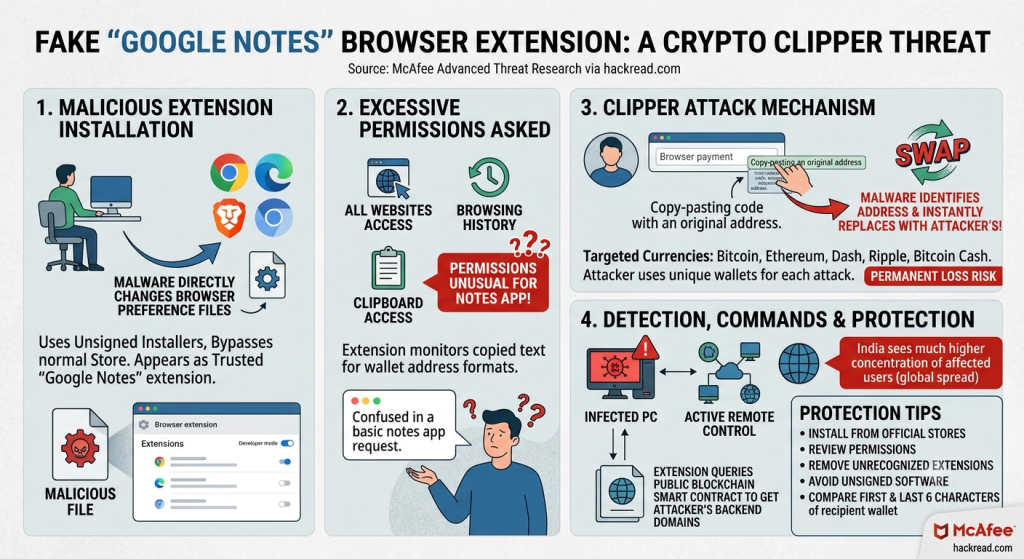
If you deal with crypto and use a Chromium-based browser, compare the first and last six characters of the recipient wallet address with the source, preferably on another device. This needs to be done before approving a crypto transfer.
McAfee also advises installing extensions only from official browser stores, removing any extension the user does not remember installing, reviewing permissions, avoiding unsigned software downloads, and keeping device protection active.
(Photo by Mariia Shalabaieva on Unsplash)