Hackers are exploiting CVE-2026-84869 in ConnectWise ScreenConnect to execute malicious files on technicians’ workstations and deploy attacker-controlled remote access clients.
Huntress confirmed a November 12 compromise in which a guest-pushed batch file notified a Telegram bot, downloaded an installer, and established a rogue ScreenConnect connection within approximately nine seconds.
A technician only needs to join a malicious or infiltrated session for a vulnerable host client to process an unauthorized file-execution request without displaying a confirmation prompt.
ConnectWise disclosed the vulnerability on September 8, 2026, assigning it a CVSS score of 9.9.
Its security advisory identifies missing authorization and improper privilege management affecting clients before version 26.6.5.
The flaw permits unauthorized file transfers and execution through active sessions; ScreenConnect servers themselves are not affected
Huntress observed the November 12 attack after an MSP technician joined a blank-named Access session. The host client executed update_224ac089.bat from its Documents-based temporary directory.
The script relaunched covertly through PowerShell and WScript.Shell, decoded Telegram notification credentials, queried Windows version information, checked for an existing rogue client, and tested administrative privileges.
It then downloaded WindowsUpdate.msi from masterdarky[.]com. An administrative MSI extraction placed the payload beneath %LOCALAPPDATA%wclient_224ac089 without a conventional installation record.
After enabling the Secondary Logon service, the script launched WindowsUpdate.WindowsClient.exe, a rebranded ScreenConnect client connecting to the attacker’s relay on port 8041.
The Windows Update branding disguised an unauthorized remote-access channel on a workstation that may have held customer credentials, management consoles, and privileged sessions.
Huntress observed that, the campaign targets managed service providers through their technicians rather than directly compromising ScreenConnect servers.
ScreenConnect Vulnerability Abused
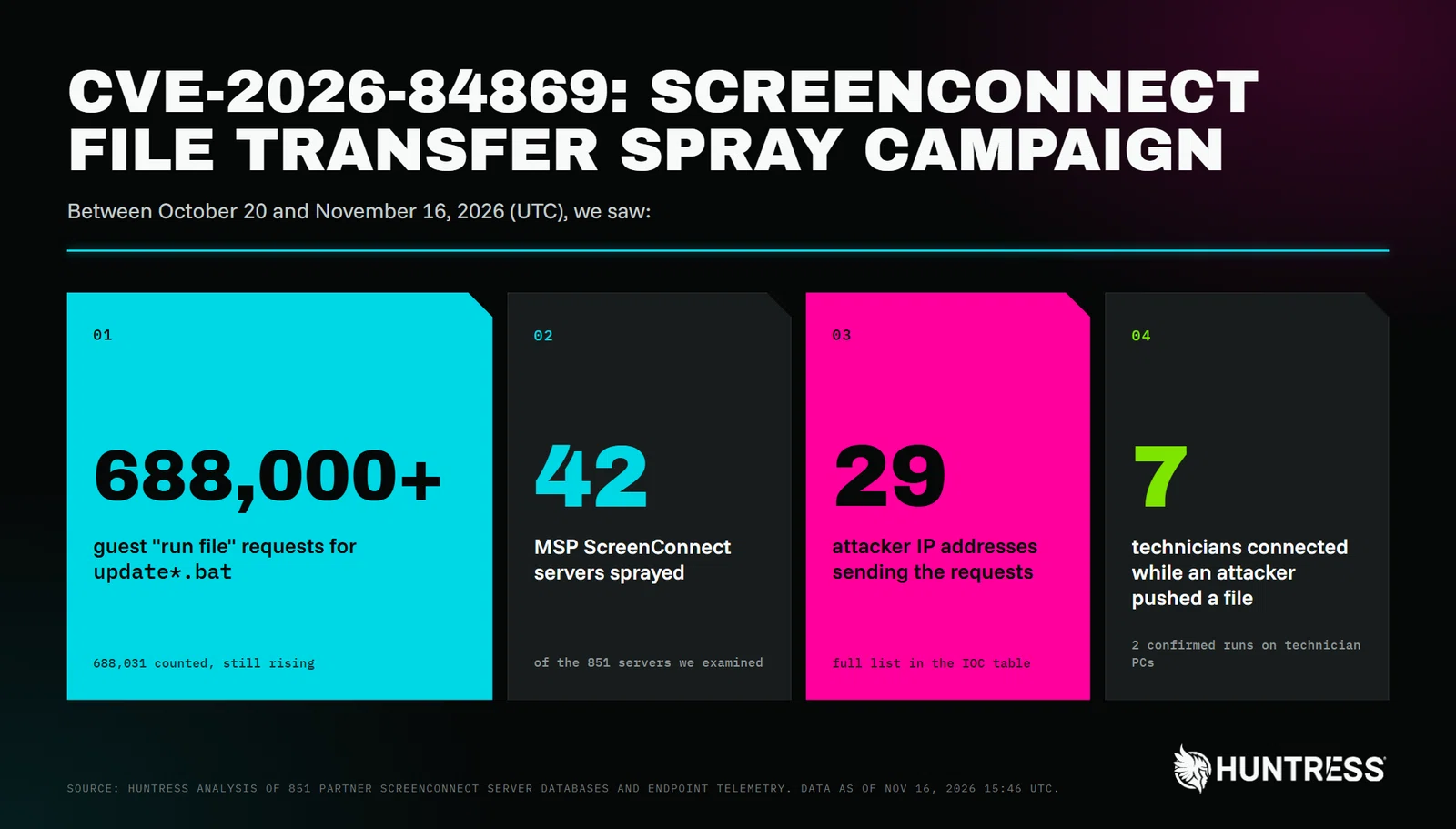
Between October 20 and November 16, Huntress recorded at least 688,000 guest “run file” requests across 42 MSP ScreenConnect servers, originating from 29 IP addresses.
The requests repeatedly offered update.bat or update_<8hex>.bat, apparently waiting for technicians to connect.
The exact batch filename used in the confirmed compromise appeared across five MSP servers, with spraying beginning almost simultaneously, approximately 43 minutes before execution.
Huntress assessed with high confidence that the spray operator also controlled masterdarky[.]com.
On November 13, another technician’s client opened an attacker-supplied marker.txt in Notepad++, consistent with a canary test.
October activity also included traversal requests targeting Sync.bat in technicians’ Windows Startup folders, although the supplied evidence does not establish successful persistence.
These findings remain distinct from Huntress’s crypto-exchange session investigation, which found unauthorized sessions on more than 100 servers but no observed guest-side malicious execution.
Separately, SCKit activity involved a third-party extension authentication weakness and relay-trap functionality, not the same confirmed exploitation chain.
MSPs should update every technician host client and affected Access agent to 26.6.5 or later. Updating server infrastructure alone does not replace vulnerable endpoint clients.
Where immediate patching is impossible, ConnectWise recommends removing TransferFiles permissions across applicable roles and session groups.
Investigators should correlate guest-originated RanFiles and SentFiles database events with active technician connections, then inspect workstation telemetry for ScreenConnect spawning scripts from Documents*Temp.
Additional indicators include unexpected Startup scripts, wclient_<8hex> directories, wupdate_<8hex>.msi files, and clients contacting unfamiliar relays.
Confirmed compromise warrants workstation isolation, rogue-client removal, session revocation, and rotation of accessible MSP and customer credentials.
Investigators should preserve relevant process telemetry and session database evidence before cleanup begins.
Indicators of Compromise
| Item | Description |
|---|---|
masterdarky[.]com | Attacker ScreenConnect relay (port 8041) and payload host |
hxxps://masterdarky[.]com/WindowsUpdate.msi | Stage-2 installer containing the rebranded ScreenConnect client |
f8871b1561d5c77c297378a7f49c84de52a01ff297395544f0e95d13ef972841 | WindowsUpdate.WindowsClient.exe, rogue ScreenConnect client (h=masterdarky[.]com&p=8041) |
%LOCALAPPDATA%wclient_<8hex>Windows Update AgentWindowsUpdate.WindowsClient.exe | Rogue client install path |
Note: IP addresses and domains are intentionally defanged (e.g., [.]) to prevent accidental resolution or hyperlinking. Re-fang only within controlled threat intelligence platforms such as MISP, VirusTotal, or your SIEM.
Stops Cyber threats before impact with 21 min faster MTTR. Integrate ANYRUN’s Sandbox in your SOC.