Attackers are using genuine Microsoft sign-in pages to hijack Microsoft 365 accounts without collecting passwords on counterfeit login forms.
Once a victim approves the request, Microsoft issues OAuth tokens to the attacker-controlled client, granting access within the permissions authorized.
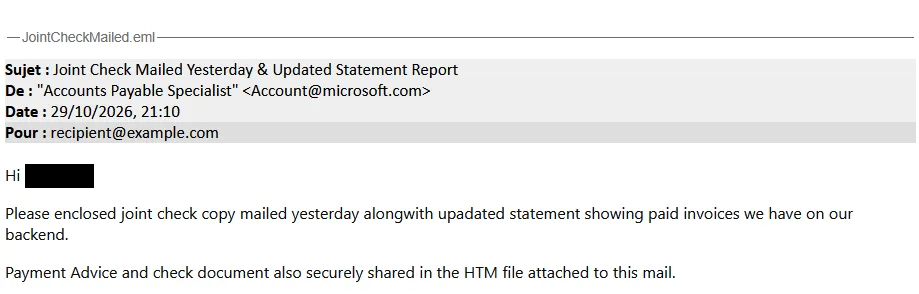
One email arrived with a single period as its subject and almost no visible body. A personalized ZIP filename supplied the pretext: payment advice prepared for the recipient.
Inside, an HTML attachment presented an interactive SVG as a security check. The apparent verification step redirected the browser to a site that screened visitors before showing a counterfeit SharePoint workspace.
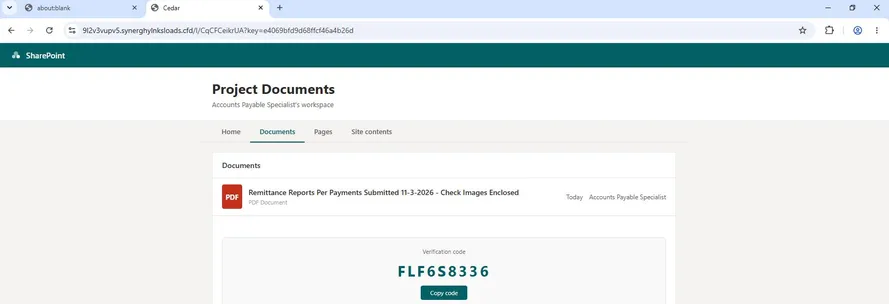
There, remittance reports and check images gave recipients a reason to follow the sign-in prompt.
A second campaign announced a scheduled electronic payment and attached SpwcinBillPaymentReports.zip. The displayed sender did not match the Irving Oil name in the message’s confidentiality disclaimer.
Its HTML loader rebuilt a page from 475 obfuscated fragments, but the resulting lure followed the same pattern: a SharePoint-style document list, a verification code and a Microsoft sign-in prompt.
Researchers also observed recurring heartbeat and status requests that kept the phishing page synchronized with its backend.
Hornetsecurity reported, on November 19 that several campaigns used payment notices and fake SharePoint workspaces to trick recipients into approving sign-ins they did not initiate.
OAuth Token Theft
The fake workspace supplied the code, but Microsoft hosted the authentication page. That distinction is central to device-code phishing.
The OAuth device flow lets clients without a full browser delegate sign-in to another device. Here, the attacker starts the request and the victim approves it.
Any multifactor authentication Microsoft requires can still take place normally. The problem is not that MFA failed; it authenticated the user for a request initiated by someone else.
Microsoft demonstrated the same authorization risk in a separate November 17 analysis involving GitHub Copilot CLI.
In a controlled simulation, an approved device code could expose private repositories and synchronized sessions, depending on permissions and settings.
Microsoft did not observe those outcomes in the wild. Hornetsecurity’s report, by contrast, documented active payment-themed campaigns targeting Microsoft 365 users.
The browser capture shows the host ngjedt0xrv.promtateusachorloadscorp[.]sbs in the address bar.
Security teams should inspect HTML and SVG files inside archives rather than trusting attachment names.
In Microsoft Entra sign-in logs, filter Authentication Protocol for Device code and investigate successful events that lack a business justification.
Correlate the account, application, source and timestamp with email and browser telemetry.
The Original transfer method field can help trace sessions back to device-code authorization even when later token renewals use a different flow.
Hornetsecurity’s report includes defanged domains and SHA-256 hashes for threat hunting.
Microsoft recommends blocking device-code authentication wherever possible. Its Conditional Access guidance specifies Authentication flows → Device code flow → Block access.
Start in report-only mode, review the impact before enforcing the policy, and audit exclusions for emergency accounts and documented business requirements. A broad block should follow an inventory of legitimate use, not precede it.
For users, the rule is simple: enter a device code only for a sign-in or setup you started. Verify unexpected payment or document requests through a trusted channel.
If someone already approved an unsolicited code, investigate the resulting authorization and active sessions promptly. A genuine Microsoft domain tells users who is hosting the page, not who requested access.
IOCs
| Type | Value | Context |
|---|---|---|
| Domain | 9l2v3vupv5.synerghylnksloads[.]cfd | First sample: verification gate, fake SharePoint page and session endpoints. |
| URL | hxxps://9l2v3vupv5.synerghylnksloads[.]cfd/l/CqCFCeikrUA | First sample: decoded redirect destination. |
| SHA256 | bbf9f563371d6afc449c69546a4ec39e831ca18d3bf3764b7b4c27f525426140 | First sample: HTML/SVG redirector. |
| Domain | ngjedt0xrv.promtateusachorloadscorp[.]sbs | Second sample: document lure host shown in the browser capture. |
Note: IP addresses and domains are intentionally defanged (e.g., [.]) to prevent accidental resolution or hyperlinking. Re-fang only within controlled threat intelligence platforms such as MISP, VirusTotal, or your SIEM.
Stops Cyber threats before impact with 21 min faster MTTR. Integrate ANYRUN’s Sandbox in your SOC.