- Prerequisites for automating Elastic Defend response actions
- Keeping Linux endpoints configured without MDM
- How Elastic Workflows turn a response action into a reconciliation loop
- How the Linux endpoint management workflow works
- The complete workflow YAML
- Setting the script ID and endpoint query
- Permissions for scheduled Elastic Workflows
- How the workflow skips duplicates and handles offline hosts
- Deploying Codex requirements.toml and Cursor enterprise hooks on Linux
- Reusing the workflow pattern for other endpoint configuration
- Limitations and secrets handling

Our mobile device management (MDM) covers macOS and Windows but not Linux. So, for Linux endpoint management, we turned to Elastic Agent and Elastic Defend, which were already installed on every Linux workstation. Every six hours, an Elastic workflow lists those endpoints and checks whether each one already has our deployment queued. It sends managed Cursor and Codex configuration to any host that doesn’t, as an Elastic Defend response action. A laptop that enrolls tomorrow gets picked up on the next pass, and a host that’s offline for a week ends up with one queued action instead of 28. The logic fits in 68 lines of YAML. The only constant is a script ID, so changing the Kibana Query Language (KQL) query (kuery , the script, and that ID points the same loop at a different configuration. This post walks through the version we run in production.
Prerequisites for automating Elastic Defend response actions
To reproduce this pattern, you need:
Elastic Agent and the Elastic Defend integration on every target endpoint.
Workflows enabled in the Kibana space. If the Workflows page is missing, check the workflows:ui:enabled advanced setting.
A role with All for Analytics > Workflows, Read for Endpoint List and Response Actions History, and the Execute Operations privilege. The operator who uploads or changes the deployment script also needs All for Elastic Defend Scripts Management. See the Workflows access requirements and Elastic Defend feature privileges.
Elastic Stack 9.4 or later with an Enterprise subscription, or an Elastic Cloud Serverless project whose feature tier includes Elastic Workflows and endpoint response actions, along with the script library. We validated the complete flow on Elastic Stack 9.5.1.
Keeping Linux endpoints configured without MDM
Here’s why we built the general pattern. Our security team manages organization-wide settings for AI coding agents. Codex handles policy and defaults as separate layers. Enforced constraints live in requirements.toml. Current OpenAI guidance puts administrator-provided defaults in system or cloud-managed config.toml settings. Our Linux deployment still writes its OpenTelemetry (OTel) defaults to the legacy managed_config.toml layer because that’s how the production script is currently packaged. Cursor reads system hooks that observe agent events, including shell commands, and file reads, in addition to Model Context Protocol (MCP) executions.
MDM already delivered those settings to macOS and Windows. Linux workstations needed a different route. Elastic Agent and Elastic Defend were already installed there, so the endpoints could run an administrator-approved script. What we didn’t have was the recurring logic around that one action.
An operator can fire a response action at every online host. That solves today’s deployment and nothing else; the laptop that enrolls tomorrow still needs a human to notice it. Putting the action on a cron schedule trades that problem for a worse one, because every pass adds another copy of the same request to the queue of a host that happens to be offline.
So we needed something that could answer two questions per endpoint before doing anything: Does this host need a deployment right now? And is an identical action already waiting for it?
Each constraint maps to one part of the design:
Problem | How the workflow handles it |
Our MDM doesn’t cover Linux workstations. | An administrator-approved script runs through Elastic Defend, because Elastic Agent and Elastic Defend are already on every Linux host. |
A one-shot response action only covers hosts enrolled at that moment. | A scheduled workflow relists endpoints on every pass, so newly enrolled hosts are covered automatically. |
A repeated schedule queues duplicate actions on offline hosts. | A pending-action check skips any host that already has this script ID queued. |
How Elastic Workflows turn a response action into a reconciliation loop
Elastic Workflows are YAML automations built from triggers and steps, with data moving between steps through named outputs and constants. Liquid templating connects one step’s data to the next. Flow control adds loops and conditions, and action steps call Elastic services or external systems. Workflows reached general availability (GA) in Elastic 9.4 and were available as a technical preview in 9.3. They’re GA on Elastic Cloud Serverless.
Five capabilities carried this deployment:
Workflow capability | Role in the deployment |
|---|---|
Scheduled trigger | Starts the reconciliation pass every six hours. |
kibana.request | Lists endpoints, reads pending actions, and creates the deployment action. |
foreach | Runs the same decision sequence for each endpoint. |
data.filter | Selects pending actions matching the current script ID. |
if | Skips a host when the matching action is already queued. |
These five capabilities turn a one-shot response action into a reconciliation loop, because the workflow compares current action state against desired deployment state before it changes anything. The Workflows library has more examples.
We considered an external scheduler that would enumerate Linux endpoints and call Kibana APIs, in addition to tracking deployment state. Then we noticed that every piece of data we needed and every API we called already lived inside Elastic, so the control logic and the execution engine may as well live there, too. Elastic InfoSec runs on Elastic products as customer zero, and a real operational problem is the best place to try a new capability.
How the Linux endpoint management workflow works
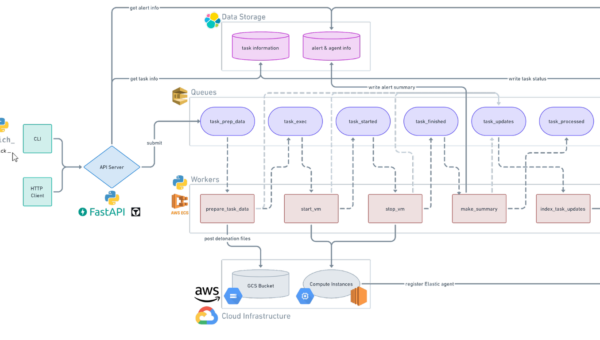
The diagram shows the loop in its general form. What follows is the same loop worked through end to end with our own deployment, because a real example beats a placeholder one, but nothing below is specific to Linux or to AI coding agents except the kuery and the script it calls. We built this control loop in YAML and validated it end to end on Elastic Stack 9.5.1. Most of the definition describes decisions that you can observe after the fact rather than payload content, which is the part we care about.
The complete workflow YAML
reconcile-managed-config-linux.workflow.yaml
name: reconcile-managed-config-linux
enabled: truetriggers:
- type: scheduled
with:
every: 6hconsts:
script_id: ""

steps:
  - name: list_endpoints
    type: kibana.request
    with:
      method: GET
      path: /api/endpoint/metadata
      query:
        kuery: 'united.agent.local_metadata.os.family : ("debian" or "redhat" or "arch" or "suse" or "fedora")'
        pageSize: 1000
        sortField: "last_checkin"
        sortDirection: "desc"

  - name: each_endpoint
    type: foreach
    foreach: "${{ steps.list_endpoints.output.data }}"
    steps:

      - name: pending_actions
        type: kibana.request
        on-failure: { continue: true }
        with:
          method: GET
          path: /api/endpoint/action
          query:
            agentIds: "{{ foreach.item.metadata.agent.id }}"
            commands: runscript
            statuses: pending
            pageSize: 100

      - name: filter_scriptid
        type: data.filter
        items: "${{ steps.pending_actions.output.data }}"
        with:
          condition: 'item.parameters.scriptId : "{{ consts.script_id }}"'

      - name: decide
        type: if
        condition: "steps.filter_scriptid.output.length > 0"
        steps:
          - name: skip
            type: console
            with:
              message: "Skip {{ foreach.item.metadata.host.hostname }}: action already pending"
        else:
          - name: run_script
            type: kibana.request
            with:
              method: POST
              path: /api/endpoint/action/run_script
              headers: { kbn-xsrf: "true" }
              body:
                agent_type: endpoint
                endpoint_ids:
                  - "{{ foreach.item.metadata.agent.id }}"
                parameters:
                  scriptId: "{{ consts.script_id }}"
                comment: "Managed configuration reconciliation"
The published listing is 68 lines, including the blank ones. It’s intentionally shorter than our production copy, which adds TLS Fetcher settings for our internal Kibana and carries the real script ID.
Setting the script ID and endpoint query
The workflow never generates a scriptId; it reads one. The ID belongs to an entry in the Elastic Security script library, and that entry has to exist before the workflow can reference it, so add the deployment script to the library and save it first. Kibana hands back a universally unique identifier (UUID), and that UUID is the workflow’s only configuration point.
The kuery namespace matters more than it looks. Endpoint metadata is searchable under united.agent.local_metadata.*, and host.os.type returns nothing in that index, so the distro family list is doing the filtering. Anything absent from that list is silently excluded: Gentoo, Alpine, and Amazon hosts will never receive a deployment, and nothing will tell you.
Permissions for scheduled Elastic Workflows
Scheduled workflows run with the privileges of the user who last saved them. We save ours as a dedicated principal with All for Analytics > Workflows, Read for Endpoint List and Response Actions History, and Execute Operations. Uploading and managing the script is a separate setup task that requires Elastic Defend Scripts Management; the scheduled principal doesn’t need that privilege once the script ID is fixed. The execution principal can run code on every host covered by Elastic Defend, so keep that account narrowly scoped.
Saving the workflow stores an API key with that principal’s privileges. Changing the principal’s role or deactivating the account doesn’t update the stored key, so the schedule can continue with its previously captured access. To refresh or revoke that access, have an authorized user save the workflow again, or toggle Enabled off and back on.
How the workflow skips duplicates and handles offline hosts
The pending-actions query returns every queued runscript for a host, including ones from unrelated deployments, so the filter matches on script ID. Each deployment then deduplicates independently, and a second deployment with a different script ID won’t suppress the first.
When a host is offline, Elastic Defend leaves the action queued. On the next pass, it shows up as pending, the filter matches, and the host is skipped, and this repeats until the endpoint checks in and runs the script. Action requests expire after two weeks, so a laptop that stays dark longer than that will be issued a fresh action rather than an infinitely aged one. Six hours is our cadence, not a recommendation. We wanted to catch machines somewhere inside a working day and to bound how long a newly enrolled host waits.
Deploying Codex requirements.toml and Cursor enterprise hooks on Linux
Between them, the Codex and Cursor scripts deploy four paths:
|
File path |
Tool |
Purpose |
|
/etc/codex/managed_config.toml |
Codex |
Defaults that a user can change during a session. Our deployment writes its OTel defaults to this legacy managed layer. |
|
/etc/codex/requirements.toml |
Codex |
Enforced constraints on approval policies, sandbox modes, and browser features that local config cannot override. |
|
/etc/cursor/hooks.json |
Cursor |
Enterprise, system-wide hook configuration, which takes precedence over project and user hooks. |
|
/usr/local/share/ai-hooks |
Cursor |
Hook collector installed alongside hooks.json. |
The Cursor hooks documentation lists the available events.
Hook scripts run as separate processes, and on Linux, they can exit silently without producing output if their environment doesn’t match a normal shell’s. That failure mode is exactly why we track hook collector coverage separately from deployment, although even that only tells us that the script is present and correct, not that it ran.
We run two copies of this workflow, one for Codex and one for Cursor, which differ only in name and script ID. Everything product-specific lives in the script library entry, so the YAML owns when and where a deployment runs and the script owns what it changes. Any script that writes its files idempotently and exits non-zero on failure drops into this pattern with no workflow changes at all. Ours run as root and take no arguments, and they verify a SHA-256 checksum before moving each file into place.
Reusing the workflow pattern for other endpoint configuration
We built this once, for Linux AI-agent config, and nothing in the YAML above is actually Linux-specific or AI-agent-specific. The kuery is one line, and the script is one script library entry. The rest (the schedule, the pending-action check, and the dedup logic) doesn’t know or care what either one contains. Point the same control loop at a different kuery and a different script, and you get a different reconciliation loop:
-
A config drift fix for an EDR agent other than Elastic Defend’s own.
-
A credential rotation nudge that only fires on hosts that haven’t rotated in N days.
Certificate renewal checks across macOS and Windows.
The endpoints, the script ID, and the comment are the only three things that change.
More generally, this works when Elastic Defend already covers the endpoints you care about and an approved custom script can express the change you want. Configuration files that need periodic reconciliation across intermittently connected machines are the sweet spot, which is most of a laptop fleet, on any operating system.
Limitations and secrets handling
The boundaries are real. The endpoint query holds our whole Linux fleet in one page today and will need pagination when it stops doing that. The distro allowlist fails silently, as described above. Every custom script is privileged code and needs review and testing before it touches a fleet.
Secrets need their own thought. Our Codex OTel configuration carries an ingest credential, so we use a dedicated key with narrow permissions and keep the value out of version control. It lives in the script library entry instead, which means that anyone with access through Elastic Defend Scripts Management can see it. The workflow execution principal doesn’t need that privilege once the script ID is fixed. File permissions on the endpoint have to match the sensitivity of whatever you deploy.
What we got out of doing it this way is visibility. The target query, the schedule, the branch logic, and the action call sit in one YAML definition, and the execution history sits in Kibana next to it. A reviewer can see why one endpoint got an action but the next one did not.
One workflow pattern, reused per configuration, replaces a fleet of one-off scripts. It runs on a schedule and matches pending actions against a script ID. It points itself at whichever configuration needs to stay current. Nobody has to notice a new laptop enrolling or remember to refire an action against a host that came back online, because the six-hour pass catches both.