Rokarolla, a new Android banking trojan named after its Command-and-Control (C2) infrastructure, that combines sophisticated social engineering, broad permissions abuse, and a flexible command set to harvest credentials from 217 targeted banking and cryptocurrency apps.
Distributed via malicious websites that masquerade as popular apps (examples include a disguised landing page at hxxps://infocontablidades[.]it[.]com/).
Rokarolla uses a two-stage dropper model to bypass Android protections and install a full-featured second-stage payload that leverages Accessibility Services to automate and conceal its activities.
The infection chain begins with a dropper that impersonates legitimate system components such as Google Play Protect to trick users into granting permissions and installing the core binary.
Once resident, Rokarolla enumerates device properties and telemetrics and sends them to its C2 over HTTPS to generate a unique botID.
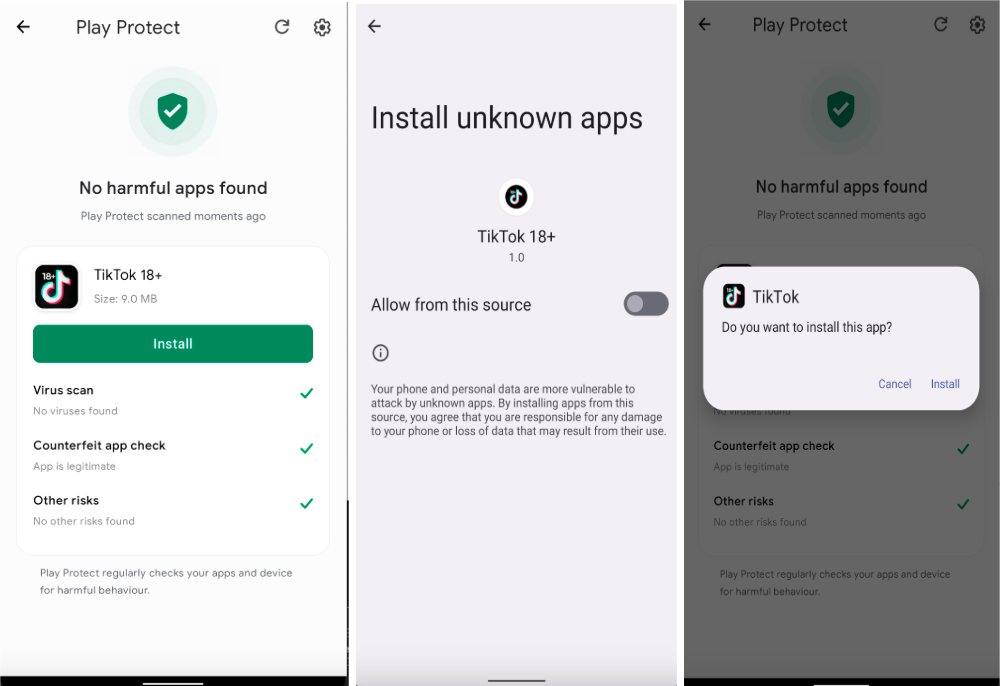
The implant supports dynamic remote configuration and multiple fallback domains, enabling resilient C2 management and updates.
The zLabs research team said in a report shared with GBhackers, has discovered Rokarolla, a newly identified Android banking trojan named after its Command and Control (C2) infrastructure.
Sample telemetry observed in analysis includes device model, Android version, locale, battery and memory stats information used to fingerprint targets and tune subsequent behavior.
Rokarolla Malware Abuses Android
Rokarolla’s operational capability is driven by a surprisingly large command set 137 commands that grant fine-grained control over the device.
Key capabilities include harvesting lock-screen credentials via deceptive overlays that replicate the Android lock screen and capture PINs, patterns, and passwords; keylogging and UI-node parsing via Accessibility Services; exfiltration of contacts, SMS messages, and notifications; and clipboard manipulation to substitute cryptocurrency addresses.
The trojan stores HTML-based phishing payloads locally for targeted apps: when a monitored banking or crypto app is launched, Rokarolla overlays a fake login page on top of the real app to harvest credentials without the user’s knowledge.
To suppress user response, Rokarolla actively interferes with device interaction. It blocks incoming calls, disables or hijacks call and SMS handlers, mutes audio and vibrations, prevents screen timeouts by forcing the display to stay on, and hides its icon from the launcher.
The malware also attempts to disable Google Play Protect access and other defenses via specific commands, increasing persistence and reducing the chance of detection.
Rather than relying solely on continuous screen-capture APIs, Rokarolla uses a pseudo‑VNC technique that takes periodic screenshots, compresses them to PNG, timestamps them, and exfiltrates them minimizing resource use while still providing actionable visual context to operators.
Network analysis reveals an initial beacon carrying basic device info followed by command exchanges that query installed apps and request targeted overlays.
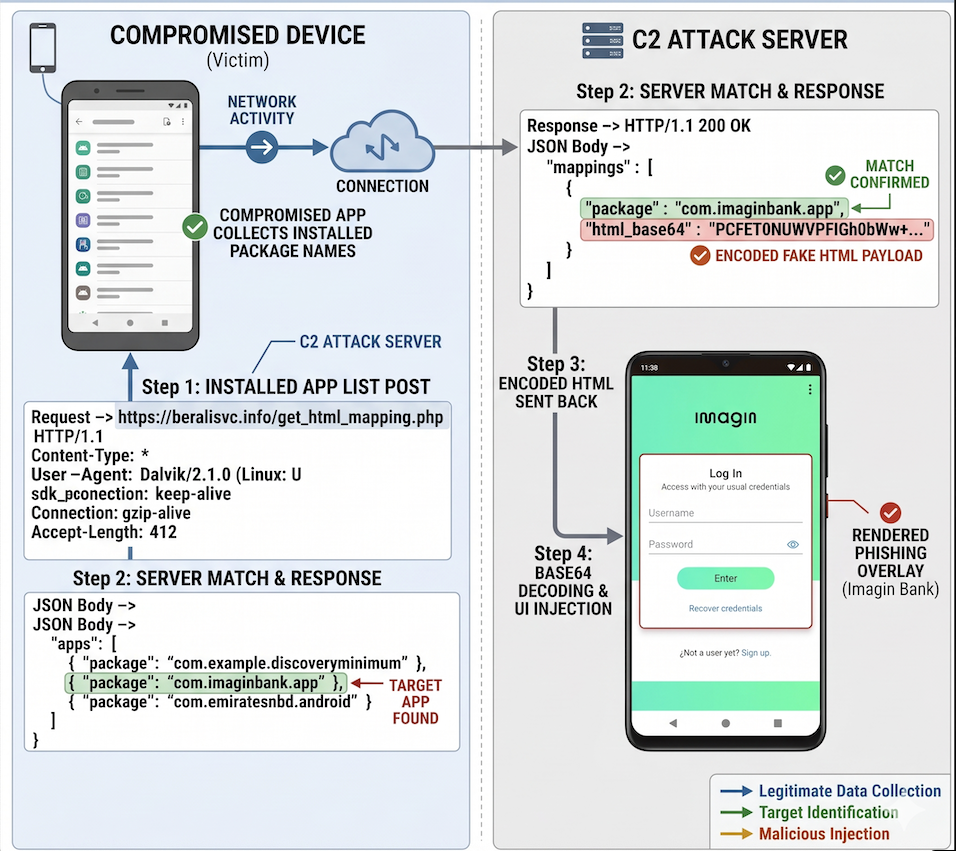
The C2 may return a monitored_app_full list tying package names to status flags and URLs for fake login pages. If a target’s status is active, the trojan downloads and stores the corresponding HTML payload and triggers overlay injection when the legitimate app opens.
Researchers linked specific overlay and control commands (for example: liveoverlay16, sms_overlay_16, call_overlay_16) to Rokarolla’s behavior; full command documentation and indicators of compromise are available in zLabs’ repository references.
Mitigation requires a combination of user and technical controls: avoid installing apps from untrusted web pages, verify Play Protect warnings, deny accessibility privileges to untrusted apps, and restrict default SMS/call handler changes.
Enterprises should enforce mobile device management policies that limit app sources and monitor unusual accessibility or overlay permission grants.
Follow us on Google News, LinkedIn, and X to Get Instant Updates and Set GBH as a Preferred Source in Google.