Threat actors know that most organizations are going to have some type of endpoint defenses, whether it’s next-generation antivirus (NGAV), endpoint detection and response (EDR), or an endpoint protection platform solution (EPP). Getting around these defenses is part of their playbook and tradecraft, covered in frameworks like MITRE ATT&CK under the Defense Evasion tactic and techniques like Impair Defense (T.1652).
These actors are moving beyond merely evading detection and even basic impairment to disabling threat-detection tools. This allows adversaries to create a “dark zone” where they can establish footholds, move laterally, exfiltrate data, and deploy ransomware with zero visibility to IT and security teams. This isn’t just evasion; it’s an active destruction of the security stack.
Attacker tradecraft and tools: How they’re wrecking antivirus and EDR
There are multiple methods used by threat attackers as part of their tradecraft to impair, block, and disable endpoint security controls. Here’s a list of the most common approaches:
- Escalate privileges, uninstall agents
Once an attacker lands on an endpoint, getting administrative privileges gives them much more latitude to install their tools, apply their tradecraft, and get to work. Sometimes, they might not even have to go through the effort if permissions aren’t properly secured, and any user has the right level of permissions to add or remove software.Even though it can be a noisy approach, uninstalling an EDR agent is effective at blinding IT and security teams to an attack. Attackers are counting on the lack of real-time visibility to threats on an endpoint, so they won’t be detected even with such a noisy approach.
- Bring Your Own Vulnerable Driver (BYOVD)
This is the new “gold standard” for EDR impairment. Attackers “bring” a legitimate, digitally signed driver that contains a known vulnerability (e.g., an old gaming driver or hardware utility). Because the driver is signed by a trusted vendor, Windows allows it to load into the kernel. The attacker then exploits the driver’s vulnerability to gain kernel-mode access, which they use to unhook security monitoring or terminate protected EDR processes that even an administrator shouldn’t be able to kill.
Real-world examples
The Huntress SOC and threat hunters consistently see threat actors trying to impair defenses, trying to uninstall our EDR agent, and using BYOVD to try to kill AV and the EDR agent. Here are some examples of the shady tradecraft our experts have detected.
- Messing with Defender Antivirus
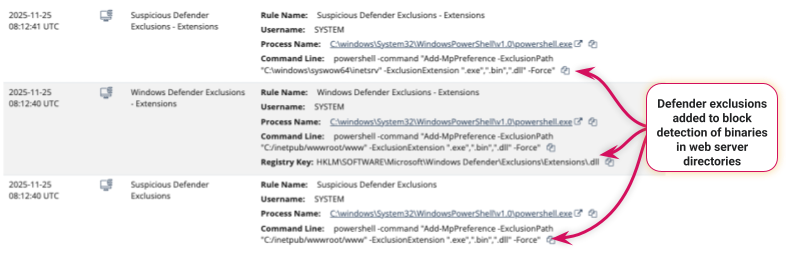
Huntress frequently sees attackers try to blind Microsoft Defender Antivirus. They have several techniques to do this, like abusing Windows Firewall rules and abusing Defender exclusions.
Figure 1: Abusing Defender AV exclusions to exclude C: and C:Windows drives
- Uninstalling the EDR agent
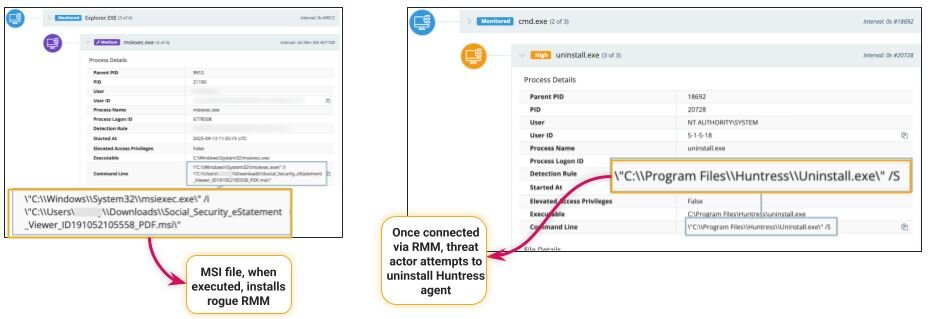
Some attackers take the noisy route and just try to uninstall the EDR agent. They’ll use Add/Remove Tools if they’re on the endpoint on a desktop (like with RDP or a screenshare utility) or try from the command line.
Figure 3: Attacker gets a rogue RMM installed, connects to the endpoint, and then tries to uninstall the Huntress EDR agent from the command line.
- 2026, the year of BYOVD attacks?
In early February 2026, during an intrusion that began with compromised SonicWall VPN credentials, threat actors deployed a sophisticated “EDR Killer” binary. In this example, the attackers used a BYOVD approach, but with a unique twist to evade static detection, allowing it to bypass scanners looking for packed or encrypted malware.The attacker dropped a legitimate forensic driver from EnCase. Although the driver’s certificate was from 2006 and had been revoked for years, it was still permitted to load due to a legacy “2015 exception” in Windows Driver Signature Enforcement. Once loaded, the attack allowed the attacker to terminate processes directly from the kernel. The malware was pre-programmed with a “hit list” of 59 different security processes from a large list of AV, EDR, and EPP tools. By calling the driver’s termination function every second, the attackers ensured that even if a security service attempted to restart, it was instantly killed, leaving the system completely defenseless.
In March of 2026, Huntress reported on another example of threat actors using BYOVD, covering a sophisticated malvertising campaign targeting US taxpayers through Google Ads for “W-2” and “W-9” forms. The attack begins when a user clicks a malicious ad and is redirected to a site that installs a rogue ScreenConnect instance, providing the threat actors with remote access. Once inside the system, the attackers deploy a kernel-mode EDR killer that leverages a vulnerable, signed Huawei audio driver to terminate security processes from major vendors, effectively blinding the system’s defenses.
What Huntress does to protect the hunters on the endpoint
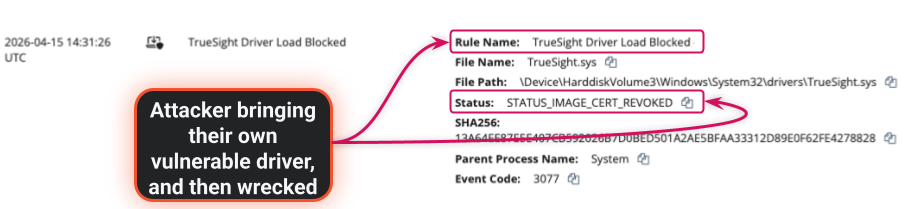
Figure 4: Attacker abusing TrueSight device driver to likely kill antivirus and EDR tool.
- Detection and remediation of attacker abuse of Windows Firewall rules
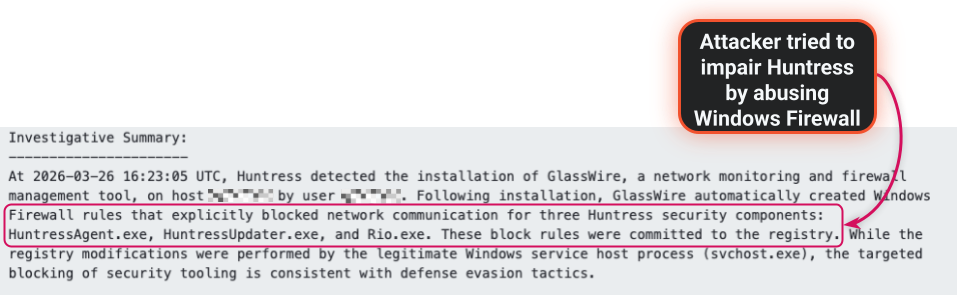
Hackers are constantly looking for ways to tamper with security tools in order to operate under the radar. Huntress Managed EDR will detect, remediate, and alert the SOC when attackers abuse Windows Firewall to block communications between Huntress’ EDR agent and the Huntress Platform, and try to impair Windows Defender Antivirus.
Figure 5: Attacker abuses a legit application to impair communication of Huntress EDR
- Going even further with built-in Tamper Protection
Tamper Protection in Huntress Managed EDR is a security layer designed to prevent unauthorized users and threat actors from disabling, uninstalling, or interfering with our agent. It ensures constant security monitoring by preventing the Huntress agent from being stopped or deleted. An exclusion for a defined period of time can be set to allow administrative activities as needed, with the exclusion being automatically removed when the time window expires.
Want to learn more?
Protecting the endpoint security tools during an attack isn’t about chasing features, but having a deep understanding of attacker tradecraft–their tactics, techniques and procedures, their tools, and how they use those together to get around defenses.
If you want to experience the power of Huntress Managed EDR and see how we wreck hackers targeting endpoints, sign up for a free trial and see for yourself. Or speak to one of our experts today.